
Minecraft version
Back to mods 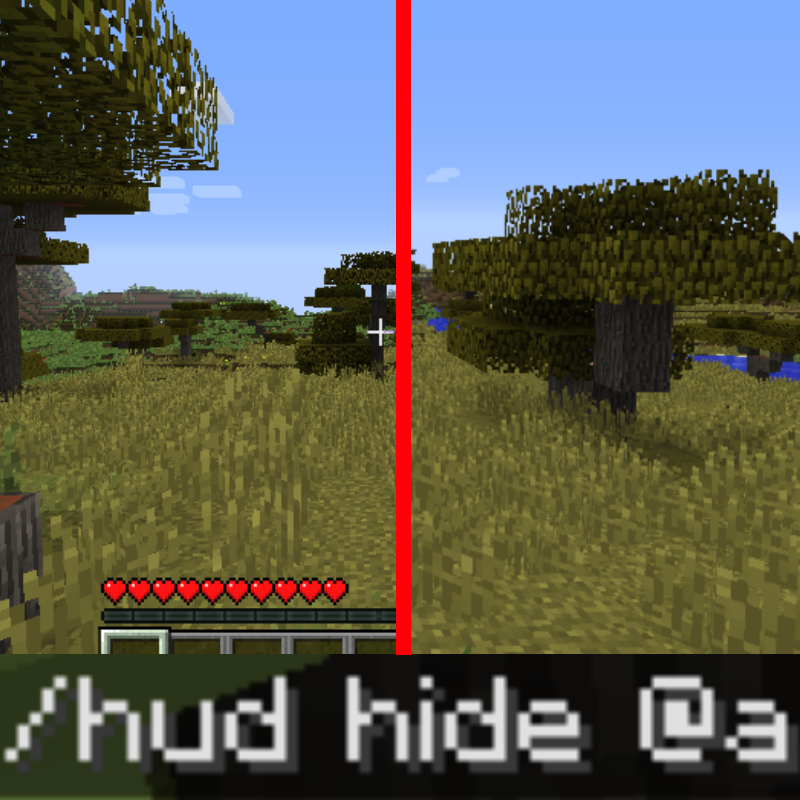
CurseForge · Minecraft mod
Hide HUD Util
Hide HUD via command
Choose a version Pick your version below, then grab the matching file.
Quick answer
Which Hide HUD Util release should I use?
Latest stable file Hide HUD Util 1.1
Game version 1.12.2
Loader Forge
Hide HUD Util 1.1 targets 1.12.2 with Forge. The project page does not say whether this file belongs on the client, dedicated server, or both. No extra mods listed for this file.
Where it goes
Is Hide HUD Util required on the client, server, or both?
The project page does not say whether this file belongs on the client, dedicated server, or both.
Client Source doesn’t say
Dedicated server Source doesn’t say
Loader for this release Forge
Required install it here Optional supported, not mandatory Not supported do not install here Source doesn’t say do not assume
The source does not explicitly classify this release as client-only or server-only.
What else does Hide HUD Util 1.1 need?
Hide HUD Util 1.1. Change the file and its required mods may change too.
This file does not list any required mods. Do not add a library just because a different file uses it.
This file does not list any required or optional mods.
Before you install it
Add Hide HUD Util without breaking your instance.
Built for Hide HUD Util 1.1. Pick another file and the loader, install side or required mods may change.
- 01
Stick to this file
Use Hide HUD Util 1.1. It targets 1.12.2 with Forge; another release may have different loader, side or dependency requirements.
- 02
Bring the mods it needs
This file does not list any required mods. Do not add a library just because a different file uses it.
- 03
Put it on the correct side
The project page does not say whether this file belongs on the client, dedicated server, or both.
- 04
Pick the file you checked
Use the “Get this file” button beside Hide HUD Util 1.1. It opens that exact file at the source.
About this project
What does Hide HUD Util add?
ENG:
This mod adds commands which allow to hide player's HUD
Sometimes while creating Minecraft maps there are cases where you want to hide HUD for the end player (just like when they press the F1 button), but there's no way to achieve that besides changing player's gamemode to spectator.
Thus I present you a mod which is able to hide player's HUD (arm, health bar, experience bar, slots and so on) via commands, this way you can use it with command blocks and other mods like CustomNPCS and Mappet. You can show and reveal HUD for multiple or one specific player. In addition, you can hide and show individual interface elements! The mod supports multiplayer. AVAILABLE COMMANDS:
- /hud list -> shows a list of all interface elements
- /hud show -> displays the standard interface for all player
- /hud hide -> hides the entire interface for all players
- /hud show Player123 -> displays the standard interface for Player123
- /hud hide Player123 -> hides the entire interface for Player123
- /hud show only health,food -> hides the health bar and food bar for all players
- /hud show but health,food -> hides everything except the health bar and food bar for all players
- /hud show Player123 only health,food -> shows the health bar and food bar for the player Player123
- /hud show Player123 but health,food -> shows everything except the health bar and the food bar for Player123
RU:
Этот мод добавляет команды, с помощью которых можно спрятать интерфейс игрока.
Иногда при создании карт Minecraft бывают случаи, когда вы хотите скрыть интрефейс для конченого игрока, как при нажатии F1, вот только без переноса игрока в режим наблюдателя такое не провернуть. Поэтому представляю вам мод, способный прятать интерфейс посредством команд. Таким образом его можно использовать в командных блоках и других модах, по типу CustomNPCS или Mappet. Прятать интерфейс можно как для одного, так и для всех игроков. Кроме этого вы можете скрывать и показывать отдельные элементы интерфейса! Мод поддерживает мультиплеер.
ДОСТУПНЫЕ КОМАНДЫ:
- /hud list -> показывает список всех элементов интерфейса
- /hud show -> отображает стандартный интерфейс для всех игроков
- /hud hide -> скрывает весь интерфейс для всех игроков
- /hud show Player123 -> отображает стандартный интерфейс для игрока Player123
- /hud hide Player123 -> скрывает весь интерфейс для игрока Player123
- /hud show only health,food -> скрывает шкалу здоровья и шкалу еды всем игрокам
- /hud show but health,food -> скрывает всё, кроме шкалы здоровья и шкалы еды всем игрокам
- /hud show Player123 only health,food -> показывает шкалу здоровья и шкалу еды для игрока Player123
- /hud show Player123 but health,food -> показывает всё, кроме шкалы здоровья и шкалы еде для игрока Player123
Examples:


Complete list of hud elements
hand
bar
health
helmet
crosshair
oxygen
food
armor
bossbar
exp
tab
potion
sabtitle
title
lines
all
chat
inventory
Project description from CurseForge.
Pick your setup
Hide HUD Util by Minecraft version and loader
Choose the version and loader you play, then open the matching release.
Minecraft version
1.12.1
1 loader buildMinecraft version
1.12-Snapshot
1 loader buildMinecraft version
1.12
1 loader buildCheck the dependencies, then try the file in a copied instance before changing a world you care about.
Recent files
Hide HUD Util versions and loaders
Hide HUD Util 1.1
hide_hud_util-1.1.jar
15 Jul 2021
Client Source doesn’t say Server Source doesn’t say Dependencies No extras listed Listed on Release listing
Check the 1.12.2 · Forge setup Forge1.12.2 release
Hide HUD Util
hide_hud_util.jar
27 Jun 2021
Client Source doesn’t say Server Source doesn’t say Dependencies No extras listed Listed on Release listing
Check the 1.12.2 · Forge setup 1.12.11.12Forge1.12.2 release
Looking for an older file? The official CurseForge project page is in Resources.
 mod
CurseForge + Modrinth · Minecraft
CC - Complementary Core
A powerful library that its core for all my mods.
 mod
CurseForge · Minecraft
Neo Configuration Screen Port
An unofficial port of NeoForge's in-game configuration screen to other mod loaders, so that a mod's configuration UI looks and behaves the same everywhere it runs.
 mod
CurseForge · Minecraft
ModularUI
A GUI library to ease the process of creating vanilla style GUIs