LuckPerms Optional for Dream Displays 1.9.3
optionalMatching file found Matched file: v5.5.71-bukkit

CurseForge · Minecraft mod
Create in-game screens to stream your favorite videos in Minecraft.
Quick answer
Dream Displays 1.9.3 targets 1.21, 1.21.1, 1.21.2 with folia, paper, purpur. Installation on the client is optional. Installation on the dedicated server is optional. No extra mods listed for this file.
Where it goes
Installation on the client is optional. Installation on the dedicated server is optional.
The source marks this as usable on both the client and server.
1.9.3. Change the file and its required mods may change too.
This file does not list any required mods. Do not add a library just because a different file uses it.
We only count dependency files that match this setup. A file for another loader does not fill the gap.
Before you install it
Built for Dream Displays 1.9.3. Pick another file and the loader, install side or required mods may change.
Use 1.9.3. It targets 1.21, 1.21.1, 1.21.2 with folia, paper, purpur; another release may have different loader, side or dependency requirements.
This file does not list any required mods. Do not add a library just because a different file uses it.
Installation on the client is optional. Installation on the dedicated server is optional.
Use the “Get this file” button beside 1.9.3. It opens that exact file at the source.
About this project
Download plugin / mod from Modrinth | CurseForge | GitHub | Discord
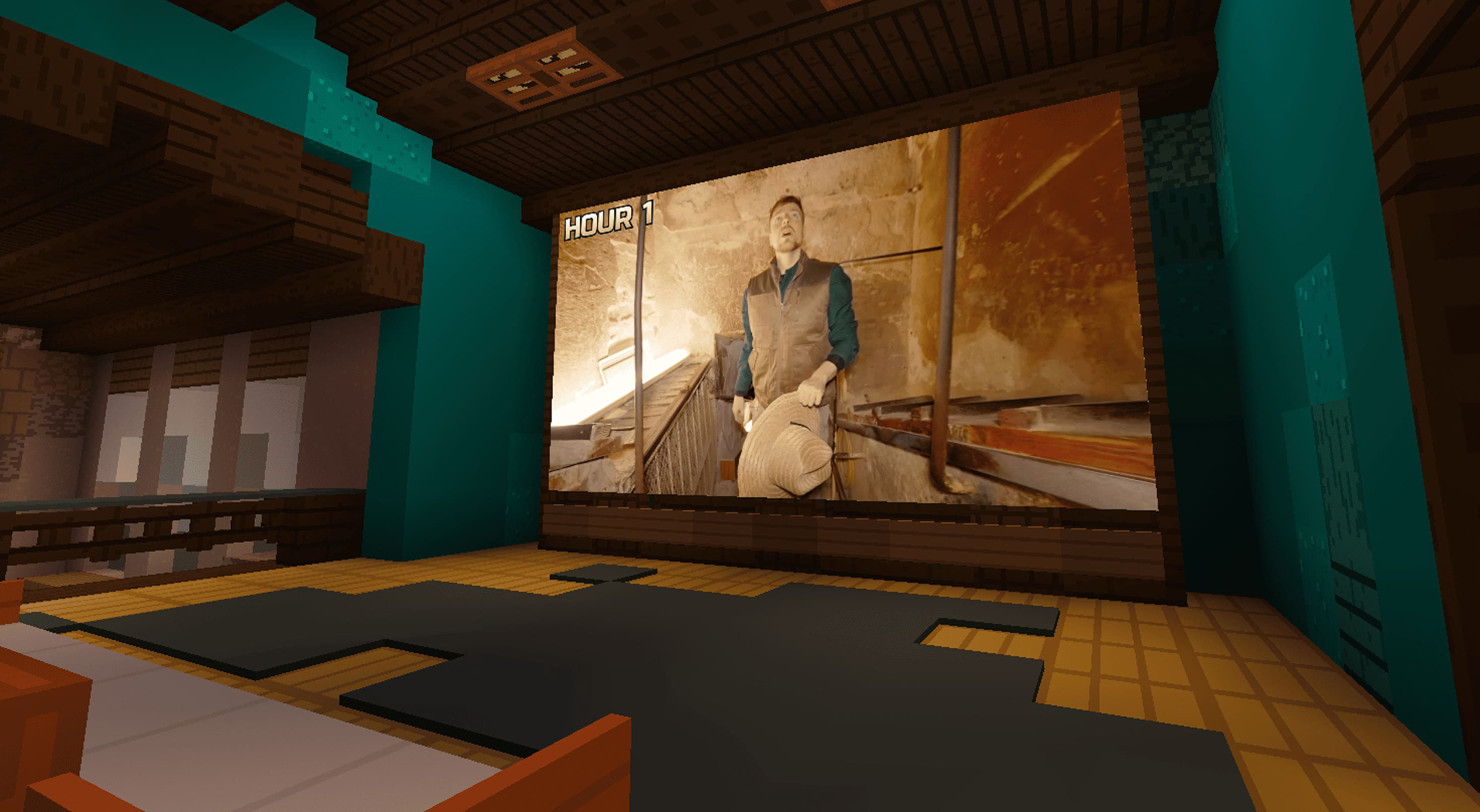
Put a display on the wall and watch YouTube, Twitch, or pretty much any video, right inside Minecraft.
It works great solo, and just as well with friends: watch together in sync, or let everyone control their own screen independently. Players just install the client-side mod, and they're ready to go.
Setting it up on the server takes seconds:
.jar into your /plugins folder.jar into your /mods folder
Create a display, paste a link with /display video <link> — Dream Displays figures out the rest.
| Icon | Source | What works |
|---|---|---|
 |
YouTube | Videos and livestreams, ad-free, up to 4K, with multiple audio languages |
 |
Twitch | Live channels, VODs, and clips |
 |
Kick | Live channels and VODs |
 |
Vimeo | Public videos and live events |
 |
Bilibili | Videos and live channels |
 |
Any video link | Direct video files and live streams (.m3u8 / .mpd) just work |
   |
Share links | Google Drive, Dropbox, and Imgur links are rewritten to the file they point at |
 |
Pretty much anywhere else | Not on the list? Try it anyway — chances are it'll play |
Set up a display using black concrete, select it with a diamond axe, and type /display create. After the display is created, type /display video <link> [language]
Done! To customize the display, look at it and press Shift + RMB
If you enjoy Dream Displays, consider buying me a coffee. Every contribution helps keep the project alive!

Project description from CurseForge.
Pick your setup
Choose the version and loader you play, then open the matching release.
Showing the newest 12 of 16 game versions. Older files are in the list below.
Check the dependencies, then try the file in a copied instance before changing a world you care about.
Recent files
dreamdisplays-paper-1.9.3.jar
20 Aug 2026
dreamdisplays-velocity-1.9.3.jar
20 Aug 2026
dreamdisplays-bungeecord-1.9.3.jar
20 Aug 2026
dreamdisplays-neoforge-26.2-1.9.3.jar
20 Aug 2026
dreamdisplays-neoforge-26.1.2-1.9.3.jar
20 Aug 2026
dreamdisplays-neoforge-1.21.11-1.9.3.jar
20 Aug 2026
dreamdisplays-neoforge-1.21.1-1.9.3.jar
20 Aug 2026
dreamdisplays-fabric-26.2-1.9.3.jar
20 Aug 2026
dreamdisplays-fabric-26.1.2-1.9.3.jar
20 Aug 2026
dreamdisplays-fabric-1.21.11-1.9.3.jar
20 Aug 2026
dreamdisplays-fabric-1.21.1-1.9.3.jar
20 Aug 2026
dreamdisplays-paper-1.9.2.jar
19 Aug 2026
Looking for an older file? The official CurseForge project page is in Resources.
 mod
modCompatibility addon between Dynamic Trees and BetterEnd
 mod
modAddon for Create: Power Grid adding nested circuit board chip components.
 mod
modCompatibility between Dynamic Trees and BetterNether


