Minecraft version
Back to mods 
Modrinth · Minecraft mod
Fast Masa Config UI
Added a quick configuration UI for Malilib mods, so you don’t have to worry about running out of hotkeys anymore
Choose a version Pick your version below, then grab the matching file.
Quick answer
Which Fast Masa Config UI release should I use?
Latest stable file 26.2-5.2.0
Game version 26.2
Loader Fabric
Fast Masa Config UI 26.2-5.2.0 targets 26.2 with Fabric. It must be installed on the client. Do not install it on the dedicated server. No extra mods listed for this file.
Where it goes
Is Fast Masa Config UI required on the client, server, or both?
It must be installed on the client. Do not install it on the dedicated server.
Client Required
Dedicated server Not supported
Loader for this release Fabric
Required install it here Optional supported, not mandatory Not supported do not install here Source doesn’t say do not assume
This file is marked client-only.
What else does Fast Masa Config UI 26.2-5.2.0 need?
26.2-5.2.0. Change the file and its required mods may change too.
This file does not list any required mods. Do not add a library just because a different file uses it.
This file does not list any required or optional mods.
Before you install it
Add Fast Masa Config UI without breaking your instance.
Built for Fast Masa Config UI 26.2-5.2.0. Pick another file and the loader, install side or required mods may change.
- 01
Stick to this file
Use 26.2-5.2.0. It targets 26.2 with Fabric; another release may have different loader, side or dependency requirements.
- 02
Bring the mods it needs
This file does not list any required mods. Do not add a library just because a different file uses it.
- 03
Put it on the correct side
It must be installed on the client. Do not install it on the dedicated server.
- 04
Pick the file you checked
Use the “Get this file” button beside 26.2-5.2.0. It opens that exact file at the source.
About this project
What does Fast Masa Config UI add?
Fast Masa Config
NOTICE: This mod isn't a fully developed one yet, so please report any issues you find.
English
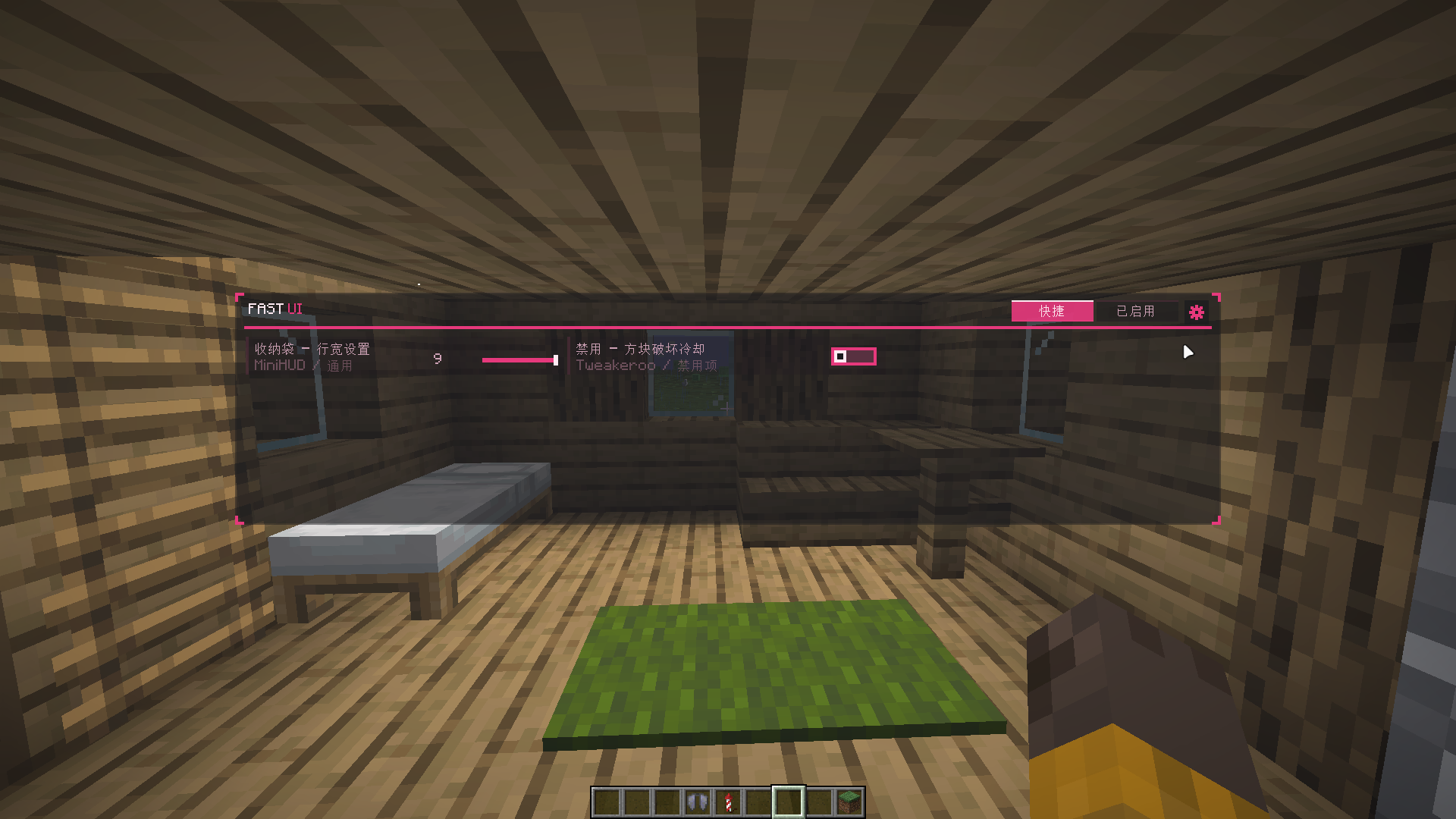
Fast Masa Config is a client-side Fabric mod that provides quick access to configuration options from Masa mods.
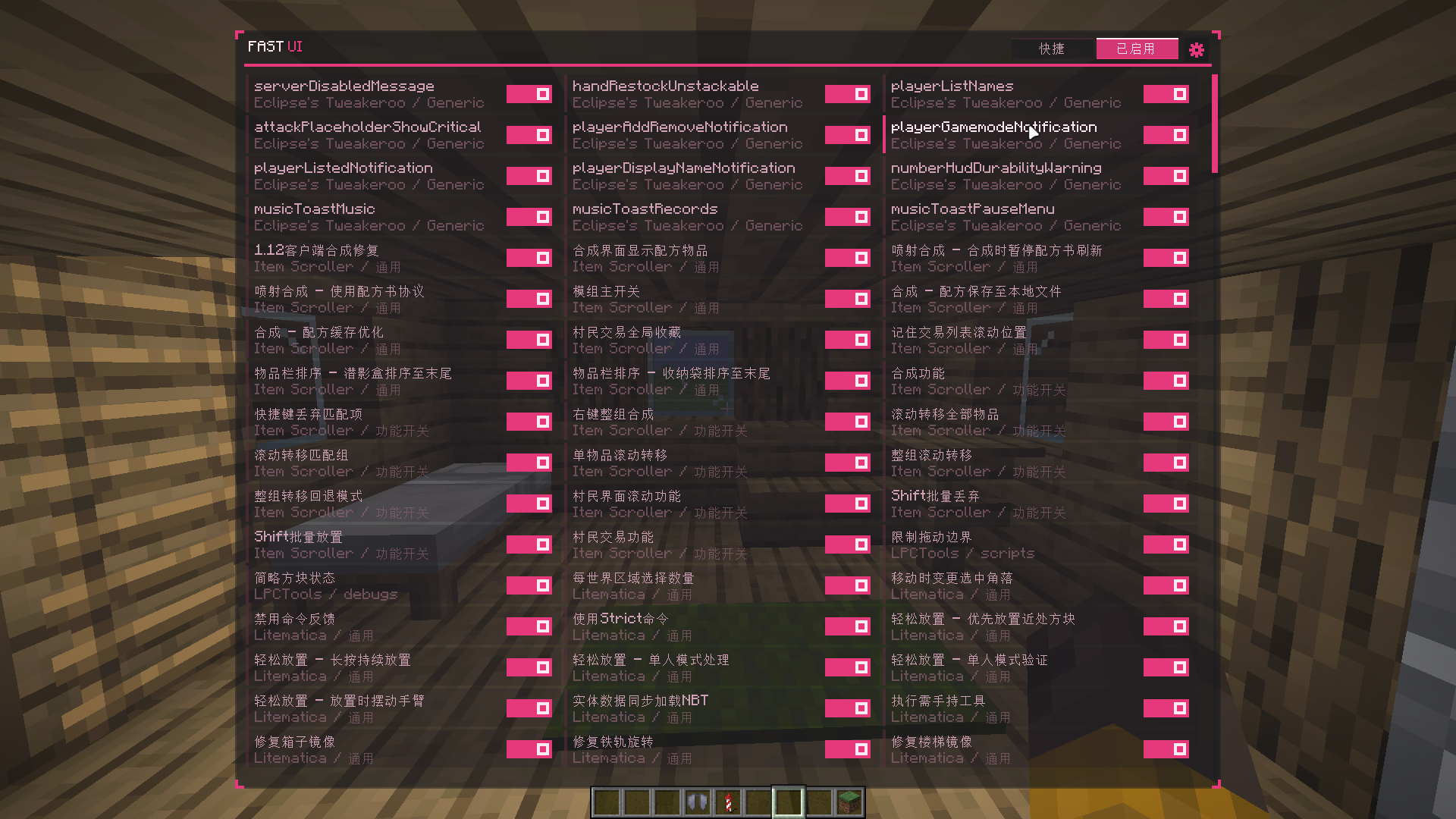
It automatically discovers available settings exposed through MaLiLib and lets you organize frequently used options into a convenient quick-access panel, so you can change settings without repeatedly opening full configuration screens.
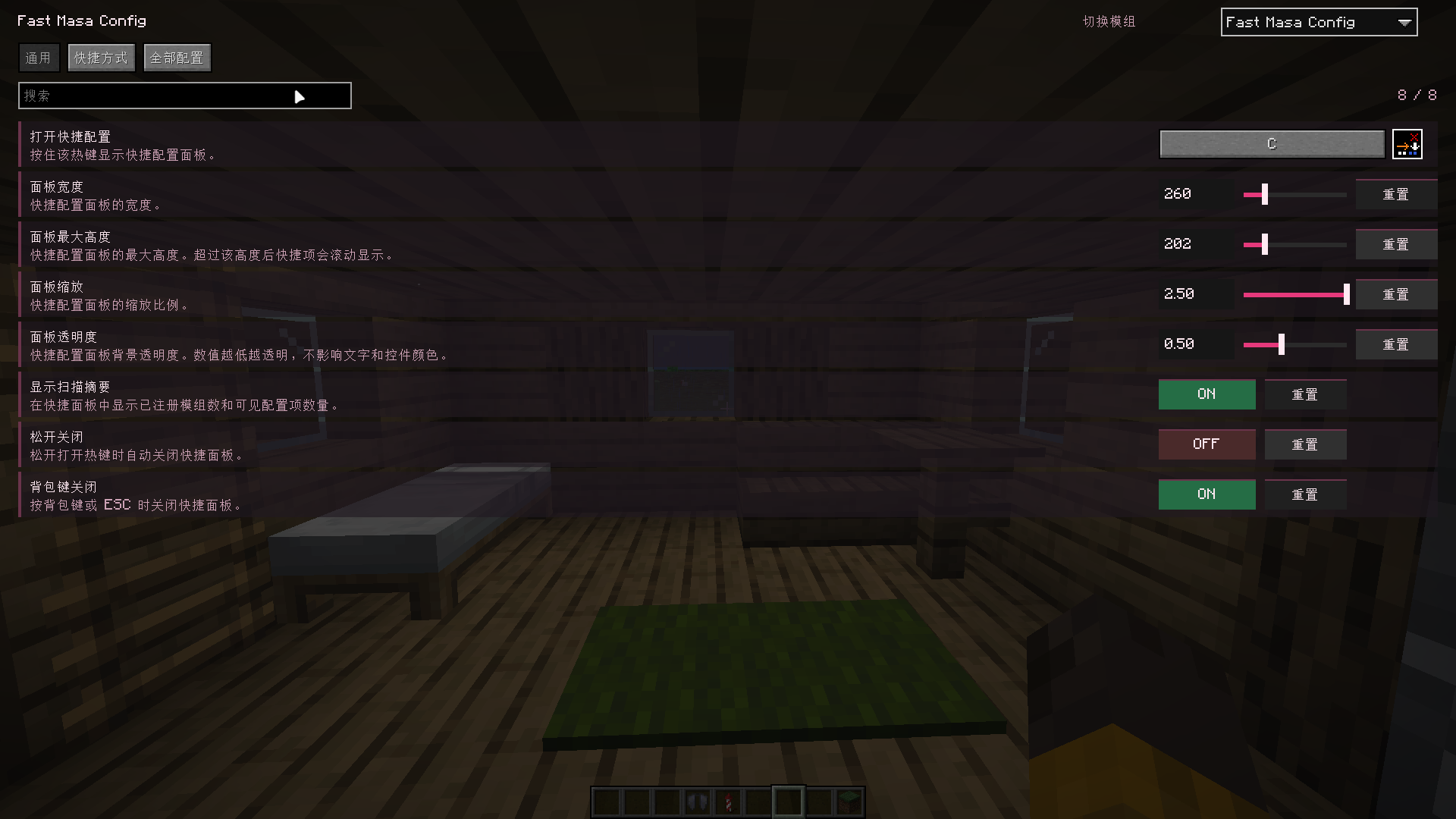
By default, hold Right Shift to open the panel. The keybind is fully configurable.
Features
- Automatically discovers configuration entries from installed MaLiLib-based mods.
- Organizes entries by mod and configuration group.
- Open the quick panel by holding
Right Shift(configurable). - Keeps the game running while the panel is open and preserves movement input whenever possible.
- Close the panel by releasing the hotkey, pressing the inventory key, or pressing
Esc. - Create, rename, hide, delete, and reorder custom groups.
- Floating group windows support dragging, collapsing, and persistent layout.
- Toggle boolean values directly or adjust numeric values with expandable sliders.
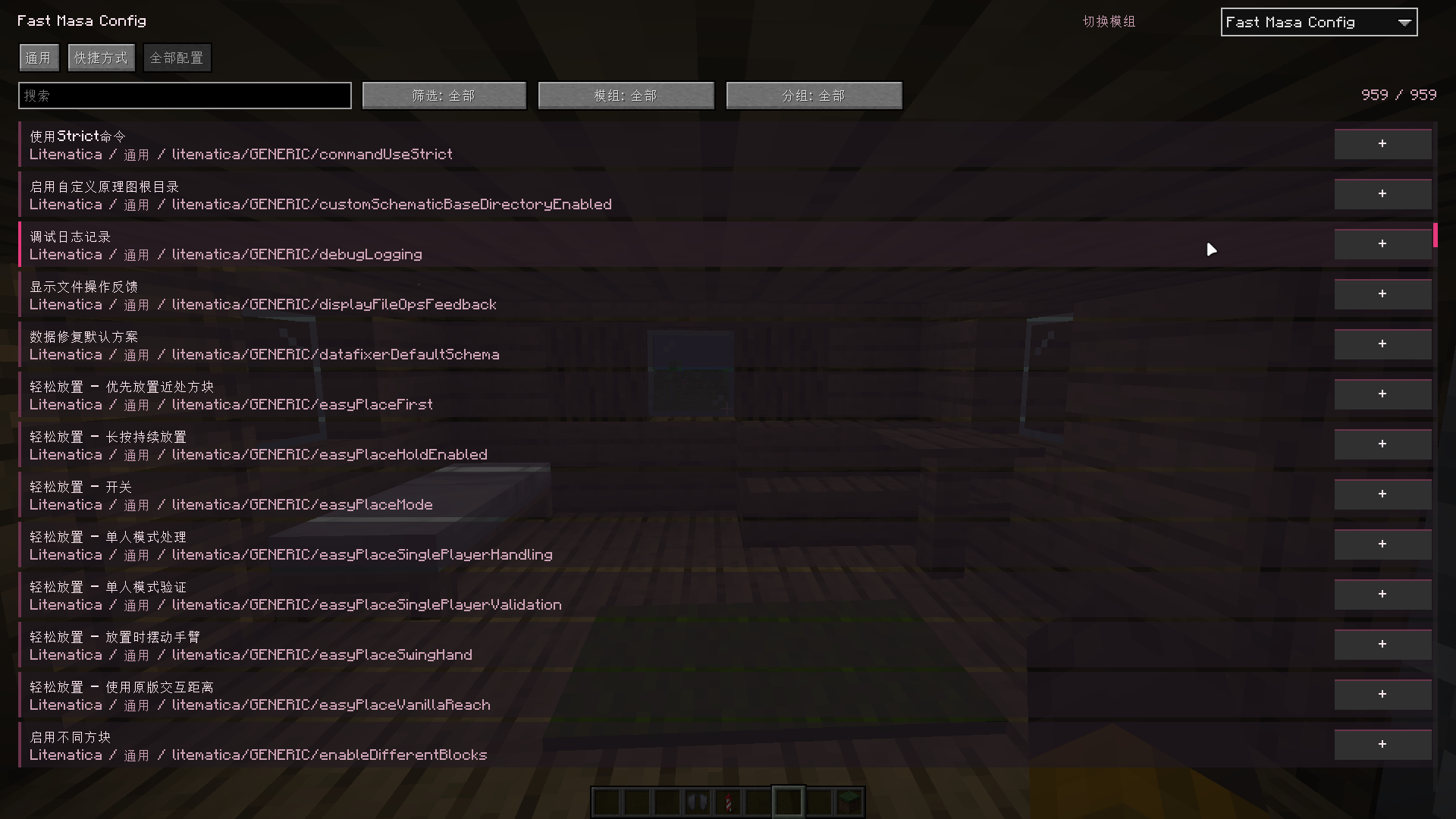
- Search and filter the full configuration list by mod, group, and whether an entry has already been added to the quick panel.
- Organize configuration entries into custom shortcut groups.
- Optional dynamic block-breaking indicator that replaces vanilla crack textures with an outline and translucent fill.
- Customize colors, transparency, outline width, and multiplayer progress rendering.
- Includes configuration scanning and CSV export commands for compatibility diagnostics.
Usage
After installation, hold Right Shift to open the quick panel.
Use the full configuration screen to add entries to your shortcut groups and organize them however you like.
If some configuration entries are missing, the corresponding mod may expose its MaLiLib configuration differently. The following client commands can be used to inspect the scan results:
/fastmasaconfig scan
/fastmasaconfig scan csv
/fastmasaconfig scan fallback
/fastmasaconfig scan fallback csv
Dependencies
This is a client-side mod and does not need to be installed on servers.
Install the following dependencies for your Minecraft version:
- Fabric Loader
- Fabric API
- MaLiLib
The required MaLiLib version depends on the Minecraft version. Please refer to the current Modrinth release page.
Mod Menu is optional and provides a convenient entry point to the full configuration screen.
Screenshots
The screenshots below show an older version of the user interface and are intended to demonstrate the available features and interactions.
The current version has a redesigned layout and updated visuals, so the in-game appearance may differ from what is shown.
Feedback
Found a bug, compatibility issue, or have a feature request?
Please report it on GitHub Issues.
中文
注 :这还不是一个成熟的mod,如果发现问题请及时反馈
Fast Masa Config 是一个客户端 Fabric Mod,用于快速访问和管理 Masa 系 Mod 的常用配置。
它会自动读取已安装 Mod 提供的配置,并提供一个快捷配置面板,让你无需频繁打开完整配置界面,就能在游戏过程中快速切换常用功能、调整模式或修改数值。
默认按住 Right Shift 即可打开快捷面板,按键可自行修改。
功能
- 自动扫描已安装的 MaLiLib 配置,并按 Mod 和配置分组整理。
- 默认按住
Right Shift打开快捷面板,支持修改快捷键。 - 面板打开时不会暂停游戏,并尽可能保持移动输入正常。
- 支持松开快捷键、按背包键或按
Esc关闭面板。 - 支持创建、重命名、隐藏、删除及排序自定义分组。
- 分组窗口支持拖动、折叠,并自动保存窗口位置、折叠状态及展开的数值项。
- 布尔值支持一键切换;整数、浮点数和双精度数值支持滑条调节。
- 完整配置界面支持按 Mod、配置分组以及是否已添加到快捷面板进行搜索和筛选。
- 可自由将配置项加入或移出快捷分组,按自己的使用习惯组织配置。
- 提供可选的动态挖掘指示器,可替代原版裂纹动画,使用描边和半透明填充显示挖掘进度。
- 挖掘效果支持自定义颜色、透明度、描边宽度,并可显示多人游戏中其他玩家的挖掘进度。
- 提供配置扫描及 CSV 导出命令,便于排查兼容性问题。
使用
安装后进入游戏,默认按住 Right Shift 打开快捷面板。
首次使用时,可以在完整配置界面中选择需要加入快捷面板的配置项,并根据自己的使用习惯创建和调整分组。
如果某些配置项没有被识别,通常是因为对应 Mod 使用了不同的 MaLiLib 配置实现方式。可以使用以下客户端命令查看扫描结果:
/fastmasaconfig scan
/fastmasaconfig scan csv
/fastmasaconfig scan fallback
/fastmasaconfig scan fallback csv
依赖
这是一个客户端 Mod,无需安装到服务端。
安装前请确认下载页面对应的 Minecraft 版本,并安装以下依赖:
- Fabric Loader
- Fabric API
- MaLiLib
MaLiLib 的具体版本要求会随 Minecraft 版本变化,请以当前 Modrinth 页面列出的依赖为准。
Mod Menu 为可选依赖,可用于直接打开完整配置界面。
截图
见上文,展示的是旧版界面截图,仅用于说明功能和交互方式。
当前版本已经重新设计了界面布局和视觉样式,因此实际游戏中的界面可能与截图存在差异。
反馈
如果发现 Bug、兼容性问题,或有功能建议,欢迎前往 GitHub Issues 反馈。
License
Fast Masa Config is licensed under GPL-3.0-or-later.
Some floating-window behavior is adapted from public Meteor Client implementations. The relevant source files retain their original copyright notices and GPL-3.0 license headers.
Fast Masa Config is an independent project and is not affiliated with or endorsed by Meteor Client or its developers.
Project description from Modrinth.
Pick your setup
Fast Masa Config UI by Minecraft version and loader
Choose the version and loader you play, then open the matching release.
Minecraft version
26.1.2
1 loader buildMinecraft version
1.21.8
1 loader buildMinecraft version
1.21.7
1 loader buildMinecraft version
1.21.1
1 loader buildCheck the dependencies, then try the file in a copied instance before changing a world you care about.
Recent files
Fast Masa Config UI versions and loaders
26.2-5.2.0
fast-masa-config-26.2-5.2.0.jar
12 Aug 2026
Client Required Server Not supported Dependencies No extras listed Listed on Release listing
Check the 26.2 · Fabric setup 26.2Fabric release
26.2-4.1.3
fast-masa-config-26.2-4.1.3.jar
12 Aug 2026
Client Required Server Not supported Dependencies No extras listed Listed on Release listing
Check the 26.2 · Fabric setup 26.2Fabric release
1.21.8-2.3.1
fast-masa-config-fabric-1.21.8-2.3.1.jar
9 Aug 2026
Client Required Server Not supported Dependencies No extras listed Listed on Release listing
Check the 1.21.8 · Fabric setup 1.21.8Fabric release
26.2-3.2.3
fast-masa-config-26.2-3.2.3.jar
9 Aug 2026
Client Required Server Not supported Dependencies 1 required · 1 unchecked Listed on Release listing
Check the 26.2 · Fabric setup 26.2Fabric release
26.2-3.1.1
fast-masa-config-26.2-3.1.1.jar
8 Aug 2026
Client Required Server Not supported Dependencies No extras listed Listed on Release listing
Check the 26.2 · Fabric setup 26.2Fabric release
26.2-3.0.4
fast-masa-config-26.2-3.0.4.jar
8 Aug 2026
Client Required Server Not supported Dependencies 1 required · 1 unchecked Listed on Release listing
Check the 26.2 · Fabric setup 26.2Fabric release
1.21.8-1.0.0
fast-masa-config-1.21.8-1.0.0.jar
8 Aug 2026
Client Required Server Not supported Dependencies No extras listed Listed on Release listing
Check the 1.21.8 · Fabric setup 1.21.8Fabric beta
26.2-3.0.0
fast-masa-config-3.0.0.jar
7 Aug 2026
Client Required Server Not supported Dependencies 1 required · 1 unchecked Listed on Release listing
Check the 26.2 · Fabric setup 26.2Fabric beta
1.21.1-1.0.0
fast-masa-config-fabric-1.21.1-1.0.0.jar
4 Aug 2026
Client Required Server Not supported Dependencies No extras listed Listed on Release listing
Check the 1.21.7 · Fabric setup 1.21.7Fabric release
1.21.1-1.0.0
fast-masa-config-fabric-1.21.1-1.0.0.jar
4 Aug 2026
Client Required Server Not supported Dependencies No extras listed Listed on Release listing
Check the 1.21.1 · Fabric setup 1.21.1Fabric beta
26.1.2-2.0.0
fast-masa-config-2.0.0.jar
19 Jul 2026
Client Required Server Not supported Dependencies 1 required · 1 unchecked Listed on Release listing
Check the 26.1.2 · Fabric setup 26.1.2Fabric release
1.21.7-1.0.0
fast-masa-config-1.0.0.jar
8 Jul 2026
Client Required Server Not supported Dependencies No extras listed Listed on Release listing
Check the 1.21.7 · Fabric setup 1.21.7Fabric beta
Looking for an older file? The official Modrinth project page is in Resources.
 mod
mod CurseForge + Modrinth · Minecraft
Soft Foliage
Leaves should be soft, lilypads shouldn't block swimming, and bamboo should be climbable. A super configurable vanilla-like mod that softens foliage!!! <3 <3 <3 Also slowdown, dethorned berry bushes and an in game config menu through vanilla options menus.
 mod
mod CurseForge + Modrinth · Minecraft
I'm Herobrine
With this mod you can become a Herobrine and spawn lightning bolt
 mod
mod Modrinth · Minecraft
Create: Storage [Neo/Forge]
A lightweight storage addon for the Create Mod featuring Storage Boxes and Backpacks