




Minecraft version
Back to mods 
Modrinth · Minecraft mod
DryEye
Fixes a cruel oversight causing players' eyes to get dry (automatic blinking)
Choose a version Pick your version below, then grab the matching file.
Quick answer
Which DryEye release should I use?
Latest stable file 0.3.1
Game version 26.1, 26.1.1, 26.1.2
Loader Fabric, Forge, NeoForge
DryEye 0.3.1 targets 26.1, 26.1.1, 26.1.2 with Fabric, Forge, NeoForge. It must be installed on the client. Do not install it on the dedicated server. No extra mods listed for this file.
Where it goes
Is DryEye required on the client, server, or both?
It must be installed on the client. Do not install it on the dedicated server.
Client Required
Dedicated server Not supported
Loader for this release Fabric, Forge, NeoForge
Required install it here Optional supported, not mandatory Not supported do not install here Source doesn’t say do not assume
This file is marked client-only.
What else does DryEye 0.3.1 need?
0.3.1. Change the file and its required mods may change too.
This file does not list any required mods. Do not add a library just because a different file uses it.
This file does not list any required or optional mods.
Before you install it
Add DryEye without breaking your instance.
Built for DryEye 0.3.1. Pick another file and the loader, install side or required mods may change.
- 01
Stick to this file
Use 0.3.1. It targets 26.1, 26.1.1, 26.1.2 with Fabric, Forge, NeoForge; another release may have different loader, side or dependency requirements.
- 02
Bring the mods it needs
This file does not list any required mods. Do not add a library just because a different file uses it.
- 03
Put it on the correct side
It must be installed on the client. Do not install it on the dedicated server.
- 04
Pick the file you checked
Use the “Get this file” button beside 0.3.1. It opens that exact file at the source.
About this project
What does DryEye add?
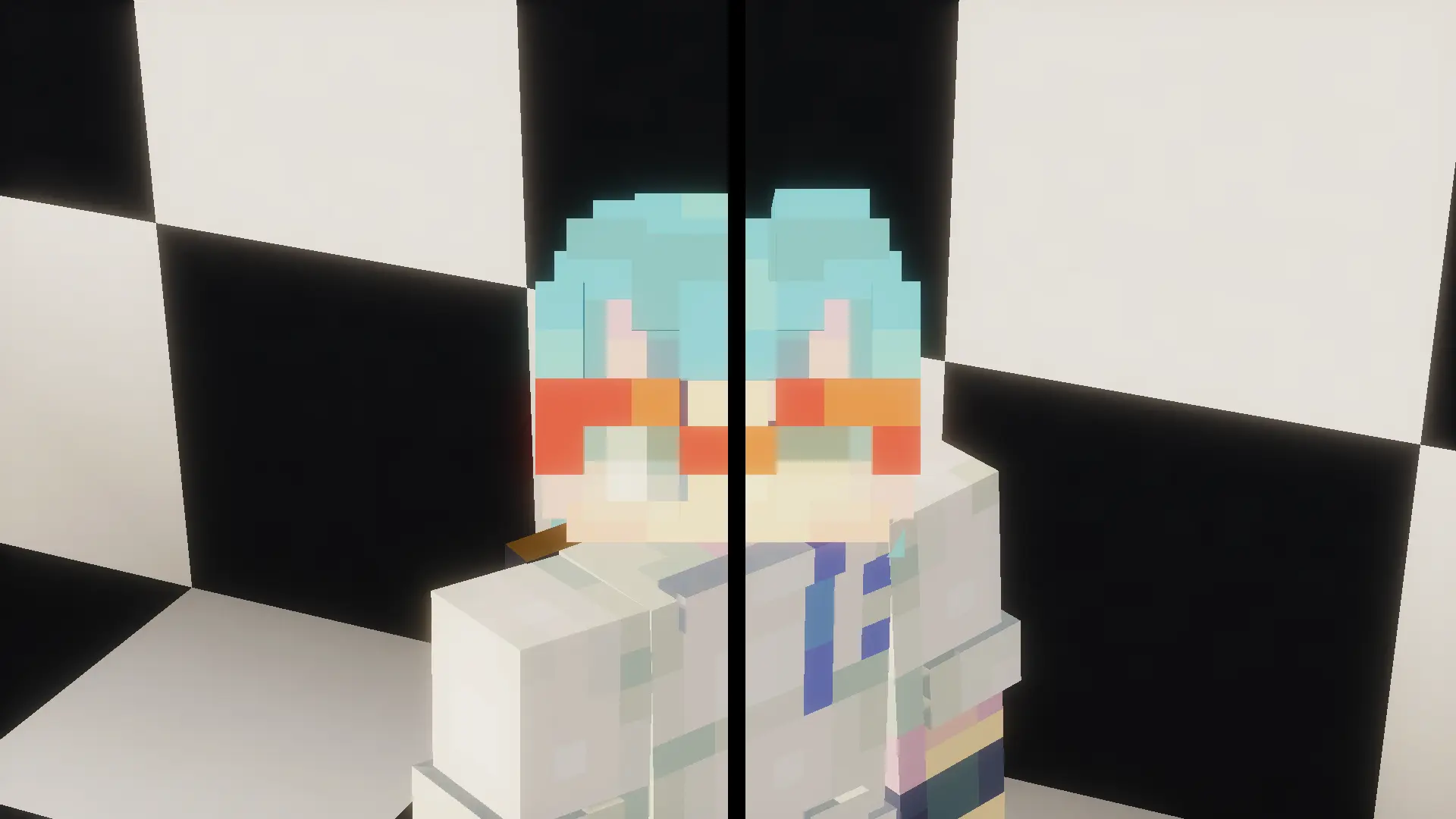
DryEye is a proof-of-concept Fabric, Forge and NeoForge mod that automatically
modifies player skins so that they can blink
periodically. It injects a lightweight callback into
the AvatarRenderer to substitute player skins with a
computed "blink variant" based on complex heuristics. This is
a fuzzy system that won't always work properly, so
click here
if you want to report an issue with your skin and improve the mod!
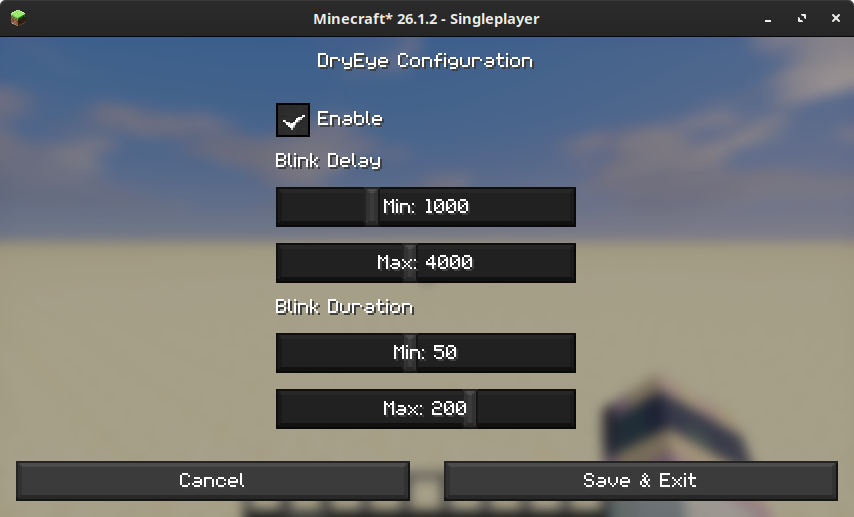
The mod is enabled by default and can be configured
in the dryeye.toml config file or by clicking through
the Mod Menu to access the GUI shown below.
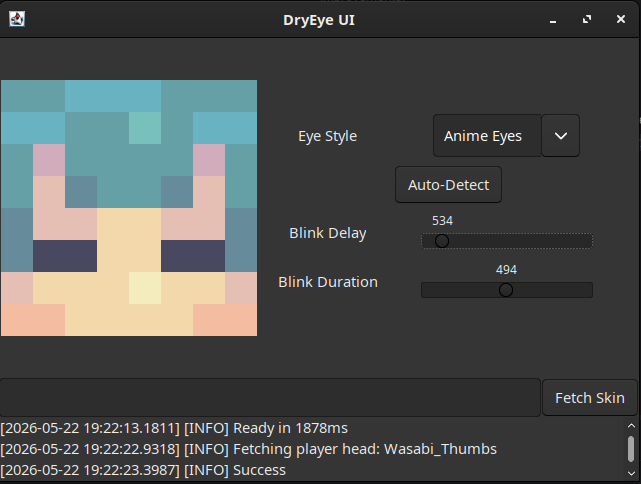
The DryEye project also mantains a standalone app
that can be used to debug/play with the skin
modification algorithm. It can be launched
via the :app:launch Gradle task or by
double clicking the dryeye-app-VERSION.jar
artifact. Downloads can be found
on GitHub.
- Allow overriding the computed "eye style" on a per-player basis
Copyright 2026 Xavier Pedraza

Licensed under the Apache License, Version 2.0 (the "License");
you may not use this file except in compliance with the License.
You may obtain a copy of the License at

    http://www.apache.org/licenses/LICENSE-2.0

Unless required by applicable law or agreed to in writing, software
distributed under the License is distributed on an "AS IS" BASIS,
WITHOUT WARRANTIES OR CONDITIONS OF ANY KIND, either express or implied.
See the License for the specific language governing permissions and
limitations under the License.

Project description from Modrinth.
Pick your setup
DryEye by Minecraft version and loader
Choose the version and loader you play, then open the matching release.
Minecraft version
26.4-snapshot-6
3 loader buildsMinecraft version
26.4-snapshot-5
3 loader buildsMinecraft version
26.4-snapshot-4
3 loader buildsMinecraft version
26.4-snapshot-3
3 loader buildsMinecraft version
26.4-snapshot-2
3 loader buildsMinecraft version
26.4-snapshot-1
3 loader buildsMinecraft version
26.3-snapshot-10
3 loader buildsMinecraft version
26.3-snapshot-9
3 loader buildsMinecraft version
26.3-snapshot-8
3 loader buildsMinecraft version
26.3-snapshot-7
3 loader buildsMinecraft version
26.3-snapshot-6
3 loader buildsShowing the newest 12 of 43 game versions. Older files are in the list below.
Check the dependencies, then try the file in a copied instance before changing a world you care about.
Recent files
DryEye versions and loaders
0.3.1
dryeye-mod-0.3.1.jar
3 Oct 2026
Client Required Server Not supported Dependencies No extras listed Listed on Release listing
Check the 26.4-snapshot-7 · Fabric setup 26.126.1.126.1.226.2 release
0.3.0
dryeye-mod-0.3.0.jar
28 Jul 2026
Client Required Server Not supported Dependencies No extras listed Listed on Release listing
Check the 26.3-snapshot-10 · Fabric setup 26.126.1.126.1.226.2 release
0.2.1
dryeye-forge-0.2.1.jar
1 Jul 2026
Client Required Server Not supported Dependencies No extras listed Listed on Release listing
Check the 26.2 · Forge setup 26.126.1.126.1.226.2 release
0.2.1
dryeye-neoforge-0.2.1.jar
1 Jul 2026
Client Required Server Not supported Dependencies No extras listed Listed on Release listing
Check the 26.2 · NeoForge setup 26.126.1.126.1.226.2 release
0.2.1
dryeye-fabric-0.2.1.jar
1 Jul 2026
Client Required Server Not supported Dependencies No extras listed Listed on Release listing
Check the 26.2 · Fabric setup 26.126.1.126.1.226.2 release
0.2.0
dryeye-neoforge-0.2.0.jar
30 Jun 2026
Client Required Server Not supported Dependencies No extras listed Listed on Release listing
Check the 26.2 · NeoForge setup 26.126.1.126.1.226.2 release
0.2.0
dryeye-fabric-0.2.0.jar
30 Jun 2026
Client Required Server Not supported Dependencies No extras listed Listed on Release listing
Check the 26.2 · Fabric setup 26.126.1.126.1.226.2 release
0.1.1
dryeye-fabric-0.1.1.jar
29 Jun 2026
Client Required Server Not supported Dependencies No extras listed Listed on Release listing
Check the 26.2 · Fabric setup 26.126.1.126.1.226.2 release
0.1.0
dryeye-fabric-0.1.0.jar
22 May 2026
Client Required Server Not supported Dependencies No extras listed Listed on Release listing
Check the 26.1.2 · Fabric setup 26.1.2Fabric release
Looking for an older file? The official Modrinth project page is in Resources.
 mod
CurseForge + Modrinth · Minecraft
Lettuce's Balanced Crates
Nifty storage blocks that also make good decorations
 mod
CurseForge · Minecraft
My Hero Academia Quirks
Get a random superpower with the Quirk Orb and master unique abilities inspired by My Hero Academia.
 mod
CurseForge + Modrinth · Minecraft
MenuMusic
Change the title menu music without much fuzz!