Minecraft version
Back to mods 
CurseForge · Minecraft mod
The Fusion Chamber
You won't need seperate tools anymore...
Choose a version Pick your version below, then grab the matching file.
Quick answer
Which The Fusion Chamber release should I use?
Latest stable file Shimmering and Smithing (1.3.0)
Game version 1.16.5
Loader forge
The Fusion Chamber Shimmering and Smithing (1.3.0) targets 1.16.5. The project page does not say whether this file belongs on the client, dedicated server, or both. No extra mods listed for this file.
Where it goes
Is The Fusion Chamber required on the client, server, or both?
The project page does not say whether this file belongs on the client, dedicated server, or both.
Client Source doesn’t say
Dedicated server Source doesn’t say
Loader for this release No loader listed
Required install it here Optional supported, not mandatory Not supported do not install here Source doesn’t say do not assume
The source does not explicitly classify this release as client-only or server-only.
What else does The Fusion Chamber Shimmering and Smithing (1.3.0) need?
Shimmering and Smithing (1.3.0). Change the file and its required mods may change too.
This file does not list any required mods. Do not add a library just because a different file uses it.
This file does not list any required or optional mods.
Before you install it
Add The Fusion Chamber without breaking your instance.
Built for The Fusion Chamber Shimmering and Smithing (1.3.0). Pick another file and the loader, install side or required mods may change.
- 01
Stick to this file
Use Shimmering and Smithing (1.3.0). It targets 1.16.5; another release may have different loader, side or dependency requirements.
- 02
Bring the mods it needs
This file does not list any required mods. Do not add a library just because a different file uses it.
- 03
Put it on the correct side
The project page does not say whether this file belongs on the client, dedicated server, or both.
- 04
Pick the file you checked
Use the “Get this file” button beside Shimmering and Smithing (1.3.0). It opens that exact file at the source.
About this project
What does The Fusion Chamber add?
This is a small mod that adds the ability to fuse tools together. The only rules are that you can't fuse tools of different tiers, and you can't fuse two of the same tool.
Fusing tools requires the Fusion Chamber, which is easy to craft.
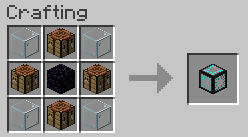
After crafting the Fusion Chamber, place it down and right click. You should see this.
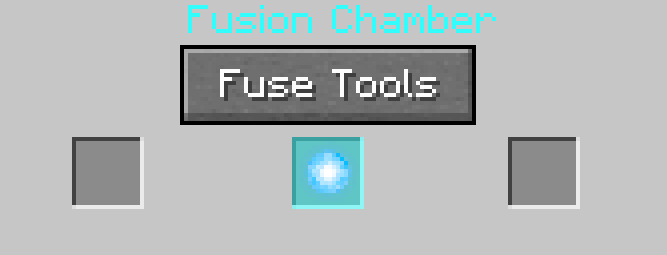
Put two tools into the left and right slots and click fuse tools. If the tools cannot be fused, nothing will happen. If they can be fused, they will be consumed and the fused tool will appear in the center.
Enjoy!
This mod is no longer supported. Updates will not happen.
Project description from CurseForge.
Pick your setup
The Fusion Chamber by Minecraft version and loader
Choose the version and loader you play, then open the matching release.
Check the dependencies, then try the file in a copied instance before changing a world you care about.
Recent files
The Fusion Chamber versions and loaders
Shimmering and Smithing (1.3.0)
fusion-1.3.0.jar
28 Aug 2021
Client Source doesn’t say Server Source doesn’t say Dependencies No extras listed Listed on Release listing
Check the 1.16.5 setup 1.16.5 release
21w33a (1.3 Snapshot)
fusion-21w33a-snap.jar
17 Aug 2021
Client Source doesn’t say Server Source doesn’t say Dependencies No extras listed Listed on Release listing
Check the 1.16.5 setup 1.16.5 beta
Ironic Fusions (1.2.0)
fusion-1.2.0.jar
11 Aug 2021
Client Source doesn’t say Server Source doesn’t say Dependencies No extras listed Listed on Release listing
Check the 1.16.5 setup 1.16.5 release
Deep Down Fusions (1.1.0)
fusion-1.1.0.jar
24 Jul 2021
Client Source doesn’t say Server Source doesn’t say Dependencies No extras listed Listed on Release listing
Check the 1.16.5 setup 1.16.5 release
1.0.0
fusion-1.0.0.jar
13 Jul 2021
Client Source doesn’t say Server Source doesn’t say Dependencies No extras listed Listed on Release listing
Check the 1.16.5 · Forge setup 1.16.5Forge release
Looking for an older file? The official CurseForge project page is in Resources.
 mod
Modrinth · Minecraft
Better With Everything
A fork of BWM that includes BWA and FIXES the broken guide. Maybe something more.
 mod
CurseForge · Minecraft
Card Jitsu
Play Card-Jitsu in Minecraft! Duel your friends or ninja penguins with elemental cards, earn your belts and become a ninja!
 mod
CurseForge · Minecraft
Kitchen made Better (A fishing made better fork)
A port of old FMB to modern versions and fixed lots of bugs.