Minecraft version
Back to mods 
CurseForge · Minecraft mod
Regions
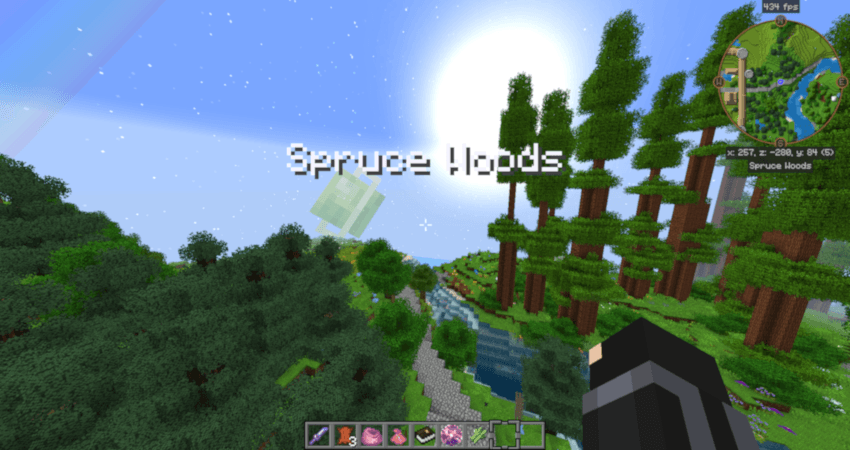
Displays the biome or village name while travelling
Choose a version Pick your version below, then grab the matching file.
Quick answer
Which Regions release should I use?
Latest stable file Regions-6.0.jar
Game version 1.7.10
Loader Forge
Regions-6.0.jar targets 1.7.10 with Forge. The project page does not say whether this file belongs on the client, dedicated server, or both. No extra mods listed for this file.
Where it goes
Is Regions required on the client, server, or both?
The project page does not say whether this file belongs on the client, dedicated server, or both.
Client Source doesn’t say
Dedicated server Source doesn’t say
Loader for this release Forge
Required install it here Optional supported, not mandatory Not supported do not install here Source doesn’t say do not assume
The source does not explicitly classify this release as client-only or server-only.
What else does Regions-6.0.jar need?
Regions-6.0.jar. Change the file and its required mods may change too.
This file does not list any required mods. Do not add a library just because a different file uses it.
This file does not list any required or optional mods.
Before you install it
Add Regions without breaking your instance.
Built for Regions-6.0.jar. Pick another file and the loader, install side or required mods may change.
- 01
Stick to this file
Use Regions-6.0.jar. It targets 1.7.10 with Forge; another release may have different loader, side or dependency requirements.
- 02
Bring the mods it needs
This file does not list any required mods. Do not add a library just because a different file uses it.
- 03
Put it on the correct side
The project page does not say whether this file belongs on the client, dedicated server, or both.
- 04
Pick the file you checked
Use the “Get this file” button beside Regions-6.0.jar. It opens that exact file at the source.
About this project
What does Regions add?
This mods shows the Biome and Village names when walking into their territory
Combitable with , will display the Names of "Village Names"
With craftable map to teleport to villages the player have discovered
Commands
/displaytext <playername> <text> Displays a certain Text for the Player
/adddisplayPosition <PosX> <PosY> <PosZ> <Radius> <Name> Sets a Point on a Map, it will display the Name on the given Pos if a player enters it
[Credits]
Ninifey
brandyn
Kamkeel
Dayd21twitch
Project description from CurseForge.
Pick your setup
Regions by Minecraft version and loader
Choose the version and loader you play, then open the matching release.
Check the dependencies, then try the file in a copied instance before changing a world you care about.
Recent files
Regions versions and loaders
Regions-6.0.jar
12 Nov 2024
Client Source doesn’t say Server Source doesn’t say Dependencies No extras listed Listed on Release listing
Check the 1.7.10 · Forge setup Forge1.7.10 release
kingdomregions-5.9.jar
11 Nov 2024
Client Source doesn’t say Server Source doesn’t say Dependencies No extras listed Listed on Release listing
Check the 1.7.10 · Forge setup Forge1.7.10 release
kingdomregions-5.8.jar
10 Nov 2024
Client Source doesn’t say Server Source doesn’t say Dependencies No extras listed Listed on Release listing
Check the 1.7.10 · Forge setup Forge1.7.10 release
kingdomregions-5.7.jar
5 Oct 2024
Client Source doesn’t say Server Source doesn’t say Dependencies No extras listed Listed on Release listing
Check the 1.7.10 · Forge setup Forge1.7.10 release
Kingdom | Regions 5.6
kingdomregions-5.6.jar
22 May 2024
Client Source doesn’t say Server Source doesn’t say Dependencies No extras listed Listed on Release listing
Check the 1.7.10 · Forge setup Forge1.7.10 release
Kingdom | Regions 5.2
kingdomregions-5.2.jar
21 May 2024
Client Source doesn’t say Server Source doesn’t say Dependencies No extras listed Listed on Release listing
Check the 1.7.10 · Forge setup Forge1.7.10 release
Kingdom | Regions 5.1
kingdomregions-5.1.jar
15 Apr 2024
Client Source doesn’t say Server Source doesn’t say Dependencies No extras listed Listed on Release listing
Check the 1.7.10 · Forge setup Forge1.7.10 release
Kingdom | Regions 5.0
kingdomregions-5.0.jar
14 Apr 2024
Client Source doesn’t say Server Source doesn’t say Dependencies No extras listed Listed on Release listing
Check the 1.7.10 · Forge setup Forge1.7.10 release
KoRINR_4.4
KoRINR_4.4.jar
13 Apr 2022
Client Source doesn’t say Server Source doesn’t say Dependencies No extras listed Listed on Release listing
Check the 1.7.10 setup 1.7.10 release
KoRINR_4.3
KoRINR_4.3.jar
30 Aug 2021
Client Source doesn’t say Server Source doesn’t say Dependencies No extras listed Listed on Release listing
Check the 1.7.10 setup 1.7.10 release
KoRINR_4.2
KoRINR_4.2.jar
27 Aug 2021
Client Source doesn’t say Server Source doesn’t say Dependencies No extras listed Listed on Release listing
Check the 1.7.10 setup 1.7.10 release
KoRINR_4.0
KoRINR_4.0.jar
19 Aug 2021
Client Source doesn’t say Server Source doesn’t say Dependencies No extras listed Listed on Release listing
Check the 1.7.10 setup 1.7.10 release
Looking for an older file? The official CurseForge project page is in Resources.
 mod
CurseForge + Modrinth · Minecraft
WTHIT
What the hell is that? A fork of Hwyla which is a fork of Waila.
 mod
CurseForge · Minecraft
The Mi Alliance: Extra Recruits!
A Mod That Adds QOL Recruits And Extras!
 mod
CurseForge · Minecraft
Piñata Celebrations
Adds piñatas, a chest fishing system, redstone-compatible animatronics, varied foods, and custom armor built with MCreator.