Minecraft version
Back to mods 
CurseForge · Minecraft mod
Coffee+
Coffee+ adds coffee to Minecraft, the way coffee should be done.
Choose a version Pick your version below, then grab the matching file.
Quick answer
Which Coffee+ release should I use?
beta file Coffee+ Beta 8 [1.18.2]
Game version 1.18.2
Loader Forge
Coffee+ Beta 8 [1.18.2] targets 1.18.2 with Forge. The project page does not say whether this file belongs on the client, dedicated server, or both. No extra mods listed for this file.
Where it goes
Is Coffee+ required on the client, server, or both?
The project page does not say whether this file belongs on the client, dedicated server, or both.
Client Source doesn’t say
Dedicated server Source doesn’t say
Loader for this release Forge
Required install it here Optional supported, not mandatory Not supported do not install here Source doesn’t say do not assume
The source does not explicitly classify this release as client-only or server-only.
What else does Coffee+ Beta 8 [1.18.2] need?
Coffee+ Beta 8 [1.18.2]. Change the file and its required mods may change too.
This file does not list any required mods. Do not add a library just because a different file uses it.
This file does not list any required or optional mods.
Before you install it
Add Coffee+ without breaking your instance.
Built for Coffee+ Beta 8 [1.18.2]. Pick another file and the loader, install side or required mods may change.
- 01
Stick to this file
Use Coffee+ Beta 8 [1.18.2]. It targets 1.18.2 with Forge; another release may have different loader, side or dependency requirements.
- 02
Bring the mods it needs
This file does not list any required mods. Do not add a library just because a different file uses it.
- 03
Put it on the correct side
The project page does not say whether this file belongs on the client, dedicated server, or both.
- 04
Pick the file you checked
Use the “Get this file” button beside Coffee+ Beta 8 [1.18.2]. It opens that exact file at the source.
About this project
What does Coffee+ add?

Coffee+ adds coffee to Minecraft, the way coffee should be done.
Plants
Coffee Tree
Right-clicking the ground while holding raw coffee beans will plant a coffee tree. Over time it will grow, and right-clicking a fully-grown tree will give you between 1-3 raw coffee beans.
Coffee trees can spawn in any mountain or mutated extreme hill biome - but remember that you can only gather coffee by right-clicking a grown plant, destroying it won't drop anything.
Blocks
Coffee Machine
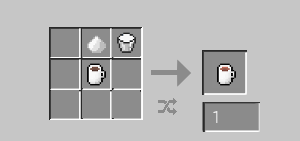
Coffee can be brewed by placing ground coffee within the top slot of a Coffee Machine, an empty mug within the bottom one, and pressing the "Brew" button. This will create a 'Full coffee mug', which can be crafted to create different coffee varieties, as listed below.
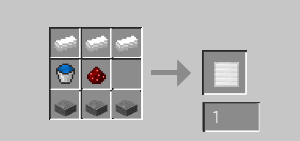
Coffee Grinder
One of the ways that coffee beans can be ground is with a coffee grinder. The coffee grinder must be placed down and does not use up durability over time. To use the coffee grinder, place roasted coffee beans into the grinder and click 'Grind'.
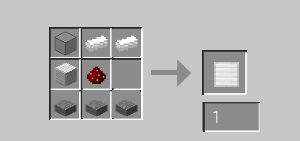
Items
Coffee varieties:
After drinking any variety of coffee, an empty mug will be returned to you. Drinking coffee also applies some potion effects for a short amount of time. The potions and amounts of time vary depending on which coffee variant is drunk. These effects slowly wear off over time, e.g., giving you speed two before slowing it to speed one as the caffeine wears off. The insomnia effect is also applied, which will prevent sleeping after drinking coffee.
Full coffee mug
The Full coffee mug is obtained after using the coffee machine, details of how to do so are listed above.
Sugary Coffee
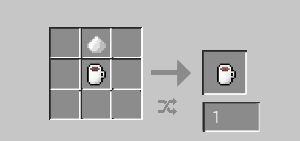
Milky coffee
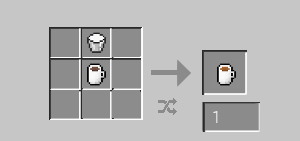
Sugary milky coffee
Coffee beans:
Raw coffee beans
These are the raw coffee beans that you harvest from a coffee tree. Details of how to collect them are listed above, under the 'Coffee Tree' plant.
Roasted coffee beans
Raw coffee beans can be roasted in a furnace or a smoker, to obtain Roasted coffee beans. These can then be ground down using any variety of coffee grinders, for use in a Coffee machine.
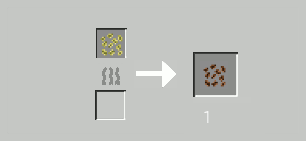
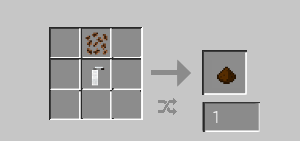
Ground coffee
This can be crafted within a crafting grid using the hand grinder (as shown below), or by utilising the coffee grinder block (as shown above)
Mugs:
Clay mug
The coffee mug is obtained by gathering 7 clay and crafting a clay mug.
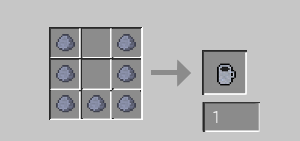
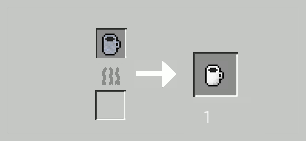
Empty coffee mug
The clay mug must be smelted in a furnace to 'harden' the clay, creating a coffee mug - the item used to hold coffee.
Other:
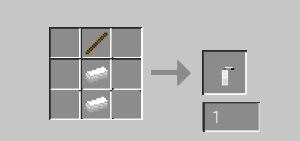
Hand grinder
Coffee beans can also be ground with a hand grinder. The hand grinder can be kept in your inventory and loses durability as you use it. To use the hand grinder, place the hand grinder and roasted coffee beans into any shape in a crafting grid. This will use up 1 durability, with a total of 16 uses.
Project description from CurseForge.
Pick your setup
Coffee+ by Minecraft version and loader
Choose the version and loader you play, then open the matching release.
Minecraft version
1.16.5
1 loader buildCheck the dependencies, then try the file in a copied instance before changing a world you care about.
Recent files
Coffee+ versions and loaders
Coffee+ Beta 8 [1.18.2]
coffeeplus_beta_8_ver1.18.2.jar
26 Oct 2022
Client Source doesn’t say Server Source doesn’t say Dependencies No extras listed Listed on Release listing
Check the 1.18.2 · Forge setup 1.18.2Forge beta
Coffee+ Beta 8 [1.16.5]
coffeeplus_beta_8_ver1.16.5.jar
26 Oct 2022
Client Source doesn’t say Server Source doesn’t say Dependencies No extras listed Listed on Release listing
Check the 1.16.5 · Forge setup 1.16.5Forge beta
[OUTDATED] Coffee+ Beta 7 [1.16.5]
coffeeplus_beta_7_ver1.16.5.jar
25 Oct 2022
Client Source doesn’t say Server Source doesn’t say Dependencies No extras listed Listed on Release listing
Check the 1.16.5 · Forge setup 1.16.5Forge beta
[OUTDATED] Coffee+ Beta 7 [1.18.2]
coffeeplus_beta_7_ver1.18.2.jar
25 Oct 2022
Client Source doesn’t say Server Source doesn’t say Dependencies No extras listed Listed on Release listing
Check the 1.18.2 · Forge setup 1.18.2Forge beta
[OUTDATED] Coffee+ Beta 6 [1.16.5]
coffeeplus_beta_6_ver1.16.5.jar
21 Oct 2022
Client Source doesn’t say Server Source doesn’t say Dependencies No extras listed Listed on Release listing
Check the 1.16.5 · Forge setup 1.16.5Forge beta
[OUTDATED] Coffee+ Beta 6 [1.18.2]
coffeeplus_beta_6_ver1.18.2.jar
21 Oct 2022
Client Source doesn’t say Server Source doesn’t say Dependencies No extras listed Listed on Release listing
Check the 1.18.2 · Forge setup 1.18.2Forge beta
[OUTDATED] Coffee+ Beta 5 [1.16.5]
coffeeplus_beta_5_ver1.16.5.jar
2 Oct 2022
Client Source doesn’t say Server Source doesn’t say Dependencies No extras listed Listed on Release listing
Check the 1.16.5 · Forge setup 1.16.5Forge beta
[OUTDATED] Coffee+ Beta 5 [1.18.2]
coffeeplus_beta_5.jar
2 Oct 2022
Client Source doesn’t say Server Source doesn’t say Dependencies No extras listed Listed on Release listing
Check the 1.18.2 · Forge setup 1.18.2Forge beta
[OUTDATED] Coffee+ Beta 4.1.1
coffeeplus_beta_4.1.1.jar
25 Jun 2022
Client Source doesn’t say Server Source doesn’t say Dependencies No extras listed Listed on Release listing
Check the 1.18.2 · Forge setup 1.18.2Forge beta
[OUTDATED] Coffee+ Beta 4.1.0
coffeeplus_beta_4.1.jar
25 Jun 2022
Client Source doesn’t say Server Source doesn’t say Dependencies No extras listed Listed on Release listing
Check the 1.18.2 · Forge setup 1.18.2Forge beta
[OUTDATED] Coffee+ Beta 4.0.0
Coffee+ Beta 4.0.0.jar
20 Jun 2022
Client Source doesn’t say Server Source doesn’t say Dependencies No extras listed Listed on Release listing
Check the 1.18.2 · Forge setup 1.18.2Forge beta
[OUTDATED] Coffee+ Beta 3.1.2
Coffee+.jar
27 Jul 2021
Client Source doesn’t say Server Source doesn’t say Dependencies No extras listed Listed on Release listing
Check the 1.16.5 · Forge setup 1.16.5Forge beta
Looking for an older file? The official CurseForge project page is in Resources.
 mod
CurseForge · Minecraft
Fartura
Fartura adds new crops, foods, cooking methods, and other small additions. The mod also features a variety of Brazilian foods.
 mod
CurseForge · Minecraft
Villager Mincer Port
Villager Mincer (1.6.2) on 1.12.2 Cleanroom: mince villagers into meat and emeralds. Not serious.
 mod
CurseForge + Modrinth · Minecraft
Carpet TIS Addition
A Carpet mod (fabric-carpet) extension, a collection of carpet mod style useful tools and interesting features