Minecraft version
Back to mods 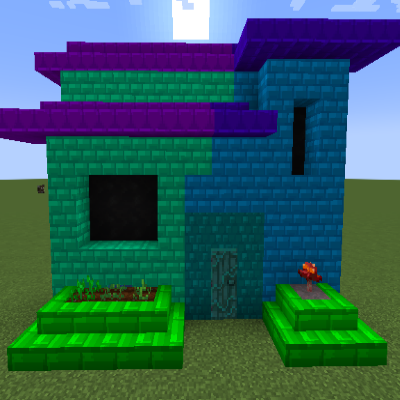
CurseForge · Minecraft mod
Mow's Crystal Blocks
Colored Blocks Mod, Makes Building Fun and Enjoyable, even for Non-Builder Type Players.
Choose a version Pick your version below, then grab the matching file.
Quick answer
Which Mow's Crystal Blocks release should I use?
beta file Crystal Blocks 1.19 - 0.3.11
Game version 1.19.2
Loader Forge
Mow's Crystal Blocks Crystal Blocks 1.19 - 0.3.11 targets 1.19.2 with Forge. The project page does not say whether this file belongs on the client, dedicated server, or both. No extra mods listed for this file.
Where it goes
Is Mow's Crystal Blocks required on the client, server, or both?
The project page does not say whether this file belongs on the client, dedicated server, or both.
Client Source doesn’t say
Dedicated server Source doesn’t say
Loader for this release Forge
Required install it here Optional supported, not mandatory Not supported do not install here Source doesn’t say do not assume
The source does not explicitly classify this release as client-only or server-only.
What else does Mow's Crystal Blocks Crystal Blocks 1.19 - 0.3.11 need?
Crystal Blocks 1.19 - 0.3.11. Change the file and its required mods may change too.
This file does not list any required mods. Do not add a library just because a different file uses it.
This file does not list any required or optional mods.
Before you install it
Add Mow's Crystal Blocks without breaking your instance.
Built for Mow's Crystal Blocks Crystal Blocks 1.19 - 0.3.11. Pick another file and the loader, install side or required mods may change.
- 01
Stick to this file
Use Crystal Blocks 1.19 - 0.3.11. It targets 1.19.2 with Forge; another release may have different loader, side or dependency requirements.
- 02
Bring the mods it needs
This file does not list any required mods. Do not add a library just because a different file uses it.
- 03
Put it on the correct side
The project page does not say whether this file belongs on the client, dedicated server, or both.
- 04
Pick the file you checked
Use the “Get this file” button beside Crystal Blocks 1.19 - 0.3.11. It opens that exact file at the source.
About this project
What does Mow's Crystal Blocks add?
Crystal Blocks for Minecraft 1.19+ Now Requires MowLib
Link Here
Crystal Blocks
64 Colors and A few Block Options (More to come later)
Make Crystal Stone using Amethyst surrounded by 8 of any 'Stone'
Make the Color Applicator by surrounding a piece of paper with 8 Crystal Stone
The Applicator can hold up to 8 colors at a time.
Ways to apply color to the applicator:
Apply colors to the Applicator by dropping red green or blue dye on the ground (up to 3 of each) and right clicking.
Crouch + Right Click the applicator from either hand onto a Crystal Blocks Block, and it'll remember that color.
Cycle between the (Up to 8) stored colors in the Applicator, crouch + right click with either hand in the air, or on any non crystal blocks block.
How to color Crystal Blocks:
Place the blocks, then with the Applicator in either hand, while the other hand is empty, right click on the blocks to apply the color.
With the Applicator in your offhand, while placing blocks with your main hand, the blocks placed will have the color automatically applied.
Similar to #1, you can re-color blocks by right clicking the applicator on it.
Project description from CurseForge.
Pick your setup
Mow's Crystal Blocks by Minecraft version and loader
Choose the version and loader you play, then open the matching release.
Minecraft version
1.19
1 loader buildMinecraft version
1.17.1
1 loader buildMinecraft version
1.17
1 loader buildCheck the dependencies, then try the file in a copied instance before changing a world you care about.
Recent files
Mow's Crystal Blocks versions and loaders
Crystal Blocks 1.19 - 0.3.11
crystalblocks-0.3.11.jar
13 Oct 2022
Client Source doesn’t say Server Source doesn’t say Dependencies No extras listed Listed on Release listing
Check the 1.19.2 · Forge setup 1.19.2Forge beta
Crystal Blocks 1.19 - 0.2.10
crystalblocks-0.2.10.jar
24 Sept 2022
Client Source doesn’t say Server Source doesn’t say Dependencies No extras listed Listed on Release listing
Check the 1.19.2 · Forge setup 1.19.2Forge alpha
Crystal Blocks 1.19 - 0.2.9
crystalblocks-0.2.9.jar
18 Sept 2022
Client Source doesn’t say Server Source doesn’t say Dependencies No extras listed Listed on Release listing
Check the 1.19.2 · Forge setup 1.19.2Forge alpha
Crystal Blocks 1.19 - 0.2.7
crystalblocks-0.2.7.jar
17 Aug 2022
Client Source doesn’t say Server Source doesn’t say Dependencies No extras listed Listed on Release listing
Check the 1.19.2 · Forge setup 1.19.2Forge beta
Crystal Blocks 1.19 - 0.1.7
crystalblocks-0.1.7.jar
18 Jul 2022
Client Source doesn’t say Server Source doesn’t say Dependencies No extras listed Listed on Release listing
Check the 1.19 · Forge setup Forge1.19 beta
Crystal Blocks 1.19 - 0.1.6
crystalblocks-0.1.6.jar
9 Jul 2022
Client Source doesn’t say Server Source doesn’t say Dependencies No extras listed Listed on Release listing
Check the 1.19 · Forge setup Forge1.19 alpha
Crystal Blocks 1.19 - 0.1.5
crystalblocks-0.1.5.jar
1 Jul 2022
Client Source doesn’t say Server Source doesn’t say Dependencies No extras listed Listed on Release listing
Check the 1.19 · Forge setup Forge1.19 beta
Crystal Blocks 1.19 - 0.1.4
crystalblocks-0.1.4.jar
22 Jun 2022
Client Source doesn’t say Server Source doesn’t say Dependencies No extras listed Listed on Release listing
Check the 1.19 · Forge setup Forge1.19 alpha
Crystal Blocks 1.19 - 0.1.3
crystalblocks-0.1.3.jar
22 Jun 2022
Client Source doesn’t say Server Source doesn’t say Dependencies No extras listed Listed on Release listing
Check the 1.19 · Forge setup Forge1.19 alpha
Crystal Blocks 1.19 - 0.1.2
crystalblocks-0.1.2.jar
22 Jun 2022
Client Source doesn’t say Server Source doesn’t say Dependencies No extras listed Listed on Release listing
Check the 1.19 · Forge setup Forge1.19 alpha
Crystal Blocks 0.1.1
crystalblocks-0.1.1.jar
15 Jun 2022
Client Source doesn’t say Server Source doesn’t say Dependencies No extras listed Listed on Release listing
Check the 1.19 · Forge setup Forge1.19 beta
Crystal Blocks 0.0.1
crystalblocks-0.0.1.jar
9 Jun 2022
Client Source doesn’t say Server Source doesn’t say Dependencies No extras listed Listed on Release listing
Check the 1.19 · Forge setup Forge1.19 alpha
Looking for an older file? The official CurseForge project page is in Resources.
 mod
CurseForge + Modrinth · Minecraft
ColoredWater
Colored water to decorate colorfully. And cauldrons!
 mod
CurseForge · Minecraft
UsefulDecor: Interactive Craft
Adds functional decorative blocks including storage chests, oak windows, and lockable doors that enhance base security.
 mod
CurseForge · Minecraft
Aki's Radio - Classics
Classics genre pack for Aki's Radio - Rock, Classical, Vintage Jazz, Sea Shanties