Minecraft version
Back to mods 
CurseForge · Minecraft mod
Satchels
Modular player inventory upgrades
Choose a version Pick your version below, then grab the matching file.
Quick answer
Which Satchels release should I use?
Latest stable file Satchels 1.0.7 for Minecraft 1.7.10
Game version 1.7.10
Loader Forge
Satchels 1.0.7 for Minecraft 1.7.10 targets 1.7.10 with Forge. The project page does not say whether this file belongs on the client, dedicated server, or both. No extra mods listed for this file.
Where it goes
Is Satchels required on the client, server, or both?
The project page does not say whether this file belongs on the client, dedicated server, or both.
Client Source doesn’t say
Dedicated server Source doesn’t say
Loader for this release Forge
Required install it here Optional supported, not mandatory Not supported do not install here Source doesn’t say do not assume
The source does not explicitly classify this release as client-only or server-only.
What else does Satchels 1.0.7 for Minecraft 1.7.10 need?
Satchels 1.0.7 for Minecraft 1.7.10. Change the file and its required mods may change too.
This file does not list any required mods. Do not add a library just because a different file uses it.
This file does not list any required or optional mods.
Before you install it
Add Satchels without breaking your instance.
Built for Satchels 1.0.7 for Minecraft 1.7.10. Pick another file and the loader, install side or required mods may change.
- 01
Stick to this file
Use Satchels 1.0.7 for Minecraft 1.7.10. It targets 1.7.10 with Forge; another release may have different loader, side or dependency requirements.
- 02
Bring the mods it needs
This file does not list any required mods. Do not add a library just because a different file uses it.
- 03
Put it on the correct side
The project page does not say whether this file belongs on the client, dedicated server, or both.
- 04
Pick the file you checked
Use the “Get this file” button beside Satchels 1.0.7 for Minecraft 1.7.10. It opens that exact file at the source.
About this project
What does Satchels add?
Satchels
This mod adds pouches and satchels, which act as wearable inventory upgrades. Unlike your typical backpack mod, it's seamlessly integrated into the inventory screen instead of being on a separate screen.
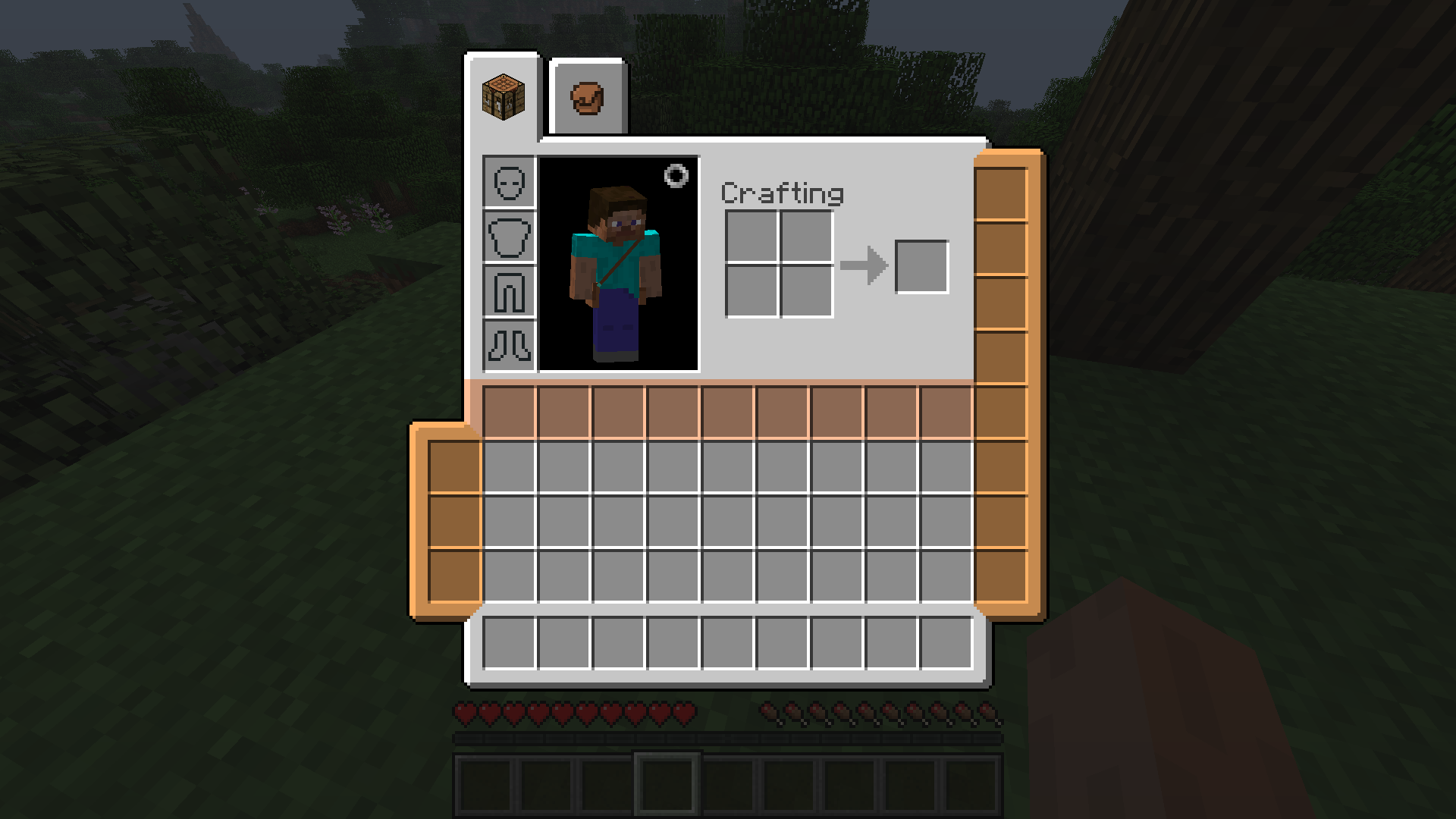
Pictured: an unupgraded pouch (the colored column on the left), a fully upgraded pouch (the colored column on the right) and a satchel (the colored row)
Pouches
A pouch adds 3 slots to your inventory, and can be worn on the left or the right side. You only need some leather and some string to craft it.
Its capacity can be increased with pouch expansions, which can only be found inside dungeon chests. Each expansion will add an additional slot to the pouch's capacity, with the maximum being 8 slots. To apply a pouch upgrade, right click a pouch to open its upgrade inventory where you can insert it.
You can wear up to 2 pouches at the same time.
Satchel
A satchel adds an entire row (9 slots) of storage to your inventory. But its utility is matched by its cost: crafting it requires a full diamond block and some slime by default. You can only wear 1 satchel at a time.
Models
The items you wear will show up as 3D models on the player. This can be disabled in the config.

Dependencies
This mod requires CodeChickenLib (installed by CodeChickenCore).
Suggested mods
If you want more inventory expansion options in your earlygame, check out D-Mod's bundle backport!
Incompatibilities
- NotEnoughItems: when a potion effect is active, the inventory tabs will show up at the wrong position due to a buggy interaction between NEI and TConstruct's tab API which Satchels uses. Enable
fixPotionRenderOffsetin Hodgepodge to fix this. - Aether Legacy: accessories button doesn't show up in inventory. This is a bug on their side. Until it's fixed, use the keybind to open the equipment GUI.
- When DropOff's button is enabled, the slots in the inventory are at the wrong position. As a workaround, set
B:"Show inventory button"=falsein its config (the hotkey can still be used). - Various coremods (for example, Factorization) will crash during startup due to an incompatibility with Mixin. This is fixed by Mixingasm.
Alternatives
Project description from CurseForge.
Pick your setup
Satchels by Minecraft version and loader
Choose the version and loader you play, then open the matching release.
Check the dependencies, then try the file in a copied instance before changing a world you care about.
Recent files
Satchels versions and loaders
Satchels 1.0.7 for Minecraft 1.7.10
Satchels-1.7.10-1.0.7.jar
7 May 2022
Client Source doesn’t say Server Source doesn’t say Dependencies No extras listed Listed on Release listing
Check the 1.7.10 · Forge setup Forge1.7.10 release
Satchels 1.0.6 for Minecraft 1.7.10
Satchels-1.7.10-1.0.6.jar
21 Apr 2022
Client Source doesn’t say Server Source doesn’t say Dependencies No extras listed Listed on Release listing
Check the 1.7.10 · Forge setup Forge1.7.10 release
Satchels 1.0.5 for Minecraft 1.7.10
Satchels-1.7.10-1.0.5.jar
12 Mar 2022
Client Source doesn’t say Server Source doesn’t say Dependencies No extras listed Listed on Release listing
Check the 1.7.10 · Forge setup Forge1.7.10 release
Satchels 1.0.4 for Minecraft 1.7.10
Satchels-1.7.10-1.0.4.jar
8 Oct 2021
Client Source doesn’t say Server Source doesn’t say Dependencies No extras listed Listed on Release listing
Check the 1.7.10 · Forge setup Forge1.7.10 release
Satchels 1.0.3.1 for Minecraft 1.7.10
Satchels-1.7.10-1.0.3.1.jar
12 Sept 2021
Client Source doesn’t say Server Source doesn’t say Dependencies No extras listed Listed on Release listing
Check the 1.7.10 · Forge setup Forge1.7.10 release
Satchels 1.0.3 for Minecraft 1.7.10
Satchels-1.7.10-1.0.3.jar
11 Sept 2021
Client Source doesn’t say Server Source doesn’t say Dependencies No extras listed Listed on Release listing
Check the 1.7.10 · Forge setup Forge1.7.10 release
Satchels 1.0.2 for Minecraft 1.7.10
Satchels-1.7.10-1.0.2.jar
4 Sept 2021
Client Source doesn’t say Server Source doesn’t say Dependencies No extras listed Listed on Release listing
Check the 1.7.10 · Forge setup Forge1.7.10 release
Satchels 1.0.1 for Minecraft 1.7.10
Satchels-1.7.10-1.0.1.jar
12 Aug 2021
Client Source doesn’t say Server Source doesn’t say Dependencies No extras listed Listed on Release listing
Check the 1.7.10 · Forge setup Forge1.7.10 release
Satchels-1.7.10-1.0.jar
9 Aug 2021
Client Source doesn’t say Server Source doesn’t say Dependencies 1 required · 1 unchecked Listed on Release listing
Check the 1.7.10 · Forge setup Forge1.7.10 release
Looking for an older file? The official CurseForge project page is in Resources.
 mod
mod CurseForge · Minecraft
Gemstone Protection
Protect your lands using customizable gemstone wards with an intuitive GUI to manage players, flags, and visual borders.
 mod
mod Modrinth · Minecraft
Functional Storage Legacy
Backport of Functional Storage features for Minecraft 1.12.2.
 mod
mod Modrinth · Minecraft
Logistics: Automation
A modern logistics and pipe mod with authentic in-pipe item motion, mod interoperability, and request/autocrafting systems.