Minecraft version
Back to mods 
CurseForge · Minecraft mod
OAuth
Adds the ability to login and authenticate to Microsoft, Mojang, or Legacy accounts!
Choose a version Pick your version below, then grab the matching file.
Quick answer
Which OAuth release matches 1.18.1 Forge?
Best match for your filters oauth-1.1.15-1.18.2.jar
Game version 1.18.1, 1.18.2, 1.18
Loader Forge
oauth-1.1.15-1.18.2.jar targets 1.18.1, 1.18.2, 1.18 with Forge. The project page does not say whether it belongs on the client. The project page does not say whether it belongs on the dedicated server. No extra mods listed for this file.
Where it goes
Is OAuth required on the client, server, or both?
The project page does not say whether it belongs on the client. The project page does not say whether it belongs on the dedicated server.
Client Source doesn’t say
Dedicated server Source doesn’t say
Loader for this release Forge
Required install it here Optional supported, not mandatory Not supported do not install here Source doesn’t say do not assume
The source does not explicitly classify this release as client-only or server-only.
What else does oauth-1.1.15-1.18.2.jar need?
oauth-1.1.15-1.18.2.jar on 1.18.1 Forge. Every mod below is checked against that same setup.
This file does not list any required mods. Do not add a library just because a different file uses it.
This file does not list any required or optional mods.
Before you install it
Add OAuth without breaking your instance.
Built for oauth-1.1.15-1.18.2.jar on 1.18.1 Forge. Pick another file and the loader, install side or required mods may change.
- 01
Stick to this file
Use oauth-1.1.15-1.18.2.jar. It targets 1.18.1, 1.18.2, 1.18 with Forge; another release may have different loader, side or dependency requirements.
- 02
Bring the mods it needs
This file does not list any required mods. Do not add a library just because a different file uses it.
- 03
Put it on the correct side
The project page does not say whether it belongs on the client. The project page does not say whether it belongs on the dedicated server.
- 04
Pick the file you checked
Use the “Get this file” button beside oauth-1.1.15-1.18.2.jar. It opens that exact file at the source.
About this project
What does OAuth add?
This mod adds a way to login within your game in the multiplayer screen.
After, it will ask the login type. If you select Microsoft it'll open in
your default browser so you can securely login. Otherwise click Mojang
login to login with your username/email just like you would in the
normal Minecraft launcher. If you leave the password field blank you can
login offline with any username you want! This only works on offline
servers or in singleplayer however. Features:Supports Legacy, Mojang, and Microsoft account logins.Adds a new button to the multiplayer screen to login and fix invalid sessions.Allows you to login to different accounts without closing your game.Ability to set your username for playing offline by leaving the password field blank.Mod only needs to be installed on the client to work.
Features
- Supports Legacy, Mojang, and Microsoft account logins.
- Adds a new button to the multiplayer screen to login and fix invalid sessions.
- Allows you to login to different accounts without closing your game.
- Ability to set your username for playing offline by leaving the password field blank.
- Mod only needs to be installed on the client to work.
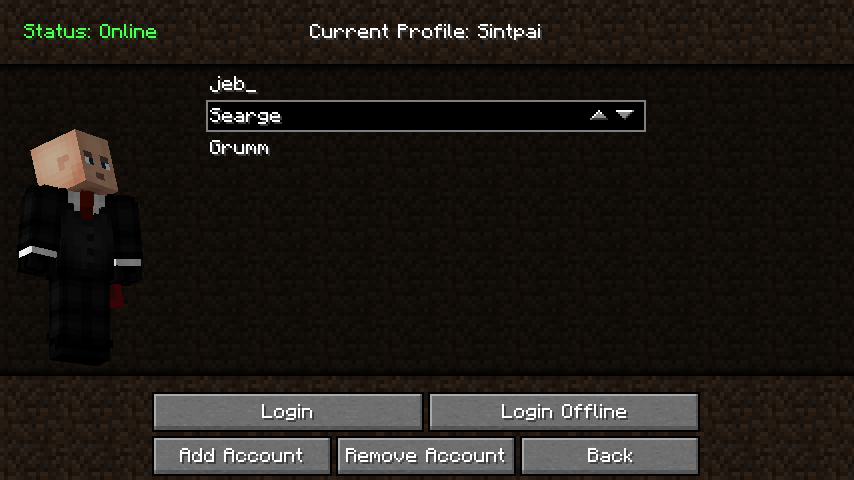
Project description from CurseForge.
Pick your setup
OAuth by Minecraft version and loader
Choose the version and loader you play, then open the matching release.
Minecraft version
1.19.3
1 loader buildMinecraft version
1.19.2
1 loader buildMinecraft version
1.19.1
1 loader buildMinecraft version
1.19
1 loader buildMinecraft version
1.18.2
1 loader buildMinecraft version
1.18.1
1 loader buildMinecraft version
1.18
1 loader buildMinecraft version
1.17.1
2 loader buildsMinecraft version
1.17-Snapshot
1 loader buildMinecraft version
1.17
1 loader buildMinecraft version
1.16.5
2 loader buildsShowing the newest 12 of 23 game versions. Older files are in the list below.
Check the dependencies, then try the file in a copied instance before changing a world you care about.
Recent files
OAuth versions and loaders
oauth-1.1.15-1.18.2.jar
3 May 2023
Client Source doesn’t say Server Source doesn’t say Dependencies No extras listed Listed on Release listing
Check the 1.18.1 · Forge setup 1.18.11.18.2Forge1.18 release
oauth-1.1.14-1.18.2.jar
10 Nov 2022
Client Source doesn’t say Server Source doesn’t say Dependencies No extras listed Listed on Release listing
Check the 1.18.1 · Forge setup 1.18.11.18.2Forge1.18 release
oauth-1.1.12-1.18.1.jar
11 Feb 2022
Client Source doesn’t say Server Source doesn’t say Dependencies No extras listed Listed on Release listing
Check the 1.18.1 · Forge setup 1.18.1Forge1.18 release
oauth-1.1.11-1.18.1.jar
28 Jan 2022
Client Source doesn’t say Server Source doesn’t say Dependencies No extras listed Listed on Release listing
Check the 1.18.1 · Forge setup 1.18.1Forge1.18 release
oauth-1.1.10-1.18.1.jar
26 Jan 2022
Client Source doesn’t say Server Source doesn’t say Dependencies No extras listed Listed on Release listing
Check the 1.18.1 · Forge setup 1.18.1Forge1.18 release
oauth-1.1.9-1.18.1.jar
22 Jan 2022
Client Source doesn’t say Server Source doesn’t say Dependencies No extras listed Listed on Release listing
Check the 1.18.1 · Forge setup 1.18.1Forge1.18 release
oauth-1.1.8-1.18.1.jar
4 Jan 2022
Client Source doesn’t say Server Source doesn’t say Dependencies No extras listed Listed on Release listing
Check the 1.18.1 · Forge setup 1.18.1Forge release
oauth-1.1.7-1.18.1.jar
1 Jan 2022
Client Source doesn’t say Server Source doesn’t say Dependencies No extras listed Listed on Release listing
Check the 1.18.1 · Forge setup 1.18.1Forge1.18 release
oauth-1.1.5-1.18.1.jar
14 Dec 2021
Client Source doesn’t say Server Source doesn’t say Dependencies No extras listed Listed on Release listing
Check the 1.18.1 · Forge setup 1.18.1Forge1.18 release
oauth-1.1.5-1.18.jar
9 Dec 2021
Client Source doesn’t say Server Source doesn’t say Dependencies No extras listed Listed on Release listing
Check the 1.18.1 · Forge setup 1.18.1Forge1.18 release
Looking for an older file? The official CurseForge project page is in Resources.
 mod
mod CurseForge · Minecraft
Auto Fast XP
Automatically throws XP bottles rapidly when you hold right-click. Perfect for quickly gaining XP!
 mod
mod CurseForge · Minecraft
Toggle Sprint
Allows you to keep sprinting when sprint is toggled.
 mod
mod CurseForge + Modrinth · Minecraft
Safra
Don’t mess with the server Play Minecraft with your friends in 2 clicks