Cloth Config API (UNUSED) Optional for Fabulous Clouds [FABRIC] Fabulous Clouds v0.3.0
optionalMatching file found Matched file: [Fabric 1.18-1.18.2] v6.2.57
CurseForge · Minecraft mod
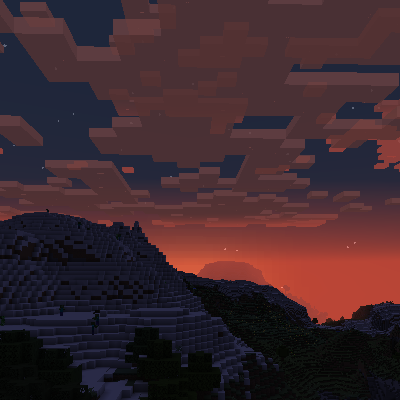
This mod makes the clouds look much better and adds configurable cloud layers.
Quick answer
Fabulous Clouds [FABRIC] Fabulous Clouds v0.3.0 targets 1.18.1, 1.18 with Fabric. The project page does not say whether this file belongs on the client, dedicated server, or both. No extra mods listed for this file.
Where it goes
The project page does not say whether this file belongs on the client, dedicated server, or both.
The source does not explicitly classify this release as client-only or server-only.
Fabulous Clouds v0.3.0. Change the file and its required mods may change too.
This file does not list any required mods. Do not add a library just because a different file uses it.
We only count dependency files that match this setup. A file for another loader does not fill the gap.
Before you install it
Built for Fabulous Clouds [FABRIC] Fabulous Clouds v0.3.0. Pick another file and the loader, install side or required mods may change.
Use Fabulous Clouds v0.3.0. It targets 1.18.1, 1.18 with Fabric; another release may have different loader, side or dependency requirements.
This file does not list any required mods. Do not add a library just because a different file uses it.
The project page does not say whether this file belongs on the client, dedicated server, or both.
Use the “Get this file” button beside Fabulous Clouds v0.3.0. It opens that exact file at the source.
About this project
Fabulous Clouds is my first mod. The concept for Fabulous Clouds came when I got bedrock edition and realised that the clouds tinted during sunrise and sunset. I wanted to add this ingame, but I also wanted to do more with clouds than just this so I decided to add cloud layers too, and give people the ability to add their own cloud layers. Fabulous Clouds is entirely client side so you could use it on a server without everyone having to download the mod. Fabulous Clouds is compatible with Sodium and works on the 1.18 experimental snapshots.

Fabulous Clouds has 3 major features: vibrant clouds, customizable cloud layers, and procedurally generated cloud covers. Vibrant clouds make the clouds change color in sunrise/sunset similar to bedrock edition. Procedural cloud covers change how the clouds are shaped over time based on three presets: Clear, Normal, and Cloudy. Cloud layers be changed in the .minecraft/config/fabulous-clouds config file:
{
	"vibrant_clouds": true,
	"vibrance_intensity": 1.0,
	"enable_default_cloud_layer": true,
	"cloud_layers": [
		{
			"offset": 64.0,
			"scale": 1.25,
			"speed": -1.0
		}
	]
	"noise_clouds": true,
	"debug_noise_clouds": false,
	"offset_cloud_rendering": false
}
This example enables the default vanilla cloud layer and adds a cloud layer 64 blocks above normal cloud height. The negative speed means it will go in the opposite direction to the default cloud layer. Cloud layers all have an offset, scale and speed:
offset is how many blocks above or below cloud height the layer is positioned. (default 0.0)
scale is how big the cloud layer is. (default 1.0)
speed is how fast the cloud layer moves. (default 1.0)
You can find more information about the config in the wiki.
Project description from CurseForge.
Pick your setup
Choose the version and loader you play, then open the matching release.
Check the dependencies, then try the file in a copied instance before changing a world you care about.
Recent files
fabulousclouds-0.3.0.jar
20 Feb 2022
fabulousclouds-0.2.3.jar
29 Aug 2021
fabulousclouds-0.2.2.jar
20 Aug 2021
fabulousclouds-0.2.1.jar
17 Aug 2021
fabulousclouds-0.2.0.jar
12 Aug 2021
Looking for an older file? The official CurseForge project page is in Resources.
 mod
A mod that modifies various vanilla HUD elements, such as the bossbar, action bar, sidebar / scoreboard, hotbar, title / subtitle, and more. By Polyfrost, best with OneClient.
 mod
Terralith addon: swaps Terralith's vanilla-block trees for 20+ new woods (logs, planks, doors, boats, signs, leaves with fixed colours) without touching terrain.
 mod
Choose your origin and shape how you play with unique abilities, strengths, and weaknesses.