Minecraft version
Back to mods 
CurseForge · Minecraft mod
Spawn Normalization
A mod about changing spawn y-level selection algorithms
Choose a version Pick your version below, then grab the matching file.
Quick answer
Which Spawn Normalization release should I use?
Latest stable file SpawnNormalization-1.16.5-1.0.1.jar
Game version 1.16.5
Loader Forge
Spawn Normalization SpawnNormalization-1.16.5-1.0.1.jar targets 1.16.5 with Forge. The project page does not say whether this file belongs on the client, dedicated server, or both. No extra mods listed for this file.
Where it goes
Is Spawn Normalization required on the client, server, or both?
The project page does not say whether this file belongs on the client, dedicated server, or both.
Client Source doesn’t say
Dedicated server Source doesn’t say
Loader for this release Forge
Required install it here Optional supported, not mandatory Not supported do not install here Source doesn’t say do not assume
The source does not explicitly classify this release as client-only or server-only.
What else does Spawn Normalization SpawnNormalization-1.16.5-1.0.1.jar need?
SpawnNormalization-1.16.5-1.0.1.jar. Change the file and its required mods may change too.
This file does not list any required mods. Do not add a library just because a different file uses it.
This file does not list any required or optional mods.
Before you install it
Add Spawn Normalization without breaking your instance.
Built for Spawn Normalization SpawnNormalization-1.16.5-1.0.1.jar. Pick another file and the loader, install side or required mods may change.
- 01
Stick to this file
Use SpawnNormalization-1.16.5-1.0.1.jar. It targets 1.16.5 with Forge; another release may have different loader, side or dependency requirements.
- 02
Bring the mods it needs
This file does not list any required mods. Do not add a library just because a different file uses it.
- 03
Put it on the correct side
The project page does not say whether this file belongs on the client, dedicated server, or both.
- 04
Pick the file you checked
Use the “Get this file” button beside SpawnNormalization-1.16.5-1.0.1.jar. It opens that exact file at the source.
About this project
What does Spawn Normalization add?
In Minecraft, when mobs are going to be spawned into the world, they must first selected a position to spawn in. This means selecting a random x/y position within a chunk, and then picking a y-level within that column.
By default, the y-level is selected uniformly from all possible y-levels, from zero to the current highest block in that column. This is problematic for a couple reasons
- Most y-levels within that column will not be suitable spawn space
- Spawning is slow as a result of all of these failed attempts
- Mob farms are only most efficient when their top block is at or close to y=0.
For example, if you had a skyblock world, and you were living at y=65, mobs would only have a 1/66 chance to actually successfully select your platform to spawn on. This means you have to wait longer for mobs to generate, and in turn makes the experience less exciting.
However, using math, we can adjust the curves at which certain y-levels are selected. This mod provides the ability to select a specific spawn algorithm from a list of defaults, and apply that instead of the vanilla spawn algorithm. The algorithms provided by this mod are described in this graph:
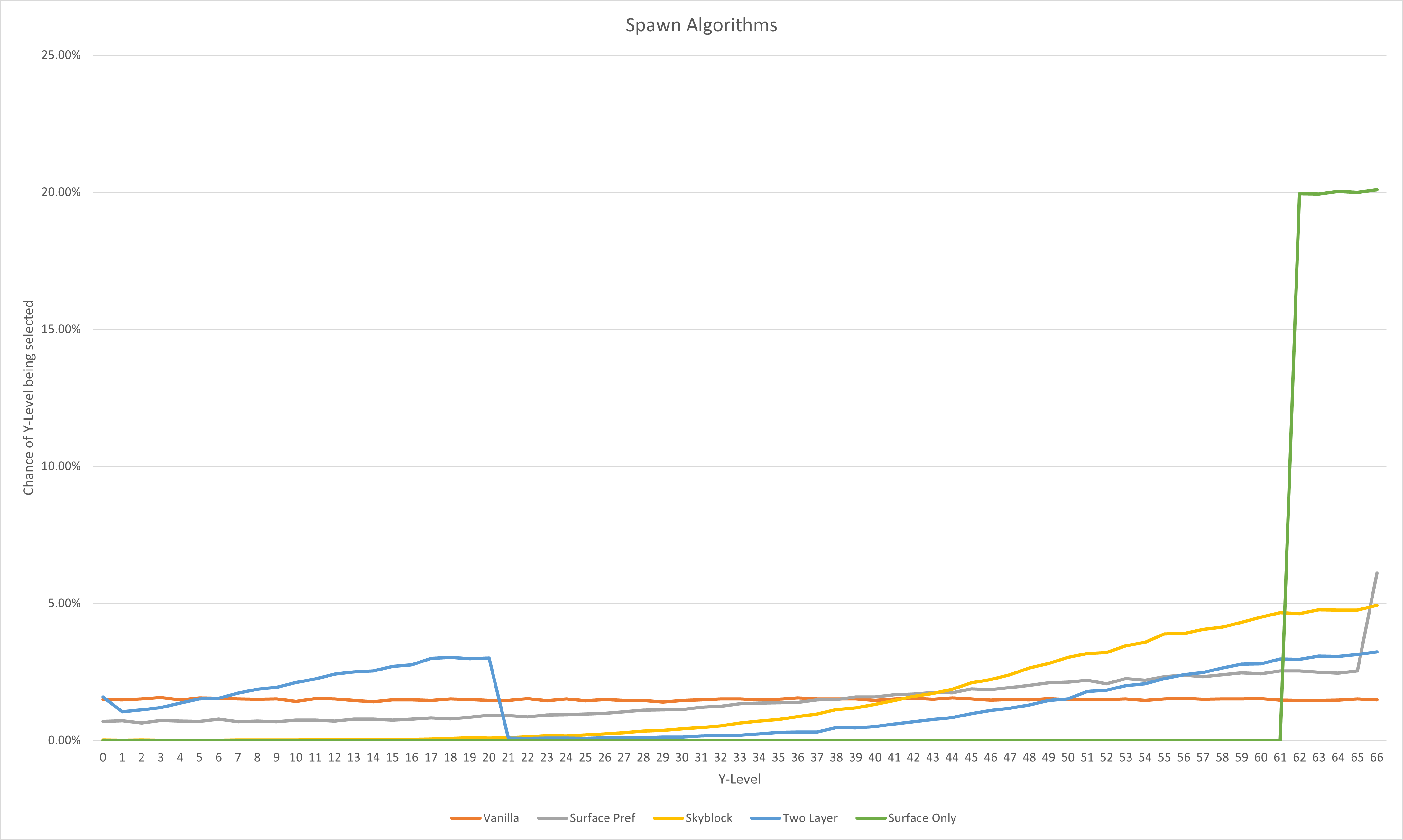
These estimates are done with a height level of 65, but their curves can be understood as how likely a certain y-level (as a function of the height) is to be selected.
- Vanilla has equal probability for all height levels.
- Surface Pref has a much higher probability to select the surface, with a higher than normal probability to select areas near the surface, dropping to lower than vanilla probabilities after about 55% max height level.
- Skyblock has high preferences towards levels that are at or above 60% max height level, and near-zero percent chance to select values below 30% max height.
- Two Layer has a high probability to select levels near the surface, but also a high probability to select a secondary zone at about 33% max height (allowing for surface spawns, and deep cave spawns)
- Surface Only relegates all spawns to the surface level or blocks very nearby (to allow for water mobs to spawn).
Finally, these curves can be inverted, allowing you to receive the opposite effects (relative to height level) - meaning that the y level would become (max height - y) instead of (y). This would mean that the inversion of Surface Only would only select levels near bedrock, and the inverse of Skyblock would have a much higher probability to select levels near bedrock.
Project description from CurseForge.
Pick your setup
Spawn Normalization by Minecraft version and loader
Choose the version and loader you play, then open the matching release.
Check the dependencies, then try the file in a copied instance before changing a world you care about.
Recent files
Spawn Normalization versions and loaders
SpawnNormalization-1.16.5-1.0.1.jar
19 Nov 2021
Client Source doesn’t say Server Source doesn’t say Dependencies No extras listed Listed on Release listing
Check the 1.16.5 · Forge setup 1.16.5Forge release
SpawnNormalization-1.16.5-1.0.0.jar
18 Aug 2021
Client Source doesn’t say Server Source doesn’t say Dependencies No extras listed Listed on Release listing
Check the 1.16.5 · Forge setup 1.16.5Forge release
Looking for an older file? The official CurseForge project page is in Resources.
 mod
mod CurseForge · Minecraft
Economies
Create markets and trade items across separate Minecraft worlds
 mod
mod CurseForge + Modrinth · Minecraft
Cobblemon - Genesis Forms
An all-in-one server-side gimmick and forms handler for Cobblemon 1.6.1 and above!
 mod
mod CurseForge · Minecraft
DMZ Ragnarok
An all in one Utility mod for Dragon Mine Z Previously known as *Shurui's DMZ Utilities*, it also adds all of the exclusive content to the DMZ Ragnarok Server.