Cloth Config API (Fabric/Forge/NeoForge) Needed by Reasonable Sorting 合理排序 reasonable-sorting-forge-2.1.0-mc1.17.1.jar
requiredMatching file found Matched file: [Forge 1.17(.1)] v5.3.63
CurseForge · Minecraft mod
Adjusts the sorting of items in creative inventory
Quick answer
Reasonable Sorting 合理排序 reasonable-sorting-forge-2.1.0-mc1.17.1.jar targets 1.17.1, 1.17 with Forge. The project page does not say whether this file belongs on the client, dedicated server, or both. All 1 required mods have matching files.
Where it goes
The project page does not say whether this file belongs on the client, dedicated server, or both.
The source does not explicitly classify this release as client-only or server-only.
reasonable-sorting-forge-2.1.0-mc1.17.1.jar on 1.17.1 Forge. Every mod below is checked against that same setup.
Install Cloth Config API (Fabric/Forge/NeoForge) first. We found matching files for this game-version and loader setup.
We only count dependency files that match this setup. A file for another loader does not fill the gap.
Before you install it
Built for Reasonable Sorting 合理排序 reasonable-sorting-forge-2.1.0-mc1.17.1.jar on 1.17.1 Forge. Pick another file and the loader, install side or required mods may change.
Use reasonable-sorting-forge-2.1.0-mc1.17.1.jar. It targets 1.17.1, 1.17 with Forge; another release may have different loader, side or dependency requirements.
Install Cloth Config API (Fabric/Forge/NeoForge) first. We found matching files for this game-version and loader setup.
The project page does not say whether this file belongs on the client, dedicated server, or both.
Use the “Get this file” button beside reasonable-sorting-forge-2.1.0-mc1.17.1.jar. It opens that exact file at the source.
About this project
中文用户可以阅读中文版的模组介绍。
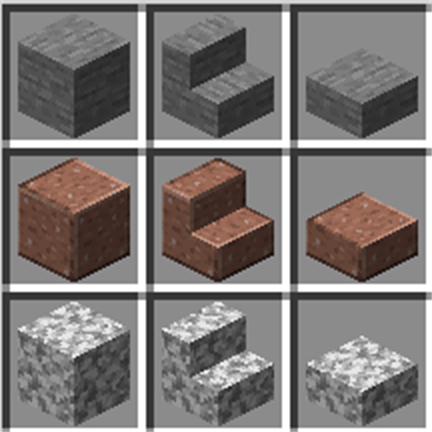
Did you find that, in Creative Mode, it's quite a hard work to find in the creative inventory anything you want, as the sorting of them is so messy? Install this mod, and your creative inventory will be beautifully sorted! You will discover that all stairs and slabs follow their base blocks, and fence gates are transferred to decoration blocks and follow their relevant fence. Colorful blocks are sorted in the gradient color order.
You may config your custom sorting rules and item group transfer rules.
The mod depends on Cloth Config mod, without which this mod cannot work. Besides, for Fabric and Quilt version, it's recommended to install Mod Menu to configure.
The Fabric version of this mod depends on Fabric API. The Quilt version of this mod (for 1.18.2 and above) depends on Quilt Standard Libraries.
Since version 2.0.0, this mod does not work with Extended Block Shapes mod of version 1.5.2 or lower (yet still no conflict). Please wait for newer versions of Extended Block Shapes mod.
The Quilt version of this mod is under construction.
You can configure this mod through Mod Menu.
Enable sorting
ON by default. If OFF, all the sorting works as vanilla, and following configurations will not work.
Sorting influence range
Defines in what cases the mod has influence. If you don't know the meaning, just remain the default value. Supported values:
Sorting calculation type
Defines when to calculate the sorting. If you don't know the meaning, just remain the default value. Supported values:
Debug mode
If enabled, more detailed information of the mod will be logged. You may enable it when you're researching this mod or find any problems.
Enable default item sorting rules
ON by default. This mod has some installed item sorting rules. For instance, Ice, Packed Ice and Blue Ice are sorted together.
Custom sorting rule
Empty by default. You can have custom sorting rules by typing item id. In the mod config screen, click the "+" on the left, and you will see an unapparent text box on the below. Type one rule in it. The syntax of a rule is: multiple item ids are separated with a space. For example, dirt white_wool diamond_block means that Dirt, White Wool and Diamond Block become together, in which White Wools and Diamond Block follow Dirt.
Variants following base blocks
In Minecraft, many blocks have their variants. For example, of Oak Planks, the "stairs" variant is "Oak Stairs" and "slab" variant is "Oak Slab", which also means, Oak Planks is the base block or Oak Stairs, Oak Slab etc. You can specify some variants which will follow their base blocks.
The default syntax is, multiple block variant names are separated with a space. Available variant names are displayed in the mod config screen. By default stairs slab, which means, all stairs and slabs follow their base blocks.
Take notice that changing item sorting does not affect which item group they belong to. To change item groups you need also to config Variant transfer rules.
Fence gate follows fence
ON by default. Makes all fence gate blocks follow their corresponding fence blocks. Requires Fence gates in decorations otherwise their still appear in "Redstone" item group and does not take effect.
Fancy color sorting
Sort colored blocks and items (such as wool, glazed terracotta, bed, banner) in a gradient order, like what is looks in Minecraft 1.19.3.
Avoid affecting block registries
OFF by default. When ON, only the item registry, including block items (such as blocks in the Creative inventory) are affected by options above, and block registries (such as blocks in the Debug Mode) are not affected. This can to some extent avoid block mismatch if you are joining a server. This option has no effect if you set 'Sorting Influence Range' to 'Inventory only'.
Note: If "sorting influence range" is set to "inventory only", this config will take no effect.
Enable item group transfer
ON by default. If OFF, all items appear in the item groups they belong to in vanilla, and following configs will not work.
Buttons in decorations
Fence gates in decorations
Swords in tools
Doors in decorations
The meaning of the four entries above is obvious. By default, "Fence gates in decorations" is ON, and others are OFF.
Custom item group transfer rules
Empty by default. Similar to custom sorting rules, one rule every line, and add a new rule by clicking "+". The syntax of each rule is: item id, space, the item group to transfer to. For example, redstone_block building_blocks will transfer Redstone Block to "Building Blocks" item group.
Custom variant transfer rules
Empty by default. Similar to above. Syntax: variant name, space, and the item group to transfer to. For example,cut transportation transfers all cut blocks to "Transportations".
Custom regex transfer rules
Empty by default. Similar to above. Syntax: regex, space, and the item group to transfer to. For example, .+?button transportation transfers to all items which identifier ends with button to "Transportations".
Custom tag transfer rules
Empty by default. Similar to above. Syntax: tag id, space, and the item group to transfer to. For example, flowers transportation will transfer items in #minecraft:flowers to "Transportation" item group.
The essence of item sorting is "specify a leading item and multiple following items; the following items will appear right after the leading item". To make an example, for rule dirt white_wool diamond_block, the dirt is a leading item, and white wool and diamond block will appear right after the dirt, instead of the place they should have been.
An item may not follow multiple items, otherwise it only follows one of them. For example, if both the two rules dirt white_wool and grass_block white_wool are defined, the white wool will right after one of the dirt and grass block, which means, items will not duplicate.
Items can follow recursively. In default situation, for instance, according to the "variants following base blocks" rule, oak stairs and oak slab appear after the oak planks. And according to "default item sorting rule", petrified oak slab appear after the oak slab. Therefore, you may see the combination of "oak planks - oak stairs - oak slab - petrified oak slab".
Items may not follow mutually or loopy. For example, if both dirt white_wool and white_wool dirt are defined, both dirt and white wool may not disappear (you can find errors in the log). Danger of dead loop may exist. You should avoid this.
About item group transfer, the transferred items do not appear in the former item groups. However, one item can be transferred to multiple groups.
Project description from CurseForge.
Pick your setup
Choose the version and loader you play, then open the matching release.
Showing the newest 12 of 17 game versions. Older files are in the list below.
Check the dependencies, then try the file in a copied instance before changing a world you care about.
Recent files
15 Nov 2022
28 Aug 2022
25 Jul 2022
25 Jul 2022
Looking for an older file? The official CurseForge project page is in Resources.
 mod
A mod for Minecraft helping control input method
 mod
Don’t mess with the server Play Minecraft with your friends in 2 clicks via P2P
 mod
Skins for offline nicknames, loaded from disk. No capes or cosmetics. !Only if you have TClauncher!