Minecraft version
Back to mods 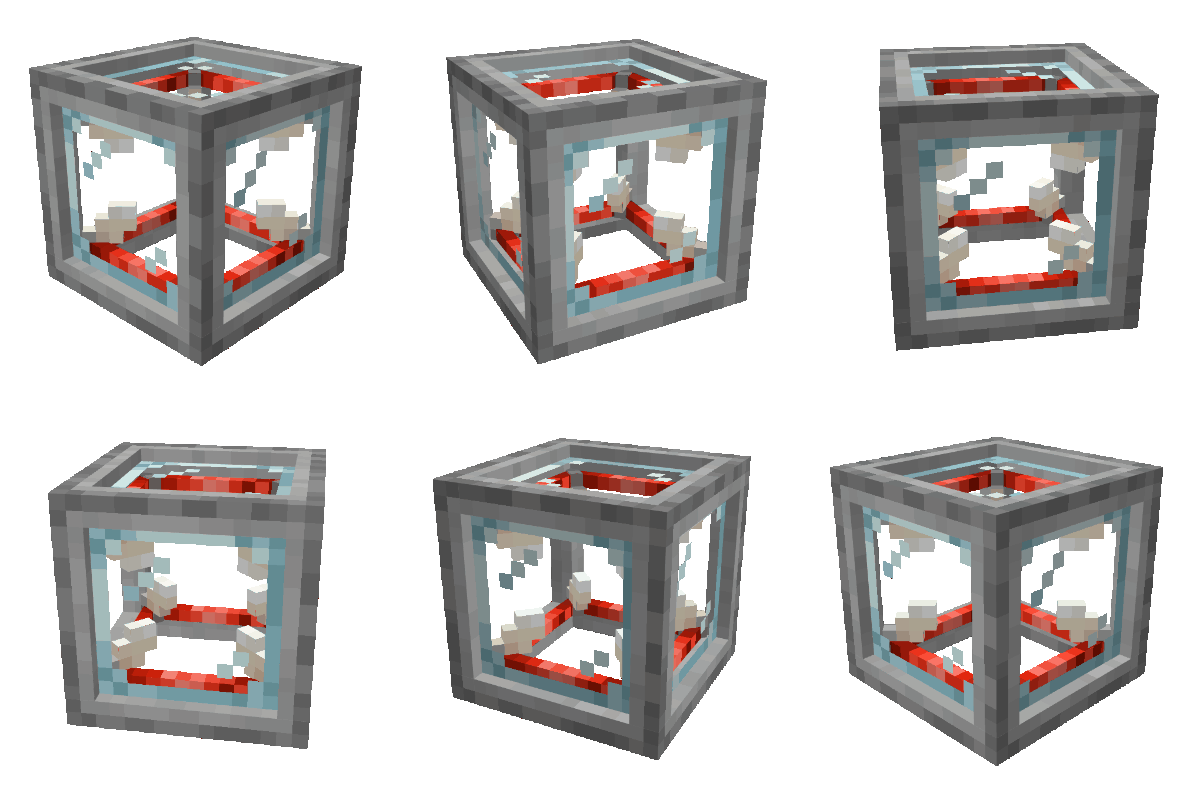
CurseForge · Minecraft mod
VFX Generator
Adds a block that can generate visual effects.
Choose a version Pick your version below, then grab the matching file.
Quick answer
Which VFX Generator release matches 1.20 Forge?
Best match for your filters VFX Generator-1.2.0.1 (1.20.1)
Game version 1.20.1, 1.20
Loader NeoForge, Forge
VFX Generator-1.2.0.1 (1.20.1) targets 1.20.1, 1.20 with NeoForge, Forge. The project page does not say whether this file belongs on the client, dedicated server, or both. No extra mods listed for this file.
Where it goes
Is VFX Generator required on the client, server, or both?
The project page does not say whether this file belongs on the client, dedicated server, or both.
Client Source doesn’t say
Dedicated server Source doesn’t say
Loader for this release NeoForge, Forge
Required install it here Optional supported, not mandatory Not supported do not install here Source doesn’t say do not assume
The source does not explicitly classify this release as client-only or server-only.
What else does VFX Generator-1.2.0.1 (1.20.1) need?
VFX Generator-1.2.0.1 (1.20.1) on 1.20 Forge. Every mod below is checked against that same setup.
This file does not list any required mods. Do not add a library just because a different file uses it.
This file does not list any required or optional mods.
Before you install it
Add VFX Generator without breaking your instance.
Built for VFX Generator-1.2.0.1 (1.20.1) on 1.20 Forge. Pick another file and the loader, install side or required mods may change.
- 01
Stick to this file
Use VFX Generator-1.2.0.1 (1.20.1). It targets 1.20.1, 1.20 with NeoForge, Forge; another release may have different loader, side or dependency requirements.
- 02
Bring the mods it needs
This file does not list any required mods. Do not add a library just because a different file uses it.
- 03
Put it on the correct side
The project page does not say whether this file belongs on the client, dedicated server, or both.
- 04
Pick the file you checked
Use the “Get this file” button beside VFX Generator-1.2.0.1 (1.20.1). It opens that exact file at the source.
About this project
What does VFX Generator add?

Want to build a menacing-looking volcano without running the risk of burning all your surroundings, including yourself? Want to build a confetti cannon but don't have any confetti lying around? Do have some spare end rods, redstone blocks, stone and some glass though? Well, just craft yourself the new VFX Generator!
This mod adds a new block, the Visual Effects Generator

This block enables you to generate an array of visual effects using it's GUI, which the block then generates in a customizable area around it in the world.
Currently, you can only generate particles, but more effects are planned. You can also only choose from a few predefined shapes/textures, however we are also planning to add a way to add your own textures to enable you to create any particle or visual effect you want in the future.You now have the ability to add your own particles! For a tutorial on how to do this, please take a look in the wiki before asking a question.If you are stuck somewhere or don't understand something in the wiki, please feel free to complain about it (in a constructive manner!).
----------------------------------------------------------------------------------------------------------------------------------------------------------
Want to know exactly how to craft the thing? Look here:
For the core of the generator, you need: 4x Redstone Block | 4x End Rod | 1x Glass Block

For the generator block itself you need the Generator Core you just crafted + 4x Smooth Stone blocks

Want to know what the GUI of the VFX Generator looks like and what options you (currently) have? Look here:
Note - This GUI will change in the future, much of what you see here is very temporary! (also these pictures are outdated as of 1.1.0.0 - will update soon to show the current state of the GUI.)

Need a little inspiration? Look here or in the "Images"-Tab:
This is an example of a simple effect, combining the VFX Generator with the Target block:
If you hit the target, you get confetti, hoorrayy.
This is how the volcano (which you can see in the "Images" tab) looks under the stony facade, if you wondered. Spider approves:

----------------------------------------------------------------------------------------------------------------------------------------------------------
If you like our mods and want to support us a little, consider clicking the donation button on the right and leaving some euros/dollars/whatever your currency is!
(Note: what you can currently do with the generator is not too much, but we will eventually add many more features and options! Please have patience with us however, as we are both studying full time and as such unfortunately hardly have enough time to craft regular updates filled with new content. Thanks for your understanding!)
If you have any questions or suggestions, please open an issue on the GitHub!
We will most likely not read the comments here on CurseForge very frequently, so if you want to be heard, go pay the GitHub a visit, thank you!
Project description from CurseForge.
Pick your setup
VFX Generator by Minecraft version and loader
Choose the version and loader you play, then open the matching release.
Minecraft version
1.20
2 loader buildsMinecraft version
1.19.4
1 loader buildMinecraft version
1.19.3
1 loader buildMinecraft version
1.19.2
1 loader buildMinecraft version
1.18.2
1 loader buildMinecraft version
1.16.5
1 loader buildMinecraft version
1.16.4
1 loader buildCheck the dependencies, then try the file in a copied instance before changing a world you care about.
Recent files
VFX Generator versions and loaders
VFX Generator-1.2.0.1 (1.20.1)
VFX Generator-1.20.1-1.2.0.1.jar
4 Feb 2024
Client Source doesn’t say Server Source doesn’t say Dependencies No extras listed Listed on Release listing
Check the 1.20 · Forge setup NeoForge1.20.1Forge1.20 release
VFX Generator-1.2.0.0 (1.20.1)
VFX Generator-1.20.1-1.2.0.0.jar
26 Jan 2024
Client Source doesn’t say Server Source doesn’t say Dependencies No extras listed Listed on Release listing
Check the 1.20 · Forge setup NeoForge1.20.1Forge1.20 release
VFX Generator-1.1.0.0 (1.20)
VFX Generator-1.20-1.1.0.0.jar
9 Jun 2023
Client Source doesn’t say Server Source doesn’t say Dependencies No extras listed Listed on Release listing
Check the 1.20 · Forge setup NeoForge1.20.1Forge1.20 release
Looking for an older file? The official CurseForge project page is in Resources.
 mod
CurseForge · Minecraft
OG'S Backpacks
Backpack mod on all versions
 mod
CurseForge · Minecraft
Ancient Trees
Ancient Trees adds species of extinct trees to your world.
 mod
CurseForge · Minecraft
Elsewood
Redwoods, firs, Japanese maples, two cypresses, rainbow eucalyptus, and the elsewood, grown in the biomes you already have.