Fabric API Needed by BlockTuner 1.1.2
requiredNo matching file

CurseForge · Minecraft mod
A note block tuning assistant for fabric
Quick answer
BlockTuner 1.1.2 targets 1.20.3, 1.20.4 with Fabric. Do not install it on the client. It must be installed on the dedicated server. 1 required mod needs a matching file.
Where it goes
Do not install it on the client. It must be installed on the dedicated server.
This file is marked server-only.
1.1.2. Change the file and its required mods may change too.
Install Fabric API first, but 1 required mod has no matching file for this setup. Do not mix loader builds to force a match.
We only count dependency files that match this setup. A file for another loader does not fill the gap.
Before you install it
Built for BlockTuner 1.1.2. Pick another file and the loader, install side or required mods may change.
Use 1.1.2. It targets 1.20.3, 1.20.4 with Fabric; another release may have different loader, side or dependency requirements.
Install Fabric API first, but 1 required mod has no matching file for this setup. Do not mix loader builds to force a match.
Do not install it on the client. It must be installed on the dedicated server.
Use the “Get this file” button beside 1.1.2. It opens that exact file at the source.
About this project
BlockTuner (Fabric Mod)
About
This is the fabric version of BlockTuner. If you want the data pack for older versions of Minecraft, please visit this page.This mod requires fabric API.Instructions
Installation
Put this mod in your mods folder. You also need to install Fabric API if you haven't installed it yet.
This mod also works on servers and require no client installation (Functionality may be limited).
View all releases on GitHub.
How to Use BlockTuner
Right clock on note blocks to open tuning GUI. Placing an untuned note block also opens tuning GUI automatically. Use command /blocktuner to toggle these.
Ctrl + middle click on note blocks will give you readily tuned note blocks. Placing these won't open tuning GUI.
Right click note blocks with blaze rods to play with right clicks without tuning.
Tuning GUI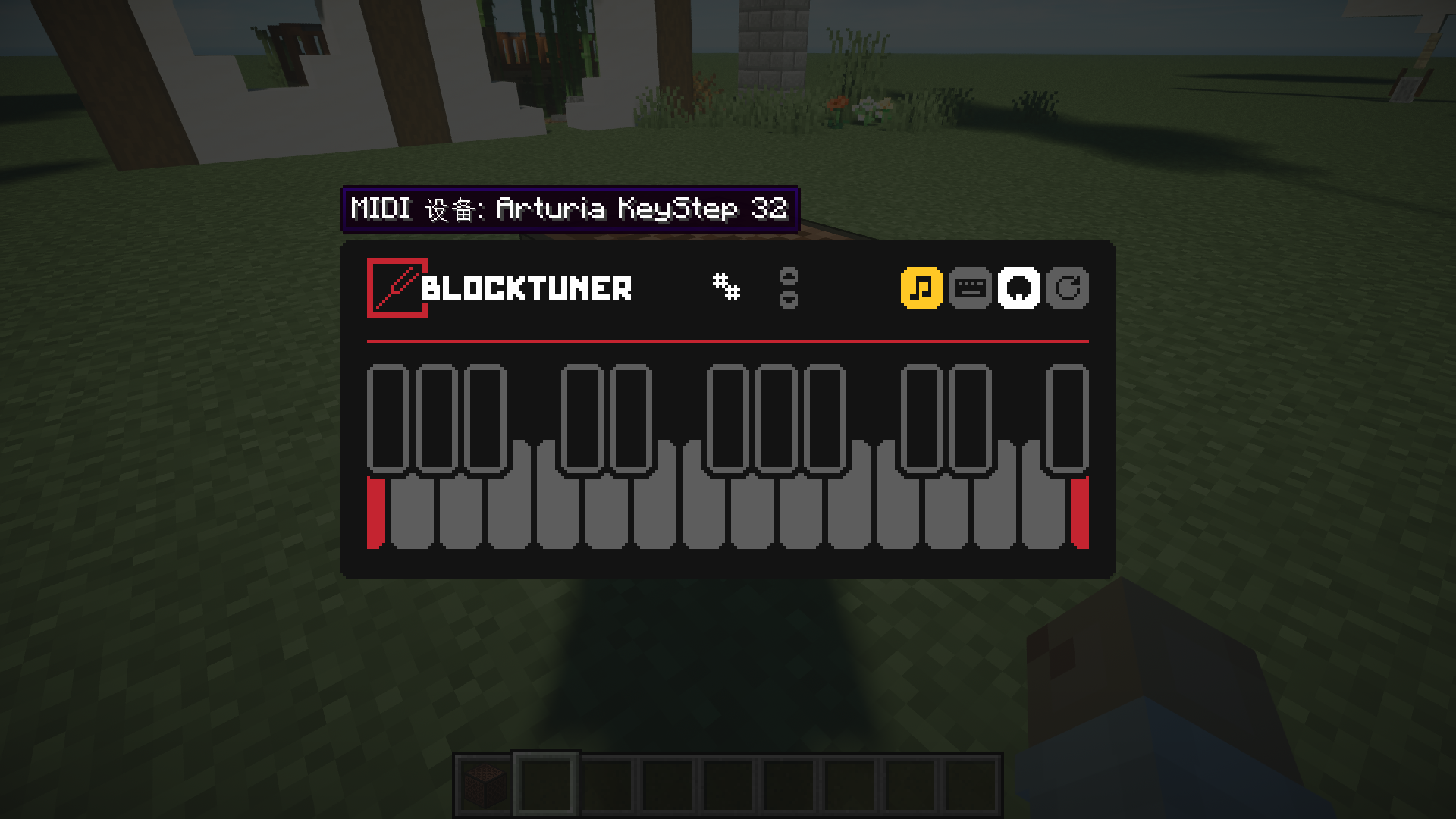
Top-right corner (from left to right)
 * Play mode - toggle whether the GUI will turn off immediately upon clicking a note on the piano keyboard.
 * Typing keyboard to piano keyboard - toggle whether you want to play the piano keyboard using your computer keyboard.
 * MIDI Device - Click to cycle through available MIDI input devices. The icon shows red if the device is currently occupied by other programs.
Key Mappings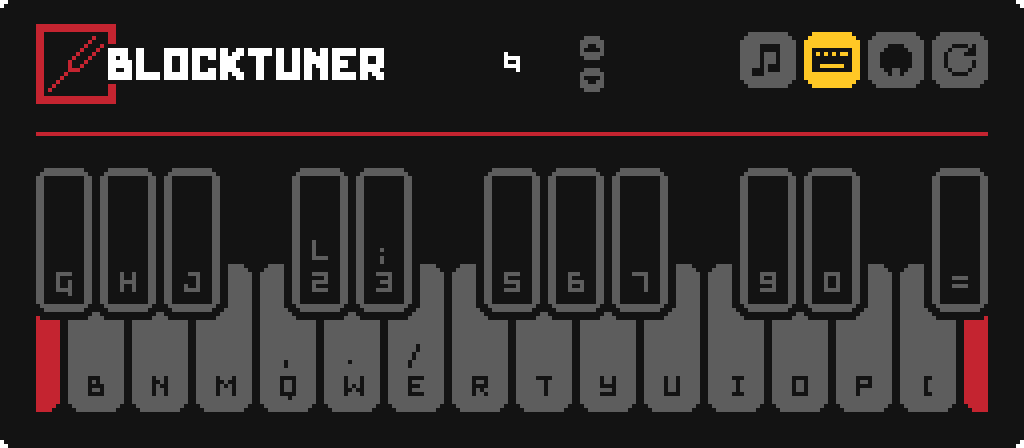
License
Copyright © 2021, xwjcoolThis program is free software: you can redistribute it and/or modify it under the terms of the GNU Lesser General Public License as published by the Free Software Foundation, either version 3 of the License, or (at your option) any later version.This program is distributed in the hope that it will be useful, but WITHOUT ANY WARRANTY; without even the implied warranty of MERCHANTABILITY or FITNESS FOR A PARTICULAR PURPOSE. See the GNU Lesser General Public License for more details.You should have received a copy of the GNU Lesser General Public License along with this program. If not, see https://www.gnu.org/licenses/.
Project description from CurseForge.
Pick your setup
Choose the version and loader you play, then open the matching release.
Check the dependencies, then try the file in a copied instance before changing a world you care about.
Recent files
blocktuner-fabric-1.1.2-mc-1.20.4.jar
10 Dec 2023
blocktuner-fabric-1.1.1-mc-1.20.jar
13 Jun 2023
blocktuner-fabric-1.1.1-mc-1.19.4.jar
13 Jun 2023
blocktuner-fabric-1.1.0-mc-1.20.jar
11 Jun 2023
blocktuner-fabric-1.1.0-mc-1.19.4.jar
11 Jun 2023
blocktuner-fabric-1.1.0-beta-2-MC-1.20.jar
10 Jun 2023
28 Apr 2023
20 Jan 2022
18 Jan 2022
6 Jan 2022
4 Jan 2022
15 Dec 2021
Looking for an older file? The official CurseForge project page is in Resources.
 mod
SearchCarefully is a Minecraft mod that adds a tactical search system similar to Tarkov, allowing players to progressively uncover items in containers.
 mod
When two recipes use the same ingredients, choose which result the crafting table makes. Your choice is remembered.
 mod
Restrict the number of enchantments that may be applied to an item.