Minecraft version
Back to mods 
CurseForge · Minecraft mod
The Guild
Quests, expeditions and adventures await you!
Choose a version Pick your version below, then grab the matching file.
This page is having a moment, so a few details may be a little behind.
Quick answer
Which The Guild release should I use?
beta file [Fabric 1.20.4] The Guild 0.4.10
Game version 1.20.4
Loader Fabric
The Guild [Fabric 1.20.4] The Guild 0.4.10 targets 1.20.4 with Fabric. The project page does not say whether it belongs on the client. The project page does not say whether it belongs on the dedicated server. No extra mods listed for this file.
Where it goes
Is The Guild required on the client, server, or both?
The project page does not say whether it belongs on the client. The project page does not say whether it belongs on the dedicated server.
Client Source doesn’t say
Dedicated server Source doesn’t say
Loader for this release Fabric
Required install it here Optional supported, not mandatory Not supported do not install here Source doesn’t say do not assume
The source does not explicitly classify this release as client-only or server-only.
What else does The Guild [Fabric 1.20.4] The Guild 0.4.10 need?
[Fabric 1.20.4] The Guild 0.4.10. Change the file and its required mods may change too.
This file does not list any required mods. Do not add a library just because a different file uses it.
This file does not list any required or optional mods.
Before you install it
Add The Guild without breaking your instance.
Built for The Guild [Fabric 1.20.4] The Guild 0.4.10. Pick another file and the loader, install side or required mods may change.
- 01
Stick to this file
Use [Fabric 1.20.4] The Guild 0.4.10. It targets 1.20.4 with Fabric; another release may have different loader, side or dependency requirements.
- 02
Bring the mods it needs
This file does not list any required mods. Do not add a library just because a different file uses it.
- 03
Put it on the correct side
The project page does not say whether it belongs on the client. The project page does not say whether it belongs on the dedicated server.
- 04
Pick the file you checked
Use the “Get this file” button beside [Fabric 1.20.4] The Guild 0.4.10. It opens that exact file at the source.
About this project
What does The Guild add?
Introduction
Welcome to The Guild, a quest mod inspired by Bountiful.
Have you ever wanted to go on an adventure? Or maybe you're more inclined for a stable life? Either way The Guild has got you covered!
Choose between 15 different professions (7 available at the moment) and embark on a journey of questing!
This mod adds quests to the game.
Ok, but what are quests?
A quest is a set of randomly generated tasks usually accompanied by a corresponding reward based on said tasks.
Quests are highly customizable through datapacks, with a solid base of defaults so you can start adventuring out of the box.
Getting started
To start, find a Guild Master in a plains village, and buy a Profession Licence.
Here's The Guild, a build found mainly in plains villages and more rarely in other ones. Here you can buy Professions Licences to start accepting quests or to expand your choices. 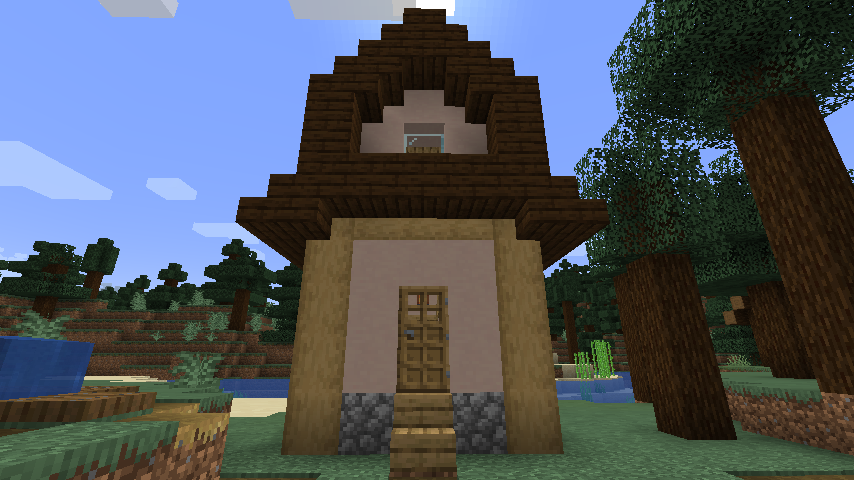
Quests screen
Obtaining and using a licence will unlock the entire Questing system. To open the Quests Screen press the Guild Screen Key (J by default).
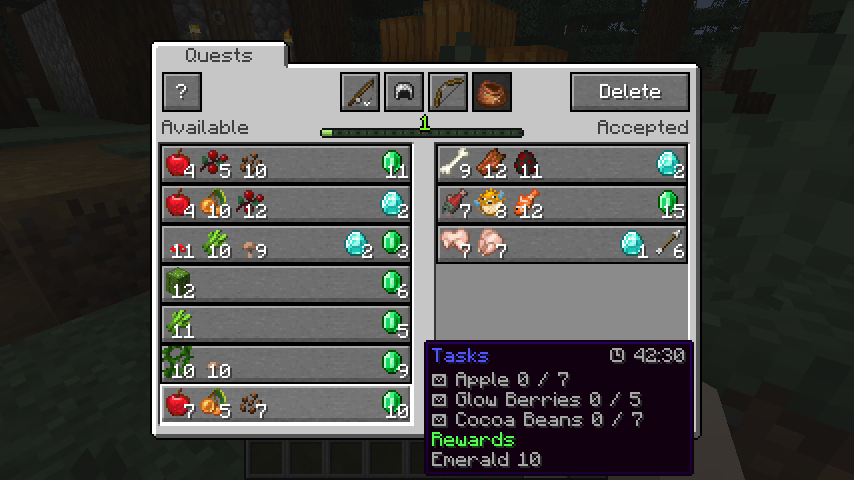
The Quests Screen showing available quests (on the left) and accepted quests (on the right). Professions are also visible on the top.
Datapack guide
Customizing quests is easy, you can follow the guide here to create your own quests datapacks in minutes!
https://github.com/Fulmineo64/Guild/tree/master/examples/datapacks
FAQ
Is there gonna be a Forge version?
No, but you can download the Bountiful mod which offers many of the functionalities.
Discord
You can discuss, suggest new features and get previews of my mods on my Discord server!
Have fun living your adventures!
Project description from CurseForge.
Pick your setup
The Guild by Minecraft version and loader
Choose the version and loader you play, then open the matching release.
Minecraft version
1.20.3
1 loader buildMinecraft version
1.20.2
1 loader buildMinecraft version
1.20.1
1 loader buildMinecraft version
1.20
1 loader buildMinecraft version
1.19.4
1 loader buildMinecraft version
1.19.3
1 loader buildMinecraft version
1.19.2
1 loader buildMinecraft version
1.19.1
1 loader buildMinecraft version
1.19
1 loader buildMinecraft version
1.18.2
1 loader buildMinecraft version
1.18.1
1 loader buildShowing the newest 12 of 14 game versions. Older files are in the list below.
Check the dependencies, then try the file in a copied instance before changing a world you care about.
Recent files
The Guild versions and loaders
[Fabric 1.20.4] The Guild 0.4.10
guild-fabric-0.4.10.jar
31 Mar 2024
Client Source doesn’t say Server Source doesn’t say Dependencies No extras listed Listed on Release listing
Check the 1.20.4 · Fabric setup Fabric1.20.4 beta
[Fabric 1.20.3] The Guild 0.4.9
guild-fabric-0.4.9.jar
31 Mar 2024
Client Source doesn’t say Server Source doesn’t say Dependencies No extras listed Listed on Release listing
Check the 1.20.3 · Fabric setup Fabric1.20.3 beta
[Fabric 1.20.2] The Guild 0.4.8
guild-fabric-0.4.8.jar
31 Mar 2024
Client Source doesn’t say Server Source doesn’t say Dependencies No extras listed Listed on Release listing
Check the 1.20.2 · Fabric setup 1.20.2Fabric beta
[Fabric 1.20.1] The Guild 0.4.7
guild-fabric-0.4.7.jar
31 Mar 2024
Client Source doesn’t say Server Source doesn’t say Dependencies No extras listed Listed on Release listing
Check the 1.20.1 · Fabric setup Fabric1.20.1 beta
[Fabric 1.20] The Guild 0.4.6
guild-fabric-0.4.6.jar
3 Mar 2024
Client Source doesn’t say Server Source doesn’t say Dependencies 1 required · 1 unchecked Listed on Release listing
Check the 1.20 · Fabric setup Fabric1.20 beta
[Fabric 1.19.4] The Guild 0.4.5
guild-fabric-0.4.5.jar
9 Jan 2024
Client Source doesn’t say Server Source doesn’t say Dependencies 1 required · 1 unchecked Listed on Release listing
Check the 1.19.4 · Fabric setup 1.19.4Fabric beta
[Fabric 1.19.3] The Guild 0.4.4
guild-fabric-0.4.4.jar
9 Jan 2024
Client Source doesn’t say Server Source doesn’t say Dependencies 1 required · 1 unchecked Listed on Release listing
Check the 1.19.3 · Fabric setup 1.19.3Fabric beta
[Fabric 1.19.2] The Guild 0.4.3
guild-fabric-0.4.3.jar
5 Nov 2023
Client Source doesn’t say Server Source doesn’t say Dependencies 1 required · 1 unchecked Listed on Release listing
Check the 1.19.2 · Fabric setup Fabric1.19.2 beta
[Fabric 1.19.1] The Guild 0.4.2
guild-fabric-0.4.2.jar
5 Nov 2023
Client Source doesn’t say Server Source doesn’t say Dependencies 1 required · 1 unchecked Listed on Release listing
Check the 1.19.1 · Fabric setup Fabric1.19.1 beta
[Fabric 1.19] The Guild 0.4.1
guild-fabric-0.4.1.jar
5 Nov 2023
Client Source doesn’t say Server Source doesn’t say Dependencies 1 required · 1 unchecked Listed on Release listing
Check the 1.19 · Fabric setup Fabric1.19 beta
[Fabric 1.18.2] The Guild 0.4.0
guild-fabric-0.4.0.jar
1 May 2022
Client Source doesn’t say Server Source doesn’t say Dependencies 1 required · 1 unchecked Listed on Release listing
Check the 1.18.2 · Fabric setup Fabric1.18.2 beta
[Fabric 1.18.1] The Guild 0.3.8
guild-fabric-0.3.8.jar
9 Jan 2022
Client Source doesn’t say Server Source doesn’t say Dependencies 1 required · 1 unchecked Listed on Release listing
Check the 1.18.1 · Fabric setup 1.18.1Fabric beta
Looking for an older file? The official CurseForge project page is in Resources.
 mod
mod CurseForge · Minecraft
Culling Games (CG)
This mod is based off the culling games from jjk and is very early in its development.
 mod
mod CurseForge · Minecraft
Fundamental Principles - Iron's Spells Addon
Adds mechanics, balance and progression to the Iron's Spells n Spellbooks magic system.
 mod
mod CurseForge · Minecraft
Carry Mechanics
Pick up, carry, and place blocks and entities with your bare hands! A lightweight, configurable successor to Carry On.