Mod Menu Optional for Modget 0.4.3 for MC 1.17 and 1.18
optionalMatching file found Matched file: Mod Menu v2.0.17 for 1.17

CurseForge · Minecraft mod
The Minecraft Mod Package Manager! Can install mods via commands, search for updates and much more.
Quick answer
Modget 0.4.3 for MC 1.17 and 1.18 targets 1.17.1, 1.18.1, 1.17 with Fabric. The project page does not say whether this file belongs on the client, dedicated server, or both. No extra mods listed for this file.
Where it goes
The project page does not say whether this file belongs on the client, dedicated server, or both.
The source does not explicitly classify this release as client-only or server-only.
0.4.3 for MC 1.17 and 1.18. Change the file and its required mods may change too.
This file does not list any required mods. Do not add a library just because a different file uses it.
We only count dependency files that match this setup. A file for another loader does not fill the gap.
Before you install it
Built for Modget 0.4.3 for MC 1.17 and 1.18. Pick another file and the loader, install side or required mods may change.
Use 0.4.3 for MC 1.17 and 1.18. It targets 1.17.1, 1.18.1, 1.17 with Fabric; another release may have different loader, side or dependency requirements.
This file does not list any required mods. Do not add a library just because a different file uses it.
The project page does not say whether this file belongs on the client, dedicated server, or both.
Use the “Get this file” button beside 0.4.3 for MC 1.17 and 1.18. It opens that exact file at the source.
About this project
Note: Since 0.2.2, Modget doesn't bundle the Server Translations API anymore. If you want to install Modget on a dedicated server, please also install this API there, otherwise your chat messages will look like gibberish.
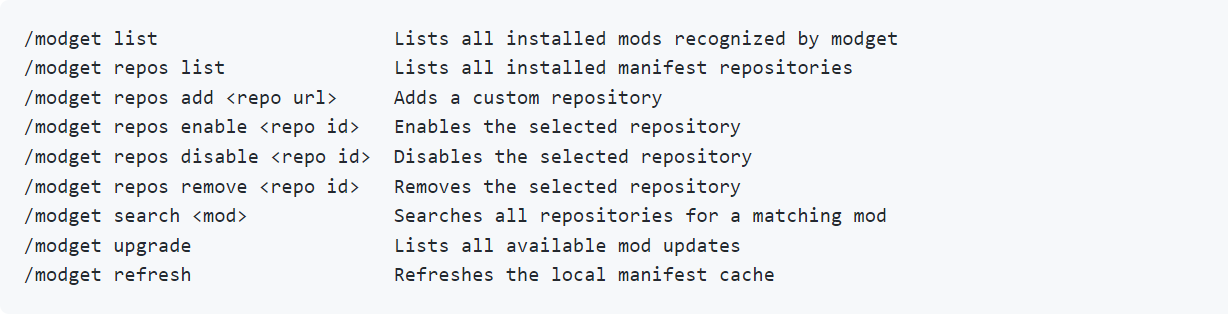
Modget is the first properly implemented Minecraft mod package manager. In the future, it will be able to securely install mods via commands, handle their dependencies, search for updates and much more. 
Ever since the dawn of Minecraft modding, players have struggled with finding secure and reliable websites to download their mods from. Although this issue is partly fixed nowadays, with developers primarily focusing on CurseForge and Modrinth, you still have to double-check every time which of the two platforms actually has your desired mod and where you can find the latest updates, since often the devs are lazy and forget to update both.
That's why we develop Modget, a quite ambitious new take on the age-old issue of Minecraft mod downloads and updates. It works a lot like Microsoft's Winget, fetching new version metadata from a central GitHub repository. This allows us to be much more flexible than previous mod updater implementations, which were limited by the metadata provided by Curseforge.
This has the side effect that only mods added to our manifest repository currently work. If you want to help us out getting more mods to be supported, please join our Discord server and we will show you how you can help!

We also have a WIP GUI: 
If you still have questions or if you have problems using the mod, feel free to join our Discord server and ask for help there.
Project description from CurseForge.
Pick your setup
Choose the version and loader you play, then open the matching release.
Check the dependencies, then try the file in a copied instance before changing a world you care about.
Recent files
modget-minecraft-0.4.3+1.17.jar
1 Jan 2022
modget-minecraft-0.4.3+1.16.jar
1 Jan 2022
modget-minecraft-0.4.2+1.17.jar
23 Dec 2021
modget-minecraft-0.4.2+1.16.jar
23 Dec 2021
modget-minecraft-0.4.1+1.16.jar
23 Dec 2021
modget-minecraft-0.4.1+1.17.jar
23 Dec 2021
modget-minecraft-0.4.0+1.17.jar
14 Dec 2021
modget-minecraft-0.4.0+1.16.jar
14 Dec 2021
modget-minecraft-0.3.1+1.17.jar
11 Dec 2021
modget-minecraft-0.3.1+1.16.jar
11 Dec 2021
modget-0.3.0.jar
4 Dec 2021
modget-0.2.3.jar
27 Oct 2021
Looking for an older file? The official CurseForge project page is in Resources.
 mod
Client-Side QoL mod for the server KobbledKarp. Offers HUDs, reminders, a stats tracker and more.
 mod
Minecraft mod for Hypixel adding levelhead, BedWars stars, SkyWars stars and Duels division display in tablist and above nametags
 mod
Adds a mod menu to view the list of mods you have installed.
