ShetiPhianCore [Fabric] Needed by MultiBeds [Fabric] multibeds-fabric-1.21.1-1.0.jar
requiredMatching file found Matched file: shetiphiancore-fabric-1.21.1-1.1.jar

CurseForge · Minecraft mod
::Design Your Bed:: Pick the style, block texture, blanket pattern and color (or use a banner). Dye your sheets and pillow case. Choose an embroidery or create/use/share a custom one.
Quick answer
MultiBeds [Fabric] multibeds-fabric-1.21.1-1.0.jar targets 1.21.1 with Fabric. The project page does not say whether this file belongs on the client, dedicated server, or both. All 3 required mods have matching files.
Where it goes
The project page does not say whether this file belongs on the client, dedicated server, or both.
The source does not explicitly classify this release as client-only or server-only.
multibeds-fabric-1.21.1-1.0.jar. Change the file and its required mods may change too.
Install ShetiPhianCore [Fabric], Forge Config API Port, Fabric API first. We found matching files for this game-version and loader setup. 3 come through another mod in the chain.
3 extra mods were pulled in by other dependencies. Indented rows show who needs each one. We only count dependency files that match this setup. A file for another loader does not fill the gap.
Before you install it
Built for MultiBeds [Fabric] multibeds-fabric-1.21.1-1.0.jar. Pick another file and the loader, install side or required mods may change.
Use multibeds-fabric-1.21.1-1.0.jar. It targets 1.21.1 with Fabric; another release may have different loader, side or dependency requirements.
Install ShetiPhianCore [Fabric], Forge Config API Port, Fabric API first. We found matching files for this game-version and loader setup. 3 come through another mod in the chain.
The project page does not say whether this file belongs on the client, dedicated server, or both.
Use the “Get this file” button beside multibeds-fabric-1.21.1-1.0.jar. It opens that exact file at the source.
About this project


*** ShetiPhianCore [Fabric] Required! ***
*Indium is also required if you have Sodium installed*
Make the bed of your dreams. Choose patterns, textures, and colors. Even draw your own pixel art on top!

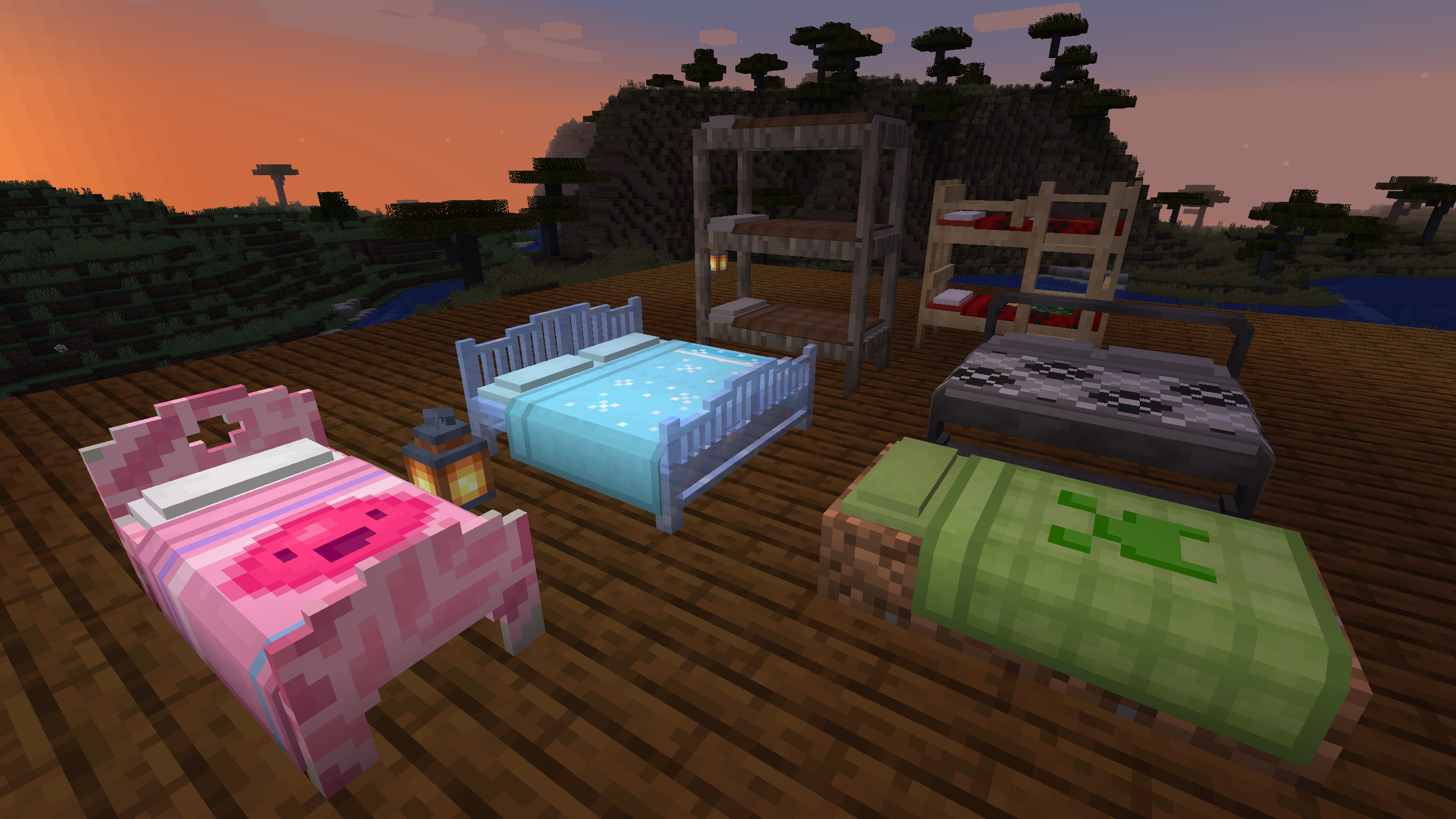

Apply Sheets, pillow cover, blanket, and art to your bed.

Make your own pixel art in-game.

Multiple styles of bed to choose from. Add any block to change appearance.

Click a blanket onto a loom to customize the color/pattern.

Beds automatically join in wide/bunk configurations.

Custom ladders to fit your bunk bed.
Submit localization files on github.
Do not post bugs in the comments, use the Issue Tracker.
Project description from CurseForge.
Pick your setup
Choose the version and loader you play, then open the matching release.
Showing the newest 12 of 13 game versions. Older files are in the list below.
Check the dependencies, then try the file in a copied instance before changing a world you care about.
Recent files
22 Aug 2025
2 Jan 2025
1 Jun 2024
27 Apr 2024
27 Apr 2024
27 Apr 2024
27 Apr 2024
5 Nov 2023
5 Nov 2023
5 Nov 2023
5 Nov 2023
5 Nov 2023
Looking for an older file? The official CurseForge project page is in Resources.
 mod
An extension mod for the hub server
 mod
Scales up short text on signs to fit
 mod
Unofficial multiplayer support for Voxy: servers send distant terrain and far-away players to clients. Also fills Xaero's World Map and JourneyMap, and works with Distant Horizons servers. The same mod as Voxy Server Side.