Puzzles Lib Needed by Trading Post v26.3.0-mc26.3.x+neoforge
requiredMatching file found Matched file: v26.3.17-mc26.3.x+neoforge

CurseForge · Minecraft mod
Rule the village! Trade with every villager at once!
Quick answer
Trading Post v26.3.0-mc26.3.x+neoforge targets 26.3 with NeoForge. The project page does not say whether this file belongs on the client, dedicated server, or both. All 1 required mods have matching files.
Where it goes
The project page does not say whether this file belongs on the client, dedicated server, or both.
The source does not explicitly classify this release as client-only or server-only.
v26.3.0-mc26.3.x+neoforge. Change the file and its required mods may change too.
Install Puzzles Lib first. We found matching files for this game-version and loader setup.
We only count dependency files that match this setup. A file for another loader does not fill the gap.
Before you install it
Built for Trading Post v26.3.0-mc26.3.x+neoforge. Pick another file and the loader, install side or required mods may change.
Use v26.3.0-mc26.3.x+neoforge. It targets 26.3 with NeoForge; another release may have different loader, side or dependency requirements.
Install Puzzles Lib first. We found matching files for this game-version and loader setup.
The project page does not say whether this file belongs on the client, dedicated server, or both.
Use the “Get this file” button beside v26.3.0-mc26.3.x+neoforge. It opens that exact file at the source.
About this project








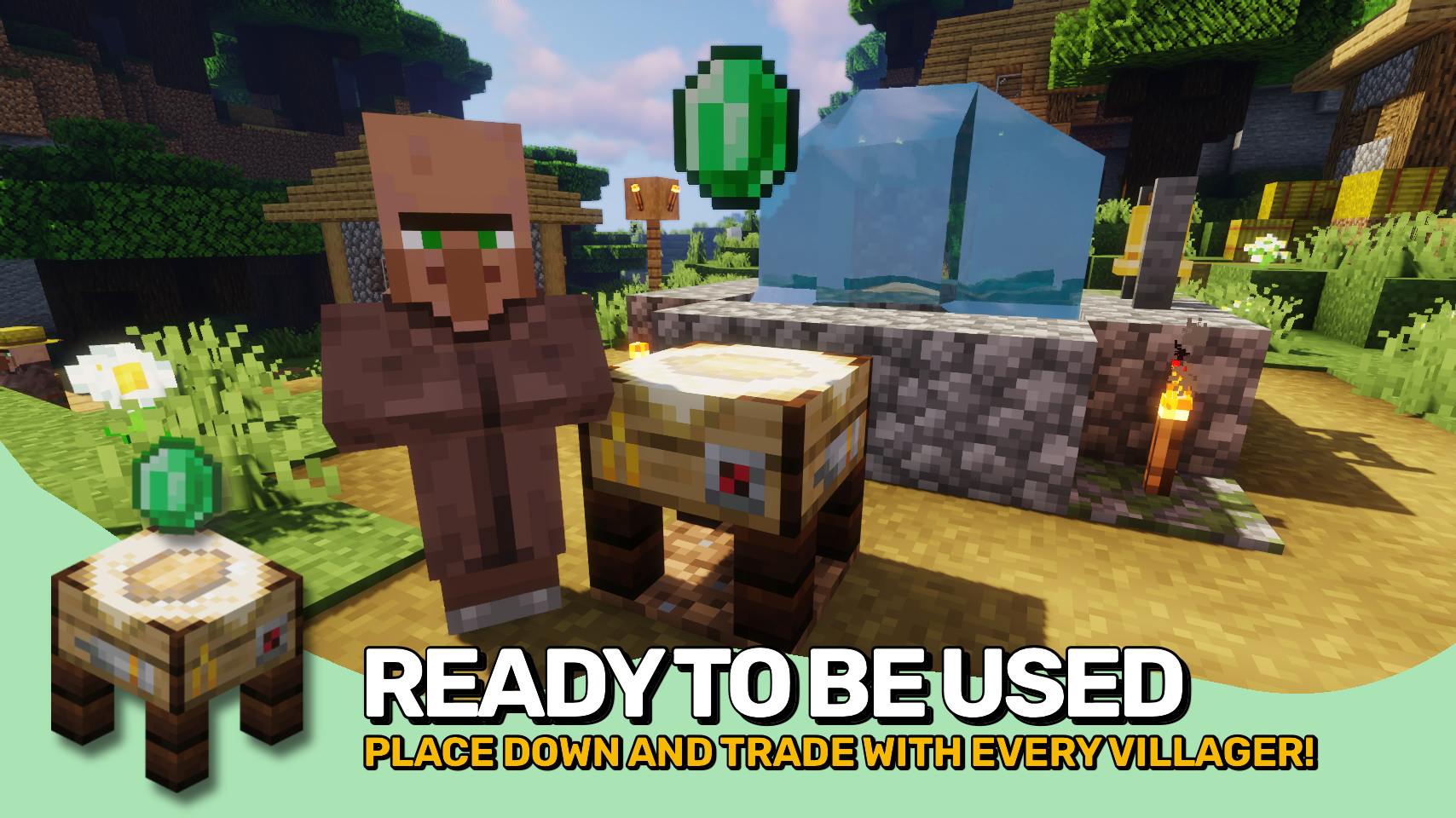
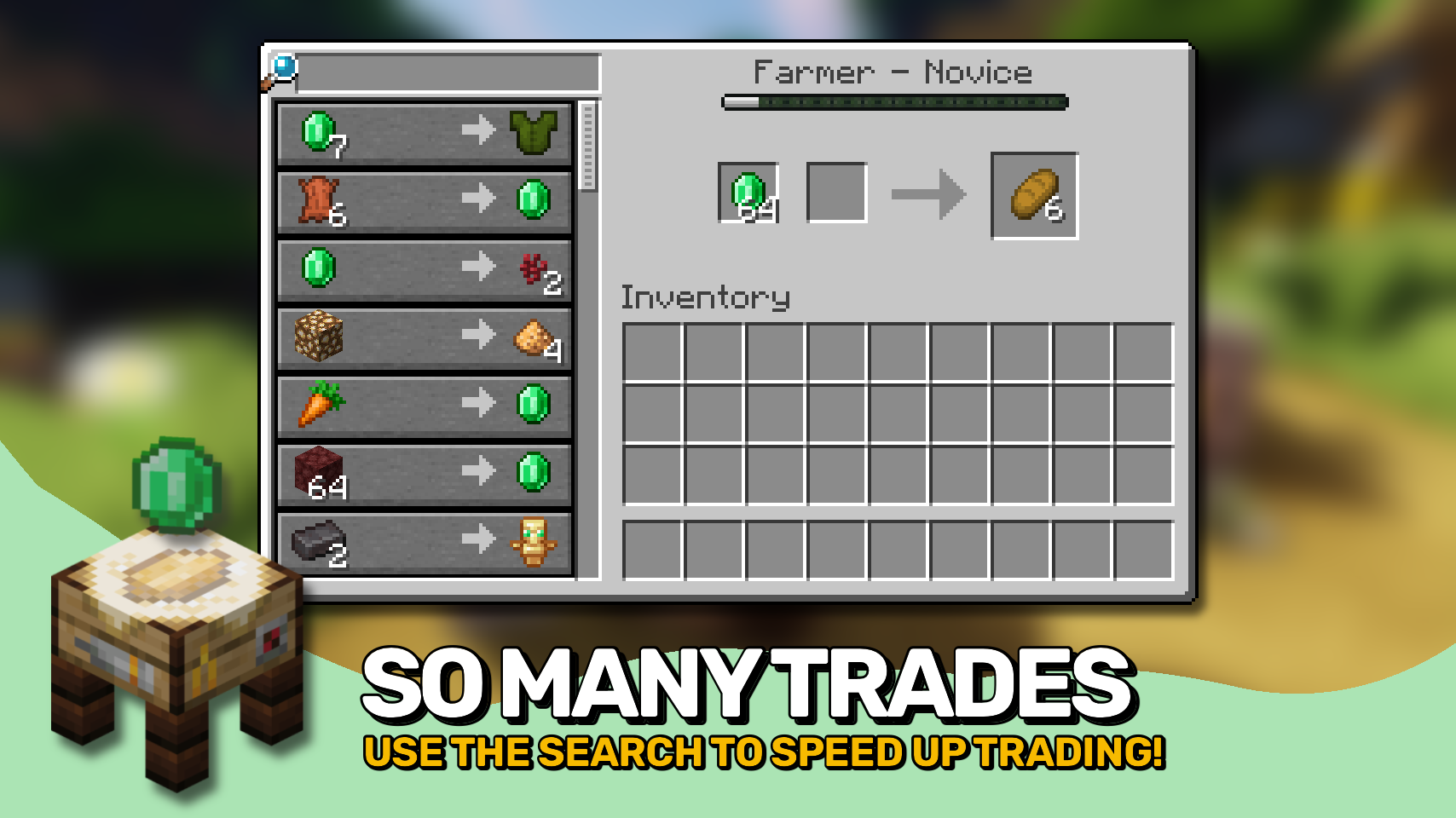
Trading Post adds a single new block that changes how trading works in your world. 🧾 Instead of searching for individual villagers, you can access all nearby trades in one clean interface within an area.
The block also features a unique model and a smooth animation when you approach it, making it feel right at home in any village. ✨


⏩ INSTALLATION REQUIRED ON CLIENT & REQUIRED ON SERVER
⏩ REQUIRES PUZZLES LIB TO BE INSTALLED (FABRIC & NEOFORGE)
⏩ REQUIRES FABRIC API TO BE INSTALLED (FABRIC)
⏩ REQUIRES FORGE CONFIG API PORT TO BE INSTALLED (FABRIC)

If available for a mod, configuration is possible directly from in-game using the mod menu (requires Mod Menu by Prospector to be installed on Fabric).
For manual configuration using an external text editor all files are found at .minecraft/config, named as MOD_ID-client.toml, MOD_ID-common.toml, or MOD_ID-server.toml, depending on the type of config. Not all types might exist for a mod, if any at all.

🌟 Thanks to RWTema for inspiring this mod from the trading post block found in old versions of their Extra Utilities mod.
🌟 Thanks to Vazkii for the floating emerald rendering code taken from the matrix enchanting table renderer in their Quark mod.
 |
 |
|
|---|---|---|
 |
 |
|
 |
 |
|
 |
 |
|
 |
 |
|

© 2026 @heyitsfuzs. All rights reserved. This page was last edited on 11 September 2026, at 06:44 (UTC).
Project description from CurseForge.
Pick your setup
Choose the version and loader you play, then open the matching release.
Showing the newest 12 of 24 game versions. Older files are in the list below.
Check the dependencies, then try the file in a copied instance before changing a world you care about.
Recent files
tradingpost-v26.3.0-mc26.3.x+neoforge.jar
24 Sept 2026
tradingpost-v26.3.0-mc26.3.x+fabric.jar
24 Sept 2026
TradingPost-v26.2.0-mc26.2.x-Fabric.jar
18 Jun 2026
TradingPost-v26.2.0-mc26.2.x-NeoForge.jar
18 Jun 2026
TradingPost-v26.1.0-mc26.1.x-Fabric.jar
30 Apr 2026
TradingPost-v26.1.0-mc26.1.x-NeoForge.jar
30 Apr 2026
TradingPost-v21.11.0-mc1.21.11-Fabric.jar
18 Dec 2025
TradingPost-v21.11.0-mc1.21.11-NeoForge.jar
18 Dec 2025
TradingPost-v21.10.1+mc1.21.10-NeoForge.jar
24 Oct 2025
TradingPost-v21.10.1+mc1.21.10-Fabric.jar
24 Oct 2025
TradingPost-v21.1.1-1.21.1-NeoForge.jar
24 Oct 2025
TradingPost-v21.1.1-1.21.1-Fabric.jar
24 Oct 2025
Looking for an older file? The official CurseForge project page is in Resources.
 mod
modA Minecraft jobs and professions mod featuring action-based XP, profession leveling, unique skill, and unlockable perks.
 mod
modSee what's new without updating: join 26.3 servers from 1.21.11 and see their real new blocks, items and sounds.
 mod
modAn addon for TaCZ that adds immersive and useful features
