Minecraft version
Back to mods 
CurseForge · Minecraft mod
Apples & Carrots [Forge]
New special apples and carrots
Choose a version Pick your version below, then grab the matching file.
Quick answer
Which Apples & Carrots [Forge] release should I use?
Latest stable file [1.19]
Game version 1.19
Loader Forge
Apples & Carrots [Forge] [1.19] targets 1.19 with Forge. The project page does not say whether this file belongs on the client, dedicated server, or both. No extra mods listed for this file.
Where it goes
Is Apples & Carrots [Forge] required on the client, server, or both?
The project page does not say whether this file belongs on the client, dedicated server, or both.
Client Source doesn’t say
Dedicated server Source doesn’t say
Loader for this release Forge
Required install it here Optional supported, not mandatory Not supported do not install here Source doesn’t say do not assume
The source does not explicitly classify this release as client-only or server-only.
What else does Apples & Carrots [Forge] [1.19] need?
[1.19] . Change the file and its required mods may change too.
This file does not list any required mods. Do not add a library just because a different file uses it.
This file does not list any required or optional mods.
Before you install it
Add Apples & Carrots [Forge] without breaking your instance.
Built for Apples & Carrots [Forge] [1.19]. Pick another file and the loader, install side or required mods may change.
- 01
Stick to this file
Use [1.19] . It targets 1.19 with Forge; another release may have different loader, side or dependency requirements.
- 02
Bring the mods it needs
This file does not list any required mods. Do not add a library just because a different file uses it.
- 03
Put it on the correct side
The project page does not say whether this file belongs on the client, dedicated server, or both.
- 04
Pick the file you checked
Use the “Get this file” button beside [1.19] . It opens that exact file at the source.
About this project
What does Apples & Carrots [Forge] add?
Golden apple and golden carrot are not enough, Minecraft players have a lack of interesting and fun food.
Apples & Carrots is a forge mod that will fix this problem, giving you several new items with effects.
This is a Forge version, you can find Fabric version here:
Apples & Carrots [Fabric] - Mods - Minecraft - CurseForge
You can craft Apples made of minerals.

Or craft Carrots made of... nuggets of minerals?
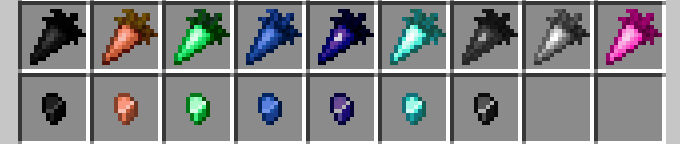
Yup, this mod also adds more nuggets, but don't get nervous, all of them can be used like fuel, this way you won't have some useless nuggets messing around. (you're going to need a bunch of those)
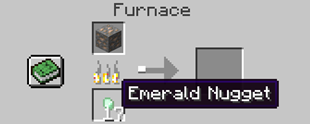
Now, what can you expect from each item?
Discovering the effects of an apple or a carrot is an adventure, but here is little description:
- Coal apple/carrot: Get a boost in your cave.
- Iron apple/carrot: Defend yourself.
- Copper apple/carrot: Electricity flows on you.
- Emerald apple/carrot: Villager's favorite.
- Lapis apple/carrot: Lucky player.
- Obsidian apple/carrot: Become the greatest defender.
- Diamond apple/carrot: War machine.
- Netherite apple/carrot: War machine II.
- Creative apple/carrot: Minecraft God.
So, What are you waiting for? Start your journey today and create a new story with this fun mod.
Notes:
Please always download the latest version.
Feel free to add this mod to your modpack!
Ads:
Try out this mod:
Copper Armor & Tools [Forge] - Mods - Minecraft - CurseForge
Project description from CurseForge.
Pick your setup
Apples & Carrots [Forge] by Minecraft version and loader
Choose the version and loader you play, then open the matching release.
Minecraft version
1.18.1
1 loader buildMinecraft version
1.18
1 loader buildMinecraft version
1.17.1
1 loader buildCheck the dependencies, then try the file in a copied instance before changing a world you care about.
Recent files
Apples & Carrots [Forge] versions and loaders
[1.19]
apples-1.19.jar
26 Jun 2022
Client Source doesn’t say Server Source doesn’t say Dependencies No extras listed Listed on Release listing
Check the 1.19 · Forge setup Forge1.19 release
[1.18.1]
apples-carrots-1.18.1.jar
13 Dec 2021
Client Source doesn’t say Server Source doesn’t say Dependencies No extras listed Listed on Release listing
Check the 1.18.1 · Forge setup 1.18.1Forge release
[1.18] v1.2
apples-carrots-1.2.jar
8 Dec 2021
Client Source doesn’t say Server Source doesn’t say Dependencies No extras listed Listed on Release listing
Check the 1.18 · Forge setup Forge1.18 release
[1.17.1] v1.1
apples-1.1.jar
2 Nov 2021
Client Source doesn’t say Server Source doesn’t say Dependencies No extras listed Listed on Release listing
Check the 1.17.1 · Forge setup 1.17.1Forge release
Looking for an older file? The official CurseForge project page is in Resources.
 mod
Modrinth · Minecraft
Kaleidoscope Cookery Refabricated
The unofficial fabric continuation for Kaleidoscope Cookery mod
 mod
CurseForge · Minecraft
Ascendent Blade
Description / SummaryAscendant Blade is a feature-rich Minecraft mod centered around the legendary, multi-tiered Ascendant Blade and the mysterious Arbiter entity.
 mod
CurseForge · Minecraft
Life In The Rainforest
A companion mod to my other mod "Life On The Prairie" this time focused on the Rainforests of the Still Life world