Fabric API Needed by Mod Settings 1.2.0 (26.3)
requiredMatching file found Matched file: [26.3] Fabric API 0.161.0+26.3
CurseForge · Minecraft mod
Provides an easy to access configuration screen for all installed mods on Fabric
Quick answer
Mod Settings 1.2.0 (26.3) targets 26.3 with Fabric. The project page does not say whether this file belongs on the client, dedicated server, or both. All 1 required mods have matching files.
Where it goes
The project page does not say whether this file belongs on the client, dedicated server, or both.
The source does not explicitly classify this release as client-only or server-only.
Mod Settings 1.2.0 (26.3). Change the file and its required mods may change too.
Install Fabric API first. We found matching files for this game-version and loader setup.
We only count dependency files that match this setup. A file for another loader does not fill the gap.
Before you install it
Built for Mod Settings 1.2.0 (26.3). Pick another file and the loader, install side or required mods may change.
Use Mod Settings 1.2.0 (26.3). It targets 26.3 with Fabric; another release may have different loader, side or dependency requirements.
Install Fabric API first. We found matching files for this game-version and loader setup.
The project page does not say whether this file belongs on the client, dedicated server, or both.
Use the “Get this file” button beside Mod Settings 1.2.0 (26.3). It opens that exact file at the source.
About this project
This is a Minecraft mod for Fabric that provides an easy to access configuration screen for all installed mods!
Similar to how "Mod Options" works in Forge, this will add a Vanilla-style menu screen with easy-to-access buttons to get to the configurations for your mods.
You can go directly to this screen using the Mod Settings hotkey. This means there is no need to memorize all those hotkeys for settings of all your mods. The Mod Settings hotkey is F6 by default, but this can be changed in the ordinary "Key Binds" options screen.
I created this mod when I found myself over and over again go into the Mod Menu list, scroll to the bottom to find Tweakeroo or whatever, and then try to hit the configuration button on the opposite side of the screen. With this mod, you can directly go to the configuration screen with just a single button, and unless you have an extreme amount of mods installed, they are all likely to fit on a single page.
This mod requires the Fabric loader and the Fabric API. See dependencies below.
This is what it looks like when you are using the mod.
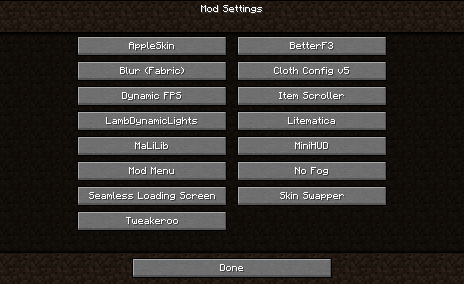
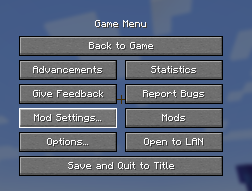
Mod Settings work fine with Mod Menu. It does not require the Mod Menu mod to be present, but if it is, it tries to add the "Mod Settings…" button close to the "Mods" button from Mod Menu.
Mod Settings use the API created by Mod Menu to query the mods for how to present a configuration screen. All mods that can be configured from within Mod Menu will show up on the Mod Settings screen, and conversely, mods that cannot be configured from within Mod Menu will not show up on the Mod Settings screen.
This mod needs Fabric API. If you have a modded Minecraft, chances are it is already installed. Otherwise, you can find it here: Fabric API on Modrinth)](https://modrinth.com/mod/fabric-api%29).
You can download the mod from any of these sites:
Install this as you would any other Fabric mod. (I recommend using a replacement launcher such as Prism Launcher for modded Minecraft.)
Do you have any problems with the mod? Please open an issue on Github.
The mod Content Creator Integration versions 1.9.3 and older contains an incompatible implementation of the Mod Menu API. This is fixed in newer versions of CCI.
Check out my other mods, which also supplies vanilla-style usability enhancements:

Status Effect Timer is a Minecraft mod for Fabric that overlays a timer on the Vanilla status effect HUD icons.

Elytra Indicators is a Minecraft mod for Fabric that provides Vanilla-style "fly by instrument" support for elytra flight.
Project description from CurseForge.
Pick your setup
Choose the version and loader you play, then open the matching release.
Showing the newest 12 of 34 game versions. Older files are in the list below.
Check the dependencies, then try the file in a copied instance before changing a world you care about.
Recent files
ModSettings-1.2.0+26.3.jar
20 Sept 2026
modsettings-1.2.0+26.1.jar
9 Jul 2026
modsettings-1.2.0+26.1.jar
9 Jul 2026
modsettings-1.2.0+1.21.11.jar
9 Jul 2026
modsettings-1.2.0+1.21.9.jar
9 Jul 2026
modsettings-1.2.0+1.21.jar
13 Jun 2024
modsettings-1.1.0+1.20.3.jar
27 Apr 2024
modsettings-1.1.0+1.20.jar
27 Apr 2024
modsettings-1.1.0+1.19.4.jar
27 Apr 2024
modsettings-1.1.0+1.19.jar
27 Apr 2024
modsettings-1.1.0+1.18.1.jar
27 Apr 2024
modsettings-1.1.0+1.17.1.jar
27 Apr 2024
Looking for an older file? The official CurseForge project page is in Resources.
 mod
modA library that serves as a bridge between mods.
 mod
modTurkish Okey and Tavla on real tables: the Rummikub-style tile game with 106 tiles and istaka racks, plus backgammon with 30 checkers and dice. AI uncles, live stakes, a turn clock, nargile and cay.
 mod
modA varied and simple quests system!