Fabric API Needed by [Fabric] Map Saver [1.19.X] Map Saver 1.0.2
requiredMatching file found Matched file: [1.19.1] Fabric API 0.58.5+1.19.1
CurseForge · Minecraft mod
A client only mod that allows you to save maps from item frames as images
Quick answer
[Fabric] Map Saver [1.19.X] Map Saver 1.0.2 targets 1.19.1, 1.19 with Fabric. The project page does not say whether this file belongs on the client, dedicated server, or both. All 1 required mods have matching files.
Where it goes
The project page does not say whether this file belongs on the client, dedicated server, or both.
The source does not explicitly classify this release as client-only or server-only.
[1.19.X] Map Saver 1.0.2. Change the file and its required mods may change too.
Install Fabric API first. We found matching files for this game-version and loader setup.
We only count dependency files that match this setup. A file for another loader does not fill the gap.
Before you install it
Built for [Fabric] Map Saver [1.19.X] Map Saver 1.0.2. Pick another file and the loader, install side or required mods may change.
Use [1.19.X] Map Saver 1.0.2. It targets 1.19.1, 1.19 with Fabric; another release may have different loader, side or dependency requirements.
Install Fabric API first. We found matching files for this game-version and loader setup.
The project page does not say whether this file belongs on the client, dedicated server, or both.
Use the “Get this file” button beside [1.19.X] Map Saver 1.0.2. It opens that exact file at the source.
About this project
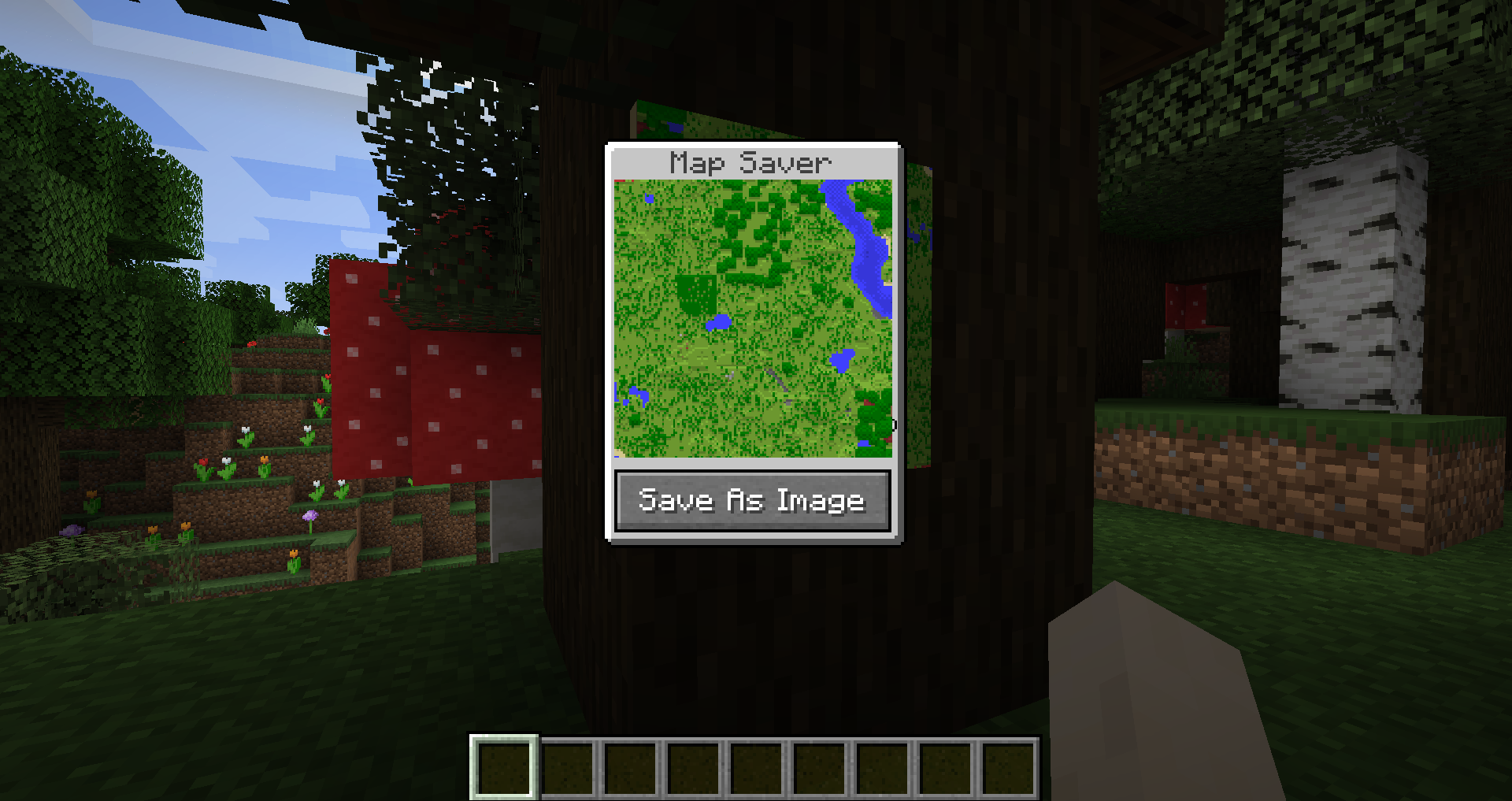
Saw a cool map art and want to save it? Shift-click the item frame and simply do it with Map Saver! This client-side mod allows you to save maps that players put in item frames by shift-clicking them.
Simply shift-click an item frame with a map in it and a HUD will appear which will display the entire map you are saving. Press "Save As Image" and the map will be saved in .minecraft/map_screenshots
Have an issue with the mod? Got some feedback? Or do you simply want to be updated on my mods? Join my Discord server!
Project description from CurseForge.
Pick your setup
Choose the version and loader you play, then open the matching release.
Check the dependencies, then try the file in a copied instance before changing a world you care about.
Recent files
map_saver-1.0.2-1.19.jar
3 Aug 2022
map_saver-1.0.1-1.19.jar
10 Jun 2022
map_saver-1.0.1-1.18.2.jar
10 Apr 2022
map_saver-1.0.1-1.18.jar
1 Dec 2021
map_saver-1.0.0-1.18.jar
30 Nov 2021
map_saver-1.0.0.jar
6 Nov 2021
Looking for an older file? The official CurseForge project page is in Resources.
 mod
Extends FTB Industrial Contraptions spray paint cans to all 16 Minecraft dye colors !
 mod
See invisible ranges: beacons, conduits, spawners, raids, sculk sensors and shriekers, and spawn chunks, each with its own color and toggle key.
 mod
HUD:A lightweight Jade alternative ,effect timmer ,Target Info,Saturation and Coordinates Monitor ,Waila,HWYLA,show Horse speed and jump stats,death location,Death Finder