CoFH Core Needed by Tool's Complement tools_complement-1.20.1-4.0.0.25.jar
requiredMatching file found Matched file: cofh_core-1.20.1-11.0.2.56.jar
CurseForge · Minecraft mod
More tool types and modded metal support.
Quick answer
Tool's Complement tools_complement-1.20.1-4.0.0.25.jar targets 1.20.1 with NeoForge, Forge. The project page does not say whether this file belongs on the client, dedicated server, or both. All 1 required mods have matching files.
Where it goes
The project page does not say whether this file belongs on the client, dedicated server, or both.
The source does not explicitly classify this release as client-only or server-only.
tools_complement-1.20.1-4.0.0.25.jar. Change the file and its required mods may change too.
Install CoFH Core first. We found matching files for this game-version and loader setup.
We only count dependency files that match this setup. A file for another loader does not fill the gap.
Before you install it
Built for Tool's Complement tools_complement-1.20.1-4.0.0.25.jar. Pick another file and the loader, install side or required mods may change.
Use tools_complement-1.20.1-4.0.0.25.jar. It targets 1.20.1 with NeoForge, Forge; another release may have different loader, side or dependency requirements.
Install CoFH Core first. We found matching files for this game-version and loader setup.
The project page does not say whether this file belongs on the client, dedicated server, or both.
Use the “Get this file” button beside tools_complement-1.20.1-4.0.0.25.jar. It opens that exact file at the source.
About this project
__Active Development__: Minecraft 1.18.2
Website: Team CoFH
Discord: Team CoFH Discord
Tool's Complement adds weapons and armor for most standard metals. A lot of this was once in Thermal Foundation in 1.12.
This mod has been redesigned to be more Vanilla+ friendly, though it still plays well alongside the Thermal Series.
This mod requires CoFH Core. It can be found here: CoFH Core
tools_complement-client.toml file located in /configtools_complement-server.toml located in the /saves/WORLD_NAME/serverconfigs folder.Copying this file to your /defaultconfigs folder will apply those configs to all newly created worlds.
Dedicated servers will have this file in /world/serverconfigs
This section describes features available for the version under active development. Older versions may have different features.
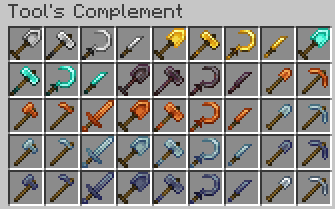
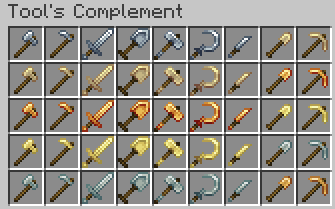
There are currently 9 metals supported, each with a Tool and Armor set. Standard Minecraft tools are provided, as well as 4 new ones:
Hammer - AoE Mining
Excavator - AoE Shovel
Sickle - AoE Plant Clearing
Knife - Faster Attack, Lower Damage Sword
Each of these tools is also provided in standard Minecraft materials (Iron, Diamond, etc).
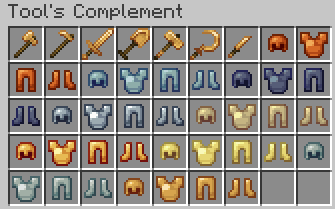
Project description from CurseForge.
Pick your setup
Choose the version and loader you play, then open the matching release.
Check the dependencies, then try the file in a copied instance before changing a world you care about.
Recent files
20 Dec 2023
20 Sept 2023
20 Sept 2023
5 Feb 2023
5 Feb 2023
26 Nov 2022
20 Nov 2022
14 Oct 2022
18 Jun 2022
24 May 2022
16 May 2022
14 May 2022
Looking for an older file? The official CurseForge project page is in Resources.
 mod
modUpgrade your fishing experience with powerful fishing rods, rare crystals, unique effects, and progression-based rewards.
 mod
modMine faster and wider with excavators that break 3x3 areas of blocks at once.
 mod
modThis mod adds more content for Minecraft gold ingots. It features various building blocks including doors, lanterns and fences, alongside a brand‑new sturdygold material with its full set of tools and building blocks.