Fabric API Needed by Mod-erate Loading Screen 1.4.3 for 1.20.6
requiredMatching file found Matched file: [1.20.5] Fabric API 0.97.8+1.20.5

CurseForge · Minecraft mod
An "alternative" to Mod Menu that's a lot less usable.
Quick answer
Mod-erate Loading Screen 1.4.3 for 1.20.6 targets 1.20.5, 1.20.6 with Fabric. The project page does not say whether this file belongs on the client, dedicated server, or both. All 2 required mods have matching files.
Where it goes
The project page does not say whether this file belongs on the client, dedicated server, or both.
The source does not explicitly classify this release as client-only or server-only.
1.4.3 for 1.20.6. Change the file and its required mods may change too.
Install Fabric API, CICADA first. We found matching files for this game-version and loader setup.
We only count dependency files that match this setup. A file for another loader does not fill the gap.
Before you install it
Built for Mod-erate Loading Screen 1.4.3 for 1.20.6. Pick another file and the loader, install side or required mods may change.
Use 1.4.3 for 1.20.6. It targets 1.20.5, 1.20.6 with Fabric; another release may have different loader, side or dependency requirements.
Install Fabric API, CICADA first. We found matching files for this game-version and loader setup.
The project page does not say whether this file belongs on the client, dedicated server, or both.
Use the “Get this file” button beside 1.4.3 for 1.20.6. It opens that exact file at the source.
About this project


An "alternative" to Mod Menu that's a lot less usable. (full feature parity not included)
Makes the icons of installed mods fall down the loading screen like snowflakes. Includes a few configuration options like showing every mod only once, hiding libraries, and changing the background color. I'd recommend installing the actual Mod Menu mod to access the configs.
Discord: https://discord.gg/WcYsDDQtyR
Example of snowflakes mode on the Benchmark II modpack with modified background color: 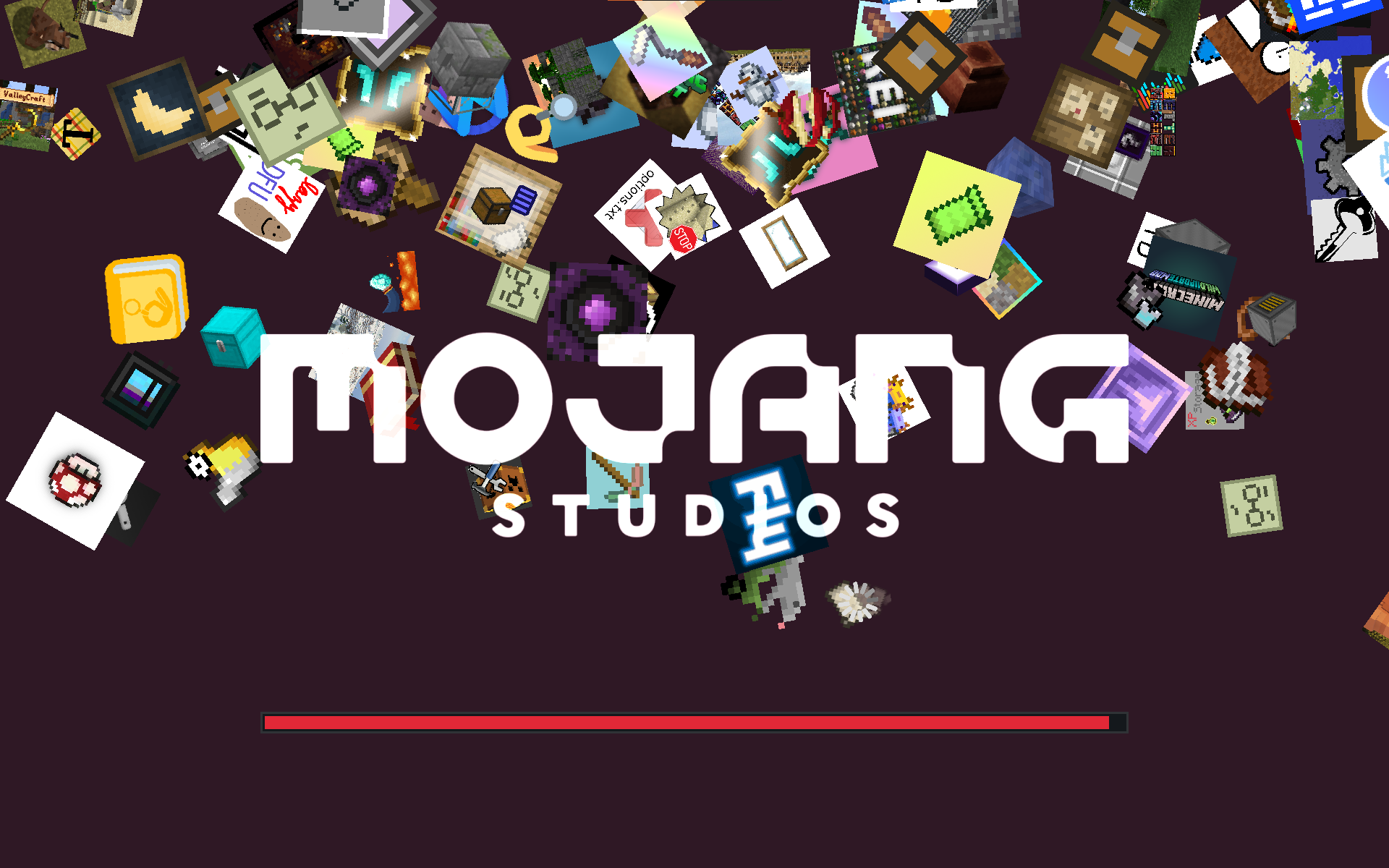
Example of stacking mode, also on Benchmark II: 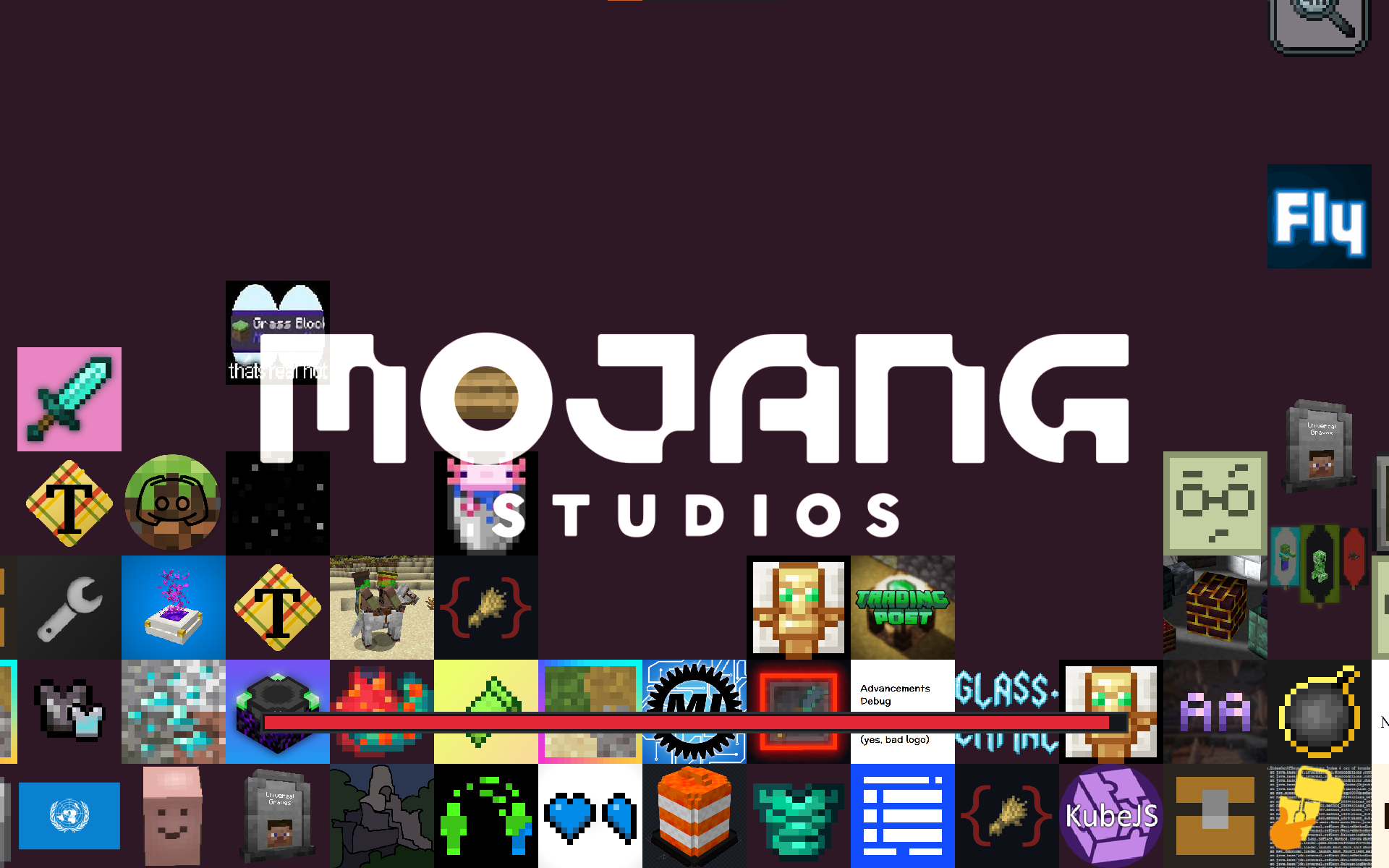
Heavily based on and inspired by Quilt Loading Screen
Project description from CurseForge.
Pick your setup
Choose the version and loader you play, then open the matching release.
Showing the newest 12 of 22 game versions. Older files are in the list below.
Check the dependencies, then try the file in a copied instance before changing a world you care about.
Recent files
moderate-loading-screen-1.4.3+1.20.6.jar
22 Dec 2024
moderate-loading-screen-1.4.3+1.20.4.jar
22 Dec 2024
moderate-loading-screen-1.4.3+1.20.1.jar
22 Dec 2024
moderate-loading-screen-1.4.3+1.21.3.jar
22 Dec 2024
moderate-loading-screen-1.4.3+1.21.4.jar
22 Dec 2024
moderate-loading-screen-1.4.3+1.19.4.jar
22 Dec 2024
moderate-loading-screen-1.4.3+1.21.jar
22 Dec 2024
moderate-loading-screen-1.4.3+1.20.2.jar
22 Dec 2024
moderate-loading-screen-1.4.2+1.20.6.jar
24 Jun 2024
moderate-loading-screen-1.4.2+1.19.4.jar
24 Jun 2024
moderate-loading-screen-1.4.2+1.20.4.jar
24 Jun 2024
moderate-loading-screen-1.4.2+1.20.1.jar
24 Jun 2024
Looking for an older file? The official CurseForge project page is in Resources.
 mod
5th Version of the QDC Quantum Dis-Assembly Craft mod. Focusing on QOL Usability and other Mods Compatibility.
 mod
Makes Indev 20100223 playable again.
 mod
Turn players and mobs into penguins, then make them dance with built-in or custom animations. 让玩家和生物变成企鹅,并用内置或自定义动作跳舞。