Minecraft version
Back to mods 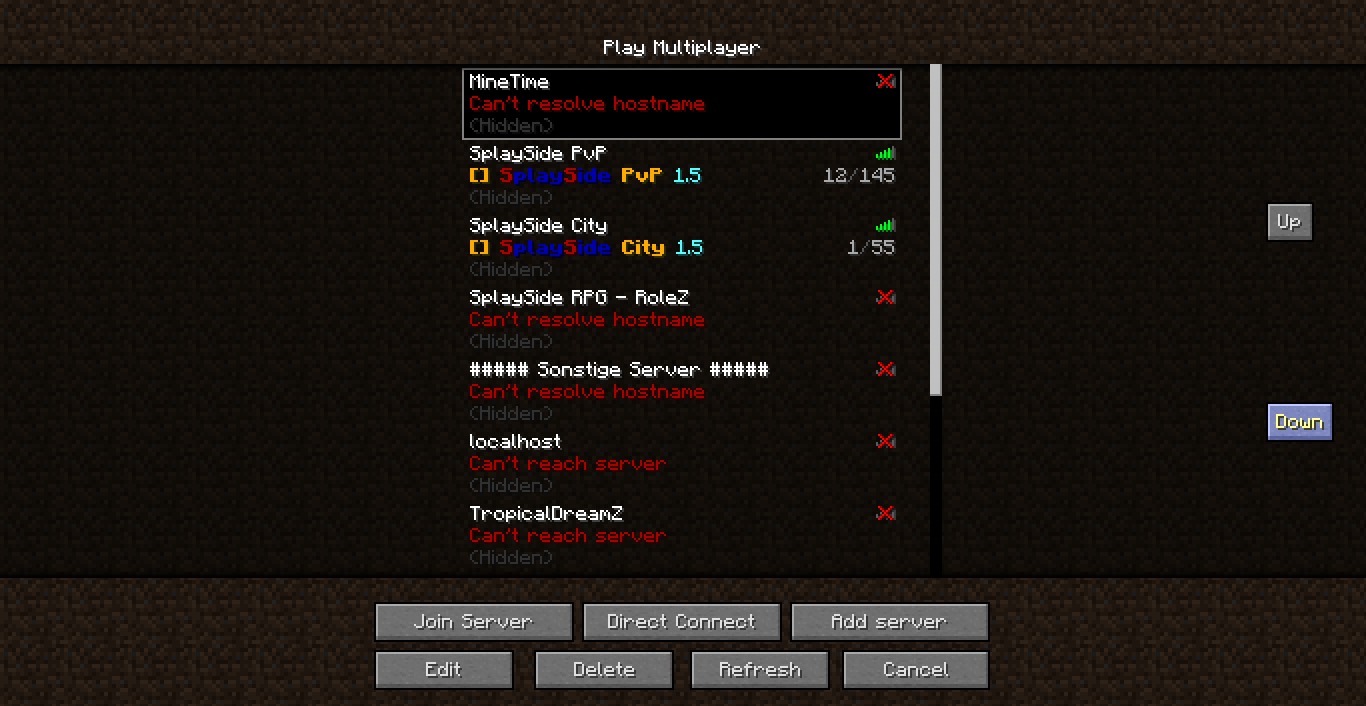
CurseForge · Minecraft mod
Server Sort
Server Sort
Choose a version Pick your version below, then grab the matching file.
Quick answer
Which Server Sort release should I use?
Latest stable file ServerSort.zip
Game version 1.6.2
Loader Not required
Server Sort ServerSort.zip targets 1.6.2. The project page does not say whether this file belongs on the client, dedicated server, or both. No extra mods listed for this file.
Where it goes
Is Server Sort required on the client, server, or both?
The project page does not say whether this file belongs on the client, dedicated server, or both.
Client Source doesn’t say
Dedicated server Source doesn’t say
Loader for this release No loader listed
Required install it here Optional supported, not mandatory Not supported do not install here Source doesn’t say do not assume
The source does not explicitly classify this release as client-only or server-only.
What else does Server Sort ServerSort.zip need?
ServerSort.zip. Change the file and its required mods may change too.
This file does not list any required mods. Do not add a library just because a different file uses it.
This file does not list any required or optional mods.
Before you install it
Add Server Sort without breaking your instance.
Built for Server Sort ServerSort.zip. Pick another file and the loader, install side or required mods may change.
- 01
Stick to this file
Use ServerSort.zip. It targets 1.6.2; another release may have different loader, side or dependency requirements.
- 02
Bring the mods it needs
This file does not list any required mods. Do not add a library just because a different file uses it.
- 03
Put it on the correct side
The project page does not say whether this file belongs on the client, dedicated server, or both.
- 04
Pick the file you checked
Use the “Get this file” button beside ServerSort.zip. It opens that exact file at the source.
About this project
What does Server Sort add?
Server Sort
With this mod you can move the servers in the server list up and down
Images
Installation
- Find the .minecraft directory
- Then navigate to versions/VERSION/
- Open VERSION.jar with 7zip or a similar programm.
- Drag and drop all files within ServerSort.zip into the jar.
- Remove the folder "META-INF".
- Start minecraft.
- Enjoy!
Replace the word VERSION with the version you want to mod
Source Code
Here is the source code: Click here
Project description from CurseForge.
Pick your setup
Server Sort by Minecraft version and loader
Choose the version and loader you play, then open the matching release.
Minecraft version
1.6.1
1 loader buildMinecraft version
1.5.2
1 loader buildMinecraft version
1.5.1
1 loader buildMinecraft version
1.5.0
1 loader buildCheck the dependencies, then try the file in a copied instance before changing a world you care about.
Recent files
Server Sort versions and loaders
ServerSort.zip
9 Jul 2013
Client Source doesn’t say Server Source doesn’t say Dependencies No extras listed Listed on Release listing
Check the 1.6.2 setup 1.6.2 release
ServerSort.zip
3 Jul 2013
Client Source doesn’t say Server Source doesn’t say Dependencies No extras listed Listed on Release listing
Check the 1.6.1 setup 1.6.1 release
ServerSort.zip
13 May 2013
Client Source doesn’t say Server Source doesn’t say Dependencies No extras listed Listed on Release listing
Check the 1.5.2 setup 1.5.2 release
ServerSort1.0.zip
15 Apr 2013
Client Source doesn’t say Server Source doesn’t say Dependencies No extras listed Listed on Release listing
Check the 1.5.1 setup 1.5.11.5.0 release
Looking for an older file? The official CurseForge project page is in Resources.
 mod
mod CurseForge · Minecraft
OneKeyMiner(Neo)Forge and Fabric| Vein Miner | Chain Vein
This mod adds the ability to chain tools to break blocks and chain farming while holding down the chain button. If you break a block, the adjacent blocks will be destroyed together, or if you hold a seed, the adjacent farmland will also be planted.
 mod
mod CurseForge · Minecraft
Gamemode Detector
Client-side Fabric mod that notifies you when players switch gamemode, shows how long they've been in it, and logs each player's switch history via /checkgamemode and /gamemodelog.
 mod
mod CurseForge + Modrinth · Minecraft
Greews Races
Race selection mod, always wanted to play as a Dwarf, Elf, Fairy or Human?! Now you can, this mod adds new races with different bonuses and maluses. Oh and Vampire Biome