Minecraft version
Back to mods 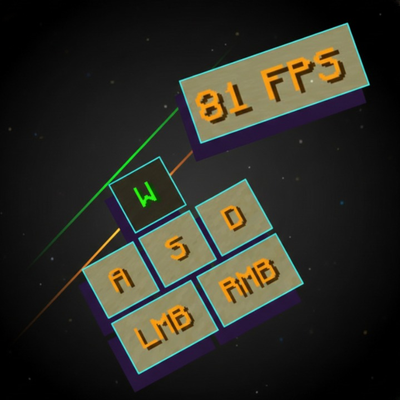
CurseForge · Minecraft mod
Lunar Keystrokes
Lunar Keystrokes By Rakib
Choose a version Pick your version below, then grab the matching file.
Quick answer
Which Lunar Keystrokes release should I use?
Latest stable file [26.3] Lunar Keystrokes V3.1.1
Game version 26.3
Loader Forge
Lunar Keystrokes [26.3] Lunar Keystrokes V3.1.1 targets 26.3 with Forge. The project page does not say whether this file belongs on the client, dedicated server, or both. No extra mods listed for this file.
Where it goes
Is Lunar Keystrokes required on the client, server, or both?
The project page does not say whether this file belongs on the client, dedicated server, or both.
Client Source doesn’t say
Dedicated server Source doesn’t say
Loader for this release Forge
Required install it here Optional supported, not mandatory Not supported do not install here Source doesn’t say do not assume
The source does not explicitly classify this release as client-only or server-only.
What else does Lunar Keystrokes [26.3] Lunar Keystrokes V3.1.1 need?
[26.3] Lunar Keystrokes V3.1.1. Change the file and its required mods may change too.
This file does not list any required mods. Do not add a library just because a different file uses it.
This file does not list any required or optional mods.
Before you install it
Add Lunar Keystrokes without breaking your instance.
Built for Lunar Keystrokes [26.3] Lunar Keystrokes V3.1.1. Pick another file and the loader, install side or required mods may change.
- 01
Stick to this file
Use [26.3] Lunar Keystrokes V3.1.1. It targets 26.3 with Forge; another release may have different loader, side or dependency requirements.
- 02
Bring the mods it needs
This file does not list any required mods. Do not add a library just because a different file uses it.
- 03
Put it on the correct side
The project page does not say whether this file belongs on the client, dedicated server, or both.
- 04
Pick the file you checked
Use the “Get this file” button beside [26.3] Lunar Keystrokes V3.1.1. It opens that exact file at the source.
About this project
What does Lunar Keystrokes add?
How To Use
Type /keystrokes to open the Keystrokes HUD editor.
Keystrokes: Toggle the WASD movement HUD on or off.
Jump: Toggle the Space key HUD on or off.
Sneak: Toggle the Sneak key HUD on or off.
Mouse: Toggle the mouse HUD between On, Off, and Separate modes.
- On: Displays LMB and RMB mouse buttons.
- Off: Hides the mouse HUD.
- Separate: Displays the modern 0 | 0 CPS counter as an independent HUD.
Default Color: Change the normal color of keys and HUD elements.
Pressed Color: Change the color displayed when a key is pressed.
Both color options support RGB values, HEX codes, and a color picker with adjustable sliders.
CPS: Toggle CPS numbers inside the LMB and RMB boxes. When enabled, the button labels change to CPS numbers while clicking and return to LMB/RMB when CPS reaches zero. This option is available only when Mouse is set to On.
FPS: Enable or disable the FPS HUD.
Drag HUD elements to change their positions and use the scale slider to resize them.
FEATURES
Customizable WASD, Jump, Sneak, LMB and RMB indicators.
Independent FPS and Mouse HUDs.
Separate Mouse HUD mode with a modern 0 | 0 CPS display.
Live CPS counter inside LMB and RMB indicators.
Customizable default and pressed colors.
RGB and HEX color input with an interactive color picker.
Rainbow Keystrokes available.
Adjustable HUD scale (0.5×–3.0×).
Drag-and-drop HUD positioning.
HUD Customization:
- Attach or detach individual HUD elements from the main Keystrokes HUD.
- Arrange HUD elements in any vertical order.
- Detached elements become independent, freely movable HUDs.
- Automatically adjusts the layout when elements are attached or detached.
- Mouse HUD can be separated and positioned independently.
- Grid snapping with visible alignment guides.
- HUD elements maintain a minimum 5 px gap to prevent overlapping.
- Double-click any HUD element to reset its scale to 1×.
- Reset all HUD positions and stacking layout with one click.
- Automatically saves HUD positions, scale, and colors.
- Editable configuration file with automatic repair for invalid values.
Project description from CurseForge.
Pick your setup
Lunar Keystrokes by Minecraft version and loader
Choose the version and loader you play, then open the matching release.
Minecraft version
1.8.9
1 loader buildCheck the dependencies, then try the file in a copied instance before changing a world you care about.
Recent files
Lunar Keystrokes versions and loaders
[26.3] Lunar Keystrokes V3.1.1
26.3-Lunar-Keystrokes-V3.1.1.jar
9 Nov 2026
Client Source doesn’t say Server Source doesn’t say Dependencies No extras listed Listed on Release listing
Check the 26.3 · Forge setup Forge26.3 release
[1.8.9] Lunar Keystrokes Mod v3.1.1.jar
23 Oct 2026
Client Source doesn’t say Server Source doesn’t say Dependencies No extras listed Listed on Release listing
Check the 1.8.9 · Forge setup Forge1.8.9 release
[1.8.9] Lunar Keystrokes Mod v3.1.jar
22 Oct 2026
Client Source doesn’t say Server Source doesn’t say Dependencies No extras listed Listed on Release listing
Check the 1.8.9 · Forge setup Forge1.8.9 release
[1.8.9] Lunar Keystrokes Mod v3.jar
[1.8.9] Lunar Keystrokes Mod v3-3.0.jar
1 Feb 2026
Client Source doesn’t say Server Source doesn’t say Dependencies No extras listed Listed on Release listing
Check the 1.8.9 · Forge setup Forge1.8.9 release
[1.8.9] Lunar Keystrokes V2
[1.8.9] Lunar Kyestrokes V2.jar
9 Jan 2022
Client Source doesn’t say Server Source doesn’t say Dependencies No extras listed Listed on Release listing
Check the 1.8.9 · Forge setup Forge1.8.9 release
Kyestrokes 1.8.9
Keystrokes-8.0.2 (1.8.9).jar
21 Dec 2021
Client Source doesn’t say Server Source doesn’t say Dependencies No extras listed Listed on Release listing
Check the 1.8.9 · Forge setup Forge1.8.9 release
Looking for an older file? The official CurseForge project page is in Resources.
 mod
CurseForge · Minecraft
Optimized Block Entities
A client-side optimization mod to make block entities render faster
 mod
CurseForge · Minecraft
Classic Achievements
Restores the classic look of Minecraft's achievement interface, with new additions and quality-of-life improvements. Brings back the nostalgic feel of the old days while making achievements more convenient to use.
 mod
CurseForge · Minecraft
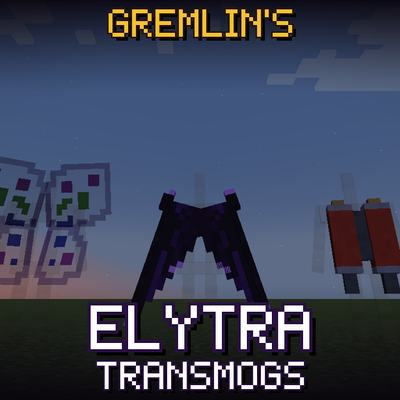
Gremlin's Elytra Transmogs
Using Gremlin's Transmogs, change the whole appearance of your Elytra!