Curios API Needed by Mobile Beacons MobileBeacons1.20.1(Forge)vs1.0.3
requiredMatching file found Matched file: curios-forge-5.14.1+1.20.1.jar

CurseForge · Minecraft mod
Take the power of beacons wherever you go! Fuel your portable beacons with redstone, customize your effects, automatically collect fuel, and track your remaining runtime with a customizable HUD.
Quick answer
Mobile Beacons MobileBeacons1.20.1(Forge)vs1.0.3 targets 1.20.1 with Forge. The project page does not say whether this file belongs on the client, dedicated server, or both. All 1 required mods have matching files.
Where it goes
The project page does not say whether this file belongs on the client, dedicated server, or both.
The source does not explicitly classify this release as client-only or server-only.
MobileBeacons1.20.1(Forge)vs1.0.3 on 1.20.1 Forge. Every mod below is checked against that same setup.
Install Curios API first. We found matching files for this game-version and loader setup.
We only count dependency files that match this setup. A file for another loader does not fill the gap.
Before you install it
Built for Mobile Beacons MobileBeacons1.20.1(Forge)vs1.0.3 on 1.20.1 Forge. Pick another file and the loader, install side or required mods may change.
Use MobileBeacons1.20.1(Forge)vs1.0.3. It targets 1.20.1 with Forge; another release may have different loader, side or dependency requirements.
Install Curios API first. We found matching files for this game-version and loader setup.
The project page does not say whether this file belongs on the client, dedicated server, or both.
Use the “Get this file” button beside MobileBeacons1.20.1(Forge)vs1.0.3. It opens that exact file at the source.
About this project
Power in Your Pocket. Adventure Without Limits.
Why leave the power of a beacon behind?
Mobile Beacons brings the benefits of traditional Minecraft beacons wherever your adventures take you. Whether you're mining deep underground, exploring distant lands, building massive structures, or battling hostile mobs, your personal beacon keeps you powered up along the way.
Completely redesigned for Minecraft 1.21.1, the Revival Update introduces a redstone-powered fuel system, customizable effects, expanded fuel storage, and much more!
Each material upgrade unlocks additional effects and increases your beacon's fuel storage capacity.
| Material | Available Effects | Fuel Slots |
|---|---|---|
| Iron | Regeneration, Speed | 6 |
| Gold | Regeneration, Speed, Jump Boost | 8 |
| Emerald | Regeneration, Speed, Jump Boost, Haste | 10 |
| Diamond | Regeneration, Speed, Jump Boost, Haste, Strength | 12 |
| Netherite | Regeneration, Speed, Jump Boost, Haste, Strength, Resistance | 14 |
Rank I beacons provide level I effects, while Rank II beacons provide level II effects at an increased fuel consumption rate.
Upgrading your beacon preserves its stored fuel and configuration.
Forget sacrificing experience levels to keep your beacon running!
Simply load your Mobile Beacon with Redstone Dust or Redstone Blocks, activate it, and let it automatically manage its fuel.
Disable effects you don't currently need to extend your operating time.
Fuel is not consumed while your beacon is inactive.
Spend less time managing your inventory and more time exploring!
Enable Auto-Collect in your beacon's Fuel tab to automatically store newly collected redstone in its internal fuel inventory.
When the beacon is full, additional redstone is handled by your normal inventory.
Perfect for extended mining expeditions!
The Fuel tab allows you to manage redstone reserves, monitor fuel levels, view estimated runtime, and configure automatic fuel collection.
The Effects tab allows you to individually enable or disable available effects.
Keep track of your beacon without interrupting your adventure.
The Mobile Beacons HUD features:
Customize the HUD to suit your preferred Minecraft experience, or disable it entirely.
Mobile Beacons is designed for both single-player and multiplayer gameplay.
Server owners and modpack developers can customize fuel consumption, fuel values, and beacon aura range to suit their desired gameplay balance.
By default, beacon effects apply only to their holder. Server administrators can configure an aura radius to allow nearby players to benefit as well.
Mobile Beacons works without Curios installed.
Installing a compatible version of Curios adds a dedicated Mobile Beacon equipment slot, allowing you to carry your beacon without occupying a regular inventory slot.
Mobile Beacons returns with a complete modernization for Minecraft 1.21.1 and NeoForge!
This update preserves the original mod's identity while introducing an entirely redesigned fuel system, improved progression, a new configuration interface, and a customizable gameplay HUD.
Important for returning players: The original experience-based power system has been replaced with redstone fuel. Built-in death protection has also been removed in favor of standalone item protection mods such as Soulbinding.
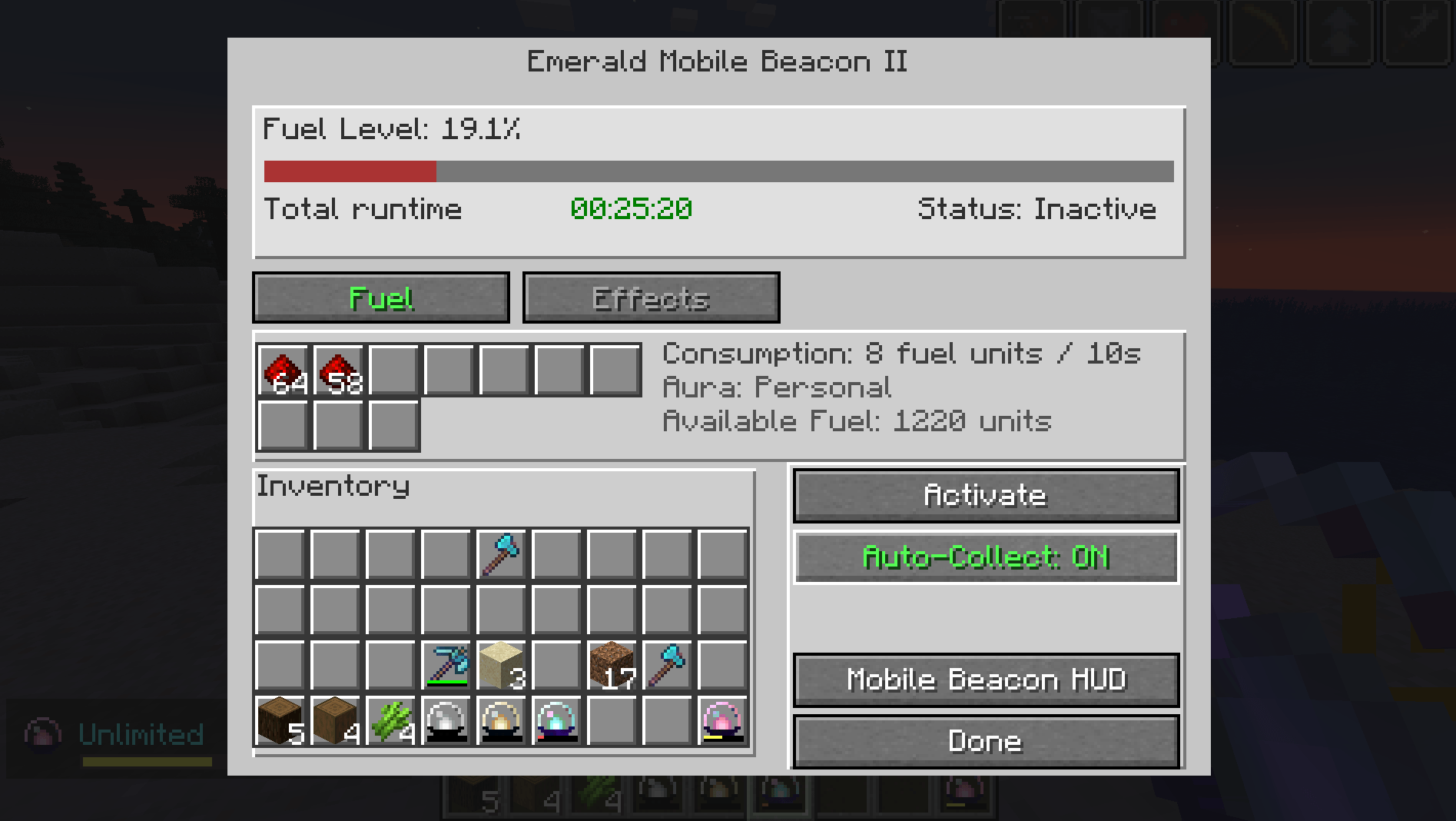
New UI for 1.21.1 Neoforge!
Have a suggestion, discovered a bug, or want to follow the development of future updates?
Join the Coldspell Games community on Discord!

Project description from CurseForge.
Pick your setup
Choose the version and loader you play, then open the matching release.
Check the dependencies, then try the file in a copied instance before changing a world you care about.
Recent files
MobileBeacons1.20.1(Forge)vs1.0.3.jar
24 Sept 2023
Looking for an older file? The official CurseForge project page is in Resources.
 mod
The World Will Soon Be Destroyed....
 mod
Deep within the subterranean depths, ancient towns lie waiting.
 mod
A clumsy-but-earnest servo arm that sorts your chests, plus sentry turrets and a missile battery to guard the city, and a wearable exoskeleton jacket with shoulder guns — all drawn as runtime vector machinery.