Fabric API Needed by Show Me What You Got 1.21.3: SMWYG 1.2.0
requiredMatching file found Matched file: [1.21.3] Fabric API 0.114.1+1.21.3
CurseForge · Minecraft mod
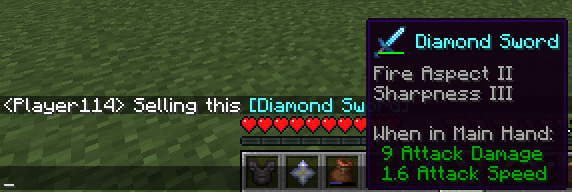
Allows displaying your items in chat. Brag about your cool equipment!
Quick answer
Show Me What You Got 1.21.3: SMWYG 1.2.0 targets 1.21.3 with Fabric, Quilt. The project page does not say whether this file belongs on the client, dedicated server, or both. All 1 required mods have matching files.
Where it goes
The project page does not say whether this file belongs on the client, dedicated server, or both.
The source does not explicitly classify this release as client-only or server-only.
1.21.3: SMWYG 1.2.0. Change the file and its required mods may change too.
Install Fabric API first. We found matching files for this game-version and loader setup.
We only count dependency files that match this setup. A file for another loader does not fill the gap.
Before you install it
Built for Show Me What You Got 1.21.3: SMWYG 1.2.0. Pick another file and the loader, install side or required mods may change.
Use 1.21.3: SMWYG 1.2.0. It targets 1.21.3 with Fabric, Quilt; another release may have different loader, side or dependency requirements.
Install Fabric API first. We found matching files for this game-version and loader setup.
The project page does not say whether this file belongs on the client, dedicated server, or both.
Use the “Get this file” button beside 1.21.3: SMWYG 1.2.0. It opens that exact file at the source.
About this project
Show Me What You Got
A simple mod which allows displaying your items to other users in chat.
While in your inventory, hold ctrl and then press your chat key while hovering over an item to share it. (so Ctrl+T by default).
Your chat window will open with the linked item inside. Feel free to write a message before or after the item (or both) before sending!
Client or server?
The mod should be installed on the client and the server in order to function properly. Clients without the mod can still see items shared by others with the mod in chat, but can't share items themselves and also won't see the shared item's texture in the tooltip. If you use this mod on your client and try to share an item on a server without the mod installed, you will just send text with the item name.
Project description from CurseForge.
Pick your setup
Choose the version and loader you play, then open the matching release.
Showing the newest 12 of 20 game versions. Older files are in the list below.
Check the dependencies, then try the file in a copied instance before changing a world you care about.
Recent files
ShowMeWhatYouGot-1.21.3-1.2.0.jar
12 Nov 2024
ShowMeWhatYouGot-1.20.2-1.2.0.jar
18 Nov 2023
ShowMeWhatYouGot-1.20-1.1.1.jar
8 Jul 2023
ShowMeWhatYouGot-1.19.4-1.1.1.jar
8 Jul 2023
ShowMeWhatYouGot-1.18-1.0.4.jar
7 Jul 2023
15 Mar 2023
7 Feb 2023
21 Dec 2022
28 Jul 2022
14 Apr 2022
10 Jan 2022
7 Jan 2022
Looking for an older file? The official CurseForge project page is in Resources.
 mod
A Create addon that brings living creatures into the factory. | 一个把活体生物接进工厂里的机械动力附属模组。
 mod
The Portal Gun From Portal 1 and Portal 2 and more!
 mod
Adds trails to arrows, tridents, and ender pearls