


Minecraft version
Back to mods ![Delete Worlds To Trash [Legacy Fabric] project artwork](https://media.forgecdn.net/avatars/483/823/637784455894487502.png)
CurseForge · Minecraft mod
Delete Worlds To Trash [Legacy Fabric]
Deleted worlds are gone forever, right? Not anymore! Simply restore them from your recycle bin.
Choose a version Pick your version below, then grab the matching file.
Quick answer
Which Delete Worlds To Trash [Legacy Fabric] release should I use?
Latest stable file DeleteWorldsToTrash-v3.2.0-1.18.2-Fabric.jar
Game version 1.18.2
Loader Fabric
Delete Worlds To Trash [Legacy Fabric] DeleteWorldsToTrash-v3.2.0-1.18.2-Fabric.jar targets 1.18.2 with Fabric. The project page does not say whether it belongs on the client. The project page does not say whether it belongs on the dedicated server. No extra mods listed for this file.
Where it goes
Is Delete Worlds To Trash [Legacy Fabric] required on the client, server, or both?
The project page does not say whether it belongs on the client. The project page does not say whether it belongs on the dedicated server.
Client Source doesn’t say
Dedicated server Source doesn’t say
Loader for this release Fabric
Required install it here Optional supported, not mandatory Not supported do not install here Source doesn’t say do not assume
The source does not explicitly classify this release as client-only or server-only.
What else does Delete Worlds To Trash [Legacy Fabric] DeleteWorldsToTrash-v3.2.0-1.18.2-Fabric.jar need?
DeleteWorldsToTrash-v3.2.0-1.18.2-Fabric.jar. Change the file and its required mods may change too.
This file does not list any required mods. Do not add a library just because a different file uses it.
This file does not list any required or optional mods.
Before you install it
Add Delete Worlds To Trash [Legacy Fabric] without breaking your instance.
Built for Delete Worlds To Trash [Legacy Fabric] DeleteWorldsToTrash-v3.2.0-1.18.2-Fabric.jar. Pick another file and the loader, install side or required mods may change.
- 01
Stick to this file
Use DeleteWorldsToTrash-v3.2.0-1.18.2-Fabric.jar. It targets 1.18.2 with Fabric; another release may have different loader, side or dependency requirements.
- 02
Bring the mods it needs
This file does not list any required mods. Do not add a library just because a different file uses it.
- 03
Put it on the correct side
The project page does not say whether it belongs on the client. The project page does not say whether it belongs on the dedicated server.
- 04
Pick the file you checked
Use the “Get this file” button beside DeleteWorldsToTrash-v3.2.0-1.18.2-Fabric.jar. It opens that exact file at the source.
About this project
What does Delete Worlds To Trash [Legacy Fabric] add?
Download for 1.19+: https://www.curseforge.com/minecraft/mc-mods/delete-worlds-to-trash



📖 About:
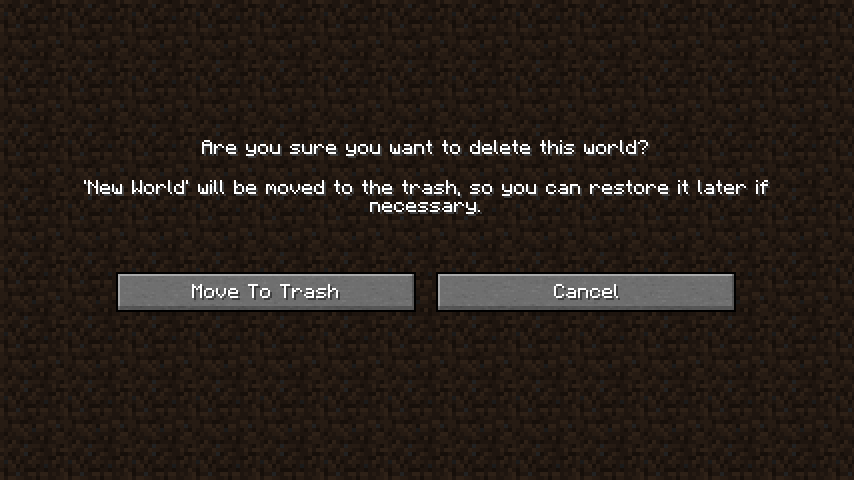
Delete Worlds To Trash makes it so that when deleting a Minecraft world it is moved to the recycle bin/trash instead of being nuked out of existence. Gives you a chance to reconsider, and after all you never know when it might come in handy later on!
📷 Media:
 |
||
|---|---|---|
| New screen for deleting worlds | ||
💡 FAQ:
Q: Does this support all operating systems?
A: Moving an item to the recycle bin/trash varies a lot between operating systems, so this is indeed not guaranteed to work on all systems. This mod has been tested to work on Windows and Mac. Other Gnome based Unix systems should work, too (1.18+ only). If your Linux system is not supported, running apt-get install libgnome2-0 in terminal for installing the necessary components might just do the trick. If your system is not supported, worlds will be deleted using the vanilla method, meaning they're gone forever.
Q: How can I tell whether my operating system is supported?
A: The delete world screen will tell you! If it gives you the option to move a world to the recycle bin/trash everything is supported. If you only see the vanilla delete world screen you're out of luck unfortunately.
🏆 Credits:
Developing Delete Worlds To Trash was helped and inspired by:
- K3nchikka00 for suggesting this feature on Reddit






 |
 |
|
|---|---|---|
 |
 |
|
 |
 |
|
Project description from CurseForge.
Pick your setup
Delete Worlds To Trash [Legacy Fabric] by Minecraft version and loader
Choose the version and loader you play, then open the matching release.
Minecraft version
1.18.1
1 loader buildMinecraft version
1.18
1 loader buildCheck the dependencies, then try the file in a copied instance before changing a world you care about.
Recent files
Delete Worlds To Trash [Legacy Fabric] versions and loaders
DeleteWorldsToTrash-v3.2.0-1.18.2-Fabric.jar
3 Mar 2022
Client Source doesn’t say Server Source doesn’t say Dependencies No extras listed Listed on Release listing
Check the 1.18.2 · Fabric setup Fabric1.18.2 release
DeleteWorldsToTrash-v3.1.0-1.18.1-Fabric.jar
25 Jan 2022
Client Source doesn’t say Server Source doesn’t say Dependencies No extras listed Listed on Release listing
Check the 1.18.1 · Fabric setup 1.18.1Fabric1.18 release
DeleteWorldsToTrash-v3.0.0-1.18.1-Fabric.jar
22 Jan 2022
Client Source doesn’t say Server Source doesn’t say Dependencies No extras listed Listed on Release listing
Check the 1.18.1 · Fabric setup 1.18.1Fabric1.18 release
Looking for an older file? The official CurseForge project page is in Resources.
