Minecraft version
Back to mods 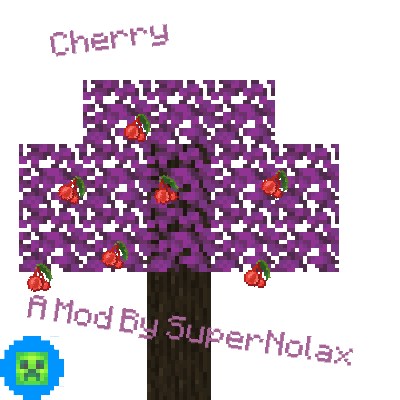
CurseForge · Minecraft mod
SuperNolax's Cherries
A Simple Mod That Adds Cherries To Minecraft
Choose a version Pick your version below, then grab the matching file.
Quick answer
Which SuperNolax's Cherries release should I use?
Latest stable file Cherry V1.0.2 (1.17.1)
Game version 1.17.1
Loader Forge
SuperNolax's Cherries Cherry V1.0.2 (1.17.1) targets 1.17.1 with Forge. The project page does not say whether this file belongs on the client, dedicated server, or both. No extra mods listed for this file.
Where it goes
Is SuperNolax's Cherries required on the client, server, or both?
The project page does not say whether this file belongs on the client, dedicated server, or both.
Client Source doesn’t say
Dedicated server Source doesn’t say
Loader for this release Forge
Required install it here Optional supported, not mandatory Not supported do not install here Source doesn’t say do not assume
The source does not explicitly classify this release as client-only or server-only.
What else does SuperNolax's Cherries Cherry V1.0.2 (1.17.1) need?
Cherry V1.0.2 (1.17.1). Change the file and its required mods may change too.
This file does not list any required mods. Do not add a library just because a different file uses it.
This file does not list any required or optional mods.
Before you install it
Add SuperNolax's Cherries without breaking your instance.
Built for SuperNolax's Cherries Cherry V1.0.2 (1.17.1). Pick another file and the loader, install side or required mods may change.
- 01
Stick to this file
Use Cherry V1.0.2 (1.17.1). It targets 1.17.1 with Forge; another release may have different loader, side or dependency requirements.
- 02
Bring the mods it needs
This file does not list any required mods. Do not add a library just because a different file uses it.
- 03
Put it on the correct side
The project page does not say whether this file belongs on the client, dedicated server, or both.
- 04
Pick the file you checked
Use the “Get this file” button beside Cherry V1.0.2 (1.17.1). It opens that exact file at the source.
About this project
What does SuperNolax's Cherries add?
Hello! If You Are Not Getting This Mod Off CurseForge, MCreator's Official Website Or Planet Minecraft, You Are Possibly On A Mod Stealing Website, It Could Be Infecting Your Device With Various Viruses And Malware! So, Please Scan Your Device For Viruses Or Malware If You Are Not Getting This Mod Off Of CurseForge, MCreator's Official Website Or Planet Minecraft, If It Does Detect Viruses Or Malware, You Should Have Your Security Software Delete The Viruses Or Malware, You Should Have An Anti-Virus Software Running At All Times, Security Measures Over, Onto The Description!
SuperNolax's Cherries Is A Mod That Adds Cherries, A Cherry Tree And Wood Type, And Custom Cherry Leaves That Bloom Overtime!
Question And Answer Time!
Q: How Do I Get Cherries?
A: Right Click A Cherry Leaves Block With Red Dots, It Will Drop A Cherry!
Q2: How Long Did It Take You To Make The Mod?
A2: Two Days, I Had To Build Up The Courage To Publish This Mod For Five Days.
Question And Answer Time Over!
Enjoying My Mods?
More Mods Will Be Made, You Just Have To Give Me Some Time.
Other Official Links!
A Forge Mod.
Project description from CurseForge.
Pick your setup
SuperNolax's Cherries by Minecraft version and loader
Choose the version and loader you play, then open the matching release.
Minecraft version
1.16.5
1 loader buildCheck the dependencies, then try the file in a copied instance before changing a world you care about.
Recent files
SuperNolax's Cherries versions and loaders
Cherry V1.0.2 (1.17.1)
cherry-1.17.1v1.0.2.jar
7 Feb 2022
Client Source doesn’t say Server Source doesn’t say Dependencies No extras listed Listed on Release listing
Check the 1.17.1 · Forge setup 1.17.1Forge release
Cherry V1.0.2 (1.16.5)
cherry-1.16.5v1.0.2.jar
7 Feb 2022
Client Source doesn’t say Server Source doesn’t say Dependencies No extras listed Listed on Release listing
Check the 1.16.5 · Forge setup 1.16.5Forge release
Cherry V1.0.1 (1.17.1)
cherry-1.17.1v1.0.1.jar
7 Feb 2022
Client Source doesn’t say Server Source doesn’t say Dependencies No extras listed Listed on Release listing
Check the 1.17.1 · Forge setup 1.17.1Forge release
Cherry V1.0.1 (1.16.5)
cherry-1.16.5v1.0.1.jar
7 Feb 2022
Client Source doesn’t say Server Source doesn’t say Dependencies No extras listed Listed on Release listing
Check the 1.16.5 · Forge setup 1.16.5Forge release
Cherry V1.0.0 (1.17.1)
cherry-1.17.1v1.0.0.jar
23 Jan 2022
Client Source doesn’t say Server Source doesn’t say Dependencies No extras listed Listed on Release listing
Check the 1.17.1 · Forge setup 1.17.1Forge release
Cherry V1.0.0 (1.16.5)
cherry-1.16.5v1.0.0.jar
23 Jan 2022
Client Source doesn’t say Server Source doesn’t say Dependencies No extras listed Listed on Release listing
Check the 1.16.5 · Forge setup 1.16.5Forge release
Looking for an older file? The official CurseForge project page is in Resources.
 mod
CurseForge + Modrinth · Minecraft
Muffin's Thai's Delight
Cooking expansion focus on Thai's Food. An addon mod for Farmer's Delight.
 mod
CurseForge + Modrinth · Minecraft
Custom Recipes (In Game Editor)
Create custom crafting recipes and custom crafts in-game with a Fabric recipe editor. Manage vanilla/modded recipes, worlds, recipe books, and servers. Now supports custom items (NBTs).
 mod
CurseForge · Minecraft
MBU: More Berry Uses! - Berry food expansion
More Berry Uses adds 14 new food items crafted from Sweet Berries and Glow Berries, giving them real uses beyond early-game snacking.