Minecraft version
Back to mods 
CurseForge · Minecraft mod
Grass Colors
A mod for additional world grass colours
Choose a version Pick your version below, then grab the matching file.
Quick answer
Which Grass Colors release should I use?
Latest stable file grasscolors-1.0.0.jar
Game version 1.16.5
Loader Forge
Grass Colors grasscolors-1.0.0.jar targets 1.16.5 with Forge. The project page does not say whether this file belongs on the client, dedicated server, or both. No extra mods listed for this file.
Where it goes
Is Grass Colors required on the client, server, or both?
The project page does not say whether this file belongs on the client, dedicated server, or both.
Client Source doesn’t say
Dedicated server Source doesn’t say
Loader for this release Forge
Required install it here Optional supported, not mandatory Not supported do not install here Source doesn’t say do not assume
The source does not explicitly classify this release as client-only or server-only.
What else does Grass Colors grasscolors-1.0.0.jar need?
grasscolors-1.0.0.jar. Change the file and its required mods may change too.
This file does not list any required mods. Do not add a library just because a different file uses it.
This file does not list any required or optional mods.
Before you install it
Add Grass Colors without breaking your instance.
Built for Grass Colors grasscolors-1.0.0.jar. Pick another file and the loader, install side or required mods may change.
- 01
Stick to this file
Use grasscolors-1.0.0.jar. It targets 1.16.5 with Forge; another release may have different loader, side or dependency requirements.
- 02
Bring the mods it needs
This file does not list any required mods. Do not add a library just because a different file uses it.
- 03
Put it on the correct side
The project page does not say whether this file belongs on the client, dedicated server, or both.
- 04
Pick the file you checked
Use the “Get this file” button beside grasscolors-1.0.0.jar. It opens that exact file at the source.
About this project
What does Grass Colors add?
Bored of vanilla grass? Dying to see something fresh in your world?
Sneak right-click on Grass or Dirt with any of the 16 vanilla dyes and enjoy a splash of colour.
Also craftable with a ring of 8 dirt surrounding any vanilla dye
Future Release features:
- Config page to allow for custom hex code of each block colour
- A way to swap between colours using the same in-world and crafting recipes mechanic
- A way to revert back to dirt or vanilla grass
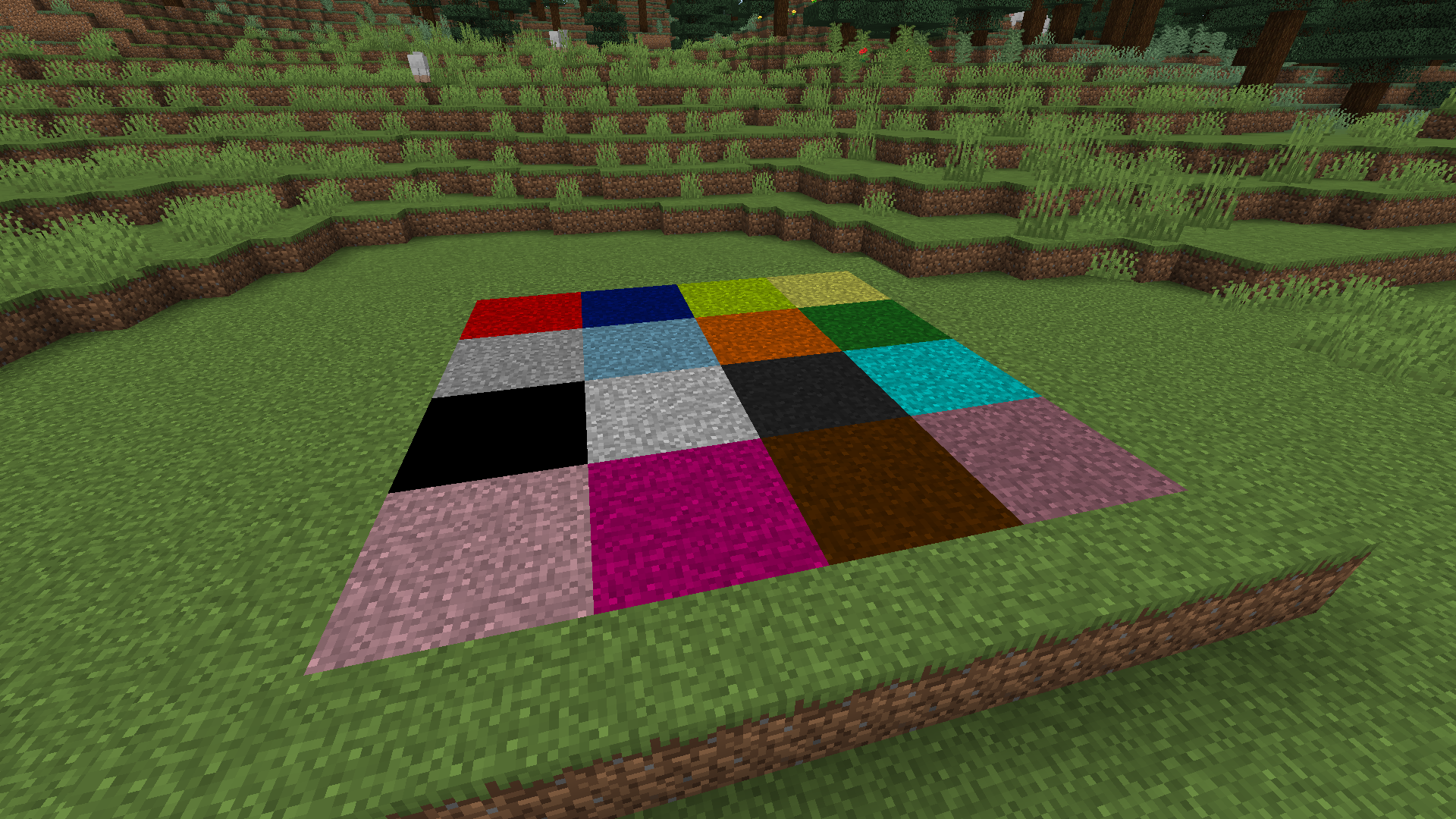
Special thanks to @OneLemonyBoii who's Cursed/Blessed/Blushed Earth code inspired this.
Project description from CurseForge.
Pick your setup
Grass Colors by Minecraft version and loader
Choose the version and loader you play, then open the matching release.
Check the dependencies, then try the file in a copied instance before changing a world you care about.
Recent files
Grass Colors versions and loaders
grasscolors-1.0.0.jar
28 Jan 2022
Client Source doesn’t say Server Source doesn’t say Dependencies No extras listed Listed on Release listing
Check the 1.16.5 · Forge setup 1.16.5Forge release
Looking for an older file? The official CurseForge project page is in Resources.
 mod
CurseForge · Minecraft
Blocks Abound
Various building blocks to fill the void in the minecraft block palette.
 mod
CurseForge · Minecraft
Mochos Tablist (and nametags)
Mochos Esenciales addon: design the player list (Tab) from an in-game editor with a live preview. Background, border, images, header and footer with placeholders, prefixes with chips and a custom nametag.
 mod
CurseForge + Modrinth · Minecraft
Kaleidoscope:Dimensions wine
Add dimensional wines to Kaleidoscope.