Minecraft version
Back to mods 
CurseForge · Minecraft mod
Farlands [FABRIC/FORGE]
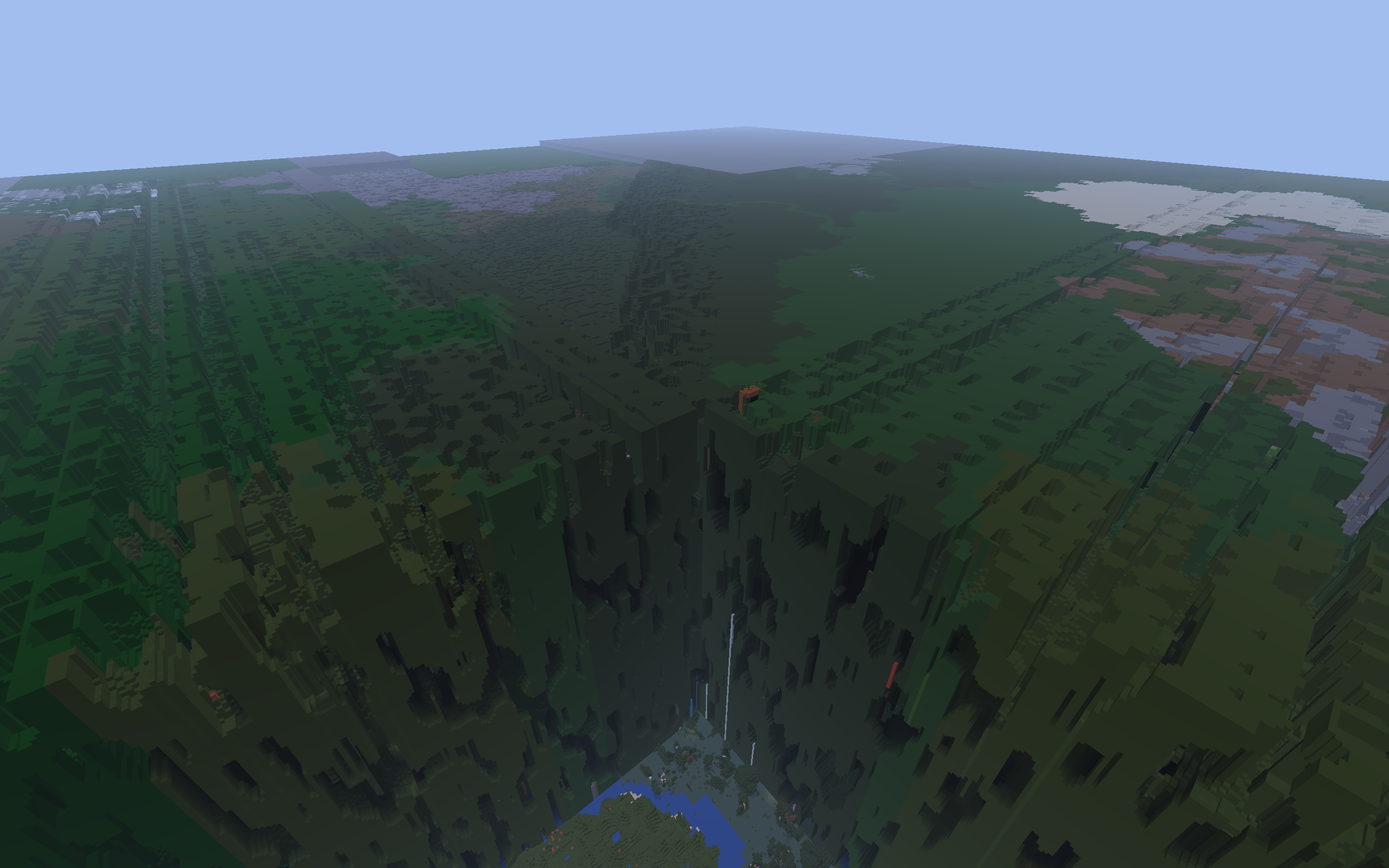
Adds the Farlands into 1.18.1 fabric and 1.16.5 forge.
Choose a version Pick your version below, then grab the matching file.
Quick answer
Which Farlands [FABRIC/FORGE] release should I use?
Latest stable file Farlands Forge 1.2
Game version 1.16.5
Loader Forge
Farlands [FABRIC/FORGE] Farlands Forge 1.2 targets 1.16.5 with Forge. The project page does not say whether this file belongs on the client, dedicated server, or both. No extra mods listed for this file.
Where it goes
Is Farlands [FABRIC/FORGE] required on the client, server, or both?
The project page does not say whether this file belongs on the client, dedicated server, or both.
Client Source doesn’t say
Dedicated server Source doesn’t say
Loader for this release Forge
Required install it here Optional supported, not mandatory Not supported do not install here Source doesn’t say do not assume
The source does not explicitly classify this release as client-only or server-only.
What else does Farlands [FABRIC/FORGE] Farlands Forge 1.2 need?
Farlands Forge 1.2. Change the file and its required mods may change too.
This file does not list any required mods. Do not add a library just because a different file uses it.
This file does not list any required or optional mods.
Before you install it
Add Farlands [FABRIC/FORGE] without breaking your instance.
Built for Farlands [FABRIC/FORGE] Farlands Forge 1.2. Pick another file and the loader, install side or required mods may change.
- 01
Stick to this file
Use Farlands Forge 1.2. It targets 1.16.5 with Forge; another release may have different loader, side or dependency requirements.
- 02
Bring the mods it needs
This file does not list any required mods. Do not add a library just because a different file uses it.
- 03
Put it on the correct side
The project page does not say whether this file belongs on the client, dedicated server, or both.
- 04
Pick the file you checked
Use the “Get this file” button beside Farlands Forge 1.2. It opens that exact file at the source.
About this project
What does Farlands [FABRIC/FORGE] add?
Checkout my other Mods/Modpacks!
Blood N Wine 2 Lite 1.18.1 (click me)
Blood N Wine 2 1.16.5 (click me)
Blood N Wine 1.12.2 (click me)
Farlands [FORGE/FABRIC] (click me)
[FABRIC] Armor Curve (click me)
Need a server to play with friends? Don't know how to setup one? Just rent already configured server!

Click on the picture above, select plan(at least 4GB), use my code bloodnwine to get 25% off your first month and enjoy playing with your friends!
Adds the Farlands!
/ or * scale by 2 to make the Farlands farther or closer to spawn.
Visualize distance here:
https://www.desmos.com/calculator/hq1scenbsw
1.16.5 version uses config/farlandsforge.toml
settings for farlands taking up all of the world:
farlandsEnabled = true
#Range: 0.0 ~ 1.7976931348623157E308
overworldScale = 64260096
#Range: 0.0 ~ 1.7976931348623157E308
endScale = 1028161536
#Range: 0.0 ~ 1.7976931348623157E308
netherScale = 32130048 //modded dimensions use netherScale
1.18.1 version uses datapacks and has no gui or config instructions how to use:
https://github.com/slicedlime/examples/commits/master obtain datapacks here (1.18-rc4) for 1.18.1 worldgen
dimension_type folder:
the_nether.json
//Change #1 - Raise world height in the nether
"height": 384,
the_end.json
//Change #1 Raise world height in the end
"logical_height": 384,
//Change #2 Raise world height in the end
"height": 384,
==============================================
noise_settings folder:
end.json
//Change #1 - Disable noise caves to generate pre 1.18 farlands in end.
"noise_caves_enabled": false,
//Change #2
"y_scale": 4000000.0, //Overflow the y axis generating sky farlands in the end!
nether.json
//Change #1 - Disable noise caves to generate pre 1.18 farlands in nether.
"noise_caves_enabled": false,
//Change #2
"xz_scale": 12500.0, //Overflow the xz axis generating farlands 1000 blocks from spawn in the nether!
overworld.json
//Change #1 - Disable noise caves to generate pre 1.18 farlands in overworld.
"noise_caves_enabled": false,
//Change #2
"default_fluid": {
"Properties": {
"level": "0"
},
"Name": "minecraft:air" //replace minecraft:water with air to make farlands not generate ocean causing the server thread to freeze
},
//Change #3
"xz_scale": 12500.0, //Overflow the xz axis generating farlands 1000 blocks from spawn in the overworld!
==============================================
This mod was created by mahan for use in Blood N Wine 2 Hardcore Modpack So nukelord can add extra autism to the world!
Requires Forge
Project description from CurseForge.
Pick your setup
Farlands [FABRIC/FORGE] by Minecraft version and loader
Choose the version and loader you play, then open the matching release.
Minecraft version
1.18.1
1 loader buildMinecraft version
1.16.5
1 loader buildCheck the dependencies, then try the file in a copied instance before changing a world you care about.
Recent files
Farlands [FABRIC/FORGE] versions and loaders
Farlands Forge 1.2
FarLandsForge-1.2.jar
6 Nov 2022
Client Source doesn’t say Server Source doesn’t say Dependencies No extras listed Listed on Release listing
Check the 1.16.5 · Forge setup 1.16.5Forge release
Farlands Fabric 1.0.3.1
Farlands-Fabric-1.0.3.1.jar
14 Feb 2022
Client Source doesn’t say Server Source doesn’t say Dependencies No extras listed Listed on Release listing
Check the 1.18.2 · Fabric setup 1.18.1Fabric1.18.2 release
Farlands Fabric 1.0.2
Farlands-Fabric-1.0.2.jar
13 Feb 2022
Client Source doesn’t say Server Source doesn’t say Dependencies No extras listed Listed on Release listing
Check the 1.18.1 · Fabric setup 1.18.1Fabric release
Farlands Fabric 1.0.1
Farlands-Fabric-1.0.1.jar
12 Feb 2022
Client Source doesn’t say Server Source doesn’t say Dependencies No extras listed Listed on Release listing
Check the 1.18.1 · Fabric setup 1.18.1Fabric release
Farlands Forge 1.0
FarLandsForge-1.0-nogui.jar
1 Feb 2022
Client Source doesn’t say Server Source doesn’t say Dependencies No extras listed Listed on Release listing
Check the 1.16.5 · Forge setup 1.16.5Forge release
Looking for an older file? The official CurseForge project page is in Resources.
 mod
CurseForge + Modrinth · Minecraft
Carpet TIS Addition
A Carpet mod (fabric-carpet) extension, a collection of carpet mod style useful tools and interesting features
 mod
CurseForge · Minecraft
Fartura
Fartura adds new crops, foods, cooking methods, and other small additions. The mod also features a variety of Brazilian foods.
 mod
CurseForge · Minecraft
Base Gems
A companion to Base Metals and Modern Metals that adds a wide variety of gems and things that can be built from them.