Minecraft version
Back to mods 
CurseForge · Minecraft mod
Automatic Chat Translator
Automatically translate incoming and outgoing chat messages in minecraft
Choose a version Pick your version below, then grab the matching file.
Quick answer
Which Automatic Chat Translator release matches 1.19.2 Forge?
Best match for your filters translate-1.1.2.jar
Game version 1.19.2
Loader Forge
Automatic Chat Translator translate-1.1.2.jar targets 1.19.2 with Forge. The project page does not say whether this file belongs on the client, dedicated server, or both. No extra mods listed for this file.
Where it goes
Is Automatic Chat Translator required on the client, server, or both?
The project page does not say whether this file belongs on the client, dedicated server, or both.
Client Source doesn’t say
Dedicated server Source doesn’t say
Loader for this release Forge
Required install it here Optional supported, not mandatory Not supported do not install here Source doesn’t say do not assume
The source does not explicitly classify this release as client-only or server-only.
What else does Automatic Chat Translator translate-1.1.2.jar need?
translate-1.1.2.jar on 1.19.2 Forge. Every mod below is checked against that same setup.
This file does not list any required mods. Do not add a library just because a different file uses it.
This file does not list any required or optional mods.
Before you install it
Add Automatic Chat Translator without breaking your instance.
Built for Automatic Chat Translator translate-1.1.2.jar on 1.19.2 Forge. Pick another file and the loader, install side or required mods may change.
- 01
Stick to this file
Use translate-1.1.2.jar. It targets 1.19.2 with Forge; another release may have different loader, side or dependency requirements.
- 02
Bring the mods it needs
This file does not list any required mods. Do not add a library just because a different file uses it.
- 03
Put it on the correct side
The project page does not say whether this file belongs on the client, dedicated server, or both.
- 04
Pick the file you checked
Use the “Get this file” button beside translate-1.1.2.jar. It opens that exact file at the source.
About this project
What does Automatic Chat Translator add?
Have you ever joined a minecraft server and everyone is speaking a language you dont understand? Gone with the days of that.
This mod automatically translates incoming and outgoing chat messages in minecraft.
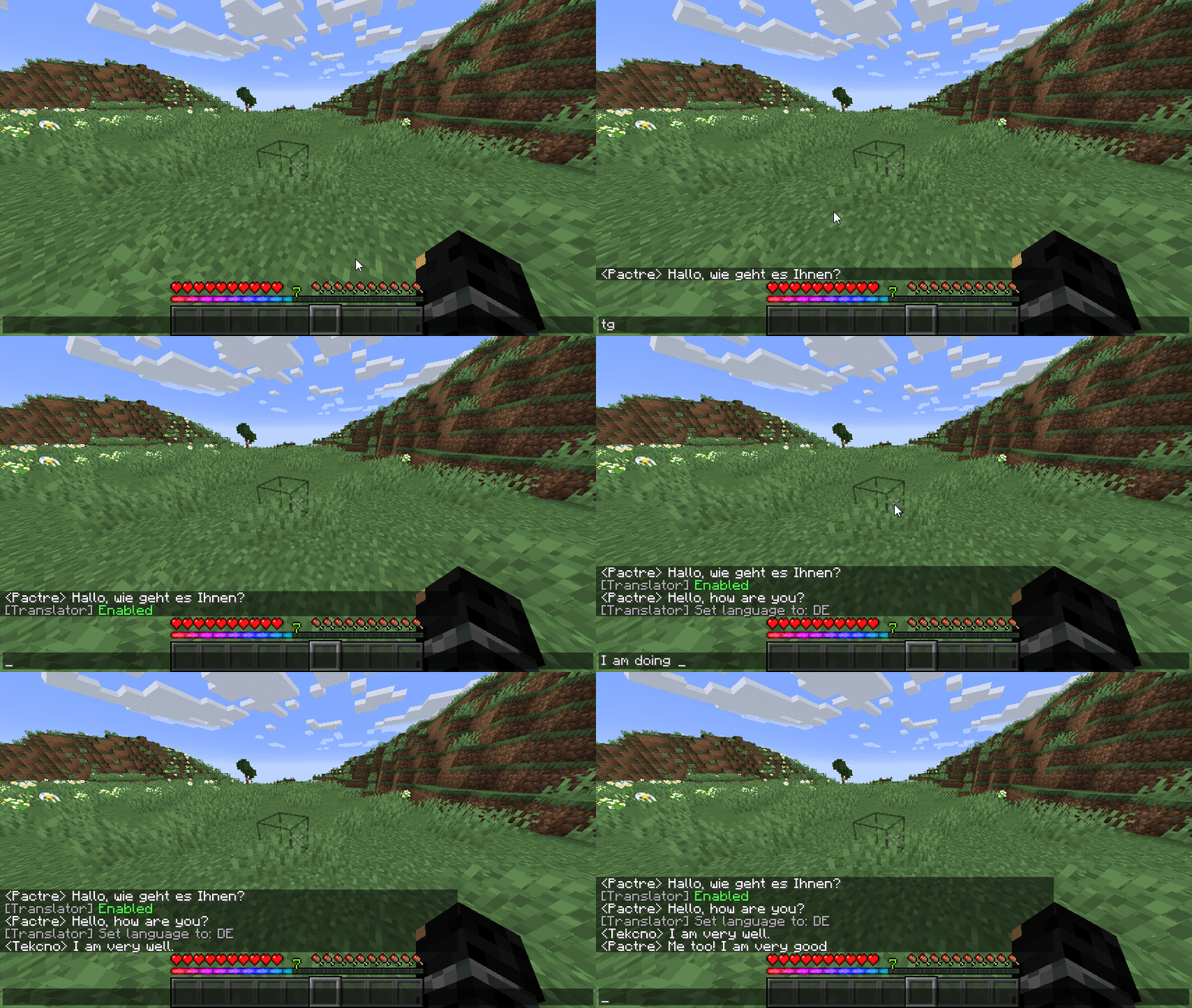
To get started, you must first have a DeepL API key. Here's how you get one:
- Step 1) Go to https://deepl.com/
- Step 2) Click "Start free trial" at the top right corner
- Step 3) Click "For developers"
- Step 4) Click "Sign up for free"
- Step 5) Enter your email and create a password.
- Step 6) Enter your information and a card for verification
- Step 7) Go to https://www.deepl.com/pro-account/summary and scroll down
- Step 8) Copy the authentication key
- Step 9) Launch minecraft, and type
/setkey <API KEY HERE>
NOTE: The OpenAI API key is NOT required for use of DeepL translation.
The default key to toggle on/off translations is G this key can be changed in the key binds menu.
Access the config menu in Mods -> Translator -> Config or press the key H in game to access it.
FEATURES
- Automatically detects language and translates it if possible
- Translates your text into a selected language
- Hover over translated text to see original message and detected language
- Click translated text to switch selected language to the detected language
- Native language translation (Set all messages to be translated to anything you want)
- Supports OpenAI GPT-3.5 & GPT-4 translation which preserves chat formatting (Requires paid OpenAI API key)
Project description from CurseForge.
Pick your setup
Automatic Chat Translator by Minecraft version and loader
Choose the version and loader you play, then open the matching release.
Minecraft version
1.19.2
1 loader buildMinecraft version
1.18.1
1 loader buildCheck the dependencies, then try the file in a copied instance before changing a world you care about.
Recent files
Automatic Chat Translator versions and loaders
translate-1.1.2.jar
22 Jul 2023
Client Source doesn’t say Server Source doesn’t say Dependencies No extras listed Listed on Release listing
Check the 1.19.2 · Forge setup 1.19.2Forge release
Looking for an older file? The official CurseForge project page is in Resources.
 mod
CurseForge + Modrinth · Minecraft
Euphoria Patches
Euphoria Patches is an add-on for Complementary Shaders, extending it with more optional features and settings.
 mod
CurseForge · Minecraft
Armor Set Bonuses (NeoForge /Forge)
Adds bonuses for armor sets, and is fully customizable
 mod
CurseForge · Minecraft
Hex's Computer
A craftable computer with custom admin shops, a quest book, easy quest editing, an emerald wallet, shopping carts and addon apps.