Minecraft version
Back to mods 
CurseForge · Minecraft mod
Crafting Panel
Transforms items to the required materials to craft them.
Choose a version Pick your version below, then grab the matching file.
Quick answer
Which Crafting Panel release matches 1.18?
Best match for your filters CraftingPanel-1.18.1-1.0.2
Game version 1.18.1, 1.18, 1.18-Snapshot
Loader Fabric
Crafting Panel CraftingPanel-1.18.1-1.0.2 targets 1.18.1, 1.18, 1.18-Snapshot with Fabric. The project page does not say whether this file belongs on the client, dedicated server, or both. No extra mods listed for this file.
Where it goes
Is Crafting Panel required on the client, server, or both?
The project page does not say whether this file belongs on the client, dedicated server, or both.
Client Source doesn’t say
Dedicated server Source doesn’t say
Loader for this release Fabric
Required install it here Optional supported, not mandatory Not supported do not install here Source doesn’t say do not assume
The source does not explicitly classify this release as client-only or server-only.
What else does Crafting Panel CraftingPanel-1.18.1-1.0.2 need?
CraftingPanel-1.18.1-1.0.2 on 1.18. Every mod below is checked against that same setup.
This file does not list any required mods. Do not add a library just because a different file uses it.
This file does not list any required or optional mods.
Before you install it
Add Crafting Panel without breaking your instance.
Built for Crafting Panel CraftingPanel-1.18.1-1.0.2 on 1.18. Pick another file and the loader, install side or required mods may change.
- 01
Stick to this file
Use CraftingPanel-1.18.1-1.0.2. It targets 1.18.1, 1.18, 1.18-Snapshot with Fabric; another release may have different loader, side or dependency requirements.
- 02
Bring the mods it needs
This file does not list any required mods. Do not add a library just because a different file uses it.
- 03
Put it on the correct side
The project page does not say whether this file belongs on the client, dedicated server, or both.
- 04
Pick the file you checked
Use the “Get this file” button beside CraftingPanel-1.18.1-1.0.2. It opens that exact file at the source.
About this project
What does Crafting Panel add?
Crafting panel is a minecraft mod currently for Fabric that supports 1.16, 1.17 and 1.18 minecraft versions.
To open the menu go to controls and search for Crafting Panel keybind.
Features:
- Custom menu.
- No limits when choosing items.
- Very accurate output for items with single output and for items with multiple output.
- Client mod with 0 incompatibilities with other mods.
- Litematicaaddon to convert materials list to a sub materials list ( Only works if you have the Litematicamod on ).
- Every rendered item has his own tooltip to get more info about it.
- Output in items / stacks / shulkers.
- No problems with different gui scales.
- Hud toggle of required materials to dont be opening and closing the menu to check the materials, it updates with your items in inventory also with items in shulker boxes.
- Export materials list to a .txt to share the required materials to your friends. The .txt is saved in a folder at .minecraft/config/CraftingPanel.
Requirements:
- Fabric apimod.
- Malilibmod.
How to use it:
- At the left of the screen there is a panel with every craftable item, select there the item.
- Under this item panel select the amount you want, if the input is nothing the amount will be 1 and click at the "+" button near this input field..
- You will see that every item you selected is displayed at the right of the item panel.
- Click the Calculate Materials button at the bottom left corner.
- All the materials are displayed at the panel at the right of the scren.
If you want to quickly search the materials for a specific item you dont need to add it to the list, you can select it, then change the amount ( if it is nothing the amount will be 1 ) and press the calculate materials button.
Buttons:
- Clear: Clears the text at the search bar.
- "+": Adds the current select to the item list. ( Requires any item to be selected to work )
- Clear Selected: Clears the item list.
- Remove Last: Removes the last item of the item list.
- "-": Removes the selected item of the item list. ( Requires any item selected in the item list to work )
- Calculate Materials: Calculates the materials of the item list, if the item list contains nothing will calculate the materials of the selected item.
- Export: Makes a file with all the materials, also says how many do you have of each and how many missing of it in your inventory. ( Requires any material display to work )
- HUD: Enables a list in the screen of the missing materials in your inventory of the results list, when you pick up any required item it gets updated and changes the display, the inventory check works with shulkers too.
- Clear Results: Clears the results panel.
- Change Output Type: Changes the results to Items/Stacks/Shulkers. ( If you hover any result item you can get some similar info )
How the mod looks like:
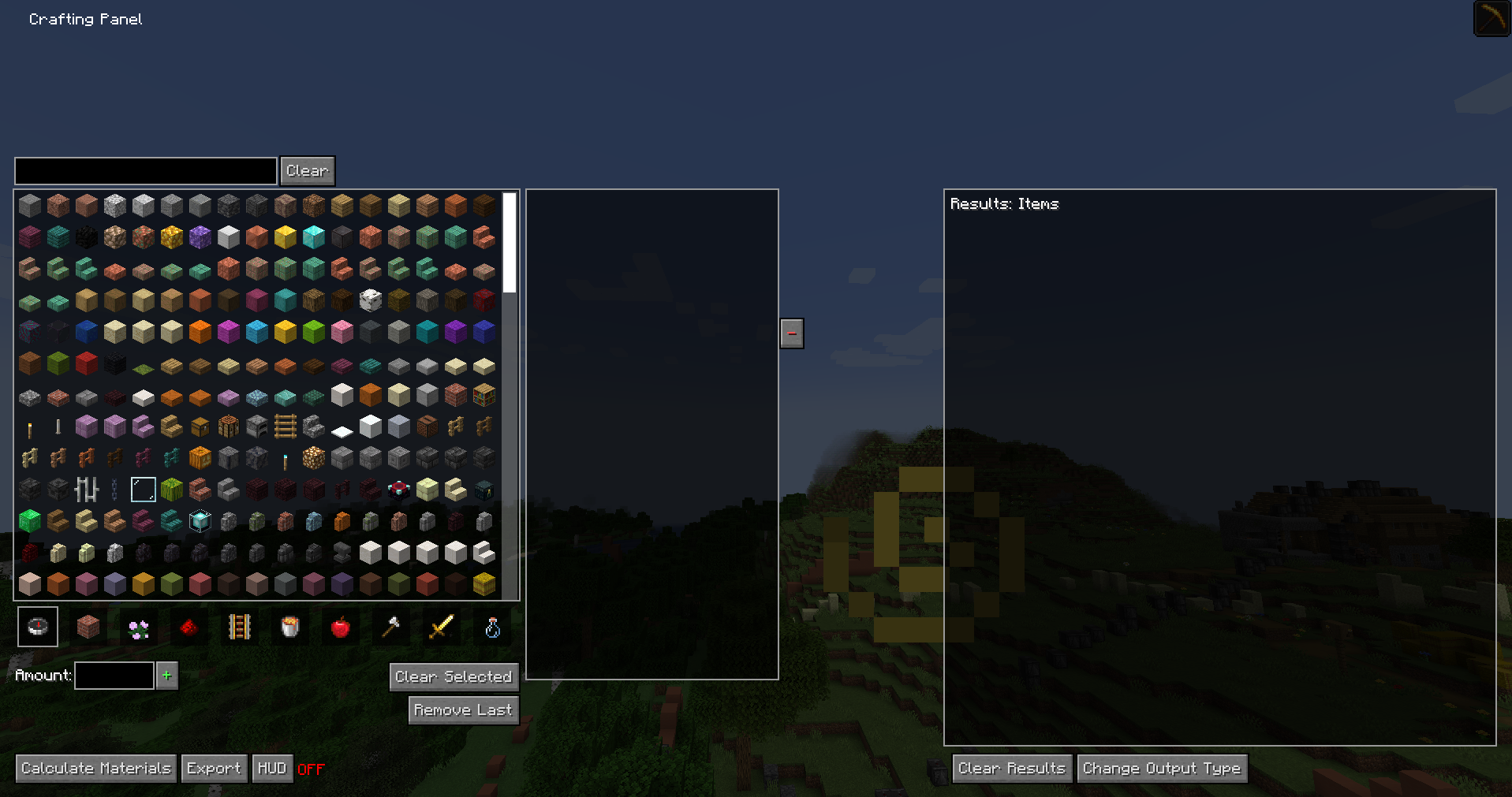
How the hud looks like and gets updated if you pick blocks:
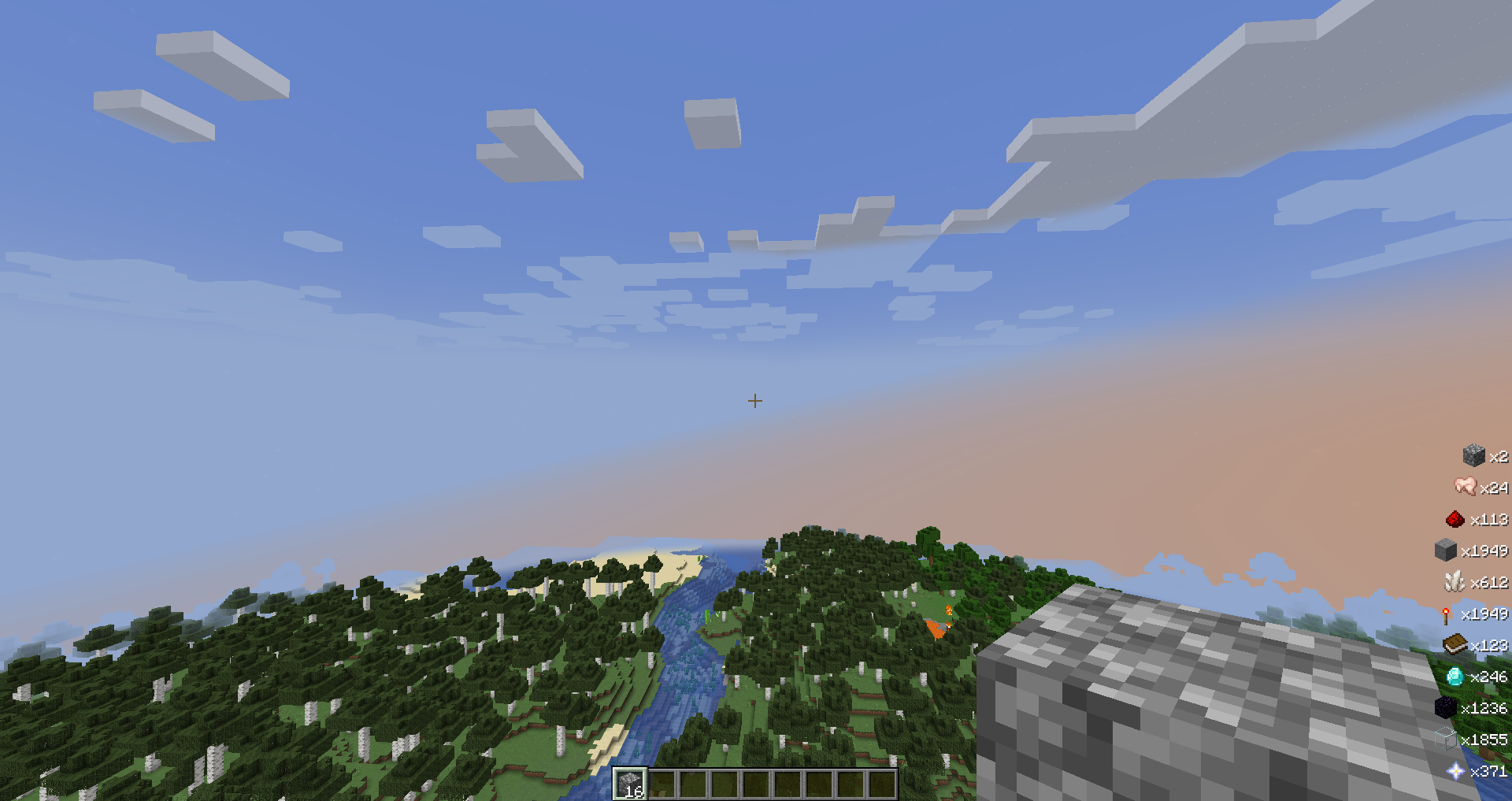
If you have any suggestion, issue or question feel free to contact me on discord : Noviembre#4606
Project description from CurseForge.
Pick your setup
Crafting Panel by Minecraft version and loader
Choose the version and loader you play, then open the matching release.
Minecraft version
1.18-Snapshot
1 loader buildMinecraft version
1.18
1 loader buildMinecraft version
1.17.1
1 loader buildMinecraft version
1.17-Snapshot
1 loader buildMinecraft version
1.17
1 loader buildMinecraft version
1.16.5
1 loader buildMinecraft version
1.16.4
1 loader buildMinecraft version
1.16.3
1 loader buildMinecraft version
1.16.2
1 loader buildMinecraft version
1.16.1
1 loader buildMinecraft version
1.16-Snapshot
1 loader buildShowing the newest 12 of 13 game versions. Older files are in the list below.
Check the dependencies, then try the file in a copied instance before changing a world you care about.
Recent files
Crafting Panel versions and loaders
CraftingPanel-1.18.1-1.0.2
Crafting-panel-1.18-1.0.2.jar
21 Feb 2022
Client Source doesn’t say Server Source doesn’t say Dependencies No extras listed Listed on Release listing
Check the 1.18 · Fabric setup 1.18.1Fabric1.181.18-Snapshot release
Looking for an older file? The official CurseForge project page is in Resources.
 mod
CurseForge · Minecraft
TNT Expansion (+300 new craftable TNT)
300 craftable TNTs, from harmless mini TNTs to nukes, black holes, a TNT x100,000 and THE ABSOLUTE CORRUPTION OF ALL EXISTENCE (power -∞). Build your own at the Workbench and see every TNT in 3D in the guide book.
 mod
CurseForge · Minecraft
NoMoWanderer
Adds various things to the game to help make the Wandering Trader less annoying.
 mod
CurseForge · Minecraft
MineMenu
Mine Menu - Radial menu, 'nuff said