Library Ferret - Fabric Needed by Egg to capture mob - Fabric Egg to capture mob 2.0.0 - Fabric 1.19.2
requiredMatching file found Matched file: Library ferret 4.0.0 - Fabric 1.19.2

CurseForge · Minecraft mod
Adds a new egg, throw it on an entity to capture it in its spawn egg
Quick answer
Egg to capture mob - Fabric Egg to capture mob 2.0.0 - Fabric 1.19.2 targets 1.19.2 with Fabric. The project page does not say whether this file belongs on the client, dedicated server, or both. All 1 required mods have matching files.
Where it goes
The project page does not say whether this file belongs on the client, dedicated server, or both.
The source does not explicitly classify this release as client-only or server-only.
Egg to capture mob 2.0.0 - Fabric 1.19.2. Change the file and its required mods may change too.
Install Library Ferret - Fabric first. We found matching files for this game-version and loader setup.
We only count dependency files that match this setup. A file for another loader does not fill the gap.
Before you install it
Built for Egg to capture mob - Fabric Egg to capture mob 2.0.0 - Fabric 1.19.2. Pick another file and the loader, install side or required mods may change.
Use Egg to capture mob 2.0.0 - Fabric 1.19.2. It targets 1.19.2 with Fabric; another release may have different loader, side or dependency requirements.
Install Library Ferret - Fabric first. We found matching files for this game-version and loader setup.
The project page does not say whether this file belongs on the client, dedicated server, or both.
Use the “Get this file” button beside Egg to capture mob 2.0.0 - Fabric 1.19.2. It opens that exact file at the source.
About this project






Do you want to capture mobs? You are on the right page curseforge! This project is for curseforge, you can find the link to the Fabric project in the ABOUT section
Adds a capture egg, you can throw it on any mob/entire/monster to capture it! If you succeed in your capture the target will disappear in its spawn egg! Be careful you have to weaken the target to capture it. Capture them all and unlock an advancements for each capture !
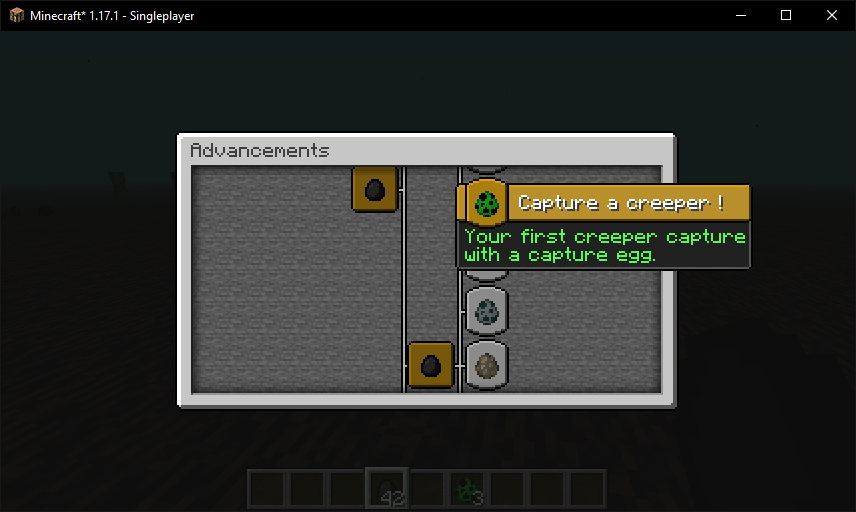

⚠️ This mod is for Fabric, you can find the Forge version here: [CLICK HERE]
📦 This mod requires "Library ferret", download it here: [CLICK HERE]
If you are looking for a quality server we are bisechosting partner, use our code to support us.
Project description from CurseForge.
Pick your setup
Choose the version and loader you play, then open the matching release.
Check the dependencies, then try the file in a copied instance before changing a world you care about.
Recent files
capturetomob-fabric-1.19.2-2.0.0.jar
16 Mar 2023
capturetomob-fabric-1.19.1-2.0.0.jar
16 Mar 2023
capturetomob-fabric-1.19-2.0.0.jar
16 Mar 2023
capturetomob-fabric-1.18.2-2.0.0.jar
16 Mar 2023
capturetomob-fabric-1.18.1-2.0.0.jar
16 Mar 2023
capturetomob-fabric-1.17.1-2.0.0.jar
16 Mar 2023
capturetomob-fabric-1.16.5-2.0.0.jar
16 Mar 2023
CaptureAmob-Fabric-1.19-1.0.2.jar
8 Jul 2022
CaptureAmob-Fabric-1.18.2-1.0.2.jar
8 Jul 2022
CaptureAmob-Fabric-1.18.1-1.0.2.jar
8 Jul 2022
CaptureAmob-Fabric-1.17.1-1.0.2.jar
8 Jul 2022
CaptureAmob-Fabric-1.16.5-1.0.2.jar
8 Jul 2022
Looking for an older file? The official CurseForge project page is in Resources.
 mod
Enhances vanilla wolves with unique personalities (Aggressive, Pacifist, Normal), smarter AI, safety behaviors, and combat improvements.
 mod
A new spell school called Immortal Arts has been added.
 mod
Better Bats overhauls the vanilla Bat into a dynamic, ecosystem-driven entity with swarming behaviors, guano fertilization, and pest control mechanics. Built for Minecraft 26.1+ with DasikLibrary integration.