Minecraft version
Back to mods 
CurseForge · Minecraft mod
Amazing Chest
Chest that filters matching items
Choose a version Pick your version below, then grab the matching file.
Quick answer
Which Amazing Chest release should I use?
Latest stable file amazingchest-0.0.8+1.19.2.jar
Game version 1.19.2
Loader Fabric
Amazing Chest amazingchest-0.0.8+1.19.2.jar targets 1.19.2 with Fabric. The project page does not say whether this file belongs on the client, dedicated server, or both. No extra mods listed for this file.
Where it goes
Is Amazing Chest required on the client, server, or both?
The project page does not say whether this file belongs on the client, dedicated server, or both.
Client Source doesn’t say
Dedicated server Source doesn’t say
Loader for this release Fabric
Required install it here Optional supported, not mandatory Not supported do not install here Source doesn’t say do not assume
The source does not explicitly classify this release as client-only or server-only.
What else does Amazing Chest amazingchest-0.0.8+1.19.2.jar need?
amazingchest-0.0.8+1.19.2.jar. Change the file and its required mods may change too.
This file does not list any required mods. Do not add a library just because a different file uses it.
This file does not list any required or optional mods.
Before you install it
Add Amazing Chest without breaking your instance.
Built for Amazing Chest amazingchest-0.0.8+1.19.2.jar. Pick another file and the loader, install side or required mods may change.
- 01
Stick to this file
Use amazingchest-0.0.8+1.19.2.jar. It targets 1.19.2 with Fabric; another release may have different loader, side or dependency requirements.
- 02
Bring the mods it needs
This file does not list any required mods. Do not add a library just because a different file uses it.
- 03
Put it on the correct side
The project page does not say whether this file belongs on the client, dedicated server, or both.
- 04
Pick the file you checked
Use the “Get this file” button beside amazingchest-0.0.8+1.19.2.jar. It opens that exact file at the source.
About this project
What does Amazing Chest add?
Tired of building complicated, inflexible item sorters? Do you want an easy way to keep your workshop organized so you can focus on other parts of the game?
Amazing Chest is for you! It adds a new 'Sorting Chest' block to your world that will will automatically pull matching items into itself from any connected hopper chain.
To set up item sorting, just put items in a Sorting Chest that you want to get sorted into it. Any matching items (and only those items) will be routed to them through the hopper chain. It works a lot like a Tango Tek sorting system (but without actually having to build one).
Features
- Super easy item sorting setup
- Reorganize the sorter at any time by just moving items to different chests
- Sort both stackable and unstackable items
- Sort lots of different items into the same chest
- Works with the Fabric modloader
- Can work without being installed in the client (thanks to the awesome Polymer framework)
Recipe
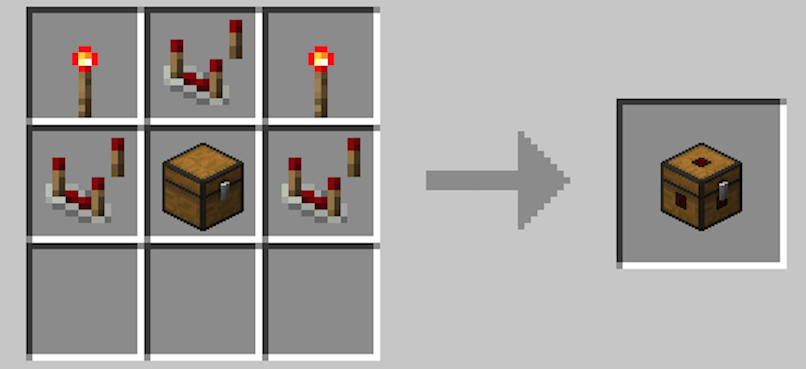
Block

How do I use a Sorting Chest?
- Create a chain of hoppers like shown.
- Put items in the chests that you want to show up in those chests.
- Make sure there's a regular 'overflow' chest somewhere on the chain to accept items that don't match any of the Sorting Chests.
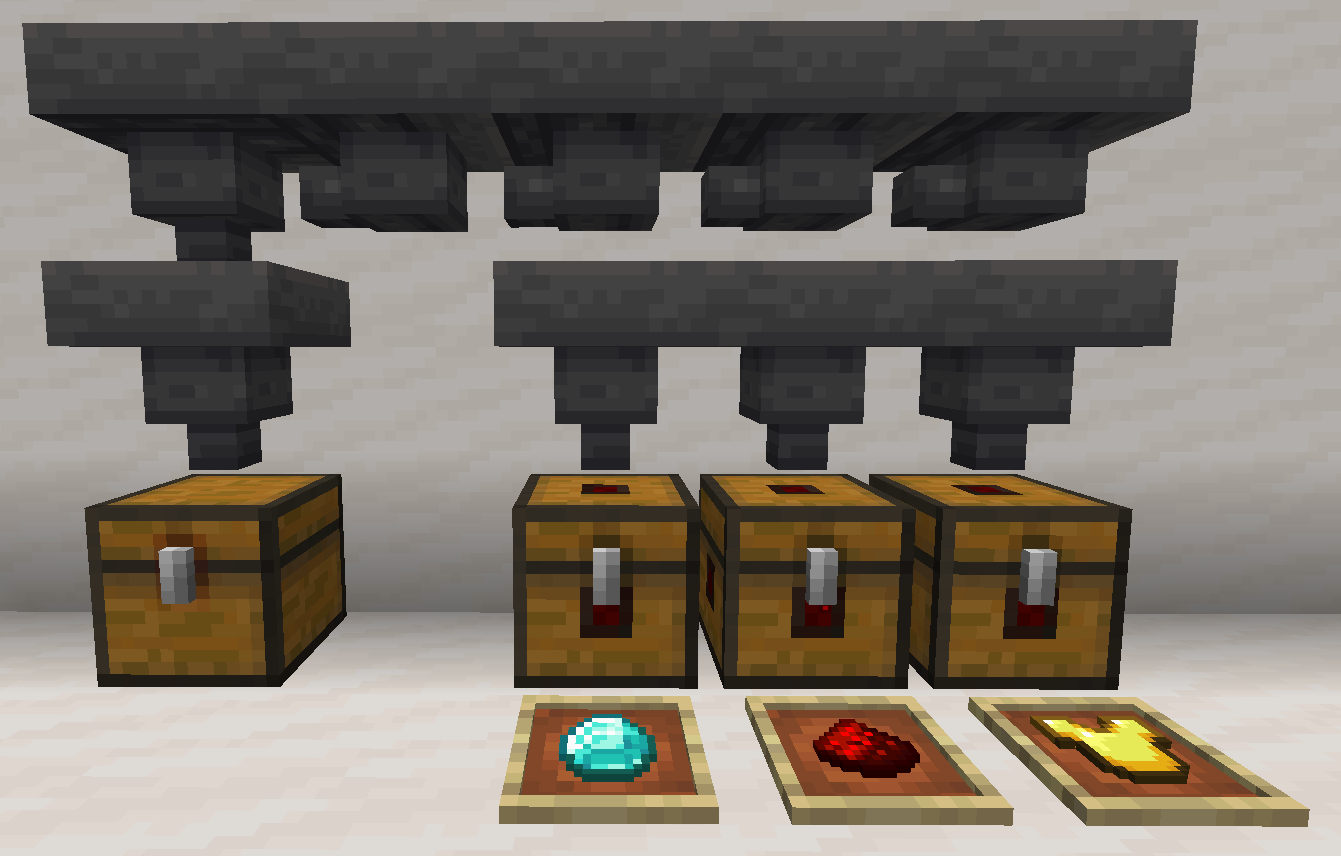
How does it work exactly?
- When a Sorting Chest is connected to a hopper chain, any items in the chain that match items in the Sorting Chest will automatically be routed into it.
- A Sorting Chest will never allow a hopper to push items into it that don't match an item it already contains.
- Also, if a hopper pulls items out of a Sorting Chest, it will never pull the last item of a given type. This ensures that the Sorting Chest will continue to sort items the items you put into it.
- They always keep the last item of a type that is held in the hopper.
Lithium Users Read This!
If you also use Lithium, Amazing Chest won't work unless you set mixin.block.hopper=false in your lithium.properties file. This will disable Lithium's hopper-related optimizations that are incompatible with Amazing Chest. (Courtesy of valkonmc)
How do I set up the mod on my server to work with vanilla clients?
Edit config/amazing-chest.properties and follow the instructions you find there: # # Uncomment the 'polymer-enabled' line if you want to run this mod on a server that works with vanilla clients # or clients that don't have the mod installed. # # IMPORTANT: your server must have an appropriate version of polymer installed: # https://modrinth.com/mod/polymer/versions # # IMPORTANT: setting polymer-enabled will have the following effects for ALL clients connecting to your server: # - Sorting Chests will appear as Trapped Chests (not custom graphics) # - Labels will not be localized (all in English) # - The 'lock button' will not be added to the UI Screen (no protection against messing up your sorting setup) # # polymer-enabled = true
Notes
- I will not be doing a Forge port of Amazing Chest. (sorry)
- This mod conflicts with Golden Hoppers. I'm not sure there's a good way to resolve it.
Legal
Amazing Chest is published under the MIT License.
You're free to include it in your modpack provided you attribute it to pcal43.
Questions?
If you have questions about this mod, please join the Discord server:
Comments have been disabled and I will **not** reply to private mes
Project description from CurseForge.
Pick your setup
Amazing Chest by Minecraft version and loader
Choose the version and loader you play, then open the matching release.
Minecraft version
1.19
1 loader buildMinecraft version
1.18.2
1 loader buildMinecraft version
1.18.1
1 loader buildCheck the dependencies, then try the file in a copied instance before changing a world you care about.
Recent files
Amazing Chest versions and loaders
amazingchest-0.0.8+1.19.2.jar
30 Aug 2022
Client Source doesn’t say Server Source doesn’t say Dependencies No extras listed Listed on Release listing
Check the 1.19.2 · Fabric setup Fabric1.19.2 release
amazingchest-0.0.7+1.19.jar
29 Jun 2022
Client Source doesn’t say Server Source doesn’t say Dependencies No extras listed Listed on Release listing
Check the 1.19 · Fabric setup Fabric1.19 release
amazingchest-0.0.6+1.18.2.jar
30 Apr 2022
Client Source doesn’t say Server Source doesn’t say Dependencies No extras listed Listed on Release listing
Check the 1.18.2 · Fabric setup Fabric1.18.2 release
amazingchest-0.0.5+1.18.2.jar
10 Apr 2022
Client Source doesn’t say Server Source doesn’t say Dependencies No extras listed Listed on Release listing
Check the 1.18.2 · Fabric setup Fabric1.18.2 release
amazingchest-0.0.4+1.18.2.jar
27 Mar 2022
Client Source doesn’t say Server Source doesn’t say Dependencies No extras listed Listed on Release listing
Check the 1.18.2 · Fabric setup Fabric1.18.2 release
amazingchest-0.0.3+1.18.1.jar
6 Mar 2022
Client Source doesn’t say Server Source doesn’t say Dependencies No extras listed Listed on Release listing
Check the 1.18.1 · Fabric setup 1.18.1Fabric release
amazingchest-0.0.2+1.18.1.jar
27 Feb 2022
Client Source doesn’t say Server Source doesn’t say Dependencies No extras listed Listed on Release listing
Check the 1.18.1 · Fabric setup 1.18.1Fabric release
amazingchest-0.0.1+1.18.1.jar
25 Feb 2022
Client Source doesn’t say Server Source doesn’t say Dependencies No extras listed Listed on Release listing
Check the 1.18.1 · Fabric setup 1.18.1Fabric alpha
Looking for an older file? The official CurseForge project page is in Resources.