Minecraft version
Back to mods 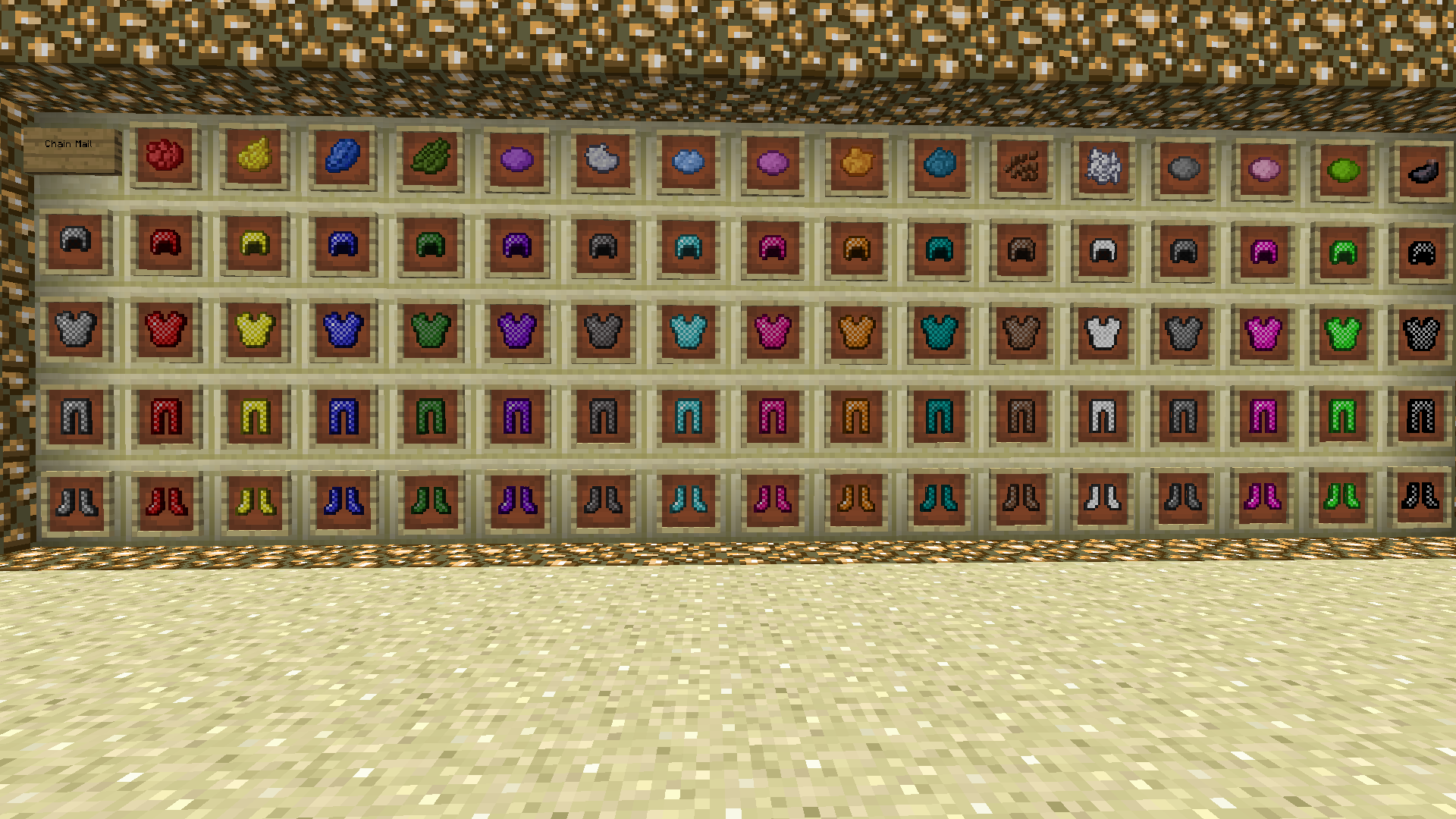
CurseForge · Minecraft mod
Colorful Armor
Colorful Armor : Dye all vanilla armor
Choose a version Pick your version below, then grab the matching file.
Quick answer
Which Colorful Armor release should I use?
Latest stable file colorfularmor-1.20.1[FORGE]-1.14.jar
Game version 1.20.1
Loader Forge
Colorful Armor colorfularmor-1.20.1[FORGE]-1.14.jar targets 1.20.1 with Forge. The project page does not say whether this file belongs on the client, dedicated server, or both. No extra mods listed for this file.
Where it goes
Is Colorful Armor required on the client, server, or both?
The project page does not say whether this file belongs on the client, dedicated server, or both.
Client Source doesn’t say
Dedicated server Source doesn’t say
Loader for this release Forge
Required install it here Optional supported, not mandatory Not supported do not install here Source doesn’t say do not assume
The source does not explicitly classify this release as client-only or server-only.
What else does Colorful Armor colorfularmor-1.20.1[FORGE]-1.14.jar need?
colorfularmor-1.20.1[FORGE]-1.14.jar. Change the file and its required mods may change too.
This file does not list any required mods. Do not add a library just because a different file uses it.
This file does not list any required or optional mods.
Before you install it
Add Colorful Armor without breaking your instance.
Built for Colorful Armor colorfularmor-1.20.1[FORGE]-1.14.jar. Pick another file and the loader, install side or required mods may change.
- 01
Stick to this file
Use colorfularmor-1.20.1[FORGE]-1.14.jar. It targets 1.20.1 with Forge; another release may have different loader, side or dependency requirements.
- 02
Bring the mods it needs
This file does not list any required mods. Do not add a library just because a different file uses it.
- 03
Put it on the correct side
The project page does not say whether this file belongs on the client, dedicated server, or both.
- 04
Pick the file you checked
Use the “Get this file” button beside colorfularmor-1.20.1[FORGE]-1.14.jar. It opens that exact file at the source.
About this project
What does Colorful Armor add?
1.8 and previous versions:
This mod makes chain, iron, gold, and diamond armor able to be dyed. To change the color of a piece of armor, just place the piece and the dye of your choice in the crafting table. All of the dyes in the game work. Different types of base armor(Chain, Iron, Gold, Diamond) create different variations of the colors so even more customization is available. Sponges are also now able to be crafted and used to clean the dyes from the armor. All recipes are shapeless. Dyed armor has its own creative tab now to cut down on clutter.
1.9 -1.10.2
Dye your chain,iron,gold,diamond like you would leather. Colors as of right now don't show on the icon but show when worn.
1.12.2
To remove dye from your armor use a bucket of water in the crafting grid with the armor you choose.
To craft chainmail first make the links using iron nuggets in the following pattern and then use the standard crafting layouts for armor with the links as the material.
oxo
xox
oxo
o=empty
x=iron nugget
Project description from CurseForge.
Pick your setup
Colorful Armor by Minecraft version and loader
Choose the version and loader you play, then open the matching release.
Minecraft version
1.19.2
1 loader buildMinecraft version
1.19
1 loader buildMinecraft version
1.18.2
2 loader buildsMinecraft version
1.18.1
2 loader buildsMinecraft version
1.17.1
2 loader buildsMinecraft version
1.16.5
2 loader buildsMinecraft version
1.16.4
1 loader buildMinecraft version
1.16.3
1 loader buildMinecraft version
1.15.2
1 loader buildMinecraft version
1.15.1
2 loader buildsMinecraft version
1.14.4
1 loader buildShowing the newest 12 of 24 game versions. Older files are in the list below.
Check the dependencies, then try the file in a copied instance before changing a world you care about.
Recent files
Colorful Armor versions and loaders
colorfularmor-1.20.1[FORGE]-1.14.jar
30 Aug 2025
Client Source doesn’t say Server Source doesn’t say Dependencies No extras listed Listed on Release listing
Check the 1.20.1 · Forge setup 1.20.1Forge release
colorfularmor-1.20.1[FORGE]-1.13.jar
1 Oct 2023
Client Source doesn’t say Server Source doesn’t say Dependencies No extras listed Listed on Release listing
Check the 1.20.1 · Forge setup 1.20.1Forge release
colorfularmor-1.19.2[FORGE]-1.12.jar
7 Sept 2022
Client Source doesn’t say Server Source doesn’t say Dependencies No extras listed Listed on Release listing
Check the 1.19.2 · Forge setup 1.19.2Forge release
colorfularmor-1.18.2[FORGE]-1.12.jar.jar
6 Sept 2022
Client Source doesn’t say Server Source doesn’t say Dependencies No extras listed Listed on Release listing
Check the 1.18.2 · Forge setup 1.18.2Forge release
colorfularmor-1.19[FABRIC]-1.12
colorfularmor-1.19-1.12.jar
11 Jul 2022
Client Source doesn’t say Server Source doesn’t say Dependencies No extras listed Listed on Release listing
Check the 1.19 · Fabric setup Fabric1.19 release
colorfularmor-1.18.2[FABRIC]-1.12.jar
colorfularmor-1.18.2-1.12.jar
11 Jul 2022
Client Source doesn’t say Server Source doesn’t say Dependencies No extras listed Listed on Release listing
Check the 1.18.2 · Fabric setup Fabric1.18.2 release
colorfularmor-1.18.1[FABRIC]-1.12.jar
colorfularmor-1.18.1-1.12.jar
11 Jul 2022
Client Source doesn’t say Server Source doesn’t say Dependencies No extras listed Listed on Release listing
Check the 1.18.1 · Fabric setup 1.18.1Fabric release
colorfularmor-1.18.1-1.11.jar
18 Jan 2022
Client Source doesn’t say Server Source doesn’t say Dependencies No extras listed Listed on Release listing
Check the 1.18.1 · Forge setup 1.18.1Forge release
colorfularmor-[FABRIC]1.18.1-1.10.jar
20 Dec 2021
Client Source doesn’t say Server Source doesn’t say Dependencies No extras listed Listed on Release listing
Check the 1.18.1 · Fabric setup 1.18.1Fabric release
colorfularmor-1.18.1-1.10.jar
17 Dec 2021
Client Source doesn’t say Server Source doesn’t say Dependencies No extras listed Listed on Release listing
Check the 1.18.1 · Forge setup 1.18.1Forge release
colorfularmor-[FABRIC]1.17.1-1.9
colorfularmor-1.17.1-1.9.jar
14 Oct 2021
Client Source doesn’t say Server Source doesn’t say Dependencies No extras listed Listed on Release listing
Check the 1.17.1 · Fabric setup 1.17.1Fabric release
colorfularmor-1.17.1-1.9.jar
14 Oct 2021
Client Source doesn’t say Server Source doesn’t say Dependencies No extras listed Listed on Release listing
Check the 1.17.1 · Forge setup 1.17.1Forge release
Looking for an older file? The official CurseForge project page is in Resources.
 mod
mod CurseForge + Modrinth · Minecraft
Energized Power
This is a technology Forge/NeoForge/Fabric mod with many machines.
 mod
mod CurseForge · Minecraft
DiscordPresence
Gives you full control over your Discord Rich Presence from inside Minecraft. Set custom text, pick your own images, create per-server profiles, and let the mod automatically switch between them based on what you're doing.
 mod
mod CurseForge · Minecraft
BetterEnd: New Dawn
An unofficially maintained continuation of BetterEnd for Fabric and NeoForge, bringing the latest BetterEnd content to every supported Minecraft version alongside bug fixes, compatibility improvements, and expanded End world generation