Cloth Config API (Fabric/Forge/NeoForge) Needed by ductwork-0.12.1.jar
requiredMatching file found Matched file: [Fabric 26.1] v26.1.154
CurseForge · Minecraft mod
Simple duct-metaphor item distribution network mod
Quick answer
ductwork-0.12.1.jar targets 26.1, 26.1.1, 26.1.2 with Fabric, Quilt. The project page does not say whether this file belongs on the client, dedicated server, or both. All 2 required mods have matching files.
Where it goes
The project page does not say whether this file belongs on the client, dedicated server, or both.
The source does not explicitly classify this release as client-only or server-only.
ductwork-0.12.1.jar on 26.1.2. Every mod below is checked against that same setup.
Install Cloth Config API (Fabric/Forge/NeoForge), Cooldown Coordinator first. We found matching files for this game-version and loader setup. 2 come through another mod in the chain.
2 extra mods were pulled in by other dependencies. Indented rows show who needs each one. We only count dependency files that match this setup. A file for another loader does not fill the gap.
Before you install it
Built for ductwork-0.12.1.jar on 26.1.2. Pick another file and the loader, install side or required mods may change.
Use ductwork-0.12.1.jar. It targets 26.1, 26.1.1, 26.1.2 with Fabric, Quilt; another release may have different loader, side or dependency requirements.
Install Cloth Config API (Fabric/Forge/NeoForge), Cooldown Coordinator first. We found matching files for this game-version and loader setup. 2 come through another mod in the chain.
The project page does not say whether this file belongs on the client, dedicated server, or both.
Use the “Get this file” button beside ductwork-0.12.1.jar. It opens that exact file at the source.
About this project
Simple duct-metaphor item distribution network mod for Fabric
Ductwork requires Cooldown Coordinator and Cloth Config!
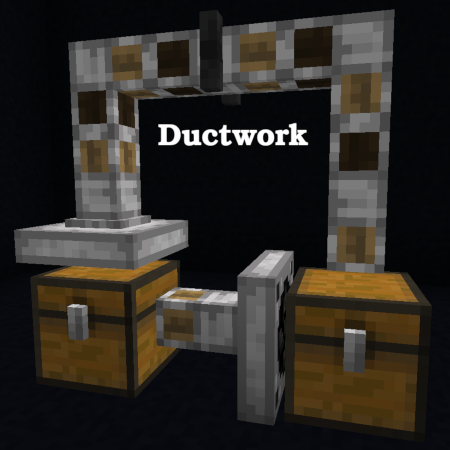
This mod provides three blocks which together implement a slight superset of the features of the Minecraft Item Hopper enabling greater flexibility and improved game performance. Ductwork item movement networks are often more space and resource efficient than Hopper versions. Another core goal of the Ductwork mod is to deliver stable item movement similar to that of Hoppers and suitable for use in sorting systems and other complex machines, even in cases where Hoppers and Ductwork blocks are intermingled.
The Duct is the workhorse of a Ductwork network. Ducts accept items from up to five adjacent blocks, and deliver items to the block they are facing. Ducts cannot be locked and do not extract items from other blocks, so they make minimal use of game resources.
A Damper is a specialized Duct which accepts items from the block behind it and delivers items to the block in front of it. Unlike the basic Duct, a Damper can be locked via Redstone and will obstruct item movement while it remains locked. Dampers can also be temporarily locked or unlocked by the player (shift-right-click on them with an empty hand), until the next time an adjacent block changes state.
Collector blocks suck items from the inventory or space behind them like a Hopper, but unlike a Hopper they can be oriented in any direction. Collectors deliver items from their inventory into the block in front of them just like other Duct blocks.
Placement of Ductwork blocks works a lot like placement of Minecraft Item Hoppers. Point at the block the Ductwork block should deliver items to and place the Ductwork block. The Ductwork block will be "facing" the side of the block you were pointing at. This determines in which direction the Ductwork block will move items (the direction it is "facing").
This can take some practice, particularly with Collector blocks! Often, the easiest way to place Ductwork blocks is to start at the end of the duct (where it is delivering items) and work backward to the beginning (where it is receiving or collecting items).
Ductwork blocks can be reoriented without breaking and re-placing them. See the wiki for more details.
If you want Ductwork blocks to be limited to doing things you can generally do with Item Hoppers, there is a configuration option for this. See the configuration file (if on a server) or the Mod Menu page (if using the client's integrated server). This makes Ductwork a great option for server admins who want a pure Minecraft technical experience but also want the performance improvements of Ductwork's Ducts.
See the Ductwork wiki for further documentation!
Project description from CurseForge.
Pick your setup
Choose the version and loader you play, then open the matching release.
Showing the newest 12 of 39 game versions. Older files are in the list below.
Check the dependencies, then try the file in a copied instance before changing a world you care about.
Recent files
11 Aug 2026
11 Aug 2026
10 May 2026
Looking for an older file? The official CurseForge project page is in Resources.
 mod
modAdd multiple new stacking levels to Sophisticated Backpacks and Sophisticated Storage.
 mod
modThis is an extension for the Carpet mod, which includes some features that I found useful and some features that I want but don't have.
 mod
modAdds a Step Crafter and Step Requester which allows recursive crafting and keeping items in-stock to Refined Storage