Minecraft version
Back to mods 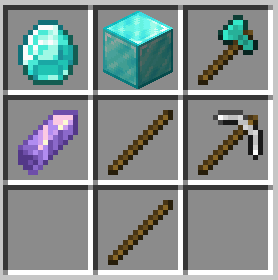
Modrinth · Minecraft mod
RecipeBuff
Makes the game challenging with advanced recipes, and toughened mobs.
Choose a version Pick your version below, then grab the matching file.
Quick answer
Which RecipeBuff release matches Quilt?
Best match for your filters 1.1+mod
Game version 1.21, 1.21.1
Loader Fabric, Forge, NeoForge
RecipeBuff 1.1+mod targets 1.21, 1.21.1 with Fabric, Forge, NeoForge. Installation on the client is optional. Installation on the dedicated server is optional. No extra mods listed for this file.
Where it goes
Is RecipeBuff required on the client, server, or both?
Installation on the client is optional. Installation on the dedicated server is optional.
Client Optional
Dedicated server Optional
Loader for this release Fabric, Forge, NeoForge
Required install it here Optional supported, not mandatory Not supported do not install here Source doesn’t say do not assume
The source marks this as usable on both the client and server.
What else does RecipeBuff 1.1+mod need?
1.1+mod on Quilt. Every mod below is checked against that same setup.
This file does not list any required mods. Do not add a library just because a different file uses it.
This file does not list any required or optional mods.
Before you install it
Add RecipeBuff without breaking your instance.
Built for RecipeBuff 1.1+mod on Quilt. Pick another file and the loader, install side or required mods may change.
- 01
Stick to this file
Use 1.1+mod. It targets 1.21, 1.21.1 with Fabric, Forge, NeoForge; another release may have different loader, side or dependency requirements.
- 02
Bring the mods it needs
This file does not list any required mods. Do not add a library just because a different file uses it.
- 03
Put it on the correct side
Installation on the client is optional. Installation on the dedicated server is optional.
- 04
Pick the file you checked
Use the “Get this file” button beside 1.1+mod. It opens that exact file at the source.
About this project
What does RecipeBuff add?
This datapack changes many recipes, like the wooden pickaxe, to be much more complicated and tedious to create. Along with changes to crafting, mobs have been buffed to annihilate you in three seconds. When you are injured, you become weaker and have effects like slowness.
Recipes changed include (but not limited to):
- All tools (except shovels)
- Crafting Table and Furnace
- Armor
How to install:
If you are adding this into a pre-existing world:
- Unzip the file
- Place into a minecraft save e.g. C:\users\Optim00se\AppData\Roaming\.minecraft\saves\world\datapacks\
- If the datapack does not show any message upon loading the world, try /reload
If you are creating a new world:
- Unzip the file
- In the Create New World menu, click More
- Click the Data Packs button, go to Open Pack Folder
- Navigate to the unzipped folder that has RecipeBuff
- Select it to be used for world creation.
- If the datapack does not show any message upon loading the world, try /reload
Any issues? My username on Discord is @optim00se
Project description from Modrinth.
Pick your setup
RecipeBuff by Minecraft version and loader
Choose the version and loader you play, then open the matching release.
Minecraft version
1.21
5 loader buildsCheck the dependencies, then try the file in a copied instance before changing a world you care about.
Recent files
RecipeBuff versions and loaders
1.1+mod
recipebuff-1.1.jar
30 Mar 2025
Client Optional Server Optional Dependencies No extras listed Listed on Release listing
Check the 1.21.1 · Quilt setup 1.211.21.1FabricForge release
Looking for an older file? The official Modrinth project page is in Resources.
 mod
CurseForge + Modrinth · Minecraft
Oh My, Meteors! - A meteorite mod
A modern mod about Meteors and meteorites falling from the sky! With extreme configurability!
 mod
CurseForge + Modrinth · Minecraft
Traveler's Waystones
Allows teleporting between waystones through a fancy screen!
 mod
CurseForge · Minecraft
Roost Ultimate [NEOFORGE/FORGE]
Catch, Breed, get Rich!