Fabric API Needed by Mouse Tweaks [1.21.3+ Fabric] Mouse Tweaks 2.27
requiredNo matching file

CurseForge · Minecraft mod
Enhances inventory management by adding various functions to the mouse buttons.
Quick answer
Mouse Tweaks [1.21.3+ Fabric] Mouse Tweaks 2.27 targets 1.21.5, 1.21.4, 1.21.3 with Fabric. The project page does not say whether it belongs on the client. The project page does not say whether it belongs on the dedicated server. 1 required mod needs a matching file.
Where it goes
The project page does not say whether it belongs on the client. The project page does not say whether it belongs on the dedicated server.
The source does not explicitly classify this release as client-only or server-only.
[1.21.3+ Fabric] Mouse Tweaks 2.27 on 1.21.5 Fabric. Every mod below is checked against that same setup.
Install Fabric API first, but 1 required mod has no matching file for this setup. Do not mix loader builds to force a match. 2 come through another mod in the chain.
2 extra mods were pulled in by other dependencies. Indented rows show who needs each one. We only count dependency files that match this setup. A file for another loader does not fill the gap.
Before you install it
Built for Mouse Tweaks [1.21.3+ Fabric] Mouse Tweaks 2.27 on 1.21.5 Fabric. Pick another file and the loader, install side or required mods may change.
Use [1.21.3+ Fabric] Mouse Tweaks 2.27. It targets 1.21.5, 1.21.4, 1.21.3 with Fabric; another release may have different loader, side or dependency requirements.
Install Fabric API first, but 1 required mod has no matching file for this setup. Do not mix loader builds to force a match. 2 come through another mod in the chain.
The project page does not say whether it belongs on the client. The project page does not say whether it belongs on the dedicated server.
Use the “Get this file” button beside [1.21.3+ Fabric] Mouse Tweaks 2.27. It opens that exact file at the source.
About this project
Mouse Tweaks replaces the standard RMB dragging mechanic, adds two new LMB dragging mechanics and an ability to quickly move items with the scroll wheel.
Mouse Tweaks is purely client-side. There is no server-side component.
Configuration file: .minecraft/config/MouseTweaks.cfg
Very similar to the standard RMB dragging mechanic, with one difference: if you drag over a slot multiple times, an item will be put there multiple times. Replaces the standard mechanic if enabled.
Configuration setting: RMBTweak=1
Hold your right mouse button:
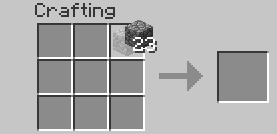
Drag your mouse around the crafting grid:
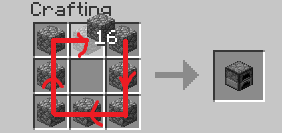
You can drag your mouse on top of existing items:
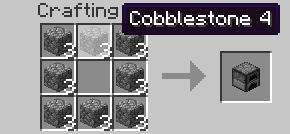
Lets you quickly pick up or move items of the same type.
Configuration setting: LMBTweakWithItem=1
Hold your left mouse button to pick up an item:

Drag your mouse across the inventory. Items of the same type will be picked up:

Hold shift and drag. Items of the same type will get "shift-clicked":

Quickly move items into another inventory.
Configuration setting: LMBTweakWithoutItem=1
Hold shift, then hold your left mouse button:
(Mouse cursor is not visible for some reason)

Drag your mouse across the inventory. Items will get "shift-clicked":
(Mouse cursor is not visible for some reason)

Scroll to quickly move items between inventories. When you scroll down on an item stack, its items will be moved one by one. When you scroll up, items will be moved into it from another inventory.
Configuration setting: WheelTweak=1
Configuration setting: WheelSearchOrder=1
When you scroll up, the mod will search for items from last to first (when this is set to 1) or from first to last (when this is set to 0).
Configuration setting: WheelScrollDirection=0
Set this to 1 to invert the default scroll actions. So, when set to 1, scrolling down will pull the items and scrolling up will push the items.
Set this to 2 to enable the inventory position aware scrolling. Scrolling up will push the items into the other inventory if it's above the selected slot, or pull items from the other inventory if it's below the selected slot. Vice versa for scrolling down.
These settings existed in older Mouse Tweaks versions but were removed since.
Configuration setting: OnTickMethodOrder=Forge, LiteLoader
Mouse Tweaks can use multiple APIs for an OnTick method that it requires. You can use this setting to control the API it prefers. This shouldn't really matter at all. If a method isn't supported (for example, you don't have the API installed) the mod will proceed to check the next ones.
Configuration setting: ScrollHandling=0
Toggles between "smooth scrolling, minor issues" (0) and "non-smooth scrolling, no issues" (1). When set to smooth scrolling, minor issues may be experienced such as scrolling "through" JEI or other mods. When set to non-smooth scrolling, those issues will not happen, but the scrolling will be a little non-smooth. Non-smooth scrolling works only with the Forge OnTick method.
This option is set to smooth scrolling by default because the aforementioned issues require rather specific conditions to trigger and aren't very impactful, while scrolling items is something you do all the time and want the experience to be as good as possible.
Mouse Tweaks is compatible with everything based on GuiContainer (as long as the behavior isn't changed too much).
If your GUI isn't based on GuiContainer, or if you want to improve compatibility (making Mouse Tweaks ignore some slot, for example), take a look at the API documentation.
Feel free to include Mouse Tweaks in modpacks.
Project description from CurseForge.
Pick your setup
Choose the version and loader you play, then open the matching release.
Showing the newest 12 of 36 game versions. Older files are in the list below.
Check the dependencies, then try the file in a copied instance before changing a world you care about.
Recent files
MouseTweaks-fabric-mc1.21.3-2.27.jar
29 Oct 2024
Looking for an older file? The official CurseForge project page is in Resources.