Minecraft version
Back to mods 
CurseForge · Minecraft mod
Fureniku's Roads
Add all sorts of Roads to your Minecraft world!
Choose a version Pick your version below, then grab the matching file.
Quick answer
Which Fureniku's Roads release should I use?
Latest stable file Furenikus_Roads-1.2.6.jar
Game version 1.12.2
Loader Forge
Fureniku's Roads Furenikus_Roads-1.2.6.jar targets 1.12.2 with Forge. The project page does not say whether this file belongs on the client, dedicated server, or both. No extra mods listed for this file.
Where it goes
Is Fureniku's Roads required on the client, server, or both?
The project page does not say whether this file belongs on the client, dedicated server, or both.
Client Source doesn’t say
Dedicated server Source doesn’t say
Loader for this release Forge
Required install it here Optional supported, not mandatory Not supported do not install here Source doesn’t say do not assume
The source does not explicitly classify this release as client-only or server-only.
What else does Fureniku's Roads Furenikus_Roads-1.2.6.jar need?
Furenikus_Roads-1.2.6.jar. Change the file and its required mods may change too.
This file does not list any required mods. Do not add a library just because a different file uses it.
This file does not list any required or optional mods.
Before you install it
Add Fureniku's Roads without breaking your instance.
Built for Fureniku's Roads Furenikus_Roads-1.2.6.jar. Pick another file and the loader, install side or required mods may change.
- 01
Stick to this file
Use Furenikus_Roads-1.2.6.jar. It targets 1.12.2 with Forge; another release may have different loader, side or dependency requirements.
- 02
Bring the mods it needs
This file does not list any required mods. Do not add a library just because a different file uses it.
- 03
Put it on the correct side
The project page does not say whether this file belongs on the client, dedicated server, or both.
- 04
Pick the file you checked
Use the “Get this file” button beside Furenikus_Roads-1.2.6.jar. It opens that exact file at the source.
About this project
What does Fureniku's Roads add?

Paving the way to a better world
Fureniku's Roads is a mod with one goal in mind: to add highly customizable roads to your Minecraft world!
Formally known as FlenixRoads, this mod adds 19 different types of road, with customizable height, and over 80 different paint patterns in 3 different colours. You can combine the roads and paint as you see fit. More blocks to decorate your streets are coming too!
All pictures are from the 1.12 version of the mod. The 1.20.1 version is by no means stable or ready for use, which is why it is marked as alpha. Do not use alpha build unless you know what you're doing (that goes for any mod really!)
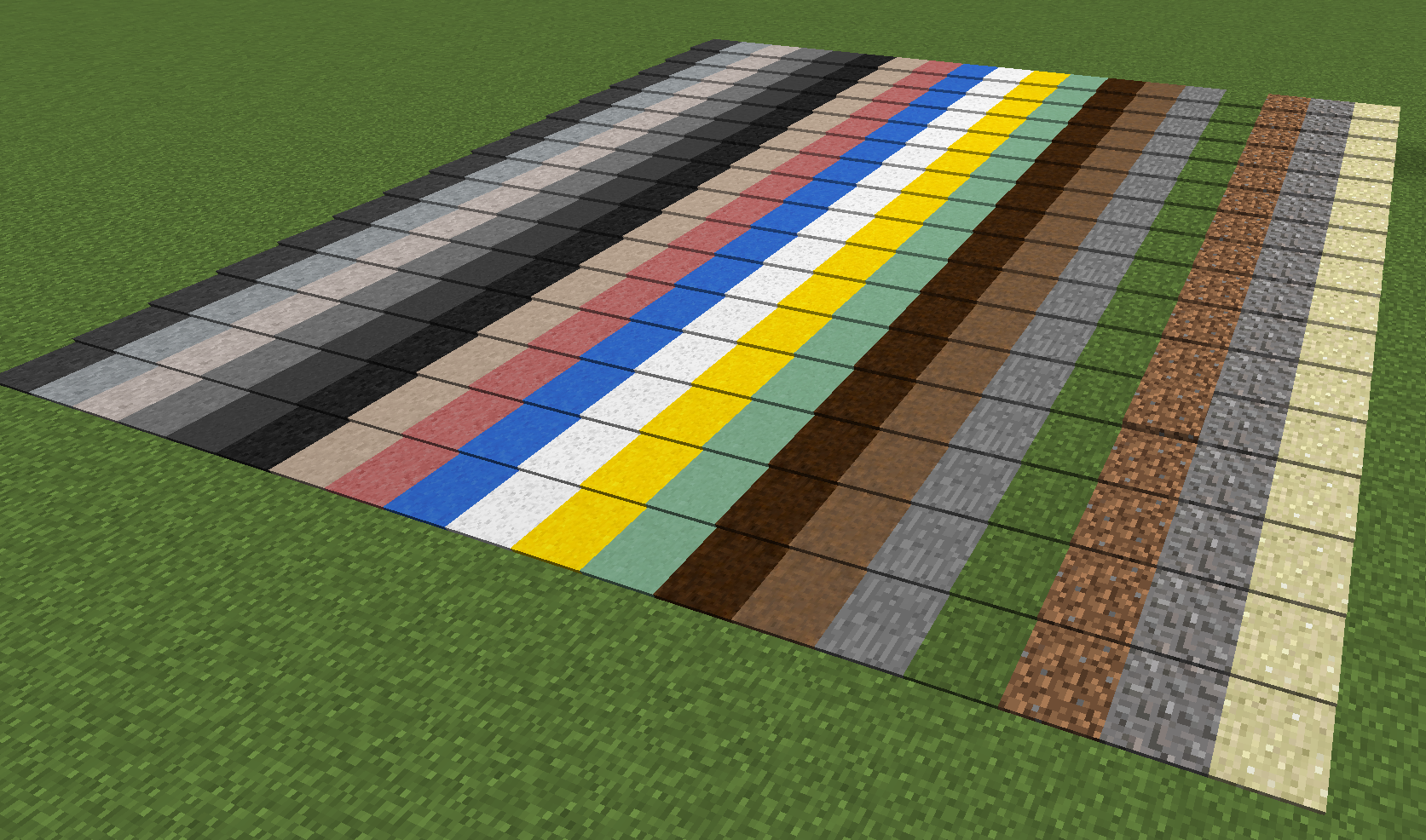 14 exclusive road types, with 5 vanilla (stone, grass, gravel, dirt, sand). 16 height options.
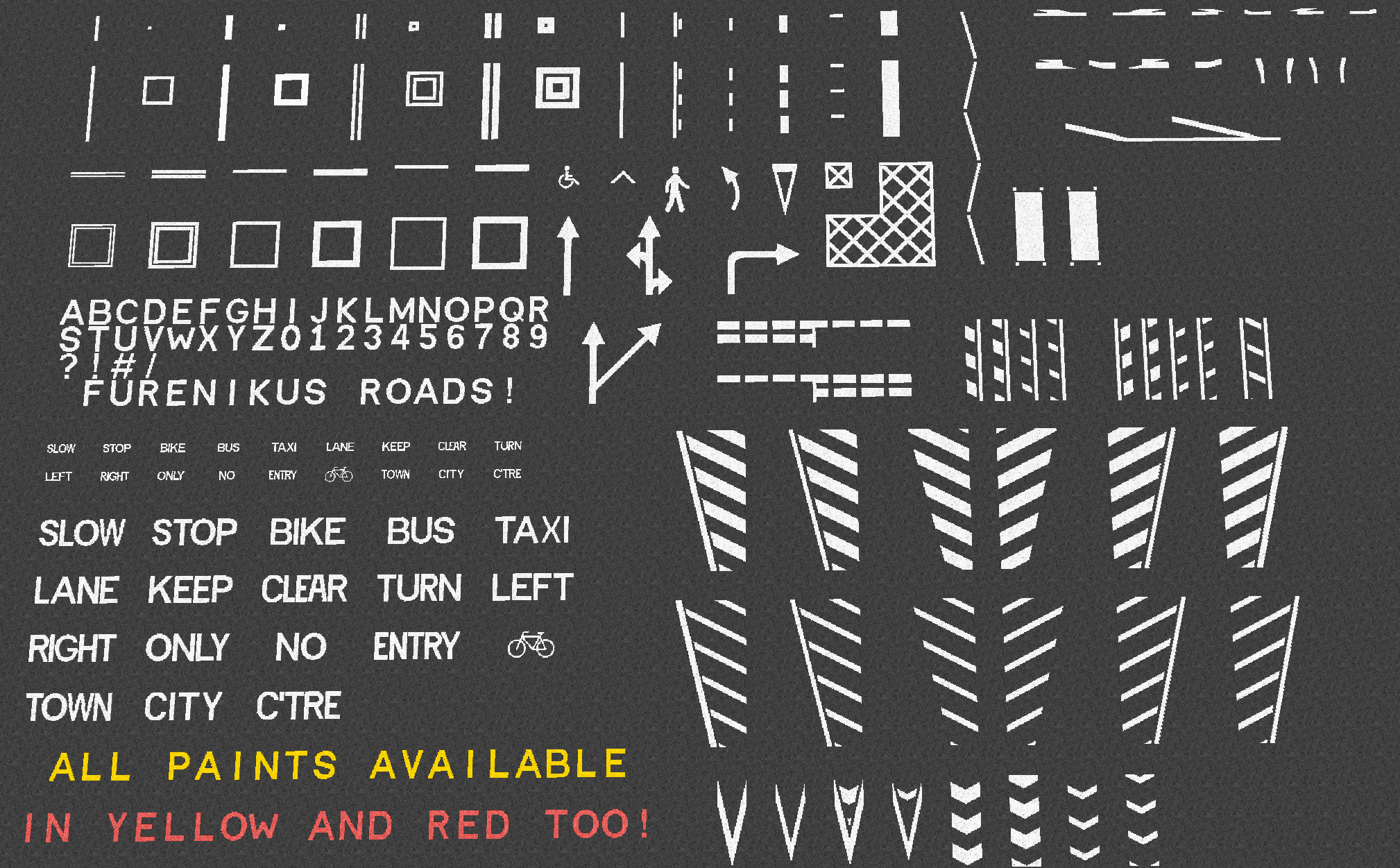 All paints are available in Yellow and Red too. You can place paint on any block, and letters can be placed on walls too!
So, what does it do exactly...?
This is mostly a decorative mod, so alone it doesn't "do" much. It allows you to express your creativity in a new way, and it's great for city roleplay builds too. I guess the best way to show it off is to show some screenshots! All roads shown here are built in a modified version of City of Newisleby Blip Noir
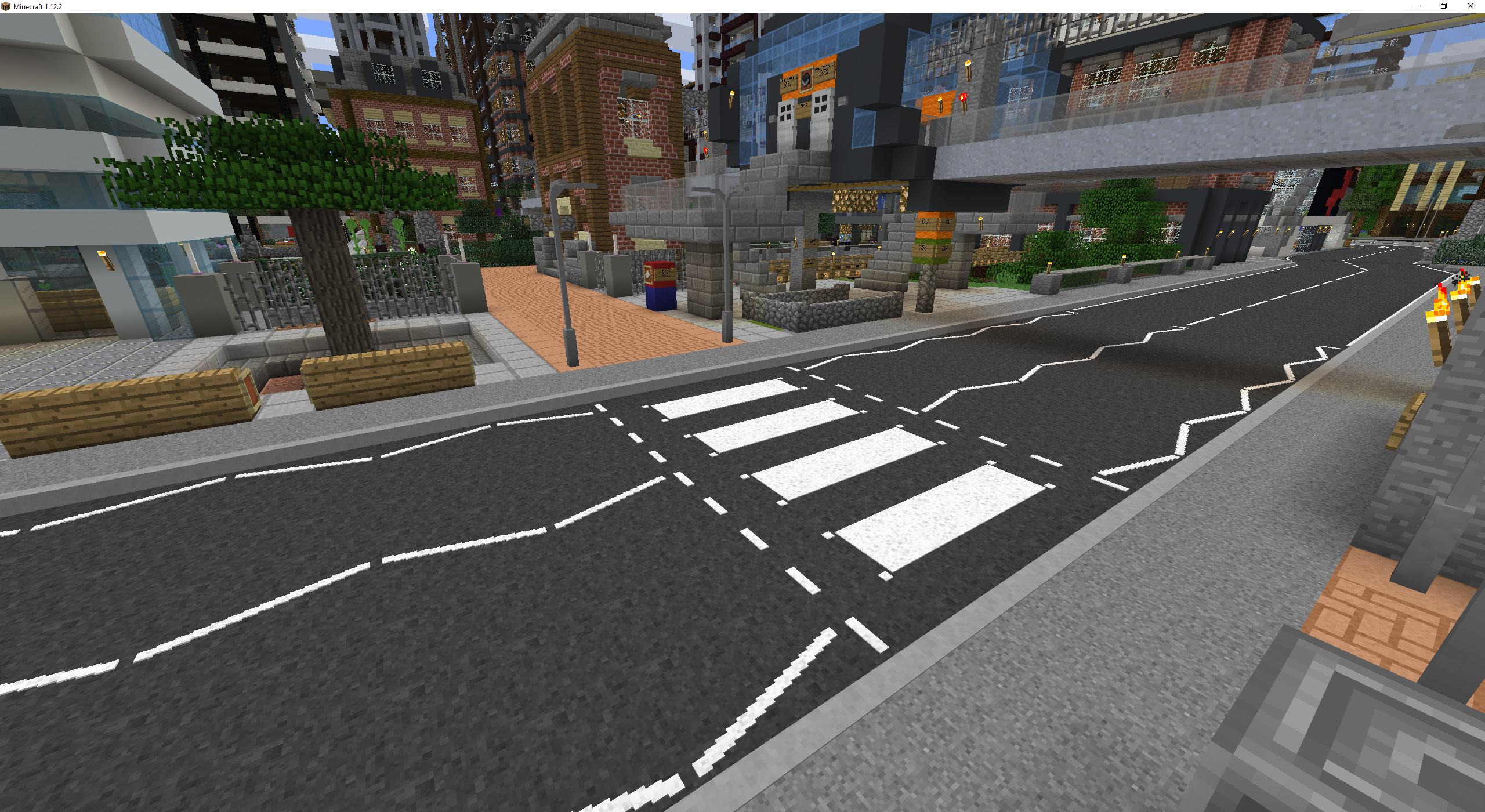
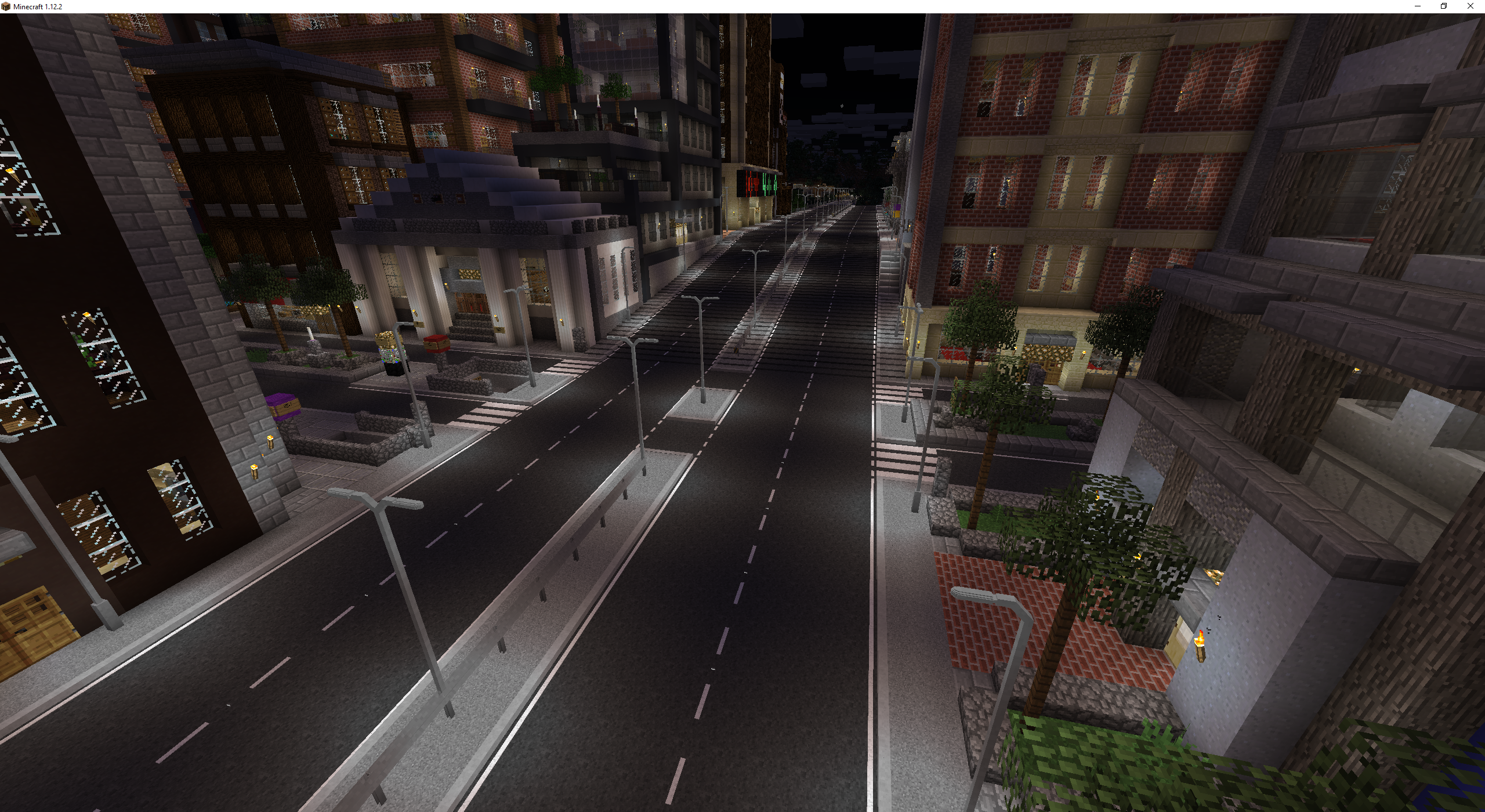
Roads are of course just the 1.0 release though! With future releases I plan to add more things to decorate your roads with, such as signs, lighting and more! I've included a few examples of things to come in this 1.0 release, such as the first street lights, barrier, and a reflector.
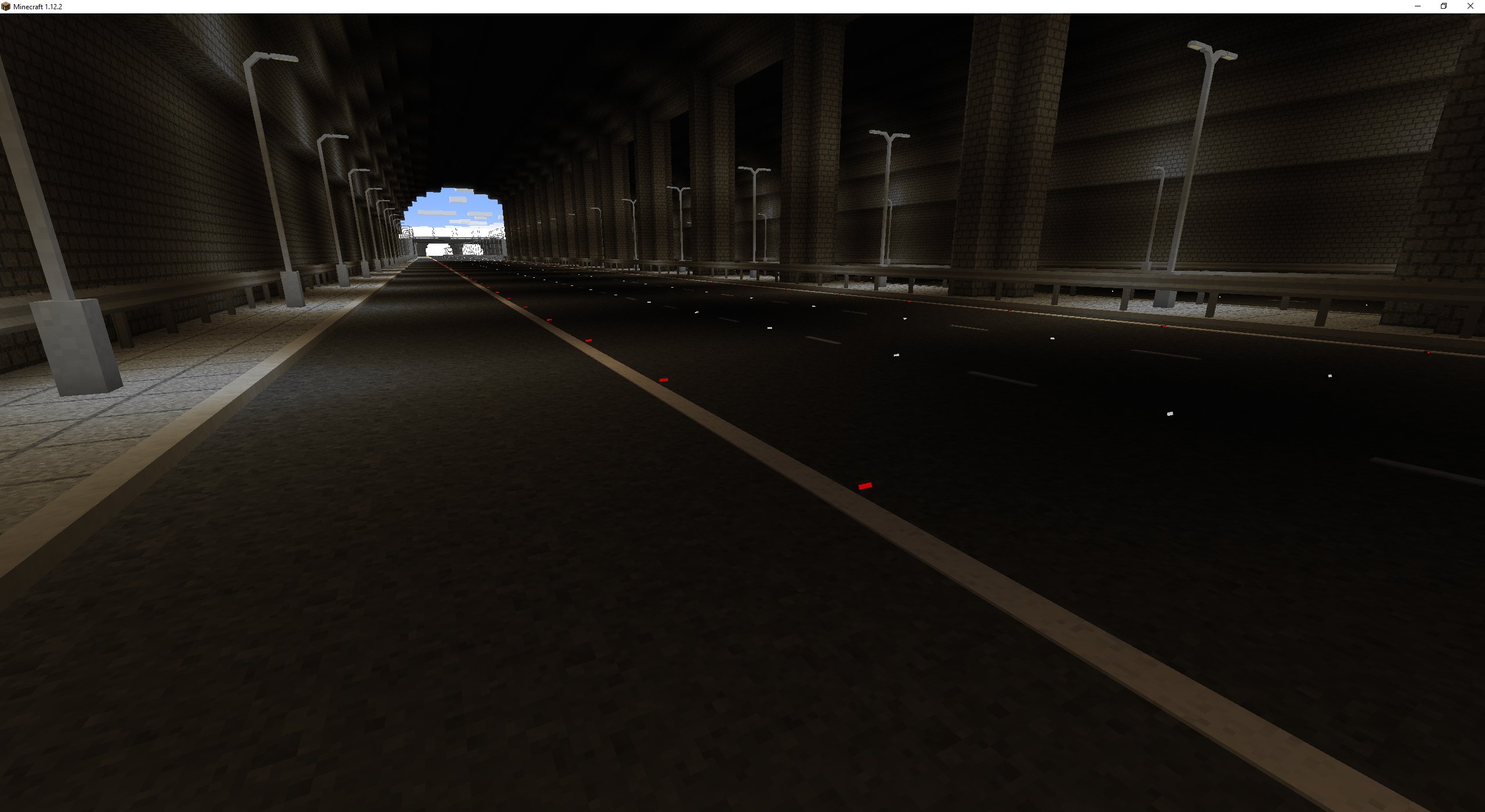
Disclaimer: The reflectors shown here will not render like this with Optifine installed.
The lighting in Fureniku's Roads is a bit fancy too. Here's a day/night comparison of a highway:
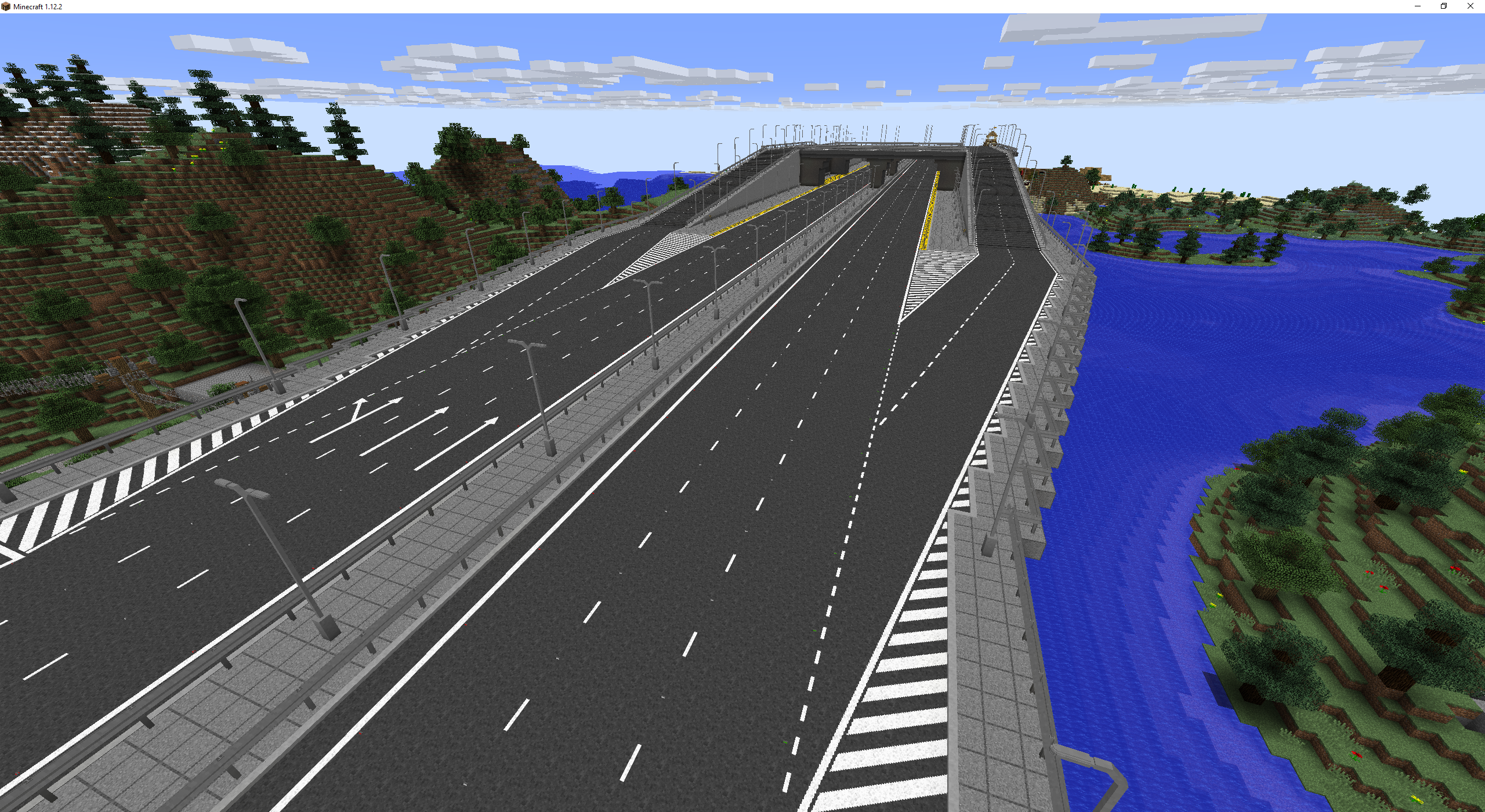
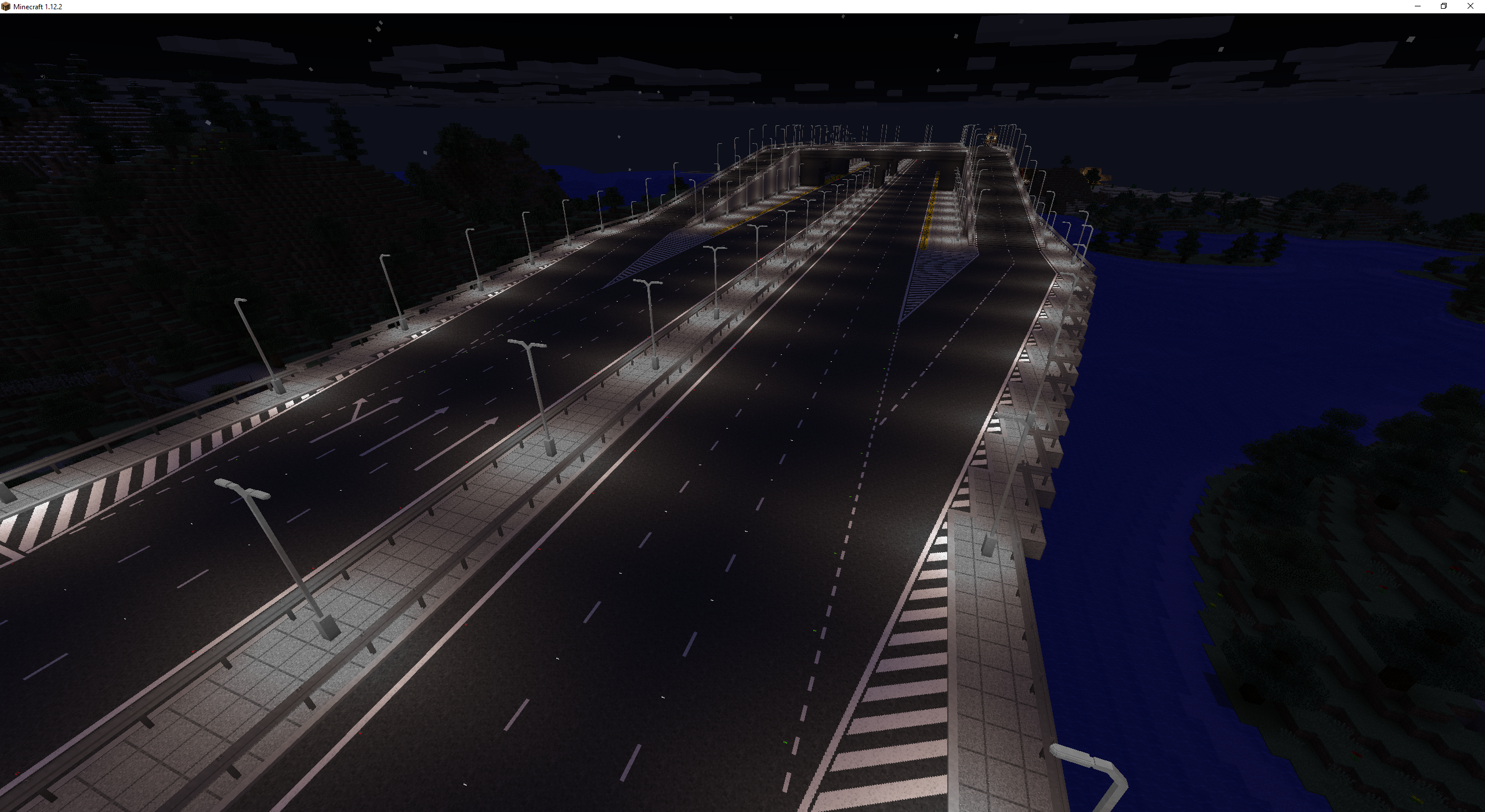
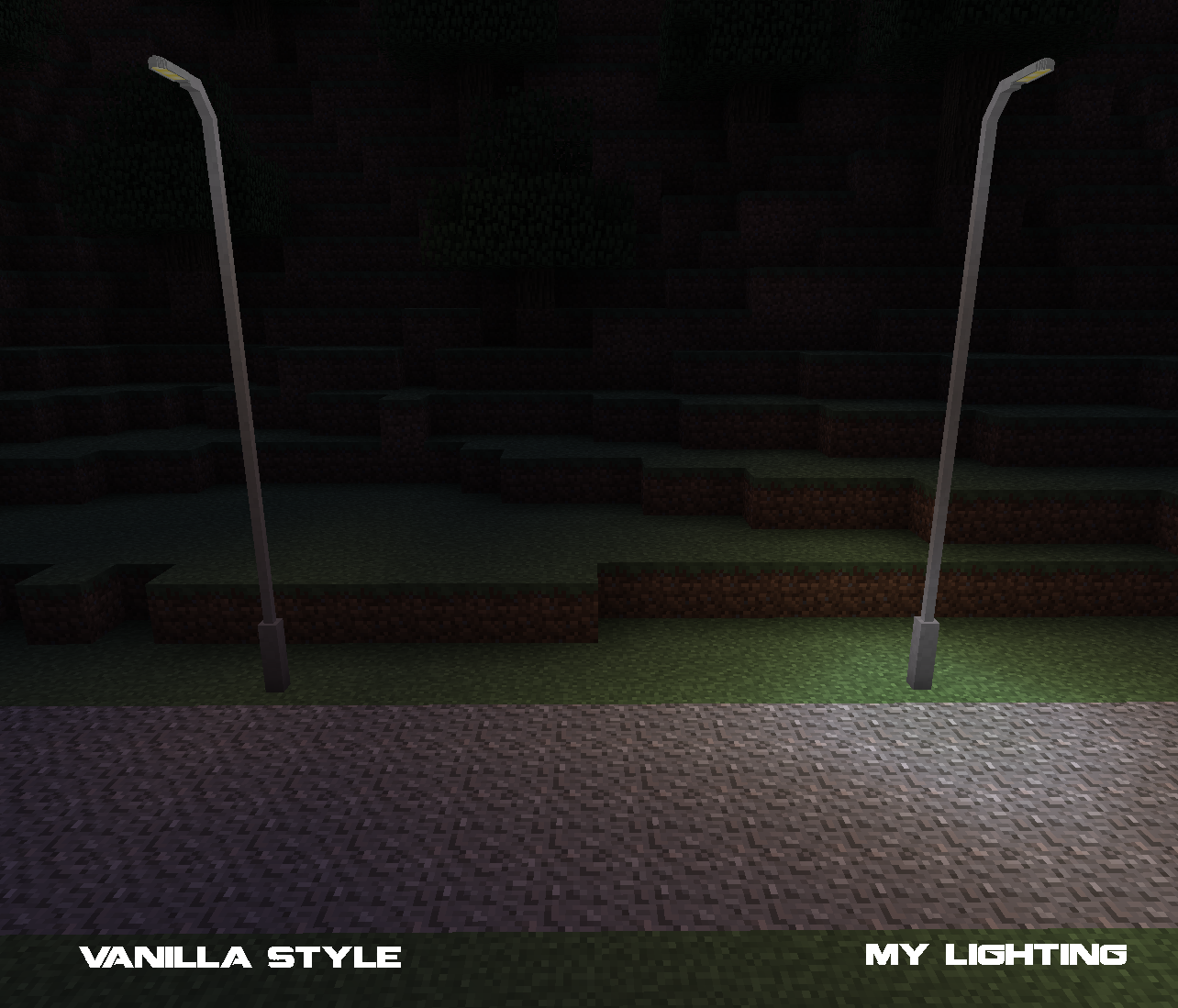
My street lights use a custom system which creates a fake light source at the base, giving them a more natural lighting feel than Minecraft would normally offer.
Crafting
Those of you who are familiar with my mods from 1.6 and 1.7 probably remember I didn't like making crafting recipes. Well, that is a thing of the past! Everything in Fureniku's Roads is now craftable and the mod can be played completely survival.
Crafting recipes and guides are available through my website, or by installing JEI.
Paint Gun
To extend the crafting system, is the paint gun! This is what you'll use to paint your roads and is useful for both survival and creative players. Just fill it up (if you're in Survival), pick your paint, pick your colour and off you go! The Paint Gun is great to manage your different paint types without filling up the hotbar. You can also use the "pick block" function (middle mouse by default) to select the paint you're currently targeting and load it up on the gun.
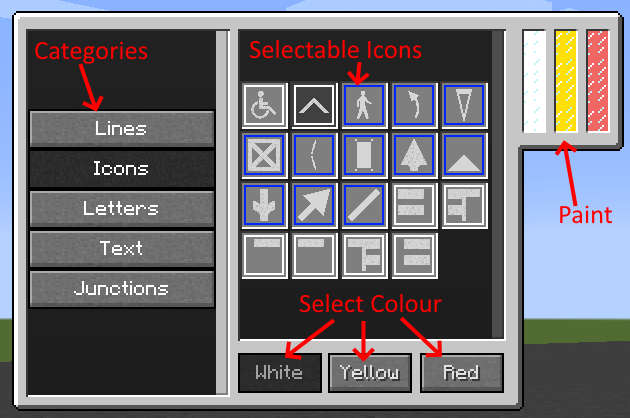
A blue border around an option suggests its a mutli-block paint and will connect to others around it.
The display and tanks on the paint gun model are fully functioning!
Custom Paints
As of version 1.2, you can now make your own custom paints! No modding or modelling experience required!
To add new paints to your world, first head over to my fancy editor: http://fureniku.com/roads/editor/
Next, draw anything you like! Scroll down to see some options such as adding helpful grid lines or changing the resolution - paints can be 16x16, 32x32 or 64x64. Most paints included in the mod are 32x32 if you want to keep on theme.
Once your glorious artwork is completed, make sure you fill in the names and then hit the Export button and you'll get a .json download! Run the game once if you haven't already, then in your Mods folder you'll find a "RoadPaints" folder. Drop your JSON in there and it'll appear in-game!
A quick summary of the options on the editor:
Internal Name: this must be completely unique amongst all paints, and must be all one word. If you're unsure, just call it yourUserNamePaintName. You can use underscores _ and hyphens - too, but no other punctuation.
Display name: This is the name shown to players when they hover over it in their inventory, with WAILA, etc. Unfortunately it cannot be localised, so it will be the same in all languages.
- Category: This is the tab it will appear in within the paint gun. Naming one of the five defaults will add it to those, or enter any other name to make your own new category!
- Type: The type of paint you're making! Changing this will wipe your progress!
- 1x1 Icon: Simple, every-day standard paint.
- 1x1 Wall Icon: Similar to letters, this can be drawn on walls as well as the floor.
- 2x1, 3x1 and 4x1 Icon: These can be placed side-by-side to create larger images, and will automatically place the correct one if it can.
- 3x1 + 1x1 Text: These are just like the Text prefabs included in the mod. You'll make a small and large variant together.
Your custom paints will be available in the paint gun in your selected category, and also in a Creative tab dedicated to custom paints.
Made something cool? Come share it in my Discord!
Planned Features
Here is everything I intend to add right now. Missing something you'd like? Suggest it!
1.1: More street lighting & road accessories Released!
1.2: Diagonal roads system
UPDATE TO NEWER MINECRAFT
1.3: Signs
1.3: Traffic light system
1.4: Road works (systems to mass-build roads in Creative, and some decorative relevant things)
1.6: Mystery surprise!
License & Disclaimer
This mod is developed and owned by Fureniku. They own it, and it's theirs. If at any point all my mods go 6 months without any update, and I have not responded to a message for 2 weeks after that point, then the mod is assumed to be public domain and someone can take over. Let's cause this the whoops I died IRL clause.
You are more than welcome to include this mod in any modpack, so long as:
You have permission to use all other mods in the pack
You credit all mods, and include a link back to the original download source (ideally in a .txt file inside your modpack, but any publicly-accessible credit list is fine). CurseForge packs do this automatically.
You do not profit off the pack (donations for server upkeep etc are fine, so long as they are not buying in-game rewards)
Fureniku cannot be held responsible if this mod breaks your world, destroys your computer or eats your dog.
FAQ
I'm sure this list will shrink drastically once I get the wiki up, but for now here's the questions I anticipate:
***Is it laggy?***No*.
*No more than if you covered blocks with fences. There's no tile entites involved here, just some clever block offset positioning. Paint is technically "the block above" a road, and offsets vertically to align with the road - no laggy tile entities involved! Actual performance will vary with your system but generally it should run relatively well.
(Note: in the future Signs will be tile entities and may have a very minor performance hit if used excessively)
HOWEVER. The startup time will be impacted because there's quite a lot of different models to load. The mod probably won't load on 32 bit Java (although 64 bit is a requirement of Forge anyway I believe). I recommend allocating at least 2gb RAM but allocate 4 if possible.
As of 1.2, I've switched a lot of paint to an internal rendering system which massively reduces the number of blockstates (down by about 10,000). Startup times should be a little faster now!
***How do I make roads in survival?***Ideally, get JEI - all the recipes are available through that. Alternatively, you'll need at least a Tar Distiller, Crusher, and Road Factory. Check the tooltips when you hover over the slots to see the recipes beyond that.
You can then adjust the height using a Tarmac Cutter, or the Pneumatic Drill once placed.
***How do you place/destroy Curbs?***Curbs are a bit strange: You place them on the road pointing at the sidewalk. If there's no paint on the side of your road, you can just place as normal, but if you want paint then place the paint first, then sneak-right-click the curb onto the paint. To destroy it, you need to sneak-right-click with the Pneumatic Drill. They're a bit hacky in how they work, my apologies for the complexity.
***How do you add posts to barriers?***Right-click with a Wrench
***My light isn't illuminating the floor as much as it should be!***You probably accidentally broke the fake light. The fake light is a block on the floor below the real light, but it's invisible. You can walk through it, and replace it by placing other blocks. Break and replace the light and it should return.
Reflectors aren't lighting up like in the screenshots!
You probably have Optifine installed. Optifine messes with how I make things bright without emitting light, and unfortunately I can't do it with OF installed.
***Why are you updating for 1.12? It's such an old version now!***1.2.x was my last update for 1.12, barring a few potential bug fixes. I am now actively developing for 1.20, but this is a ground-up rewrite (with systems to make future updates hopefully a little easier), so it will take some time.
OreDictionary?
I didn't add some ore dictionary registries into the core mod because in some cases my recipes are a lot easier than other mods (especially with coal coke). However, if you want ore dictionary support, matyou1025 has made a CraftTweaker script here.
Suggestions and Bug Reports
I'm always open to hear suggestions and feedback! Ideally, please join my Discord below, else leave them as a comment!
Discord
Join my discord server to keep up-to-date! Make sure to give yourself the Minecraft role (!rank minecraft) so you'll be notified of new releases and so on!

Project description from CurseForge.
Pick your setup
Fureniku's Roads by Minecraft version and loader
Choose the version and loader you play, then open the matching release.
Minecraft version
1.12.2
2 loader buildsMinecraft version
1.7.10
1 loader buildMinecraft version
1.6.4
1 loader buildCheck the dependencies, then try the file in a copied instance before changing a world you care about.
Recent files
Fureniku's Roads versions and loaders
Furenikus_Roads-1.2.6.jar
7 Sept 2024
Client Source doesn’t say Server Source doesn’t say Dependencies No extras listed Listed on Release listing
Check the 1.12.2 · Forge setup Forge1.12.2 release
furenikusroads-0.1.0.jar
31 Jan 2024
Client Source doesn’t say Server Source doesn’t say Dependencies 1 required · 1 unchecked Listed on Release listing
Check the 1.20.1 · Forge setup 1.20.1Forge alpha
Furenikus_Roads-1.2.5.jar
23 Oct 2023
Client Source doesn’t say Server Source doesn’t say Dependencies No extras listed Listed on Release listing
Check the 1.12.2 · Forge setup Forge1.12.2 release
Furenikus_Roads-1.2.4.jar
4 Sept 2023
Client Source doesn’t say Server Source doesn’t say Dependencies No extras listed Listed on Release listing
Check the 1.12.2 · Forge setup Forge1.12.2 release
Furenikus_Roads-1.2.2.jar
4 May 2023
Client Source doesn’t say Server Source doesn’t say Dependencies No extras listed Listed on Release listing
Check the 1.12.2 · Forge setup Forge1.12.2 release
Furenikus_Roads-1.2.1.jar
3 May 2023
Client Source doesn’t say Server Source doesn’t say Dependencies No extras listed Listed on Release listing
Check the 1.12.2 · Forge setup Forge1.12.2 release
Furenikus_Roads-1.2.0.jar
3 May 2023
Client Source doesn’t say Server Source doesn’t say Dependencies No extras listed Listed on Release listing
Check the 1.12.2 · Forge setup Forge1.12.2 release
Furenikus_Roads-1.2.0-dev-b28.jar
22 Jul 2021
Client Source doesn’t say Server Source doesn’t say Dependencies No extras listed Listed on Release listing
Check the 1.12.2 · Forge setup Forge1.12.2 alpha
Furenikus_Roads-1.2.0-dev-b27.jar
17 Jul 2021
Client Source doesn’t say Server Source doesn’t say Dependencies No extras listed Listed on Release listing
Check the 1.12.2 · Forge setup Forge1.12.2 alpha
Furenikus_Roads-1.2.0-dev-b21.jar
17 Apr 2021
Client Source doesn’t say Server Source doesn’t say Dependencies No extras listed Listed on Release listing
Check the 1.12.2 · Forge setup Forge1.12.2 beta
Fureniku's Roads-1.1.10b
Fureniku's Roads-1.1.10.jar
26 Jan 2021
Client Source doesn’t say Server Source doesn’t say Dependencies No extras listed Listed on Release listing
Check the 1.12.2 · Forge setup Forge1.12.2 release
Fureniku's Roads-1.1.10.jar
25 Jan 2021
Client Source doesn’t say Server Source doesn’t say Dependencies No extras listed Listed on Release listing
Check the 1.12.2 setup 1.12.2 release
Looking for an older file? The official CurseForge project page is in Resources.
 mod
mod CurseForge · Minecraft
ShindoCraft
a Naruto palladium mod that adds ninjutsu, taijutsu, dojutsu, kenjutsu and much more.
 mod
mod CurseForge · Minecraft
Log Fences and Gates
Log-textured fences and fence gates for every wood type. Strip the bark off each part with an axe.
 mod
mod CurseForge · Minecraft
Praseodymium
Client-side visual optimizations, connected glass and creative building tools, with zoom, light readings and a frame-time HUD in one Fabric mod.