Minecraft version
Back to mods 
CurseForge · Minecraft mod
Paginated Advancements & Custom Frames
Better advancements screen
Choose a version Pick your version below, then grab the matching file.
Quick answer
Which Paginated Advancements & Custom Frames release should I use?
Latest stable file 2.8.2+26.2-neoforge
Game version 26.2
Loader NeoForge
Paginated Advancements & Custom Frames 2.8.2+26.2-neoforge targets 26.2 with NeoForge. The project page does not say whether this file belongs on the client, dedicated server, or both. No extra mods listed for this file.
Where it goes
Is Paginated Advancements & Custom Frames required on the client, server, or both?
The project page does not say whether this file belongs on the client, dedicated server, or both.
Client Source doesn’t say
Dedicated server Source doesn’t say
Loader for this release NeoForge
Required install it here Optional supported, not mandatory Not supported do not install here Source doesn’t say do not assume
The source does not explicitly classify this release as client-only or server-only.
What else does Paginated Advancements & Custom Frames 2.8.2+26.2-neoforge need?
2.8.2+26.2-neoforge. Change the file and its required mods may change too.
This file does not list any required mods. Do not add a library just because a different file uses it.
This file does not list any required or optional mods.
Before you install it
Add Paginated Advancements & Custom Frames without breaking your instance.
Built for Paginated Advancements & Custom Frames 2.8.2+26.2-neoforge. Pick another file and the loader, install side or required mods may change.
- 01
Stick to this file
Use 2.8.2+26.2-neoforge. It targets 26.2 with NeoForge; another release may have different loader, side or dependency requirements.
- 02
Bring the mods it needs
This file does not list any required mods. Do not add a library just because a different file uses it.
- 03
Put it on the correct side
The project page does not say whether this file belongs on the client, dedicated server, or both.
- 04
Pick the file you checked
Use the “Get this file” button beside 2.8.2+26.2-neoforge. It opens that exact file at the source.
About this project
What does Paginated Advancements & Custom Frames add?
Make your advancement screen not suck!
Features
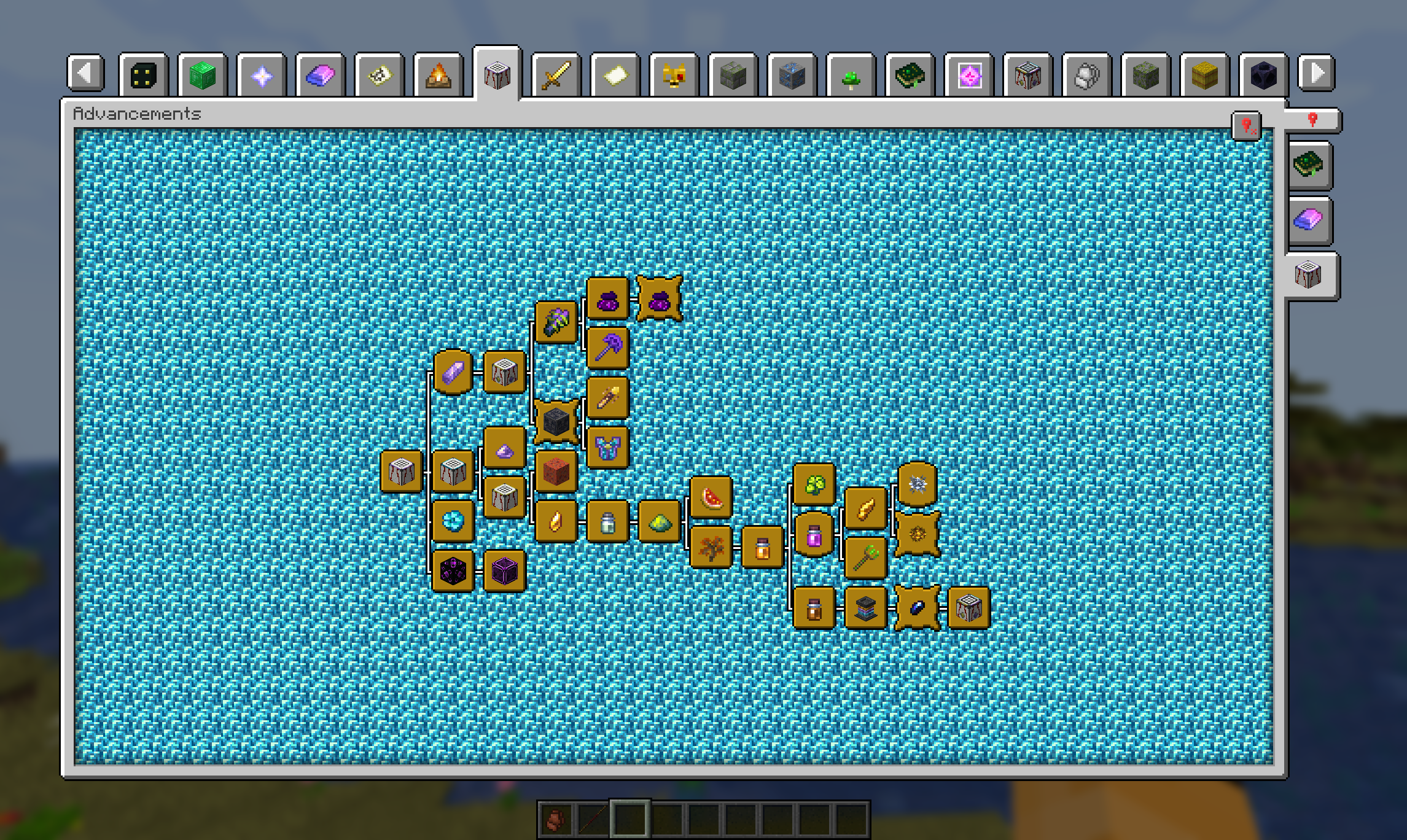
Paginated Advancements completely overhauls the advancement screen by adding a load of features:
- Makes the screen bigger, instead of vanillas fixed, tiny size
- Pagination (no "this modpack has too many tabs to display them all" anymore!)
- Pin the advancement tabs you are currently focusing on
- Remembering the last opened tab
Also adds some styling options, to make the screen exactly how you prefer it:
- Disable background fading
- Configurable Spacing between tabs. Allowing them to be condensed quite a bit, or giving them more room to breathe
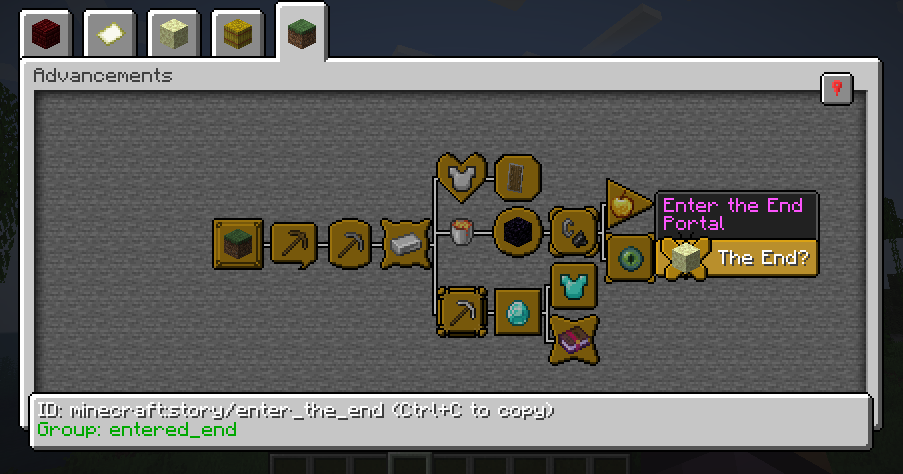
Additional Advancement Frames & Colors
With version 2.0 comes the ability to register new advancement frames, including custom colors, via data pack / mods that support it. Find out how in the Wiki
Project description from CurseForge.
Pick your setup
Paginated Advancements & Custom Frames by Minecraft version and loader
Choose the version and loader you play, then open the matching release.
Minecraft version
26.1.2
2 loader buildsMinecraft version
26.1.1
2 loader buildsMinecraft version
26.1
2 loader buildsMinecraft version
1.21.11
2 loader buildsMinecraft version
1.21.10
2 loader buildsMinecraft version
1.21.9
2 loader buildsMinecraft version
1.21.8
2 loader buildsMinecraft version
1.21.7
2 loader buildsMinecraft version
1.21.6
2 loader buildsMinecraft version
1.21.5
1 loader buildMinecraft version
1.21.4
1 loader buildShowing the newest 12 of 30 game versions. Older files are in the list below.
Check the dependencies, then try the file in a copied instance before changing a world you care about.
Recent files
Paginated Advancements & Custom Frames versions and loaders
2.8.2+26.2-neoforge
PaginatedAdvancements-2.8.2+26.2-neoforge.jar
15 Jul 2026
Client Source doesn’t say Server Source doesn’t say Dependencies No extras listed Listed on Release listing
Check the 26.2 · NeoForge setup NeoForge26.2 release
2.8.0+26.2
paginatedadvancements-2.8.0+26.2.jar
24 Jun 2026
Client Source doesn’t say Server Source doesn’t say Dependencies 1 required · 1 unchecked Listed on Release listing
Check the 26.2 · Fabric setup Fabric26.2 release
2.8.2+26.1-neoforge
paginatedadvancements-2.8.2+26.1-neoforge.jar
27 Apr 2026
Client Source doesn’t say Server Source doesn’t say Dependencies No extras listed Listed on Release listing
Check the 26.1.2 · NeoForge setup NeoForge26.126.1.126.1.2 release
2.8.1+26.1-neoforge
paginatedadvancements-2.8.1+26.1-neoforge.jar
19 Apr 2026
Client Source doesn’t say Server Source doesn’t say Dependencies 1 required · 1 unchecked Listed on Release listing
Check the 26.1.2 · NeoForge setup NeoForge26.126.1.126.1.2 release
2.8.0+26.1-fabric
paginatedadvancements-2.8.0+26.1.jar
19 Apr 2026
Client Source doesn’t say Server Source doesn’t say Dependencies 1 required · 1 unchecked Listed on Release listing
Check the 26.1.2 · Fabric setup Fabric26.126.1.126.1.2 release
2.8.1+1.21.11-neoforge
paginatedadvancements-2.8.1+1.21.11-neoforge.jar
4 Jan 2026
Client Source doesn’t say Server Source doesn’t say Dependencies No extras listed Listed on Release listing
Check the 1.21.11 · NeoForge setup NeoForge1.21.11 release
2.8.0+1.21.11-fabric
paginatedadvancements-2.8.0+1.21.11.jar
22 Dec 2025
Client Source doesn’t say Server Source doesn’t say Dependencies 1 required · 1 unchecked Listed on Release listing
Check the 1.21.11 · Fabric setup Fabric1.21.11 release
2.8.0+1.21.9-neoforge
PaginatedAdvancements-2.8.0+1.21.9-neoforge.jar
13 Oct 2025
Client Source doesn’t say Server Source doesn’t say Dependencies 1 required · 1 unchecked Listed on Release listing
Check the 1.21.10 · NeoForge setup NeoForge1.21.91.21.10 release
2.8.0+1.21.9-fabric
paginatedadvancements-2.8.0+1.21.9.jar
13 Oct 2025
Client Source doesn’t say Server Source doesn’t say Dependencies 2 required · 2 unchecked Listed on Release listing
Check the 1.21.10 · Fabric setup Fabric1.21.91.21.10 release
2.7.0+1.21.8-neoforge
PaginatedAdvancements-2.7.0+1.21.8-neoforge.jar
8 Sept 2025
Client Source doesn’t say Server Source doesn’t say Dependencies No extras listed Listed on Release listing
Check the 1.21.8 · NeoForge setup 1.21.8NeoForge release
2.7.0+1.21.8-fabric
paginatedadvancements-2.7.0+1.21.8.jar
8 Sept 2025
Client Source doesn’t say Server Source doesn’t say Dependencies 2 required · 2 unchecked Listed on Release listing
Check the 1.21.8 · Fabric setup Fabric1.21.8 release
2.7.0+1.21.7-neoforge
PaginatedAdvancements-2.7.0+1.21.7-neoforge.jar
8 Jul 2025
Client Source doesn’t say Server Source doesn’t say Dependencies No extras listed Listed on Release listing
Check the 1.21.7 · NeoForge setup NeoForge1.21.71.21.6 release
Looking for an older file? The official CurseForge project page is in Resources.
 mod
mod CurseForge · Minecraft
Explorer Compass Filtered
Filter Explorer's Compass structures by dimension and source mod.
 mod
mod CurseForge + Modrinth · Minecraft
Easy Hopper
Speed up Hoppers and add classification function to it!
 mod
mod CurseForge + Modrinth · Minecraft
Xeno (Curseforge)
A performant rendering optimization Mod for Minecraft. Evolving from a optimized VulkanMod fork for 26.1.2 into an independent mod for 26.2.