Minecraft version
Back to mods 
CurseForge · Minecraft mod
Skin Hotkey
Switch skin layers by hotkeys
Choose a version Pick your version below, then grab the matching file.
Quick answer
Which Skin Hotkey release should I use?
Latest stable file skinhotkey-1.3.jar
Game version 1.19.4
Loader Forge
Skin Hotkey skinhotkey-1.3.jar targets 1.19.4 with Forge. The project page does not say whether this file belongs on the client, dedicated server, or both. No extra mods listed for this file.
Where it goes
Is Skin Hotkey required on the client, server, or both?
The project page does not say whether this file belongs on the client, dedicated server, or both.
Client Source doesn’t say
Dedicated server Source doesn’t say
Loader for this release Forge
Required install it here Optional supported, not mandatory Not supported do not install here Source doesn’t say do not assume
The source does not explicitly classify this release as client-only or server-only.
What else does Skin Hotkey skinhotkey-1.3.jar need?
skinhotkey-1.3.jar. Change the file and its required mods may change too.
This file does not list any required mods. Do not add a library just because a different file uses it.
This file does not list any required or optional mods.
Before you install it
Add Skin Hotkey without breaking your instance.
Built for Skin Hotkey skinhotkey-1.3.jar. Pick another file and the loader, install side or required mods may change.
- 01
Stick to this file
Use skinhotkey-1.3.jar. It targets 1.19.4 with Forge; another release may have different loader, side or dependency requirements.
- 02
Bring the mods it needs
This file does not list any required mods. Do not add a library just because a different file uses it.
- 03
Put it on the correct side
The project page does not say whether this file belongs on the client, dedicated server, or both.
- 04
Pick the file you checked
Use the “Get this file” button beside skinhotkey-1.3.jar. It opens that exact file at the source.
About this project
What does Skin Hotkey add?
Skin Hotkey - a small mod that allows you to turn on and off the second layer of skin by pressing a key (s).
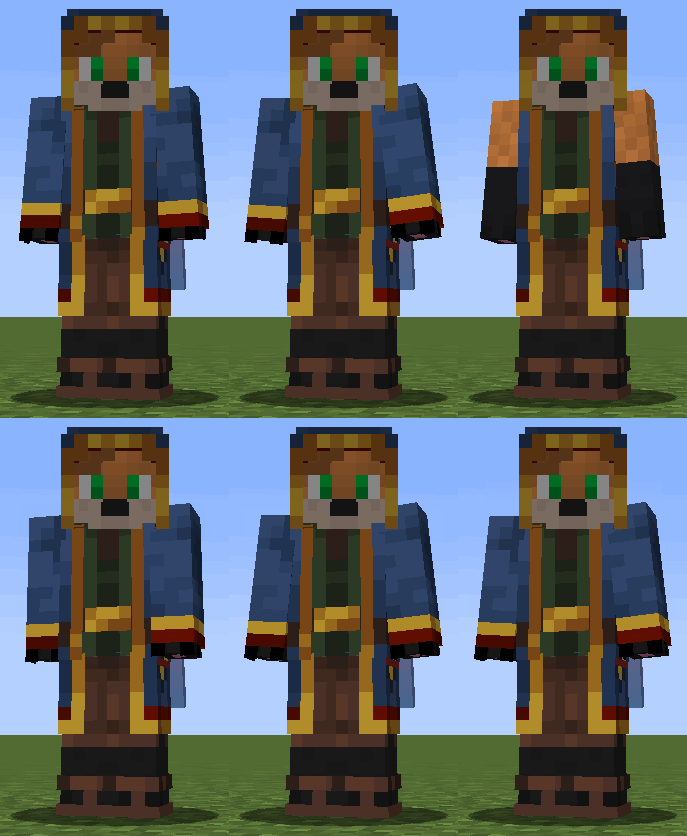
(An example of the work of groups and parts in the game)
1) Skin Hotkey - Groups
In groups, you can configure the bind to enable and disable several elements at once:
• Everything except the raincoat
• Top of clothing (two arms and body)
• Bottom of clothing (two legs)
They are made in such a way that they first turn off and then turn on these parts (the state is reset when you restart the game, that is, the mod does not remember the previous state, but each time it first tries to turn off and then turn on all the parts in this group)
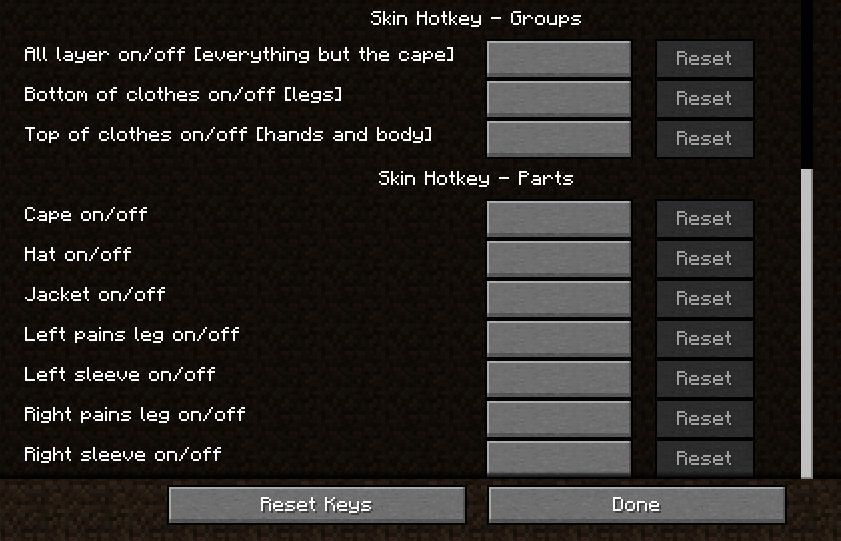
2) Skin Hotkey - Parts
In parts, you can set up buttons to enable and disable all parts individually.
Starting with version 1.1 of the mod, you can assemble your group through the "Parts" section by assigning the parts you need to the same button.
ATTENTION! in the part section - all parts just reverse their state! For example: if you create your group by binding the G button on the head, arms and legs. Then, by pressing this button, the state of all these parts will be separately changed to the opposite. That is: if your head was turned off and your legs and arms were turned on, then it would turn out that your head would turn on and your legs and arms would turn off.
Project description from CurseForge.
Pick your setup
Skin Hotkey by Minecraft version and loader
Choose the version and loader you play, then open the matching release.
Minecraft version
1.20.3
1 loader buildMinecraft version
1.20.2
1 loader buildMinecraft version
1.20.1
1 loader buildMinecraft version
1.20
1 loader buildMinecraft version
1.19.4
2 loader buildsMinecraft version
1.19.3
1 loader buildMinecraft version
1.19.2
1 loader buildMinecraft version
1.19.1
1 loader buildMinecraft version
1.19
1 loader buildMinecraft version
1.18.2
2 loader buildsMinecraft version
1.18.1
2 loader buildsShowing the newest 12 of 18 game versions. Older files are in the list below.
Check the dependencies, then try the file in a copied instance before changing a world you care about.
Recent files
Skin Hotkey versions and loaders
skinhotkey-1.3.jar
9 Feb 2024
Client Source doesn’t say Server Source doesn’t say Dependencies No extras listed Listed on Release listing
Check the 1.19.4 · Forge setup 1.19.4Forge release
skin-hotkey-1.2.1.jar
skin-hotkey-1.2.jar
31 Jan 2024
Client Source doesn’t say Server Source doesn’t say Dependencies No extras listed Listed on Release listing
Check the 1.20.4 · Fabric setup 1.19.31.20.21.19.4Fabric release
Skin Hotkey 1.1 forge 1.16.5
skinhotkey-1.1.jar
8 May 2022
Client Source doesn’t say Server Source doesn’t say Dependencies No extras listed Listed on Release listing
Check the 1.16.5 · Forge setup 1.16.31.16.11.16.5Forge release
Skin Hotkey 1.1 forge 1.18.2
skinhotkey-1.1.jar
5 May 2022
Client Source doesn’t say Server Source doesn’t say Dependencies No extras listed Listed on Release listing
Check the 1.18.2 · Forge setup 1.18.11.18.2Forge1.18 release
Skin Hotkey 1.1 fabric 1.18.2
skin-hotkey-1.1.jar
29 Apr 2022
Client Source doesn’t say Server Source doesn’t say Dependencies No extras listed Listed on Release listing
Check the 1.18.2 · Fabric setup 1.18.1Fabric1.18.21.18 release
Skin Hotkey 1.0 fabric 1.18.2
skin-hotkey-1.0.jar
28 Apr 2022
Client Source doesn’t say Server Source doesn’t say Dependencies No extras listed Listed on Release listing
Check the 1.18.2 · Fabric setup Fabric1.18.2 release
Looking for an older file? The official CurseForge project page is in Resources.
 mod
CurseForge + Modrinth · Minecraft
ShapeGen
Additional shapes for any block, including modded ones
 mod
CurseForge · Minecraft
Raw's Chunk Generation
Automatic chunk generation extension. Generates a buffer zone around online players, and generates around recent player activity when no players are online.
 mod
CurseForge + Modrinth · Minecraft
Fate/Unlimited Block Works
Bring the holy grail war to minecraft