Minecraft version
Back to mods 
CurseForge · Minecraft mod
Ben's Redstone Tools
Adding some convenient tools and commands for redstone builders.
Choose a version Pick your version below, then grab the matching file.
Quick answer
Which Ben's Redstone Tools release should I use?
Latest stable file redstone_tools-1.17.1-2.2.1.jar
Game version 1.17.1
Loader Fabric
Ben's Redstone Tools redstone_tools-1.17.1-2.2.1.jar targets 1.17.1 with Fabric. The project page does not say whether this file belongs on the client, dedicated server, or both. No extra mods listed for this file.
Where it goes
Is Ben's Redstone Tools required on the client, server, or both?
The project page does not say whether this file belongs on the client, dedicated server, or both.
Client Source doesn’t say
Dedicated server Source doesn’t say
Loader for this release Fabric
Required install it here Optional supported, not mandatory Not supported do not install here Source doesn’t say do not assume
The source does not explicitly classify this release as client-only or server-only.
What else does Ben's Redstone Tools redstone_tools-1.17.1-2.2.1.jar need?
redstone_tools-1.17.1-2.2.1.jar. Change the file and its required mods may change too.
This file does not list any required mods. Do not add a library just because a different file uses it.
This file does not list any required or optional mods.
Before you install it
Add Ben's Redstone Tools without breaking your instance.
Built for Ben's Redstone Tools redstone_tools-1.17.1-2.2.1.jar. Pick another file and the loader, install side or required mods may change.
- 01
Stick to this file
Use redstone_tools-1.17.1-2.2.1.jar. It targets 1.17.1 with Fabric; another release may have different loader, side or dependency requirements.
- 02
Bring the mods it needs
This file does not list any required mods. Do not add a library just because a different file uses it.
- 03
Put it on the correct side
The project page does not say whether this file belongs on the client, dedicated server, or both.
- 04
Pick the file you checked
Use the “Get this file” button beside redstone_tools-1.17.1-2.2.1.jar. It opens that exact file at the source.
About this project
What does Ben's Redstone Tools add?
Introduction
Redstone Tools is a small mod that adds some convenient tools and commands for the creative mod or redstone builders.
This mod is available for Minecraft 1.17.1 Fabric. I have no plan to make Forge version or older Minecraft versions.
This mod currently supports English (en-us) and Traditional Chinese (zh-tw).
Commands
- /wool [color]
Gives you a wool with the specified color. For example, /wool red gives you a red wool.
[color] accepts abbreviations, so you don't need to type the full name of the color. If you want light_blue, you can just use libl
Somebody prefers other colored blocks, so I also made commands for them.
/glass [color] Stained glass
/conbl [color] Concrete block
/conpow [color] Concrete powder
/terra [color] Terracota
/glaterra [color] Glazed terracotta
/bar [int]
Gives you a barrel with specified signal strength.
For example, /bar 5 gives you a barrel containing 8 wooden axes so it can produce 5 signal strength.
- /shulker [int]
This one is like the last one, but it gives you a shulker box instead of a barrel.
- /lectern
Gives you a lectern which contains a book with 15 pages.
You can controll signal strength easily with a lectern.
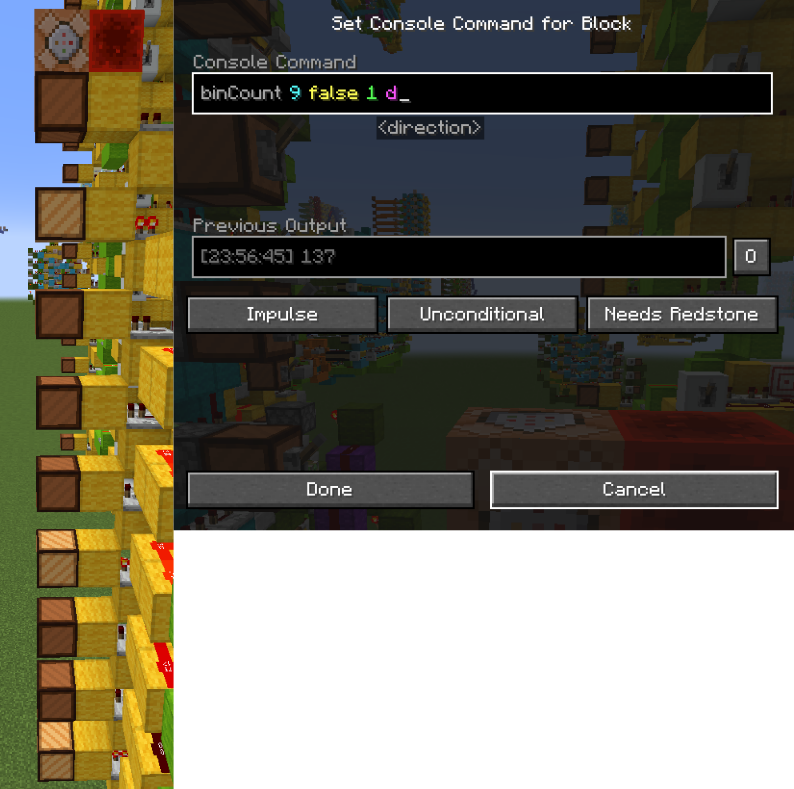
- /binCount [bits] [signed] [distance] [direction]
This command can calculate a binary number represented by redstone lamps.
It is useful when you are building logical redstone.
[bits] : Int. The bits of the binary number. It can be at most 63.
[signed] : Boolean. The number is signed or unsigned. Using 2's complement if it is signed.
[distance] : Int. The distance between two redstone lamps.
[direction] : The direction of redstone lamps. It can a name, such as down, north, east, d, n, e. It can also be an axis, such as -y, -z, +x.
Note : You have to execute this command above the MSB block.
- /hexCount [size] [signed] [distance] [direction]
This is similar to binCount, but it calculates a hexadecimal number instead.
The number is represented by the power level of redstone dusts.
[size] is the digits of the number. It can be at most 16.
Here's an example.
There are 9 redstone lamps which represent a 9 bit number. I want this number to be unsigned. The distance between redstone lamps is 1 block. The direction of blocks is down (Top is MSB, bottom is LSB)
So the command becomes binCount 9 false 1 d
The result is 128+8+1=137.
- /killitem
This command can remove all item and xp orb entities.
- /slab
Just gives you a slab, because I am too lazy to grab it from my inventory lol.
Keys
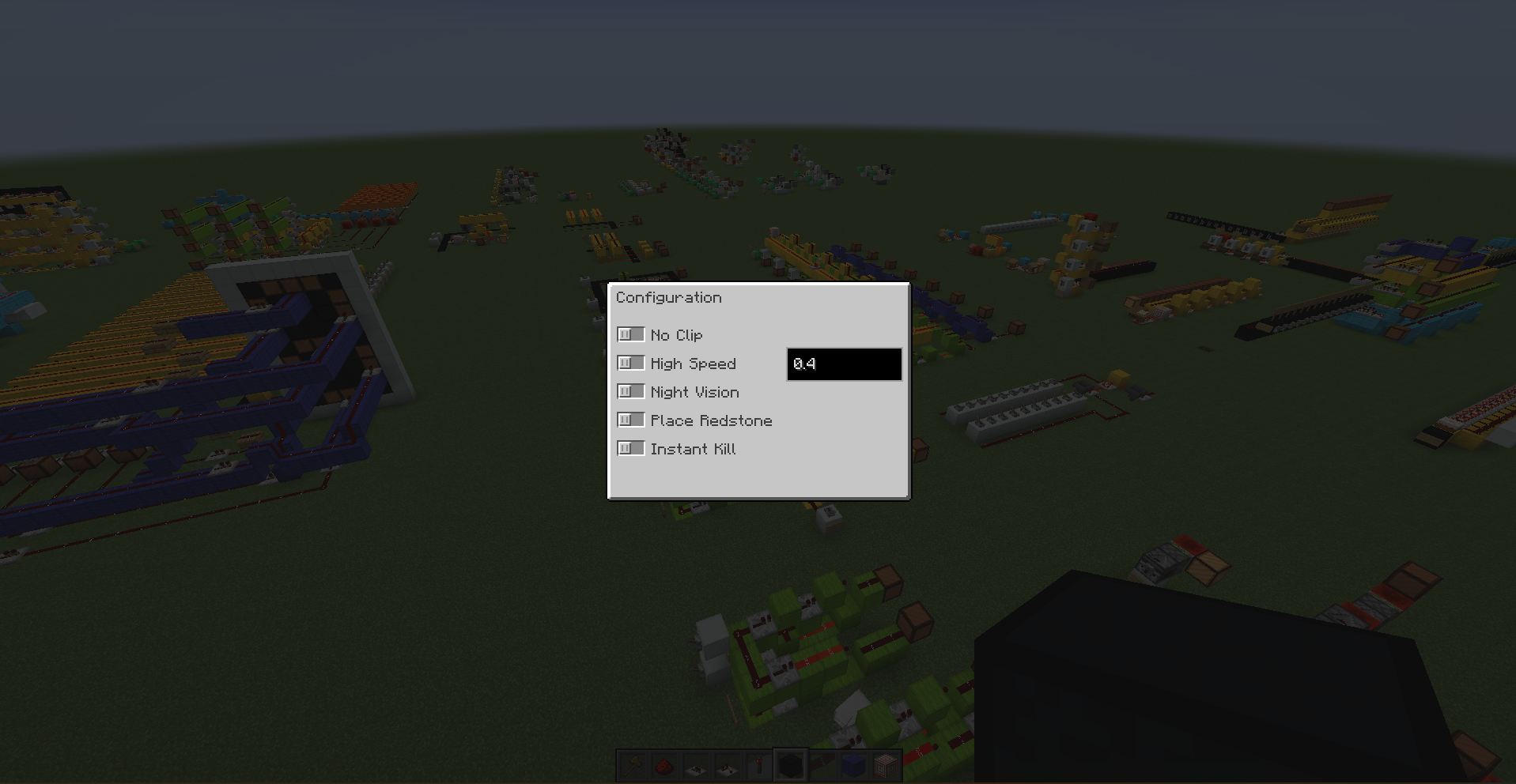
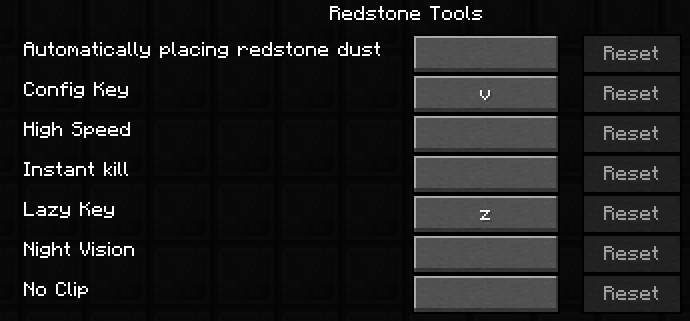
- Config key (V)
It will open a menu, and you can choose some abilities there.
Such as noclip, high speed, night vision, instant kill, instant break and auto redstone placing.
Maybe I will add more abilities in the future.
If you don't want to open the menu everytime, you can set keybindings for those abilities.
- Lazy key (Z)
With this key, you can get redstone components easily.
Press this key and it gives you a redstone dust and a repeater.
While holding a repeater, it gives you a comparator.
While holding a comparator, it gives you a redstone torch.
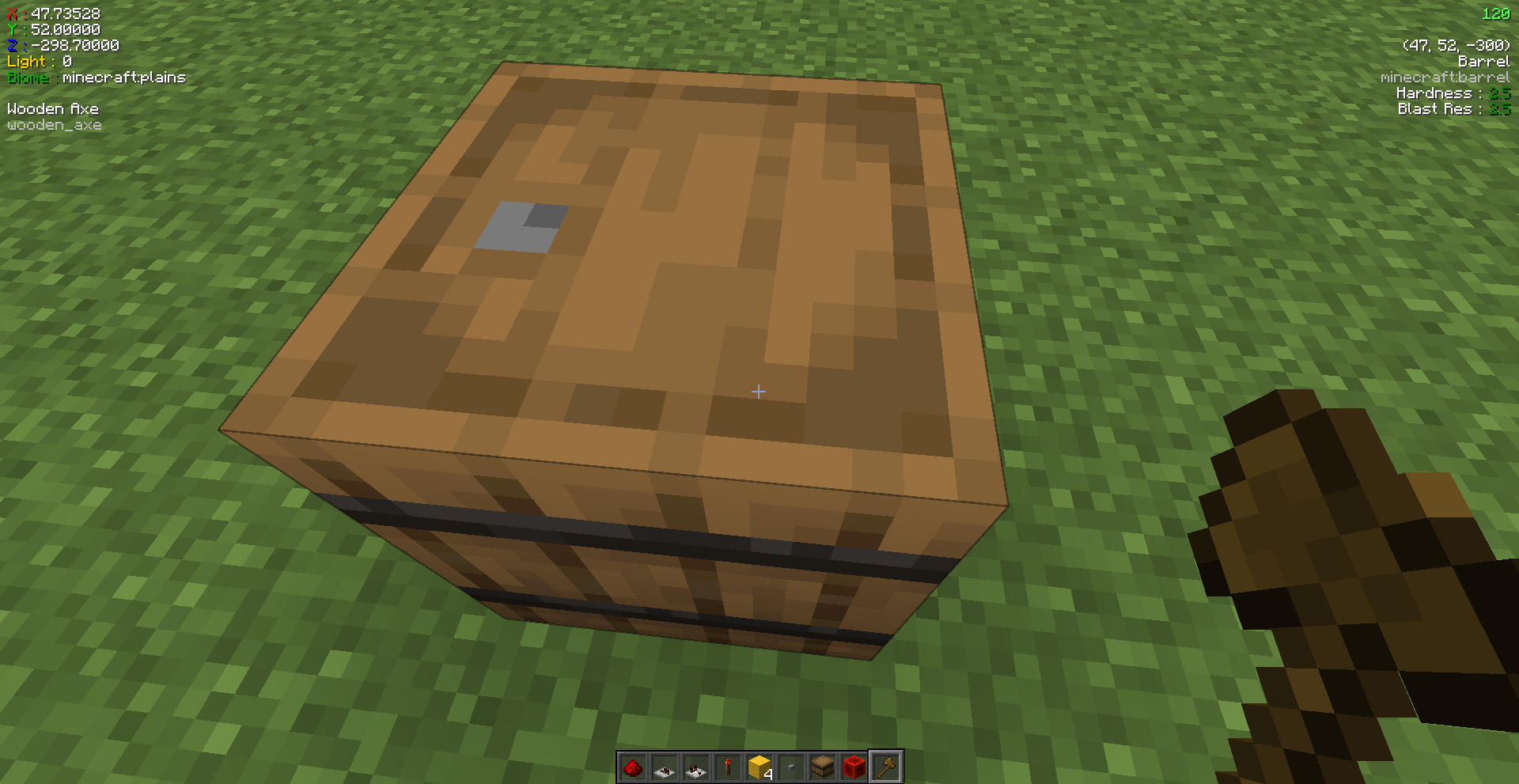
Ingame Hud
Display some information on the screen. You can use F8 to toggle the hud.
- Player's coordinates, biome and light level
- Hand held item, including enchantments, attribute modifiers and custom potion effects
- Targetted block
I might add more block information in the future.
Icon is from Flaticon.
Project description from CurseForge.
Pick your setup
Ben's Redstone Tools by Minecraft version and loader
Choose the version and loader you play, then open the matching release.
Check the dependencies, then try the file in a copied instance before changing a world you care about.
Recent files
Ben's Redstone Tools versions and loaders
redstone_tools-1.17.1-2.2.1.jar
14 May 2022
Client Source doesn’t say Server Source doesn’t say Dependencies No extras listed Listed on Release listing
Check the 1.17.1 · Fabric setup 1.17.1Fabric release
redstone_tools-1.17.1-2.2.jar
14 May 2022
Client Source doesn’t say Server Source doesn’t say Dependencies No extras listed Listed on Release listing
Check the 1.17.1 · Fabric setup 1.17.1Fabric release
redstone_tools-1.17.1-2.1.jar
6 May 2022
Client Source doesn’t say Server Source doesn’t say Dependencies No extras listed Listed on Release listing
Check the 1.17.1 · Fabric setup 1.17.1Fabric release
redstone_tools-1.17.1-2.0.jar
4 May 2022
Client Source doesn’t say Server Source doesn’t say Dependencies No extras listed Listed on Release listing
Check the 1.17.1 · Fabric setup 1.17.1Fabric release
redstone_tools-1.17.1-1.0.jar
2 May 2022
Client Source doesn’t say Server Source doesn’t say Dependencies No extras listed Listed on Release listing
Check the 1.17.1 · Fabric setup 1.17.1Fabric release
Looking for an older file? The official CurseForge project page is in Resources.
 mod
CurseForge + Modrinth · Minecraft
VanillaHUD
A mod that modifies various vanilla HUD elements, such as the bossbar, action bar, sidebar / scoreboard, hotbar, title / subtitle, and more. By Polyfrost, best with OneClient.
 mod
CurseForge · Minecraft
Visual Villager Trade Edit
Add custom villager trades with a GUI
 mod
CurseForge · Minecraft
Tensura Nations
Found a nation, claim land, turn your named monsters into citizens, run workstations, trade, and compete in seasons. A Tensura: Reincarnated addon with wars, alliances and a living economy.