Minecraft version
Back to mods 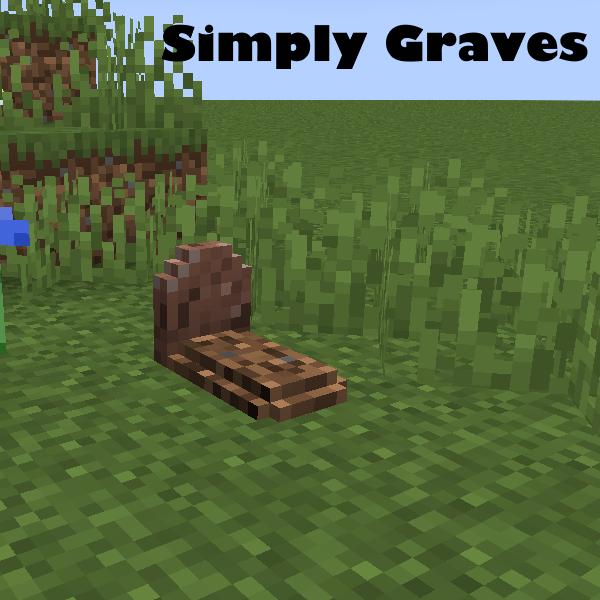
CurseForge · Minecraft mod
Simply Graves
Simple grave stone mod
Choose a version Pick your version below, then grab the matching file.
Quick answer
Which Simply Graves release matches 26.1.2?
beta file simplygraves 1.2.0+mc26.1.2-b1
Game version 26.1.2
Loader NeoForge
Simply Graves simplygraves 1.2.0+mc26.1.2-b1 targets 26.1.2 with NeoForge. The project page does not say whether this file belongs on the client, dedicated server, or both. No extra mods listed for this file.
Where it goes
Is Simply Graves required on the client, server, or both?
The project page does not say whether this file belongs on the client, dedicated server, or both.
Client Source doesn’t say
Dedicated server Source doesn’t say
Loader for this release NeoForge
Required install it here Optional supported, not mandatory Not supported do not install here Source doesn’t say do not assume
The source does not explicitly classify this release as client-only or server-only.
What else does Simply Graves simplygraves 1.2.0+mc26.1.2-b1 need?
simplygraves 1.2.0+mc26.1.2-b1 on 26.1.2. Every mod below is checked against that same setup.
This file does not list any required mods. Do not add a library just because a different file uses it.
This file does not list any required or optional mods.
Before you install it
Add Simply Graves without breaking your instance.
Built for Simply Graves simplygraves 1.2.0+mc26.1.2-b1 on 26.1.2. Pick another file and the loader, install side or required mods may change.
- 01
Stick to this file
Use simplygraves 1.2.0+mc26.1.2-b1. It targets 26.1.2 with NeoForge; another release may have different loader, side or dependency requirements.
- 02
Bring the mods it needs
This file does not list any required mods. Do not add a library just because a different file uses it.
- 03
Put it on the correct side
The project page does not say whether this file belongs on the client, dedicated server, or both.
- 04
Pick the file you checked
Use the “Get this file” button beside simplygraves 1.2.0+mc26.1.2-b1. It opens that exact file at the source.
About this project
What does Simply Graves add?
What is Simply Graves?
Simply Graves is a lightweight gravestone mod. Run into trouble and die? simply run back to your grave, and right click it to recover your items.
Features
- Configurable opt-out/in system.
- 12 Different material themes for the graves, chosen at random.
- Graves are protected for a configurable amount of time, afterward anyone can gather the items.
- If a grave fails to spawn(you died in a wall etc.) your items are still safe, and can be recovered easily.
- Commands for operators to forcibly recover graves.
Command list
- /simplygraves latest
- Lists information about your latest death and grave location.
- /simplygraves failed
- Recovers inventory from a grave that failed to spawn.
- /simplygraves option (enable/disable)
- Sets your grave preference.
- /simplygraves option [Player-Name] (enable/disable)
- OP command to set a players' preference.
- /simplygraves list
- OP command to list all graves
- /simplygraves recover [Grave-UUID] [Player-Name]
- OP command to forcibly recover a specified grave to a targeted player.
- all commands can be used with /sg as well.
Config options
- defaultOption
- The default grave option for players, Default: true
- operatorOnly
- If true, only OP's can set grave preference, Default: false
- publicDelay
- The delay in seconds a grave is protected, afterward the grave becomes public, and anyone can collect it, Default 3600 (1 hour)
Future plans.
- User preferences for grave material.
- Decorative versions of the graves.
Project description from CurseForge.
Pick your setup
Simply Graves by Minecraft version and loader
Choose the version and loader you play, then open the matching release.
Minecraft version
1.21.1
1 loader buildMinecraft version
1.21
1 loader buildMinecraft version
1.20.4
1 loader buildMinecraft version
1.20.1
1 loader buildMinecraft version
1.19.2
1 loader buildCheck the dependencies, then try the file in a copied instance before changing a world you care about.
Recent files
Simply Graves versions and loaders
simplygraves 1.2.0+mc26.1.2-b1
simplygraves-1.2.0+mc26.1.2-b1.jar
21 Jun 2026
Client Source doesn’t say Server Source doesn’t say Dependencies No extras listed Listed on Release listing
Check the 26.1.2 · NeoForge setup NeoForge26.1.2 beta
Looking for an older file? The official CurseForge project page is in Resources.
 mod
CurseForge + Modrinth · Minecraft
PPE Essentials
A lightweight mod that adds useful commands (like /tpa /repeat) and tweaks
 mod
CurseForge · Minecraft
Flora Physics
Turn Minecraft's static flora into a living, breathing ecosystem with damped-spring entity physics, seamless multi-block bending, and gentle ambient wind waves.
 mod
CurseForge · Minecraft
NeroQuests
One guided path through the whole ecosystem — story missions, daily contracts, faction quests and space-race milestones that turn a pile of mods into a designed journey.