Minecraft version
Back to mods 
CurseForge · Minecraft mod
Modern Splash
New Mojang logo and loading screen in old version
Choose a version Pick your version below, then grab the matching file.
Quick answer
Which Modern Splash release should I use?
Latest stable file ModernSplash-1.12.2-1.5.3.jar
Game version 1.12.2
Loader Forge
Modern Splash ModernSplash-1.12.2-1.5.3.jar targets 1.12.2 with Forge. The project page does not say whether this file belongs on the client, dedicated server, or both. No extra mods listed for this file.
Where it goes
Is Modern Splash required on the client, server, or both?
The project page does not say whether this file belongs on the client, dedicated server, or both.
Client Source doesn’t say
Dedicated server Source doesn’t say
Loader for this release Forge
Required install it here Optional supported, not mandatory Not supported do not install here Source doesn’t say do not assume
The source does not explicitly classify this release as client-only or server-only.
What else does Modern Splash ModernSplash-1.12.2-1.5.3.jar need?
ModernSplash-1.12.2-1.5.3.jar. Change the file and its required mods may change too.
This file does not list any required mods. Do not add a library just because a different file uses it.
This file does not list any required or optional mods.
Before you install it
Add Modern Splash without breaking your instance.
Built for Modern Splash ModernSplash-1.12.2-1.5.3.jar. Pick another file and the loader, install side or required mods may change.
- 01
Stick to this file
Use ModernSplash-1.12.2-1.5.3.jar. It targets 1.12.2 with Forge; another release may have different loader, side or dependency requirements.
- 02
Bring the mods it needs
This file does not list any required mods. Do not add a library just because a different file uses it.
- 03
Put it on the correct side
The project page does not say whether this file belongs on the client, dedicated server, or both.
- 04
Pick the file you checked
Use the “Get this file” button beside ModernSplash-1.12.2-1.5.3.jar. It opens that exact file at the source.
About this project
What does Modern Splash add?
Modern Splash is a 1.12.2 & 1.7.10 mod that changes the loading screen to high version style.
This mod also has a configurable dark mode, you can configure its start time and end time, or just always enable it.
The colour combination of the default dark mode comes from Default Dark Mode resource pack.
embeddedt's Startup Timer is included, since it's incompatible.
Some old version elements(e.g. Forge anvil) are disabled by default, but can be re-enabled in config.
Config file located at config/modernsplash.cfg
By enable mimicModern option the splash will only show main progress bar and the logo, looks exactly like modern versions.
If you install the mod in a previous game instance, you may want to remove existed config/splash.properties to clear the old colour.
To work with LiteLoader under 1.7.10, you need to change the loadingbar option in .minecraft/liteconfig/liteloader.properties to false
Incompatible with all loading screen mods.
1.12.2 version require Cleanroom
1.7.10 version require UniMixins
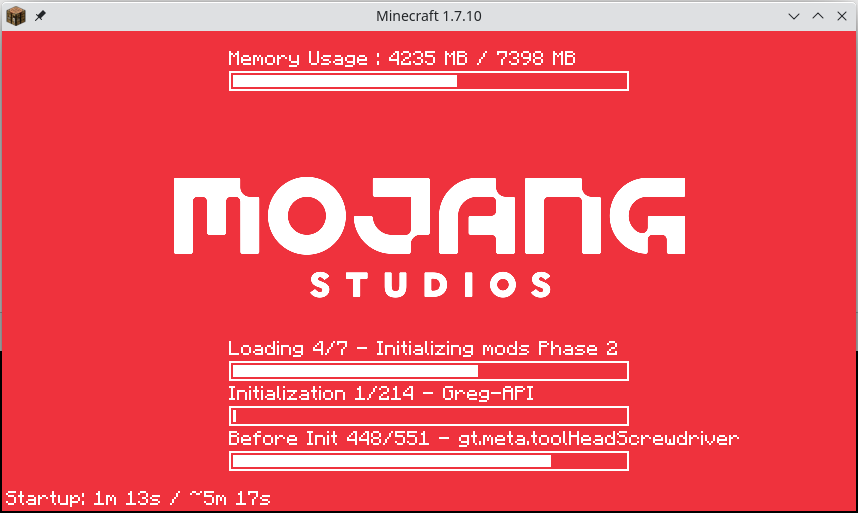
Project description from CurseForge.
Pick your setup
Modern Splash by Minecraft version and loader
Choose the version and loader you play, then open the matching release.
Minecraft version
1.7.10
1 loader buildCheck the dependencies, then try the file in a copied instance before changing a world you care about.
Recent files
Modern Splash versions and loaders
ModernSplash-1.12.2-1.5.3.jar
22 Jul 2026
Client Source doesn’t say Server Source doesn’t say Dependencies No extras listed Listed on Release listing
Check the 1.12.2 · Forge setup Forge1.12.2 release
ModernSplash-1.12.2-1.5.2.jar
10 Jul 2026
Client Source doesn’t say Server Source doesn’t say Dependencies No extras listed Listed on Release listing
Check the 1.12.2 · Forge setup Forge1.12.2 release
ModernSplash-1.12.2-1.5.1.jar
26 Jun 2026
Client Source doesn’t say Server Source doesn’t say Dependencies No extras listed Listed on Release listing
Check the 1.12.2 · Forge setup Forge1.12.2 release
ModernSplash-1.12.2-1.5.0.jar
21 Jun 2026
Client Source doesn’t say Server Source doesn’t say Dependencies No extras listed Listed on Release listing
Check the 1.12.2 · Forge setup Forge1.12.2 release
modernsplash-1.3.1.jar
17 Jun 2026
Client Source doesn’t say Server Source doesn’t say Dependencies No extras listed Listed on Release listing
Check the 1.7.10 · Forge setup Forge1.7.10 release
modernsplash-1.3.0.jar
16 Jun 2026
Client Source doesn’t say Server Source doesn’t say Dependencies No extras listed Listed on Release listing
Check the 1.7.10 · Forge setup Forge1.7.10 release
modernsplash-1.1.0.jar
12 Jun 2026
Client Source doesn’t say Server Source doesn’t say Dependencies No extras listed Listed on Release listing
Check the 1.7.10 · Forge setup Forge1.7.10 release
modernsplash-1.4.0.jar
6 May 2025
Client Source doesn’t say Server Source doesn’t say Dependencies No extras listed Listed on Release listing
Check the 1.12.2 · Forge setup Forge1.12.2 release
modernsplash-1.12.2-1.3.1.jar
22 Apr 2024
Client Source doesn’t say Server Source doesn’t say Dependencies No extras listed Listed on Release listing
Check the 1.12.2 · Forge setup Forge1.12.2 release
modernsplash-1.12.2-1.3.jar
23 Aug 2023
Client Source doesn’t say Server Source doesn’t say Dependencies 1 required · 1 unchecked Listed on Release listing
Check the 1.12.2 · Forge setup Forge1.12.2 release
modernsplash-1.12.2-1.2.2.2.jar
6 Apr 2023
Client Source doesn’t say Server Source doesn’t say Dependencies 1 required · 1 unchecked Listed on Release listing
Check the 1.12.2 · Forge setup Forge1.12.2 release
modernsplash-1.12.2-1.2.2.1.jar
26 Mar 2023
Client Source doesn’t say Server Source doesn’t say Dependencies 1 required · 1 unchecked Listed on Release listing
Check the 1.12.2 · Forge setup Forge1.12.2 release
Looking for an older file? The official CurseForge project page is in Resources.
 mod
mod CurseForge + Modrinth · Minecraft
Mind Palaces
Every player gets a small bedrock box to dream in (Pocket Dimension)
 mod
mod CurseForge + Modrinth · Minecraft
Artifacts
Adds various treasure items that can be found through exploration
 mod
mod CurseForge + Modrinth · Minecraft
Tesseract
Tesseract allows you to transport Items, Fluid and Energy