Minecraft version
Back to mods 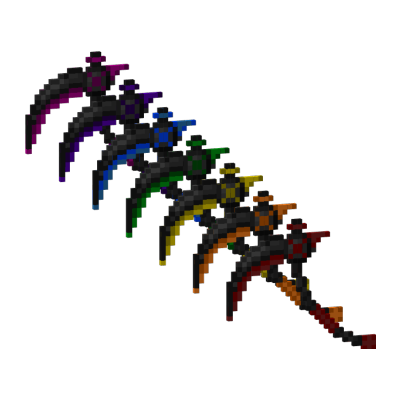
CurseForge · Minecraft mod
OP Scythes | Forge & Fabric
Just some OP scythes.
Choose a version Pick your version below, then grab the matching file.
Quick answer
Which OP Scythes | Forge & Fabric release should I use?
Latest stable file The Scythe Mod | v2.0.8 | 1.21.8 | NeoForge
Game version 1.21.8
Loader NeoForge
OP Scythes | Forge & Fabric The Scythe Mod | v2.0.8 | 1.21.8 | NeoForge targets 1.21.8 with NeoForge. The project page does not say whether this file belongs on the client, dedicated server, or both. No extra mods listed for this file.
Where it goes
Is OP Scythes | Forge & Fabric required on the client, server, or both?
The project page does not say whether this file belongs on the client, dedicated server, or both.
Client Source doesn’t say
Dedicated server Source doesn’t say
Loader for this release NeoForge
Required install it here Optional supported, not mandatory Not supported do not install here Source doesn’t say do not assume
The source does not explicitly classify this release as client-only or server-only.
What else does OP Scythes | Forge & Fabric The Scythe Mod | v2.0.8 | 1.21.8 | NeoForge need?
The Scythe Mod | v2.0.8 | 1.21.8 | NeoForge. Change the file and its required mods may change too.
This file does not list any required mods. Do not add a library just because a different file uses it.
This file does not list any required or optional mods.
Before you install it
Add OP Scythes | Forge & Fabric without breaking your instance.
Built for OP Scythes | Forge & Fabric The Scythe Mod | v2.0.8 | 1.21.8 | NeoForge. Pick another file and the loader, install side or required mods may change.
- 01
Stick to this file
Use The Scythe Mod | v2.0.8 | 1.21.8 | NeoForge. It targets 1.21.8 with NeoForge; another release may have different loader, side or dependency requirements.
- 02
Bring the mods it needs
This file does not list any required mods. Do not add a library just because a different file uses it.
- 03
Put it on the correct side
The project page does not say whether this file belongs on the client, dedicated server, or both.
- 04
Pick the file you checked
Use the “Get this file” button beside The Scythe Mod | v2.0.8 | 1.21.8 | NeoForge. It opens that exact file at the source.
About this project
What does OP Scythes | Forge & Fabric add?
FABRIC IS FINALLY HERE!!!
The Scythe Mod Currently Comes With 8 Scythes, 7 Dyes, and 2 misc. Items.
The Scythes do 24 Attack Damage and Have a .8 Attack Speed.
Dyes Are Now Here!!! Instead of Using The Old, Boring Minecraft Version, We Now Have Dyes In Jars!
Included Colors:
- Red
- Orange
- Yellow
- Green
- Blue
- Purple
- Pink
This Has Also Redone All of The Old Scythe Recipes
All Scythes Give Slowness 2 To ALL Mobs Red Scythe Gives - Strength 2 Orange Scythe Gives - Resistance 2 Yellow Scythe Gives - Water Breathing 2 Green Scythe Gives - Speed 2 Blue Scythe Gives - Jump Boost 2 Purple Scythe Gives - Night Vision 2 Pink Scythe Gives - Regeneration 2 Rainbow Scythe Give - All of The Above
GO TO "Images" TO SEE CRAFTING!
Please suggest any changes or addons you would like me to do!
Join The Discord Server:
My Other Mods:
https://curseforge.com/minecraft/mc-mods/op-scythes
https://curseforge.com/minecraft/mc-mods/cool-hats
https://curseforge.com/minecraft/mc-mods/vertical-slabs-stairs
https://curseforge.com/minecraft/mc-mods/mobie-cards
https://curseforge.com/minecraft/mc-mods/stained-wood
Project description from CurseForge.
Pick your setup
OP Scythes | Forge & Fabric by Minecraft version and loader
Choose the version and loader you play, then open the matching release.
Minecraft version
1.21.4
1 loader buildMinecraft version
1.21.1
1 loader buildMinecraft version
1.19.4
1 loader buildMinecraft version
1.19.2
2 loader buildsMinecraft version
1.18.2
1 loader buildMinecraft version
1.16.5
1 loader buildCheck the dependencies, then try the file in a copied instance before changing a world you care about.
Recent files
OP Scythes | Forge & Fabric versions and loaders
The Scythe Mod | v2.0.8 | 1.21.8 | NeoForge
op_scythes-2.0.8-neoforge-1.21.8.jar
27 Aug 2025
Client Source doesn’t say Server Source doesn’t say Dependencies No extras listed Listed on Release listing
Check the 1.21.8 · NeoForge setup 1.21.8NeoForge release
The Scythe Mod | v2.0.8 | 1.21.4 | NeoForge
op_scythes-2.0.8-neoforge-1.21.4.jar
27 Aug 2025
Client Source doesn’t say Server Source doesn’t say Dependencies No extras listed Listed on Release listing
Check the 1.21.4 · NeoForge setup 1.21.4NeoForge release
The Scythe Mod | v2.0.8 | 1.21.1 | NeoForge
op_scythes-2.0.8-neoforge-1.21.1.jar
27 Aug 2025
Client Source doesn’t say Server Source doesn’t say Dependencies No extras listed Listed on Release listing
Check the 1.21.1 · NeoForge setup NeoForge1.21.1 release
The Scythe Mod | v2.0.8 | 1.19.4 | Forge
The Scythe Mod v2.0.8-1.19.4.jar
6 Jun 2023
Client Source doesn’t say Server Source doesn’t say Dependencies No extras listed Listed on Release listing
Check the 1.19.4 · Forge setup 1.19.4Forge release
The Scythe Mod | v2.0.8 | 1.19.2 | Fabric
The Scythe Mod v2.0.8-1.19.2-Fabric.jar
27 Jan 2023
Client Source doesn’t say Server Source doesn’t say Dependencies No extras listed Listed on Release listing
Check the 1.19.2 · Fabric setup Fabric1.19.2 release
The Scythe Mod | v2.0.8 | 1.19.2 | Forge
The Scythe Mod v2.0.8-1.19.2.jar
27 Jan 2023
Client Source doesn’t say Server Source doesn’t say Dependencies No extras listed Listed on Release listing
Check the 1.19.2 · Forge setup 1.19.2Forge release
The Scythe Mod | v2.0.7 | 1.19.2 | Forge
The Scythe Mod v2.0.7-1.19.2.jar
6 Nov 2022
Client Source doesn’t say Server Source doesn’t say Dependencies No extras listed Listed on Release listing
Check the 1.19.2 · Forge setup 1.19.2Forge release
The Scythe Mod | v2.0.7 | 1.18.2 | Forge
The Scythe Mod v2.0.7-1.18.2.jar
2 Sept 2022
Client Source doesn’t say Server Source doesn’t say Dependencies No extras listed Listed on Release listing
Check the 1.18.2 · Forge setup 1.18.2Forge release
The Scythe Mod | v2.0.7 | 1.16.5 | Forge
The Scythe Mod v2.0.7-1.16.5.jar
2 Sept 2022
Client Source doesn’t say Server Source doesn’t say Dependencies No extras listed Listed on Release listing
Check the 1.16.5 · Forge setup 1.16.5Forge release
The Scythe Mod v2.0.6
The Scythe Mod v2.0.6.jar
28 Jul 2022
Client Source doesn’t say Server Source doesn’t say Dependencies No extras listed Listed on Release listing
Check the 1.18.2 · Forge setup 1.18.2Forge release
The Scythe Mod v2.0.5
The Scythe Mod v2.0.5.jar
25 Jul 2022
Client Source doesn’t say Server Source doesn’t say Dependencies No extras listed Listed on Release listing
Check the 1.18.2 · Forge setup 1.18.2Forge release
The Scythe Mod v2.0.4
The Scythe Mod v2.0.4.jar
18 Jul 2022
Client Source doesn’t say Server Source doesn’t say Dependencies No extras listed Listed on Release listing
Check the 1.18.2 · Forge setup 1.18.2Forge release
Looking for an older file? The official CurseForge project page is in Resources.
 mod
CurseForge + Modrinth · Minecraft
ShapeGen
Additional shapes for any block, including modded ones
 mod
CurseForge · Minecraft
Village Reputation & Gossip
Adds a dynamic reputation system for villagers with trade discounts, price penalties, blacklisting, iron golem aggro, and village rumors.
 mod
CurseForge · Minecraft
Phoenix Excavate
A simple and easy to use VeinMiner mod with powerful config and ingame settings.