Minecraft version
Back to mods 
CurseForge · Minecraft mod
WorldGen
WorldGen is a mod for pre-generating Minecraft worlds, with a main focus on speed.
Choose a version Pick your version below, then grab the matching file.
Quick answer
Which WorldGen release matches 1.18.2 Forge?
Best match for your filters WorldGen-forge-1.18.2-1.0.1
Game version 1.18.2
Loader Forge
WorldGen-forge-1.18.2-1.0.1 targets 1.18.2 with Forge. The project page does not say whether this file belongs on the client, dedicated server, or both. No extra mods listed for this file.
Where it goes
Is WorldGen required on the client, server, or both?
The project page does not say whether this file belongs on the client, dedicated server, or both.
Client Source doesn’t say
Dedicated server Source doesn’t say
Loader for this release Forge
Required install it here Optional supported, not mandatory Not supported do not install here Source doesn’t say do not assume
The source does not explicitly classify this release as client-only or server-only.
What else does WorldGen-forge-1.18.2-1.0.1 need?
WorldGen-forge-1.18.2-1.0.1 on 1.18.2 Forge. Every mod below is checked against that same setup.
This file does not list any required mods. Do not add a library just because a different file uses it.
This file does not list any required or optional mods.
Before you install it
Add WorldGen without breaking your instance.
Built for WorldGen-forge-1.18.2-1.0.1 on 1.18.2 Forge. Pick another file and the loader, install side or required mods may change.
- 01
Stick to this file
Use WorldGen-forge-1.18.2-1.0.1. It targets 1.18.2 with Forge; another release may have different loader, side or dependency requirements.
- 02
Bring the mods it needs
This file does not list any required mods. Do not add a library just because a different file uses it.
- 03
Put it on the correct side
The project page does not say whether this file belongs on the client, dedicated server, or both.
- 04
Pick the file you checked
Use the “Get this file” button beside WorldGen-forge-1.18.2-1.0.1. It opens that exact file at the source.
About this project
What does WorldGen add?
WorldGen
WorldGen is a mod for pre-generating Minecraft worlds, with a main focus on speed.
Installation
Just download the latest WorldGen JAR file for your exact Minecraft version. Additionally, always ensure that you are using the correct version for your modloader (Fabric/Forge). Then save the downloaded jar to the mods folder of your Minecraft instance.
Finally, if you are on Fabric you also need to download the Fabric API.
Usage
WorldGen can be used to generate more chunks for an existing World. Simply select the world you want to expand from the World Selection screen and press the "WorldGen" button as seen below:
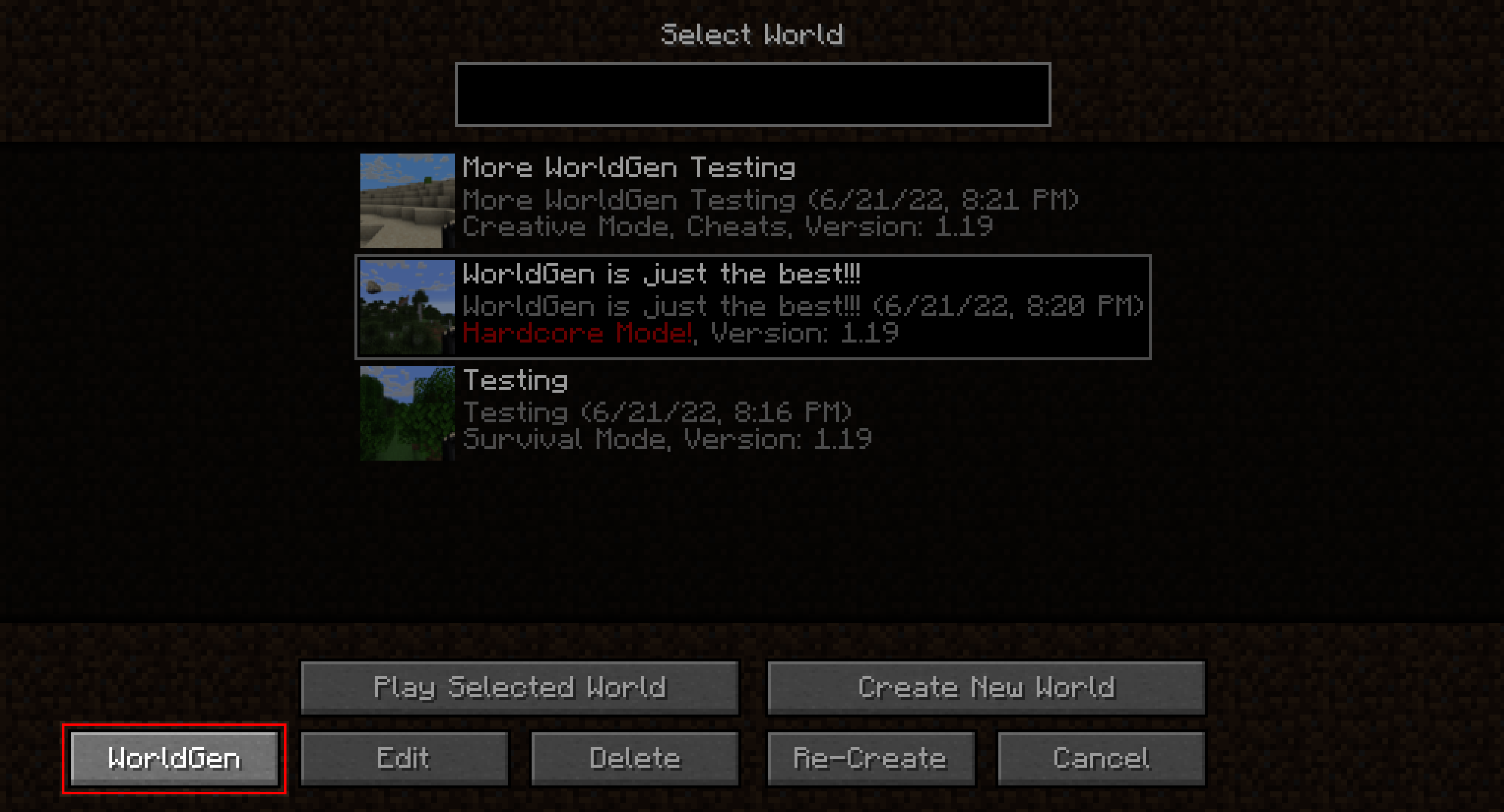
By default, existing chunks will not be overwritten and only new ones will be generated.
Also, please note that WorldGen uses chunk coordinates and not block coordinates! Since each Chunk measures 16x16 blocks from a top-down view, you can easily convert between block and chunk coordinates by multiplying / dividing by 16. You can also find the current chunk position with the F3 debug menu:
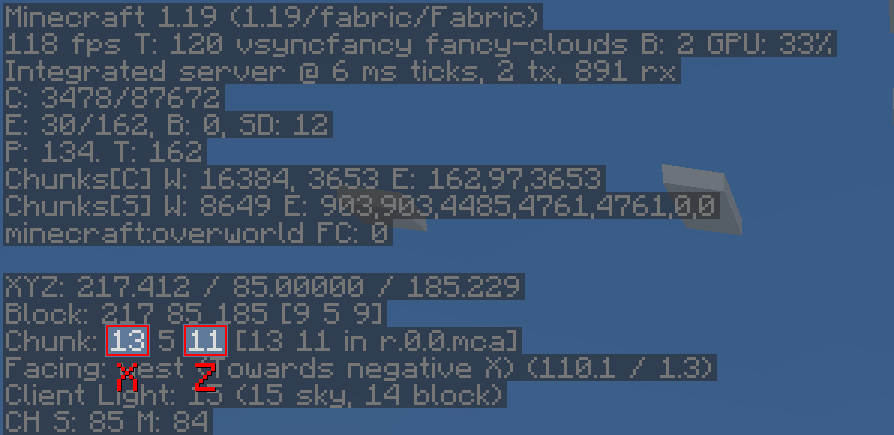
It is currently not possible to use WorldGen directly from the "Create New World" screen. Instead, you have to first create the world normally, save and quit, and then open the world with WorldGen.
Furthermore, we recommend storing your world on an SSD (at least for running WorldGen). Using a hard drive can lead to scenarios where new chunks are generated faster than previously generated chunks can be saved. This can cause out-of-memory errors, since more and more chunks will accumulate in RAM as time goes on. Additionally, the performance of the generator itself may be negatively affected.
Although we consider WorldGen to be stable, it is recommended to back up your world before using this mod. We are not responsible if you lose your world because you ran into a bug!
Recommended settings
When using WorldGen, there is no real upper limit on how many chunks can be generated. However, we do not recommend using a radius of more than 512 chunks (which would be 8192 blocks in each direction).
How it works
In contrast to other existing chunk pre-generation methods our mod does not require a full Minecraft server to be running. Instead, a lightweight internal server is used to generate the chunks efficiently.
This has the advantage of having a dedicated GUI and allows multithreading. On the downside, the world must be opened in a Minecraft client and cannot be loaded elsewhere while the chunks are being generated with WorldGen.
Supported version
This table shows the current support status for the Minecraft version.
1.20.x: Supported1.19.x: No future updates1.18.2: No future updates
Note: For both 1.19.1 and 1.19.2 Use the WorldGen 1.19.x version. However, for Minecraft 1.19.3 and above the specific WorldGen version for that specific Minecraft release is required!
FAQ
Q: The progress screen does not fit and is cut off!
A: Try reducing the GUI scale in the Minecraft video options until it fits
Q: How do I center the square / rectangle / circle around my current position?
A: Click on the square button on the right of the Center chunk selection row. This will automatically load the last position of the player.
Q: Will Minecraft versions before 1.18.2 be supported?
A: No.
Q: How do I reset chunks to their original state?
A: First of all: BACK UP YOUR WORLD! Afterwards: In the advanced WorldGen settings enable the "Please allow me to break my world!" checkbox, then enable "Override existing chunks". Also, we recommend using the "Mode: Coordinates" in the main menu to reduce the chance of resetting chunks you don't want to!
Q: How do I make a perimeter / replace all blocks in chunks with air?
A: First of all again: BACK UP YOUR WORLD! Afterwards: In the advanced WorldGen settings enable the "Please allow me to break my world!" checkbox. Then, set "Max. chunk status" to structure_starts. Next, enable "Override existing chunks". Finally, set "Fake chunk status" to full. The generation will stop early and save the chunk as a fully generated one. The "Max. chunk status" option allows stopping at different stages of generation, allowing for experimentation.
Mod incompatibilities
This mod should be compatible with most mods (including those adding new biomes and dimensions). However, mods that interfere with the Minecraft world generation process might pose a problem.
Currently known incompatible mods
- Starlight: Chunks generated with WorldGen will have no lighting
Acknowledgments
Many thanks to the following projects for supporting open source development:
- GitHub for free code hosting
- The Java profiler - JProfiler for providing a profiling tool

Project description from CurseForge.
Pick your setup
WorldGen by Minecraft version and loader
Choose the version and loader you play, then open the matching release.
Minecraft version
1.20
2 loader buildsMinecraft version
1.19.4
2 loader buildsMinecraft version
1.19.3
2 loader buildsMinecraft version
1.19.2
2 loader buildsMinecraft version
1.19.1
2 loader buildsMinecraft version
1.19
2 loader buildsMinecraft version
1.18.2
2 loader buildsCheck the dependencies, then try the file in a copied instance before changing a world you care about.
Recent files
WorldGen versions and loaders
WorldGen-forge-1.18.2-1.0.1
WorldGen-forge-1.18.2-1.0.1.jar
1 Aug 2022
Client Source doesn’t say Server Source doesn’t say Dependencies No extras listed Listed on Release listing
Check the 1.18.2 · Forge setup 1.18.2Forge release
WorldGen-forge-1.18.2-1.0.0
WorldGen-forge-1.18.2-1.0.0.jar
26 Jun 2022
Client Source doesn’t say Server Source doesn’t say Dependencies No extras listed Listed on Release listing
Check the 1.18.2 · Forge setup 1.18.2Forge release
Looking for an older file? The official CurseForge project page is in Resources.
 mod
CurseForge · Minecraft
OG'S Backpacks
Backpack mod on all versions
 mod
CurseForge + Modrinth · Minecraft
ME Requester
Keep items and fluids in your Applied Energistics 2 ME-System in stock.
 mod
CurseForge · Minecraft
GearDiff
Compare armor, weapons and tools with your equipped gear right in the tooltip: stat changes, damage per second, durability and enchantments.