Minecraft version
Back to mods 
CurseForge · Minecraft mod
Placement Utilities
Utilities and gadgets to help you place blocks and make building far less painful
Choose a version Pick your version below, then grab the matching file.
Quick answer
Which Placement Utilities release should I use?
Latest stable file [1.19-1.19.2 Forge] Placement Utilities
Game version 1.19.2, 1.19.1, 1.19
Loader Forge
Placement Utilities [1.19-1.19.2 Forge] Placement Utilities targets 1.19.2, 1.19.1, 1.19 with Forge. The project page does not say whether this file belongs on the client, dedicated server, or both. No extra mods listed for this file.
Where it goes
Is Placement Utilities required on the client, server, or both?
The project page does not say whether this file belongs on the client, dedicated server, or both.
Client Source doesn’t say
Dedicated server Source doesn’t say
Loader for this release Forge
Required install it here Optional supported, not mandatory Not supported do not install here Source doesn’t say do not assume
The source does not explicitly classify this release as client-only or server-only.
What else does Placement Utilities [1.19-1.19.2 Forge] Placement Utilities need?
[1.19-1.19.2 Forge] Placement Utilities. Change the file and its required mods may change too.
This file does not list any required mods. Do not add a library just because a different file uses it.
This file does not list any required or optional mods.
Before you install it
Add Placement Utilities without breaking your instance.
Built for Placement Utilities [1.19-1.19.2 Forge] Placement Utilities. Pick another file and the loader, install side or required mods may change.
- 01
Stick to this file
Use [1.19-1.19.2 Forge] Placement Utilities. It targets 1.19.2, 1.19.1, 1.19 with Forge; another release may have different loader, side or dependency requirements.
- 02
Bring the mods it needs
This file does not list any required mods. Do not add a library just because a different file uses it.
- 03
Put it on the correct side
The project page does not say whether this file belongs on the client, dedicated server, or both.
- 04
Pick the file you checked
Use the “Get this file” button beside [1.19-1.19.2 Forge] Placement Utilities. It opens that exact file at the source.
About this project
What does Placement Utilities add?
Are you one of the people using dirt as temporary blocks for building? Stop doing that! This mod adds instantly breakable temporary blocks as well as upgrades of them. The mod also adds a tool called Angel Wand, which lets you place many blocks in midair and rotate them to make your next build less painful.

This GIF is showing how the Angel Wand works
A list of things the mod adds (you can find these descriptions in-game while hovering over the item and pressing CTRL + SHIFT):
- Temporary Block (Default): A block that you can walk through and break instantly. It's used to place other blocks while building.
- Temporary Block (Returning): Just like a default Temporary Block, but it will go straight into your inventory after breaking.
- Temporary Block (Self Destructing): Just like a default Temporary Block, but it automatically disappears after 10 seconds (alternatively disappears on Random Tick if you configure it that way). Only used by the Temporary Wand.
- Temporary Wand: Right click to place a self-destructing Temporary Block. Unlimited uses
- Temporary Block (Angel): Just like a returning Temporary Block, but you can place it midair.
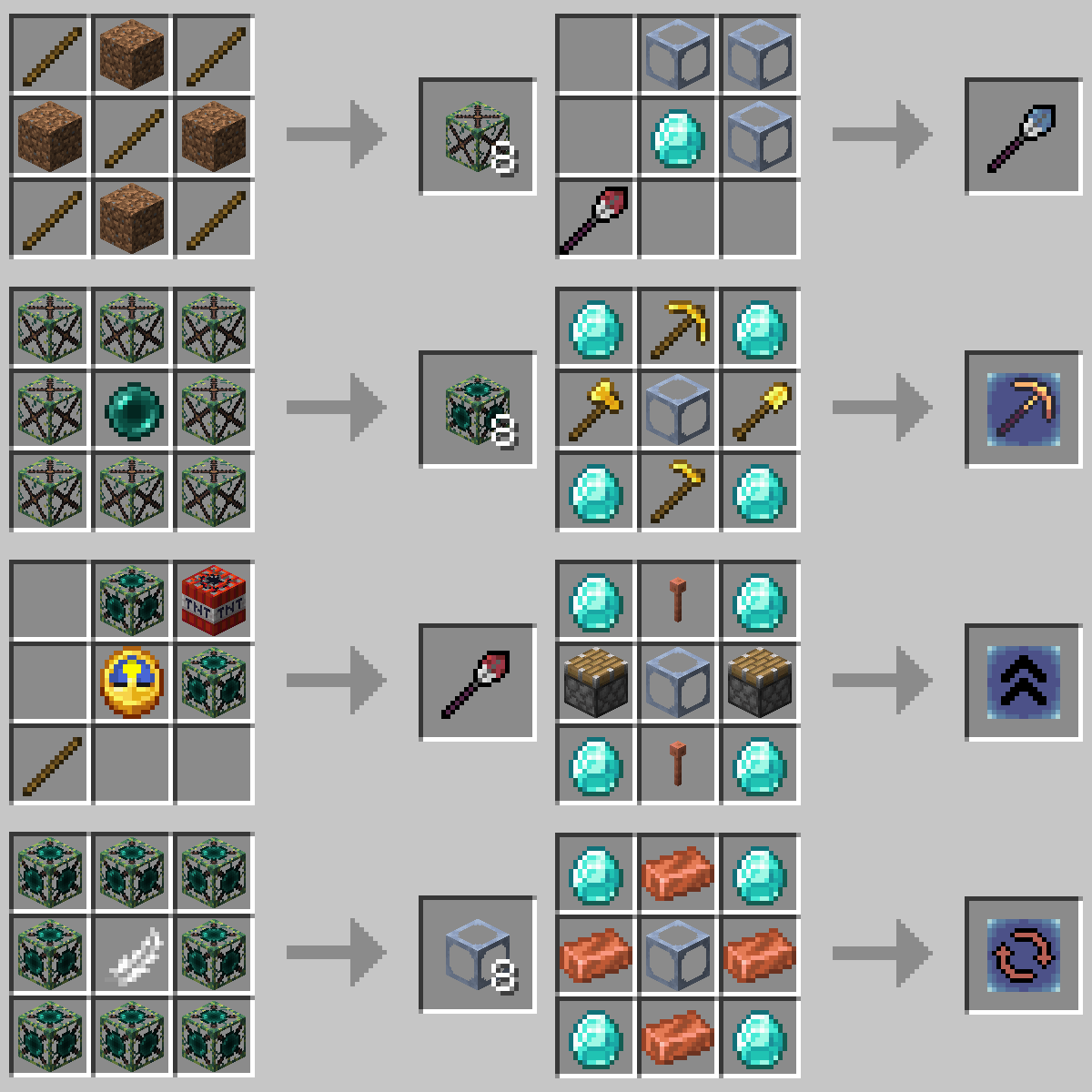
- Angel Wand: While holding in your offhand, you can place many blocks as if they were angel Temporary Blocks. The distance you place the block is changeable. Upgradeable
- Angel Add-on: Break: An add-on for the Angel Wand to remove the Mining Fatigue effect while holding an Angel Wand in your offhand.
- Angel Add-on: Range: An add-on for the Angel Wand to increase its max reach by 1 Block each (max amount is configurable).
- Angel Add-on: Rotate: An add-on for the Angel Wand to add a feature to rotate blocks you are looking at.
Recipes:
If you want your own Minecraft server to play with friends, check out Kinetic Hosting. They provide powerful servers for a fair price while being easy to use, and they have a nice support. Click on the image below for more information, and if you are interested, use code LAIDBACKSLOTH at checkout for a 15% discount.
Project description from CurseForge.
Pick your setup
Placement Utilities by Minecraft version and loader
Choose the version and loader you play, then open the matching release.
Minecraft version
1.19.1
1 loader buildMinecraft version
1.19
1 loader buildMinecraft version
1.18.2
1 loader buildCheck the dependencies, then try the file in a copied instance before changing a world you care about.
Recent files
Placement Utilities versions and loaders
[1.19-1.19.2 Forge] Placement Utilities
placementutil-1.1-1.19.jar
12 Dec 2022
Client Source doesn’t say Server Source doesn’t say Dependencies No extras listed Listed on Release listing
Check the 1.19.2 · Forge setup 1.19.2Forge1.19.11.19 release
[1.19.X-Forge] Placement Utilties
placementutil-1.0-1.19.jar
26 Jul 2022
Client Source doesn’t say Server Source doesn’t say Dependencies No extras listed Listed on Release listing
Check the 1.19.2 · Forge setup 1.19.2Forge1.19.11.19 release
[1.18.2-Forge] Placement Utilities
placementutil-1.0-1.18.2.jar
26 Jul 2022
Client Source doesn’t say Server Source doesn’t say Dependencies No extras listed Listed on Release listing
Check the 1.18.2 · Forge setup 1.18.2Forge release
Looking for an older file? The official CurseForge project page is in Resources.
 mod
mod CurseForge · Minecraft
VECTOR HUD
A cinematic, vector-drawn HUD: holographic terrain map, flight instruments, threat alerts, and thirteen switchable themes. Every instrument is geometry, not a texture.
 mod
mod CurseForge · Minecraft
Easy Mob Spawn Control
Quickly adjust spawn rate, ban bad mobs, change mob limit and more with in-game menu
 mod
mod CurseForge · Minecraft
Shulker View
Open a shulker box directly from inventory. No equipping, no placing.