Fabric API Needed by TW‘s Decorative Food 1.20.1-2.0.2
requiredMatching file found Matched file: 0.92.12+1.20.1

Modrinth · Minecraft mod
Make the food placeable.Decorate your world!
Quick answer
TW‘s Decorative Food 1.20.1-2.0.2 targets 1.20.1 with Fabric. Installation on the client is optional. Installation on the dedicated server is optional. All 1 required mods have matching files.
Where it goes
Installation on the client is optional. Installation on the dedicated server is optional.
The source marks this as usable on both the client and server.
1.20.1-2.0.2. Change the file and its required mods may change too.
Install Fabric API first. We found matching files for this game-version and loader setup.
We only count dependency files that match this setup. A file for another loader does not fill the gap.
Before you install it
Built for TW‘s Decorative Food 1.20.1-2.0.2. Pick another file and the loader, install side or required mods may change.
Use 1.20.1-2.0.2. It targets 1.20.1 with Fabric; another release may have different loader, side or dependency requirements.
Install Fabric API first. We found matching files for this game-version and loader setup.
Installation on the client is optional. Installation on the dedicated server is optional.
Use the “Get this file” button beside 1.20.1-2.0.2. It opens that exact file at the source.
About this project
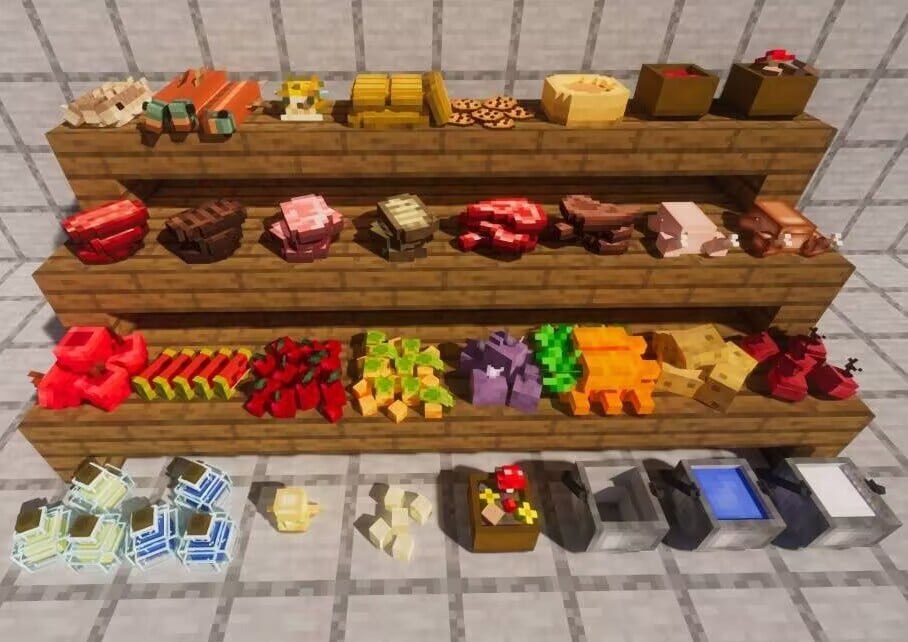
Make your food placeable. Decorate your world with edible blocks — stack your snacks, line up your stews and bottles, and turn a kitchen corner into a proper food display.
Decorative Food is a lightweight, vanilla-flavored mod that lets food items be placed in the world as 3D blocks. Drop an apple on the table, pile up some bread, or leave a bowl of stew at the counter — everything keeps the original Minecraft pixel-art look and fits right into your builds.
It adds no new game rules and doesn't disturb existing gameplay. The original food items are still real items; they're simply made placeable and stackable on top of one another.
The following vanilla items can be placed and stacked (over 45 food types in total):
Project description from Modrinth.
Pick your setup
Choose the version and loader you play, then open the matching release.
Check the dependencies, then try the file in a copied instance before changing a world you care about.
Recent files
tw-decorative-food-1.20.1-2.0.2.jar
1 Nov 2026
tw-decorative-food-1.21.1-2.0.1-forge.jar
13 Sept 2026
tw-decorative-food-1.21.1-2.0.1-neoforge.jar
13 Sept 2026
tw-decorative-food-1.20.1-2.0.1-forge.jar
12 Sept 2026
tw-decorative-food-1.21.1-2.0.1.jar
12 Sept 2026
tw-decorative-food-1.20.1-2.0.1.jar
12 Sept 2026
tw-decorative-food-1.20.1-2.0.0.jar
29 Aug 2026
tw-decorative-food-1.21.1-1.1.8.jar
20 Jun 2026
tw-decorative-food-1.21.1-1.1.8-neoforge.jar
28 May 2026
tw-decorative-food-1.21.1-1.1.7-forge.jar
20 May 2026
tw-decorative-food-1.20.1-1.1.7-forge.jar
18 May 2026
tw-decorative-food-1.21.1-1.1.7.jar
18 May 2026
Looking for an older file? The official Modrinth project page is in Resources.
 mod
A mod that makes many improvements to Minecraft and adds lots of new content
 mod
A bunch of amazing crazy bows with unique abilities!!!
 mod
A mod for Minecraft helping control input method